1
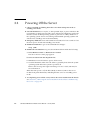
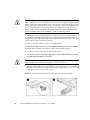
Note – When you use the Power button to enter standby power mode, power is still
directed to the SP board and power supply fans, indicated when the blue (Ready to
Remove) LED is illuminated. To completely power off the server, you must remove
the server module from the midplane.
2. Turn off any peripheral devices connected to the dongle, and disconnect the
dongle from the server.
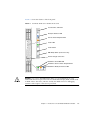
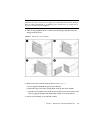
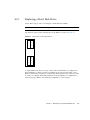
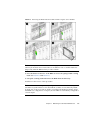
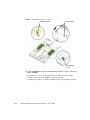
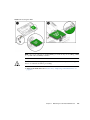
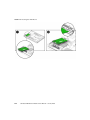
FIGURE 4-1
Removing a Server Module
3. Remove the server module from the chassis. See FIGURE 4-1.
a. Press together and hold the green ejector buttons.
b. Open the ejector levers by rotating them out from the server module.
c. Pull the server module out from the chassis by the ejector levers until you are
able to grasp the module with both hands to pull it out of the chassis.
4. Set the server module on an antistatic surface.
Chapter 4
Maintaining the Sun Blade X6240 Servers
4-3