1
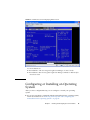
FIGURE 2-6
Redirection Screen Displaying BIOS Session
For more details see:
■
For ILOM 2.0 – The Sun Integrated Lights Out Manager 3.0 User’s Guide
■
For ILOM 3.0 –The Sun Integrated Lights Out Manager (ILOM) 3.0 Web Interface
Procedures Guide
Configuring or Installing an Operating
System
After you have configured the SP, you can configure or install your operating
system.
■
If your server module is equipped with the preinstalled Solaris operating system,
follow the instructions in “Powering On the System and Configuring the
Preinstalled Solaris Operating System” on page 26.
Chapter 2
Installing and Configuring the Server Module
25