1
EN
EN
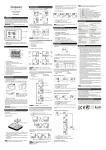
• Time setting
B
RideControl Sport/City with Full LCD Display
B
• Unit setting for distance and speed
(RideControl Only)
1. Press button (B) to change the distance/speed
unit to km and km/h or to Mi and Mi/h.
2. Press button (C): the distance/speed unit is set.
Pressing this button also gives access to the
reset mode.
1. Press button (B) for 5 seconds to enter the
time-setting mode.
C
B
Reset trip information to zero
RideControl
1. Press and hold “Mode” (button C) for 2-3
seconds to reset the values of trip distance, trip
time and average speed to zero.
2. Press button (C) to switch the time setting
mode, the digits blink in each time-setting mode,
the frequency of switching time-setting mode is
following:
Minute-setting Hour-setting Date-setting
Month-setting Back to Minutes-setting.
3. Press button (D1) to add the time value and/or
press button (D2) to lower the value.
4. Press button (B) for 5 seconds to complete the
time setting.
5. If button (B) is not pressed for 5 seconds, the
new setting will be saved automatically.
D1
C
D2
D1
D2
C
C
RideControl Sport/City with Full LCD Display
1. Press and hold button (D1) for 5 seconds to
reset the values of trip distance, trip time and
average to zero.
Reset total ODO for RideControl Sport/City with
Full LCD Display
1. Press and hold button (D2) for 5 seconds to
reset the values of total ODO to zero.*
The maximum of ODO distance show
9999km, operate this function when the
ODO distance is reached 9999km.
24
25
D1
D1
D2
D2