1
5 Operation
To operate the PROwatt 1500, turn it on using the ON/OFF switch on the front panel. The PROwatt 1500 is now
ready to deliver AC power to your loads. If you are operating several loads from the PROwatt 1500, turn them on
separately after the PROwatt has been turned on. This will ensure that the PROwatt does not have to deliver the
starting currents for all the loads at once.
5.1 Outlets, Controls and Indicators
AC Outlet
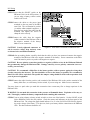
The AC outlet on the PROwatt 1500 is a Ground Fault Circuit Interrupter (GFCI) outlet. This device will protect
you against hazardous electrical shock that could be caused by dampness, faulty mechanism, worn insulation, etc.
You may still feel a shock, but the GFCI should cut it off quickly enough so a person in normal health should not
have serious injury (infants and small children may still be affected).
Test Procedures:
Like any other safety device, the GFCI should periodically be checked to make sure it is operating properly. Just
follow the simple instructions below:
1. Push TEST button and RESET button should pop out. This should result in power being OFF. Verify by
plugging test lamp into the outlet. CAUTION! If TEST lamp remains lit when the RESET button pops out,
or if RESET button does not pop out at all when test button is depressed, the inverter should be returned to
your place of purchase for service.
2. If the GFCI tests okay, restore power by pushing the RESET button back in firmly and fully into place until it
locks and remains depressed after pressure has been removed. If the GFCI fails to reset properly, do not use it
- the inverter should be returned to your place of purchase for service. Test lamp should light again.
3. If the GFCI trips by itself at any time, reset it and perform test procedures 1 and 2.
WARNING! There are no user serviceable parts inside of the PROwatt 1500, and the GFCI tripping does NOT
mean that there is no risk of personal injury if one attempts to service the inverter or perform AC wiring. Refer
all servicing to qualified personnel.
ON/OFF Switch The ON/OFF switch turns the control circuit in the PROwatt 1500 on and off. It does not disconnect power from the PROwatt.
When the switch is in the OFF position, the PROwatt 1500 draws no current from the battery. When the switch is
in the ON position but no power is being supplied to the load, the PROwatt 1500 (12 and 24 volt) draws less than
500 milliamperes from the battery. This is a low current draw. It would take more than a week to discharge a
100 ampere-hour battery at this current, so you don't have to worry about excessive drain on your battery if you
leave the PROwatt 1500 switched on for a few days. Do switch the PROwatt off if you are not planning to recharge your battery within a week or so.
Remote Panel The PROwatt also has a jack located on the bottom of the unit which interfaces with the optional
remote panel. The remote panel allows you to mount your PROwatt out of sight and turn your PROwatt ON/OFF
from a conveniently located panel. The remote panel has a button and indicator light showing the inverter is ON
or OFF (see section 4.5 for installation and operating instructions).
18