1
http://cxema.ru
– 25 –
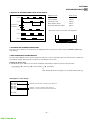
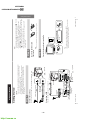
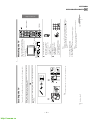
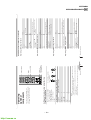
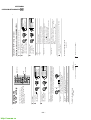
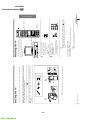
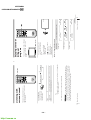
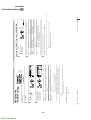
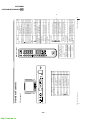
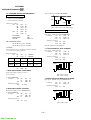
select the TV system.
Press V or v to select either “B/G”, “I”, “D/K” or “M”, then
press ENTER.
AU TO PROGRA M
PR : 0 1
T V S Y S : AU TO
VH F L OW
“TV SYS”
b
b
preset channels automatically.
ENTER
ENTER
CH PRE S E T
AU TO PROGRAM
MANUA L PROGRAM
TV SYS : B / G
V/ b/v/B/ENTER
MENU
preset channels manually. See Presetting channels
manually on page 38.
b
b
RESET
MENU
“AUTO PROGRAM”
To
ENTER
ENTER
ENTER
PIP PROGR
PIP PROGR
SOUND
MODE SURROUND
FAVORITE
PIC MODE
9
JUMP
8
0
7
6
5
4
3
2
1
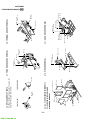
“MANUAL PROGRAM”
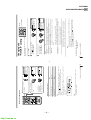
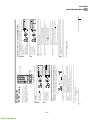
Select
Press V or v to select
the desired item (e.g.,
“AUTO PROGRAM”),
then press ENTER.
Press V or v to select the
“CH PRESET” icon (
),
then press ENTER.
Adjusting Your Setup (MENU)
continued
Tip
• For details on the menu system and how to use the menu, refer to
Introducing the menu system on page 27.
Press MENU.
To return to the normal screen
3
1
2
Press MENU.
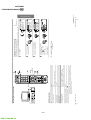
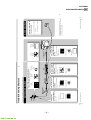
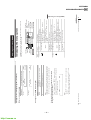
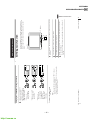
The “CH PRESET” menu allows you to
adjust the setup of your TV. For
example, you can manually tune in a
channel with a weak signal that fails to
be tuned in by automatic presetting.
Changing the
Channel Preset
(“CH PRESET”)
setting
37
38
ENTER
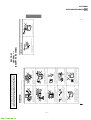
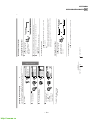
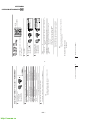
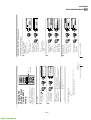
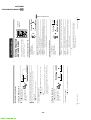
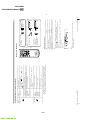
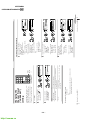
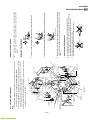
(2) Press V or v until
the sound becomes
normal, then
press ENTER.
(1) Press V or v to
select “TV SYS”,
then press ENTER.
If the sound of the
desired channel is
abnormal, select the
appropriate TV system.
(2) Press V or v until the
desired channel’s
broadcast appears
on the TV screen,
then press ENTER.
(1) Press V or v to select
either “VHF LOW”,
“VHF HIGH”,
or “UHF”, then
press ENTER.
Select the desired channel.
ENTER
ENTER
ENTER
ENTER
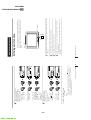
Tip
• You can also select the
program number with the
PROGR +/– or number
buttons.
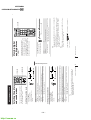
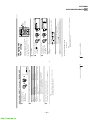
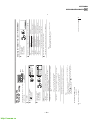
(2) Press V or v until the
program number you
want to preset (e.g.,
program number
“10”) appears on the
menu, then press ENTER.
After selecting “MANUAL
PROGRAM”, select the
program number to
which you want to preset
a channel.
(1) Make sure “PR” is selected,
then press ENTER.
Adjusting Your Setup (MENU)
3
2
1
b
b
b
b
b
Presetting channels manually
ENTER
ENTER
ENTER
ENTER
ENTER
ENTER
b
b
b
b
b
b
Changing the “CH PRESET” setting (continued)
MANUA L PROGRAM
PR : 1 0
TV SYS : I
S ENS : H I GH
VH F L OW
F I NE : AU TO
MANUA L PROGRAM
PR : 1 0
B/G
TV SYS :
I
S ENS : H I G D / K
VH F L OW
M
F I NE : AU TO
MANUA L PROGRAM
PR : 1 0
TV SYS : B / G
S ENS : H I GH
VH F L OW
F I NE : AU TO
MANUA L PROGRAM
PR : 1 0
TV SYS : B / G
S ENS : H I GH
VH F L OW
F I NE : AU TO
MANUA L PROGRAM
PR : 1 0
TV SYS : B / G
S ENS : H I GH
VH F L OW
F I NE : AU TO
MANUA L PROGRAM
PR : 0 6
TV SYS : B / G
S ENS : H I GH
VH F L OW
F I NE : AU TO
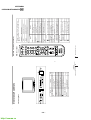
KV-EX29M63
KV-EX34M39/EX34M69/EX34M87
RM-964
RM-963