1
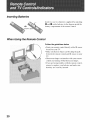
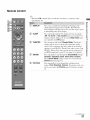
Remote Control
• The 5 and CH + buttons
operating the TV.
[]
[]
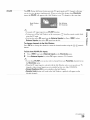
DISPLAY
SLEEP
have a tactile dot. Use theln as a reference
when
Press once to display the inforlnation
pertaining
to the
channel and/or program when available. The OSD (On
O
_"
Screen Display) will tilne out in a few seconds
to immediately
turn off the display.
o_
:_
Press repeatedly
until the TV displays
or press again
the time in minutes
(Off, 15, 30, 60 or 120 minutes)
that yon want the TV to
remain on before shutting off. To cancel Sleep Timer, press
_" repeatedly
[]
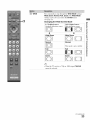
THEATER
until Off appears.
Press to turn on and off the Theater Mode. The picture
settings will be set t_r a cinema-like
experience
and the
audio will be switched to the audio output of the attached
;
speakers of your BRAVIA Theatre Sync audio system. Your
BRAVIA Theatre Sync audio system must be connected
by
an HDMI connection
to your TV (see page 14 for details).
[]
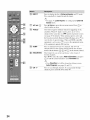
SOUND
[]
PICTURE
Press repeatedly
to step through the Sound Mode settings: ....
Dynamic,
Standard,
Game, Clear Voice, Custom.
These Sound Mode settings can be also accessed in the
Sound
menu
Press repeatedly
(see page 31).
to cycle through
the available
o..
"'1
picture
lnodes: Vivid, Standard,
Cinema.
The picture lnodes can
also be accessed in the Picture
menu. For details, see page
30.
(Continued)
21
o..
_"