1
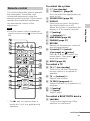
Sound may be interrupted because of a Pairing manually If you intend to pair the system with 2 or more BLUETOOTH devices, manual pairing is necessary. 1 2 3 Place the BLUETOOTH device to be connected to this system within 1 meter of the system. Press PAIRING on the remote control, or press the (BLUETOOTH) key on the Sound Bar for more than 2 seconds. The pairing standby status of the system is canceled after about 1 minute. If pairing is not successful, redo the procedure from step 1. If you wish to pair with several BLUETOOTH devices, perform the procedure from steps 1 to 3 individually for each BLUETOOTH device. If no pairing information is stored in the system, the system automatically enters pairing mode when “BT AU” is selected as input. In this case, pairing mode is not released automatically. Listening to music with the BLUETOOTH connection You can listen to a music that supports SCMS-T content protection. Before starting music playback, check the following: The BLUETOOTH function on the BLUETOOTH device is on. The pairing procedure is completed on both this system and the BLUETOOTH device. 1 2 3 Perform steps 3 to 6 in “Pairing automatically” (page 20). Notes “Passkey” may be called “Passcode,” “PIN code,” “PIN number” or “Password,” etc., depending on the device. 4 Press +/ to select “BT AU.” Start the BLUETOOTH connection from the BLUETOOTH device. The (BLUETOOTH) indicator lights up in blue when the BLUETOOTH connection is established. Start playback on the BLUETOOTH device. For details on operation, see “To control a BLUETOOTH device” (page 11). Adjust the volume. Set the volume of the BLUETOOTH device to a moderate level and press +/. continued 21GB BLUETOOTH Function problem with the BLUETOOTH device. Once a pairing operation is performed, it does not have to be performed again. However, you must repeat pairing in the cases listed below. Pairing information is deleted by repairing the system. Pairing for 9 or more devices is to be set. This system can set pairing with up to 8 devices. If pairing is to be set on a device after pairing has been set on 8 devices, the pairing information on a device whose connection date is the oldest is overwritten with new information. The connection history with this system is deleted on the connected device. The system is reset to default.