1
2402 Digital Telephone Quick Reference
2
1
3
14
4
5
13
6
CONFERENCE
7
8
12
9
11
10
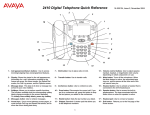
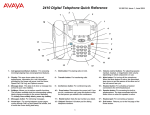
1 – Call appearance buttons: For accessing
incoming/outgoing lines.
6 – Transfer button: For transferring calls.
11 – Volume control buttons: For adjusting speaker,
handset, or ringer/button click volume depending
on which component is in use.
2 – Display: This area shows status for the call
appearances, the caller ID information for a call, the
current date and time, and information provided by the
Avaya call processing system.
7 – Conference button: For conferencing calls.
12 – Mute button: For turning off the handset
microphone. When the Mute feature is active, the
associated lamp turns on and the person at the
other end of the call cannot hear you.
3 – Message lamp: This lamp is lit when a message has
arrived in your voice mailbox. By default, this lamp
flashes to alert you to incoming calls. You can retrieve
messages using the
button.
8 – Drop button: Disconnects the current call. If you
are on a conference call, press this button to drop
the last person you added to the conference.
13 – Feature button: For using features that your
system manager has administered on your 2402
telephone.
4 – Messages button: For retrieving messages.
9 – Redial button: Dials the last number you dialed.
14 – Speaker button: For accessing the built-in oneway speaker. The lamp associated with this
button turns on when the speaker is active.
5 – Hold button: For placing calls on hold.
10 – Dialpad: Standard 12-button pad for dialing
telephone numbers.