1
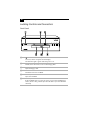
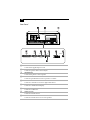
Locating Controls and Connectors
FD
CD
9
HD
7
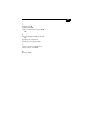
FD (Floppy disk drive) access indicator light
Lights in green while reading/writing data from/to the floppy disk.
8
CD (CD-ROM drive) access indicator light
Lights in amber while reading data from the CD-ROM.
9
HD (Hard disk drive) access indicator light
Lights in green while reading/writing data from/to the hard disk.
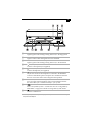
0
MIC (Microphone) connector*
Connects a microphone (not supplied).
qa
PHONES (Headphones) connector*
Connects headphones (not supplied).
qs
VOLUME control
Adjusts the volume of the headphones connected to the PHONES
connector. VAIO Slimtop LCD Computer users should note that this
does not control the volume of the integrated LCD speakers.
qd
PC CARD slot (with Zoomed Video support)
A PC Card (also called a PCMCIA card) can be installed in this slot.
PC cards enable you to add functionality to your system.
qf
MEMORY STICK media slot
Insert a Sony Memory Stick™ card into this slot. See “Using Memory
Stick Media” on page 23 for details on using Memory Stick media.
qg
USB (Universal Serial Bus) connector
Connects a USB device.
* See “Using a Headphone or Microphone” on page 11 for important information about connecting a
microphone and headphone.