1
Appendix A: Error messages description
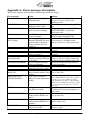
This section contains all the possible error messages shown by Smarty:
Error message
CAN ERROR #
CCD ERROR #
COMM. TIME OUT
ECM Changed
Empty Memory,
Please Update
INTERNAL ERROR #
Memory Error
Memory Written
Wrong Data File
PROGRAM ABORTED
S/N Verify Error
SW Version doesn’t
Match S/N
MISS <xyz> / PLS
CONTACT MADS
Cause
A problem in the CAN Bus
communication
Solution
Check connection cable or contact
Smarty Performance King if the
problem persists
The communication with
Check connection cable or check ABS
ABS unit doesn’t work
unit
The ECM of the vehicle
Turn the ignition key on (DO NOT
doesn’t answer to Smarty
START ENGINE) or Check the
connection cable
The ECM unit of the vehicle Restore the original ECM back to
has been changed
STOCK before changing ECM
The last Update operation
Repeat the Update operation.
(through USB port) has been The data files are available on the
unsuccessfully completed.
Smarty Performance King internet site.
Smarty memory has been
corrupted.
Smarty internal malfunction Call Smarty Performance King
assistance
Call Smarty Performance King
A malfunction in the
Smarty’s memory
assistance
The update file transmitted
Download again the update file from
to Smarty through USB port Smarty Performance King internet site
is corrupted
and update Smarty with the correct file
The ECM update function
Restore the ECM to STOCK with the
has been interrupted
recovery procedure.
The serial number of your
Check connection cable
vehicle has not been verified
The ECM software version
Please contact Smarty Performance
doesn’t match with the serial King or the seller.
number
Please inform Smarty Performance King about
Your vehicle contains a
software version unknown to the new ECM calibration. In order to program
the truck press “>” key. Smarty shows this
Smarty
string “LOAD <xyz> / Press >”. Programming
will start if you confirm the request by pressing
“>” key. To return back just press “<” key at
any request.
VIN# Locked
Smarty has been connected
to a different vehicle
WRONG CAN BUS
The connection between
Smarty and the ECM is not
correct
The communication between
Smarty and the ECM unit is
disturbed
The serial number of your
vehicle is not valid
WRONG COMMUNIC.
WRONG VIN#
Page 15 of 16
Restore the original vehicle back to
STOCK before connecting Smarty to a
new vehicle
Please contact Smarty Performance
King or the seller.
Check the connection cable or the
battery charge level
Wait 30 seconds with the ignition key
on and try again