1
9. ABS Update
Tire height update
Once Smarty is VIN# Locked (i.e. a CaTCHER software has been loaded in the ECM) the
speedometer of the vehicle can be adjusted according to the tire height.
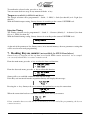
From the main menu, shown below, press the
key.
To change the tire height, choose the ABS update function:
Press the key, in the second menu as shown below:
Smarty will try to establish the communication with the ABS.
If the ignition key was not turned to the “RUN” position Smarty will display this message:
Press the
key, then Smarty will prompt you to turn on the ignition key to retry the connection:
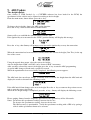
When the connection has been established, Smarty shows the current tire height (Curr Tire:) in the top
line of the screen:
Using the up and down arrow, select the correct tire height.
Any tire height from 25.00” to 45.00” can be chosen in 0.05” increments.
After you have selected the correct tire height, press the key to start the ABS programming.
A typical ABS change will take only a couple of seconds.
When the operation has been successfully completed, the following screen appears:
The ABS unit does not always change, so Smarty will re-read the tire height from the ABS unit and
display the results as shown in the following screen:
If the ABS unit did not change to the new tire height, Press the
key to return to the previous screen,
and re-enter the correct tire height.
When the tire height change is completed, press the
key. Smarty will display the following screen:
Please, unplug Smarty from the diagnostic port and turn the ignition key off for 30 seconds.
Notes: To increase the speedometer reading, increase the tire size.
To decrease the speedometer reading, decrease the tire size.
The ABS accuracy is questionable. Verify the speedometer reading with a GPS or by pacing a
vehicle with a speedometer know to be accurate.
Page 13 of 16