1
most suitable values.
However, if the image is not perfectly centralised it may prove
useful to request the system to repeat the input signal analysis
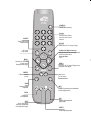
and image positioning, calling the automatic control procedure from the AUTO button on the remote control or keypad. When
this procedure is called it is helpful to have a white or light
coloured background on the screen in the current picture.
FREQUENCY/PHASE
These adjustments, available for progressive signals and for
signals from PC, ensure correspondence between the number
of pixels making up the signal and the number of pixels making
up the projected image.
These parameters do not normally require adjustment because
the system checks the input signal and automatically sets the
most suitable values.
However, if the image appears disturbed (loss of position within
the equidistant vertical bands or instability and lack of
sharpness on the narrow vertical lines) it may help to prompt
the system to repeat the input signal analysis and determination
of the best parameters by calling the automatic adjustment
procedure with the AUTO key on the remote control or on the
keypad.
If the automatic procedure fails to have the required effect, enter
the frequency and phase values manually and approach the
screen sufficiently to observe the effects of the adjustments.
Y / C DELAY
In the case of Video and S-Video signals, it may be necessary
to correct horizontal colour misalignment within the projected
image. For a given video standard (e.g. PAL or NTSC) the stored
value does not normally require further fine-tuning, unless the
source or connection cable has changed.
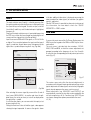
MAGNIFICATION
Use this adjustment to magnify the projected image (please
note the higher the magnification the poorer the quality of the
image).
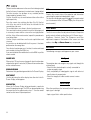
Adjust the level of enlargement using the , keys (the
magnifying lens icon
will appear at the centre of the image).
Pan (zoom button on the remote control) to choose
Select
the area of image to enlarge, using all four arrow keys.
Via remote control, it is possible to alternate between modes,
by pressing the key.
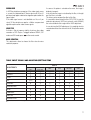
TABLE 2 INPUT SIGNALS AND ADJUSTABLE/SETTING ITEMS
INPUTS
ADJUSTEMENTS
Video
S-Video
RGBS 15kHz
YCrCb 15kHz
RGBS
YCrCb
Graphic RGB
HDMI™
-
POSITION
ASPECT
FREQUENCY
-
-
-
PHASE
-
-
-
COLOR TEMPERATURE
GAMMA CORRECTION
OVERSCAN
-
Y/C DELAY
-
-
-
MAGNIFICATION
Adjustable/can be set
- Not adjustable/can not be set
19