1
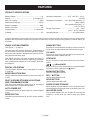
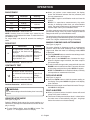
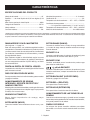
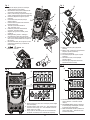
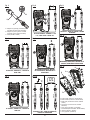
FEATURES PRODUCT SPECIFICATIONS Battery Voltage.................................................................4V Operating Temperature................. 32°F - 94°F (0°C ~ 35°C), Display........................................................ 3 3/4-digit LCD . Max. LCD reading .......................................................3999 Temperature Coefficient........0.2 x (specified accuracy) / °F (<64°F or 82°F) Measurement category............................................. CAT III <75%RH 0.2 x (specified accuracy) / °C (<18°C or 28°C) Maximum Voltage.........................................................600V Maximum Current.......................................................... 10A Sampling Rate............................................... 2~3 times/sec IP Rating......................................................................... 54* Storage Temperature........................................ 14°F - 140°F . (-10°C ~ 60°C), <85%RH Operating Altitude.................................... 0 to 2000 meters *IP Rating: Specifies the environmental protection the product enclosure provides. An IP Rating of 54 denotes protection against harmful deposits of dust and protection against water sprayed from all directions. The water resistance rating applies only when the battery cap is installed. KNOW YOUR MULTIMETER RANGE BUTTON See Figures 1 - 3, page 14. The safe use of this product requires an understanding of the information on the product and in this operator’s manual. Before use of this product, familiarize yourself with all operating features and safety rules. Switches the meter between autorange mode and manual range mode, and also selects the desired manual range. 10A JACK This digital multimeter has been designed according to IEC-61010 concerning electronic measuring instrument with a measurement category III ( CAT III 600V ) and Pollution degree 2. COM JACK DIGITAL LCD DISPLAY Plug-in connector for the red test lead for all measurements except the current measurements 400mA. The LCD display features easy to read digits for a variety of functions. MODE SELECTION DIAL Plug-in connector for the red test lead for the current measurements between 400mA and 10A. Plug-in connector for the black test lead for all measurements. μA/mA JACK BACKLIGHT BUTTON Turns the backlight on and off. Used to select the desired function and turn the meter ON or OFF. REL BUTTON BUILT IN PROBE STORAGE, KICK STAND, AND CONVENIENCE HOOK HOLD BUTTON Used to enter Data Hold mode. Keep the probes untangled, easily prop it up, and hang it almost anywhere for one-handed operation AUTO POWER OFF The automatic power-off feature helps to conserve battery power. MODE BUTTON Used to enter Relative mode. Switches the meter between DC and AC current measurements. PROBE COVER STORAGE When the black and red leads are in use, the probe covers can be placed in the storage areas on the back of the unit. ALLIGATOR CLIPS Two covered alligator clips are included for securing the probes to a circuit when you need to keep your hands free. 7 – English