1
RUGGEDCOM M2200
Chapter 2
Installation Guide
Installing Device
NOTE
The screw-type terminal block is installed using Philips screws and compression plates, allowing either
bare wire connections or crimped terminal lugs. Use #6 size ring lugs for secure, reliable screws, which
must be removed to make connections.
1.
Remove the terminal block cover.
2.
If a screw-type terminal block is installed, remove the screws from the appropriate terminals. Use these
screws along with #6 ring lugs to secure the wires to the terminal block.
3.
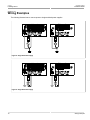
Connect the positive wire from the power source to the positive/live (+/L) terminal on the terminal block. For
more information, refer to Section 2.2.3, “Wiring Examples”.
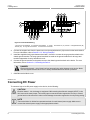
6
4
7
5
6
4
5
1
2
3
4
5
6
4
7
5
3
6
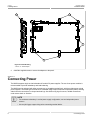
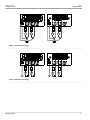
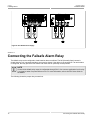
Figure 4: Terminal Block Wiring
1. Screw-Type Terminal Block 2. Pluggable Terminal Block 3. Jumper
Terminal (-/N) 6. Surge Ground Terminal 7. Chassis Ground Terminal
4. Positive/Live (+/L) Terminal
5. Negative/Neutral (-/N)
4.
Connect the negative wire from the power source to the negative/neutral (-/N) terminal on the terminal block.
For more information, refer to Section 2.2.3, “Wiring Examples”.
5.
Install the supplied metal jumper between terminals 2, 4 and 6 to connect the surge ground terminals to the
chassis ground terminal. The surge ground terminals are used as the ground conductor for all surge and
transient suppression circuitry internal to the unit.
6.
Connect the ground terminal on the power source to the chassis ground terminal on the device. For more
information, refer to Section 2.4, “Grounding the Device”
DANGER!
Electrocution hazard – risk of death, serious personal injury and/or damage to the device. Make
sure the supplied terminal block cover is always installed before the device is powered.
7.
Install the terminal block cover.
Connecting DC Power
9