1
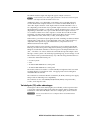
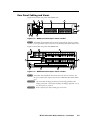
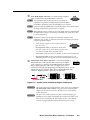
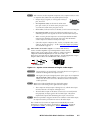
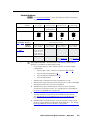
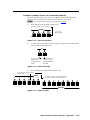
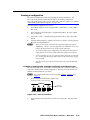
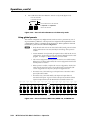
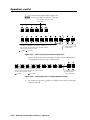
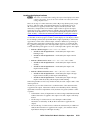
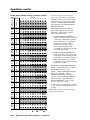
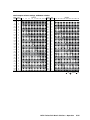
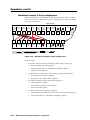
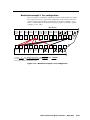
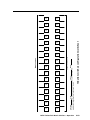
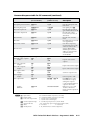
Control buttons N See “Front Panel Operations”, later in this chapter for detailed descriptions of the following operations. Primary functions Action: Indication: Save changes Select Preset mode Select View mode Cancel/escape Blink: save needed Blink: Save preset Lit: Recall preset View mode selected Flashes once ENTER PRESET VIEW ESC Select 9600 baud. Blink: selected Select 19200 baud. Blink: selected Secondary functions Front panel locks Action: Audio Action: d Select Configuration mode Select 38400 baud. Blink: selected Select 115200 baud. Blink: selected In Audio mode, decrease input level or output volume. In Audio mode, increase input level or output volume. With Video and Audio, select Lock mode 2 and/or toggle between mode 0 and mode 2. Enter button and LED — The Enter button and LED have three primary functions (•) and three secondary functions (❏): • Saves changes that you make on the front panel. To create a simple configuration: Specify video, audio, or both (see I/O buttons [h] and [i]). Press the desired input button (a). Press the desired output button(s) (b). Press the Enter button. • Indicates that a potential tie has been created but not saved. • Indicates that a global preset has been selected to be saved or recalled but that the preset action has not been accomplished. ❏ With the Preset, View, and Esc buttons, selects Serial Port and Audio/ RS-232 Input Configuration mode. See “Selecting the rear panel Remote port protocol and baud rate” on page 3-42. ❏ Selects 9600 baud for the rear panel Remote port in Serial Port and Audio/RS-232 Input Configuration mode and indicates the selection. See “Selecting the rear panel Remote port protocol and baud rate” on page 3-42. ❏ With the Video and Audio buttons, selects front panel security lockout mode 2 or toggles between mode 0 (unlocked) and mode 2. See “Setting the front panel locks (Executive modes)” on page 3-40. MTPX Twisted Pair Matrix Switchers • Operation 3-5 PRELIMINARY Port and input Action 1: configuration Action 2/ indication: