1
Operation, cont’d
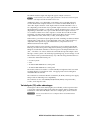
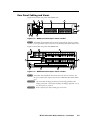
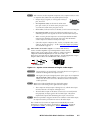
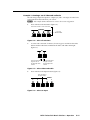
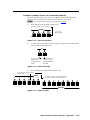
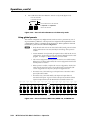
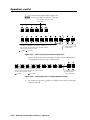
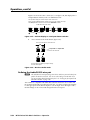
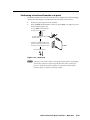
Press and release the View button to exit View-only mode (figure 3-32).
6.
Press the View button
to exit View-only mode.
CONTROL
The View LED returns to the unlit state.
All input LEDs and output LEDs
return to the unlit state.
PRESET VIEW
Figure 3-32 — Press the View button to exit View-only mode
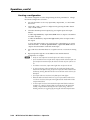
Using global presets
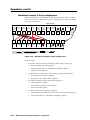
The current configuration (configuration 0) can be saved as a preset in any one of
32 preset memory addresses. All 32 presets are assigned to the input buttons and
output buttons and are available from the front panel. When a preset is retrieved
from memory, it becomes the current configuration.
PRELIMINARY
N • Only the audio and video ties are stored and recalled; audio gain and volume
settings and mutes are not saved, and they do not change when a preset is
recalled.
• Presets cannot be viewed from the front panel unless recalled as the current
configuration. Presets can be viewed using Extron’s Windows-based control
program. See chapter 5, “Matrix Software”, for more details.
• The current configuration and all presets are stored in non-volatile memory. When power is removed and restored, the current configuration is still active
and all presets are retained.
• When a preset is recalled, it replaces the current configuration, which is lost
unless it is also stored as a preset. The recalled preset overwrites all of the
current configuration ties in favor of the preset configuration ties.
• On matrix sizes of 1632 and larger, each input button is associated with a
preset of the same number.
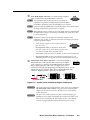
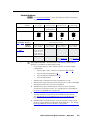
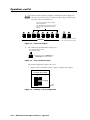
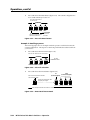
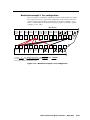
• On matrix sizes of 1616 and smaller, each input and output button is
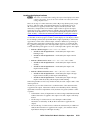
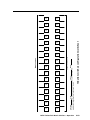
associated with a preset. Figure 3-33 shows the presets associated with the
input and output buttons for the MTPX 1616 and smaller matrix sizes.
Preset
1
1
Preset
2
2
Preset
3
3
Preset
4
4
Preset
5
5
Preset
6
6
Preset
7
7
Preset
8
Preset
9
INPUTS
9
8
1
2
3
4
5
6
7
8
Preset
17
Preset
18
Preset
19
Preset
20
Preset
21
Preset
22
Preset
23
Preset
24
9
OUTPUTS
Preset
25
Preset
10
Preset
11
Preset
12
Preset
13
Preset
14
Preset
15
Preset
16
10
11
12
13
14
15
16
10
11
12
13
14
15
16
Preset
26
Preset
27
Preset
28
Preset
29
Preset
30
Preset
31
Preset
32
Figure 3-33 — Preset locations, MTPX 1616, MTPX 168, and MTPX 816
3-22
MTPX Twisted Pair Matrix Switchers • Operation