1
DVMS 1600/800 Duplex Getting Started Guide
Stop recording alarm - - - - - - - - - - - - - - - - - - 16
Contents
Introduction - - - - - - - - - - - - - - - - - - 1
Features - - - - - - - - - - - - - - - - - - - - - - - - 1
Installation
- - - - - - - - - - - - - - - - - -2
Before you begin - - - - - - - - Initial installation mandatory steps
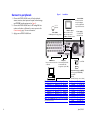
Connect to peripherals - - - - - Connect remotely - - - - - - - -
Programming
-
-
-
-
-
-
-
-
-
-
-
2
3
4
5
- - - - - - - - - - - - - - - - -5
Enter Program mode - - - - - - - - - - - - - - - - - Exit Program mode - - - - - - - - - - - - - - - - - User permissions - - - - - - - - - - - - - - - - - - - Change user passwords - - - - - - - - - - - - - - - - -
5
6
6
6
Change user names and permission levels - - - - - - - - - 6
Clock setup - - - - - - - - - - - - - - - - - - - - - - - 7
Global system parameters - - - - - - - - - - - - - - - 8
Global user preferences - - - - - - - - - - - - - - - - - 8
Sequence dwell times for monitor outputs - - - - - - - - 8
Video text display - - - - - - - - - - - - - - - - - - - - 9
Transaction text ports
- - - - - - - - - - - - - - - - - 9
Pre-event recording - - - - - - - - - - - - - - - - - - -16
Reports - - - - - - - - - - - - - - - - - - - - - - - - -17
Create a report - - - - - - - - - - - - - - - - - - - - 17
Reset to factory defaults
- - - - - - - - - - - - - - - -17
Operation - - - - - - - - - - - - - - - - - - 18
Start or stop recording - - - - - - Live monitoring - - - - - - - - - - Control PTZ cameras - - - - - - - Search for clips or images - - - - - Quick report - - - - - - - - - - - Play back the last images - - - - - Save (copy) clips to an archive drive
Save (copy) images to a VCR - - - Start sequencing mode - - - - - - View current hard drive capacity - Hot swap the removable drive - - Format the archive drive - - - - - Format the hard drive - - - - - - Reboot (restart) the DVMS - - - - Reset passwords - - - - - - - - - Upgrade the DVMS firmware - - - -
-
-
-
-
-
-
-
-
-
-19
-20
-20
-21
-22
-22
-22
-22
-23
-24
-24
-25
-25
-25
-25
-25
Contact information - - - - - - - - - - - - - 25
Remote access - - - - - - - - - - - - - - - - - - - - - Pan, tilt, and zoom (PTZ) control
- - - - - - - - - - - -10
Storage drive partitions - - - - - - - - - - - - - - - - 10
Calculate disk space required - - - - - - - - - - - - - -10
Calculate how many hours the disk will record - - - - - -11
Set drive partitions - - - - - - - - - - - - - - - - - - -11
About this manual
To make the installation and operation as simple as possible, this
Getting Started Guide has the following sections:
Installation
Describes how to connect the DVMS 1600/800 unit
to local peripherals and to a computer (PC) for
remote operation.
Programming
Covers how to do the initial configuration setup.
Operation
Describes routine daily activities.
Timelapse recording - - - - - - - - - - - - - - - - - - 1
Holiday recording times - - - - - - - - - - - - - - - - -13
Event recording - - - - - - - - - - - - - - - - - - - - 3
Image quality, video loss, and system errors - - - - - - - -14
Point of sale interface - - - - - - - - - - - - - - - - - -14
Motion event recording - - - - - - - - - - - - - - - - -15
Text event recording - - - - - - - - - - - - - - - - - -15
Alarm event recording
Document 900.0144 Rev 3.00
- - - - - - - - - - - - - - - - -16
For detailed information, please refer to the DVMS 1600/800
Duplex DVMS Reference Guide on your CD or downloadable from
the Silent Witness web site.
1