1
EPHD04+ HDcctv DVR
Appendix
D
Appendix D: Express Setup Recording Value Selection Rules
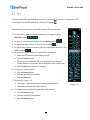
Case 1:
Record Mode: Normal + Event
Record With: Recording days
The DVR will Auto adjust image Quality and Event frame rate to match the number of Recording
days which user selected:
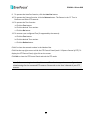
According to resolution, event hours and other assumptions above, the DVR will attempt to select
one set of suitable quality and event frame rate by checking if set 1 meets the requirements, and
proceed in order unit the requirements are met. If the DVR can’t match the required record days
from one of the 8 sets, it will use set 8.
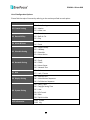
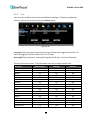
Checking Order
1
2
Normal Frame
1
1
Rate
Quality
Superior Standard
Event Frame
30
30
Rate
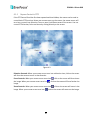
Case 2:
Record Mode: Event Only
3
4
5
6
7
8
1
1
1
1
1
1
Low
Low
Low
Low
Low
Low
30
15
10
7.5
5
1
Record With: Recording days
DVR will Auto adjust Quality and Event frame rate to match the Recording days which user need:
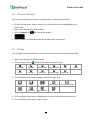
According to resolution, event hours and other assumptions above, the DVR will attempt to select
one set of suitable quality and event frame rate by checking if set 1 meets the requirements, and
proceed in order unit the requirements are met. If the DVR can’t match the required record days
from one of the 8 sets, it will use set 8.
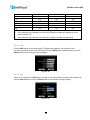
Checking
1
2
3
4
5
6
7
8
Order
Quality
Superior Standard
Low
Low
Low
Low
Low
Low
Event Frame
30
30
30
15
10
7.5
5
1
Rate
135