1
Crestron Adagio AADS
Adagio Audio Distribution System
Operations Guide
®
Important Safety Instructions
•
•
•
•
•
•
•
•
•
•
•
•
•
•
•
•
•
•
Read these instructions.
Keep these instructions.
Heed all warnings.
Follow all instructions.
Do not use this apparatus near water.
Clean only with dry cloth.
Do not block any ventilation openings. Install in accordance
with the manufacturer's instructions.
Do not install near any heat sources such as radiators, heat
registers, stoves, or other apparatus (including amplifiers)
that produce heat.
Do not defeat the safety purpose of the polarized or
grounding-type plug. A polarized plug has two blades with
one wider than the other. A grounding-type plug has two
blades and a third grounding prong. The wide blade or the
third prong are provided for your safety. If the provided plug
does not fit into your outlet, consult an electrician for
replacement of the obsolete outlet.
Protect the power cord from being walked on or pinched
particularly at plugs, convenience receptacles, and the point
where they exit from the apparatus.
Only use attachments/accessories specified by the
manufacturer.
Use only with the cart, stand, tripod, bracket or
table specified by the manufacturer or sold with
the apparatus. When a cart is used, use caution
when moving the cart/apparatus combination to
avoid injury from tip-over.
Unplug this apparatus during lightning storms or when
unused for long periods of time.
Refer all servicing to qualified service personnel. Servicing
is required when the apparatus has been damaged in any
way, such as power-supply cord or plug is damaged, liquid
has been spilled or objects have fallen into the apparatus, the
apparatus has been exposed to rain or moisture, does not
operate normally, or has been dropped.
Disconnect power prior to connecting or disconnecting
equipment.
Do not install in direct sunlight.
The apparatus must be installed in a way that the power cord
can be removed either from the wall outlet or from the
device itself in order to disconnect the mains power.
Prevent foreign objects from entering the device.
WARNING:
TO REDUCE THE RISK OF FIRE OR ELECTRIC SHOCK,
DO NOT EXPOSE THIS APPARATUS TO RAIN OR
MOISTURE. THE APPARATUS SHALL NOT BE EXPOSED
TO DRIPPING OR SPLASHING. OBJECTS FILLED WITH
LIQUIDS, SUCH AS VASES, SHOULD NOT BE PLACED
ON THE APPARATUS.
WARNING:
TO PREVENT ELECTRIC SHOCK, DO NOT REMOVE
COVER. THERE ARE NO USER SERVICEABLE PARTS
INSIDE. ONLY QUALIFIED SERVICE PERSONNEL
SHOULD PERFORM SERVICE.
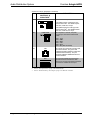
The lightning flash with arrowhead symbol, within an
equilateral triangle, is intended to alert the user to the
presence of uninsulated “dangerous voltage” within the
product's enclosure t hat may be of sufficient magnitude
to constitute a risk of electric shock to persons.
The exclamation point within an equilateral triangle is
intended to alert the user to the presence of important
operating and maintenance (servicing) instructions in
the literature accompanying the appliance.
WARNING:
THIS IS AN APPARATUS WITH CLASS I
CONSTRUCTION. IT SHALL BE CONNECTED TO AN
ELECTRICAL OUTLET WITH AN EARTHING GROUND
TERMINAL.
IMPORTANT:
This device can be used with Class 2 output wiring.
Regulatory Compliance
This product is Listed to applicable UL Standards and requirements by Underwriters Laboratories Inc.
(E302724)
As of the date of manufacture, the AADS has been tested and found to comply with specifications for CE
marking and standards per EMC and Radiocommunications Compliance Labelling.
Federal Communications Commission (FCC) Compliance Statement
This device complies with part 15 of the FCC Rules. Operation is subject to the following conditions:
(1) This device may not cause harmful interference and (2) this device must accept any interference received,
including interference that may cause undesired operation.
CAUTION: Changes or modifications not expressly approved by the manufacturer responsible for
compliance could void the user’s authority to operate the equipment.
NOTE: This equipment has been tested and found to comply with the limits for a Class B digital device,
pursuant to part 15 of the FCC Rules. These limits are designed to provide reasonable protection against
harmful interference in a residential installation. This equipment generates, uses and can radiate radio
frequency energy and, if not installed and used in accordance with the instructions, may cause harmful
interference to radio communications. However, there is no guarantee that interference will not occur in a
particular installation. If this equipment does cause harmful interference to radio or television reception,
which can be determined by turning the equipment off and on, the user is encouraged to try to correct the
interference by one or more of the following measures:
•
Reorient or relocate the receiving antenna
•
Increase the separation between the equipment and receiver
•
Connect the equipment into an outlet on a circuit different from that to which the receiver is connected
•
Consult the dealer or an experienced radio/TV technician for help
Industry Canada (IC) Compliance Statement
CAN ICES-3(B)/NMB-3(B)
The specific patents that cover Crestron products are listed at patents.crestron.com.
Crestron, the Crestron logo, Adagio, Cresnet, e-Control, infiNET, Roomview, SIMPL+ and SystemBuilder are either trademarks or registered
trademarks of Crestron Electronics, Inc. in the United States and/or other countries. Apple and iPod are either trademarks or registered trademarks of
Apple, Inc. in the United States and/or other countries. Coldfire is either a trademark or registered trademarks of Freescale Semiconductor, Inc. in the
United States and/or other countries. Windows is either a trademark or a registered trademark of Microsoft Corporation in the United States and/or
other countries. XM and the XM logo are either trademarks or registered trademarks of Sirius XM Radio Inc. in the United States and/or other
countries. UL and the UL logo are either trademarks or registered trademarks of Underwriters Laboratories, Inc. in the United States and/or other
countries. Other trademarks, registered trademarks, and trade names may be used in this document to refer to either the entities claiming the marks and
names or their products. Crestron disclaims any proprietary interest in the marks and names of others. Crestron is not responsible for errors in
typography or photography.
This document was written by the Technical Publications department at Crestron.
©2013 Crestron Electronics, Inc.
Crestron Adagio AADS
Audio Distribution System
Contents
Audio Distribution System: Adagio AADS
1
Introduction ............................................................................................................................... 1
Features and Functions ................................................................................................ 1
Applications................................................................................................................. 3
Specifications .............................................................................................................. 5
Physical Description .................................................................................................... 8
Setup ........................................................................................................................................ 15
Network Wiring ......................................................................................................... 15
Hardware Hookup ..................................................................................................... 15
Configuration ........................................................................................................................... 22
Configure the AADS for Operation........................................................................... 22
Configure Sources ..................................................................................................... 29
Configure Rooms ...................................................................................................... 30
Configure Presets ...................................................................................................... 32
Operation ................................................................................................................................. 35
Source Mode.............................................................................................................. 35
Room Mode ............................................................................................................... 49
Recall a Preset Group ................................................................................................ 51
Turn off the System ................................................................................................... 52
Programming Software ............................................................................................................ 53
Earliest Version Software Requirements for the PC ................................................. 53
Programming with Adagio Composer ....................................................................... 54
Programming with SystemBuilder ............................................................................ 54
Programming with SIMPL Windows ........................................................................ 54
Example Program ...................................................................................................... 55
Uploading and Upgrading ........................................................................................................ 56
Establishing Communication ..................................................................................... 56
Programs and Firmware ............................................................................................ 57
Problem Solving ...................................................................................................................... 58
Troubleshooting......................................................................................................... 58
Check Network Wiring.............................................................................................. 59
Reference Documents ................................................................................................ 60
Further Inquiries ........................................................................................................ 60
Future Updates .......................................................................................................... 60
Appendix: RDS/RBDS Function Support............................................................................... 61
Return and Warranty Policies .................................................................................................. 62
Merchandise Returns / Repair Service ...................................................................... 62
Crestron Limited Warranty........................................................................................ 62
Operations Guide – DOC. 6458A
Contents • i
Crestron Adagio AADS
Audio Distribution System
Audio Distribution System:
Adagio AADS
Introduction
Features and Functions
•
•
•
•
•
•
•
•
•
•
1.
2.
Operations Guide – DOC. 6458A
Whole-house audio distribution system
Out-of-the-box functionality (no programming required):
⇒ Audio distribution for six rooms at 45 watts per channel;
expandable up to 12 rooms when used with Adagio® Audio
Expander (AAE)
⇒ Control from front panel or any combination of six (up to 12 if
used with AAE) APAD LCD controllers or C2N-DBF12 12-button
room keypads
⇒ Built-in support for (1) Interface for Apple® iPod® (CEN-IDOC),
(1) AAE and (1) Adagio Audio Server (AAS)
45 watts per channel for six rooms, expandable to 24 rooms with
additional AAEs
Four inputs for line-level audio sources
Front panel control provides flexible control of whole-house audio
Control audio functions from the built-in LCD-driven front panel,
12-button room keypads, or APAD LCD controllers. Other control
devices can be used with additional programming
Two built-in AM/FM radio tuners with RDS/RBDS1 (one AM/FM
tuner on AADS-XM)
XM®2 Satellite Radio (AADS-XM)
Plug-and-play support for AAS Audio Servers (AAS-1, AAS-2,
AAS-4) and Interface for Apple iPod (CEN-IDOC)
2-Series Ethernet control system — programmable to support
Crestron® touchpanels, wireless remotes, lighting dimmers,
thermostats, and more!
The Radio Data System (RDS), a European standard, and Radio Broadcast Data System (RBDS), a
North American standard, permit broadcasters to use a sub-carrier frequency to transmit inaudible
digital data along with their regular FM programming to receivers equipped to process the data.
Refer to “Appendix: RDS/RBDS Function Support” on page 61 for more information.
Hardware and required basic monthly subscription sold separately. Premium channel available at
additional monthly cost. Installation costs and other fees and taxes, including a one-time activation
fee may apply. Subscription fee is consumer only. All fees and programming subject to change.
Subscriptions subject to Customer Agreement available at xmradio.com. Only available in the 48
contiguous United States.
Audio Distribution System: Adagio AADS • 1
Audio Distribution System
Crestron Adagio AADS
Multi-Room Audio
The AADS supports up to six sets of stereo room speakers, allowing listeners in each
room to listen selectively to any of six different stereo sources. Its integrated multichannel power amplifier delivers a robust 45 watts per channel to all rooms. Without
requiring any programming, the AADS can easily be expanded to support a total of
12 rooms by adding an AAE Audio Expander. Or, as many as 24 rooms can be
handled using three AAEs with simple setup provided by Crestron Adagio Composer
software.
High-End Performance
An advanced Class G amplifier topology produces the great sound of a classic Class
AB design with near-digital efficiency. A massive MOH-core toroidal power
transformer directs pure, continuous power to each channel, achieving exceptional
dynamic range and low distortion sound quality in every room. Gentle power-up is
achieved through a “soft-start” inrush current limiting circuit, and quick-response
output protection on each channel prevents failure caused by speaker line faults and
overheating.
Front Panel Control
The AADS's front panel provides for controlling audio to a houseful of speakers,
with custom naming of rooms and sources facilitated on the LCD display. The six
room select buttons can also be custom labeled using Crestron Engraver software.
Preset Groups
The "Group" feature makes it simple to combine speakers in adjacent rooms, or
switch into whole-house party mode, by letting the user link any number of rooms to
function as one. Grouping lets you easily route one source to multiple rooms at once
without the sync problems common to streaming-based systems. Up to six groups
can be defined within the Preset mode.
Versatile Room Controls
A choice of basic 12-button keypads or the advanced APAD Wall Mount LCD
Controller enables versatile control of the AADS in every room. A keypad provides
the essential controls for adjusting volume, selecting sources, and toggling up and
down through tracks and radio channels. For more elegant control, the APAD
provides true feedback for display of audio sources, radio stations, CD titles, artists,
and tracks by name, plus audio settings and many other parameters.
Dual AM/FM Radio, XM Radio, and MP3 Audio Servers
Two built-in AM/FM radio tuners let listeners in different rooms each enjoy their
own choice of music, news, sports and talk. RDS/RBDS enables the display of the
full radio station name and other detailed information about the song or program that
is selected.
The AADS-XM includes an XM Satellite Radio tuner for additional programming
variety.
In addition to radio, four line-level inputs are provided to accommodate external
audio sources including Crestron's AAS Audio Server and CEN-IDOC Interface for
Apple iPod. Plug-and-play compatibility with the AAS and CEN-IDOC delivers
instant access to an entire collection of music from any room in the house with fullybidirectional communications for browsing by album, artist, and song title.
2 • Audio Distribution System: Adagio AADS
Operations Guide – DOC. 6458A
Crestron Adagio AADS
Audio Distribution System
2-Series Ethernet Control System
At the heart of the AADS is the powerful 2-Series control engine. With both
Cresnet® and Ethernet connectivity, plus custom programmability using
SystemBuilder software, the AADS allows nearly limitless expansion and
customization using Crestron's entire line of touchpanels, wireless remotes, and
hundreds of other devices. The built-in Web server with native e-Control®2 XPanel
support enables full remote control over IP from computers and PDA devices, as
well as remote diagnostics and updates. Built-in IR and RS-232 ports are included to
interface the AADS with non-Crestron devices ranging from CD changers to security
systems.
Home Automation and Integration
The AADS can grow as part of a complete home automation solution supporting all
of Crestron's Cresnet and infiNET™ controllable dimmers, shade controllers,
thermostats, and so much more.
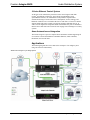
Applications
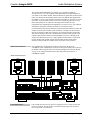
The following diagram shows an AADS as the centerpiece of an Adagio system
using out-of-the-box functionality.
AADS as the Centerpiece of an Adagio System
Operations Guide – DOC. 6458A
Audio Distribution System: Adagio AADS • 3
Audio Distribution System
Crestron Adagio AADS
Available models are:
•
AADS: AADS with built-in dual AM/FM tuner
•
AADS-XM: AADS with built-in AM/FM/XM tuner
•
AADSI: AADS for International (230 VAC) use with built-in AM/FM tuner
Out of the box, the AADS can support one AAS (Adagio Audio Server), one AAE
(Adagio Audio Expander) for control of up to 12 zones, one CEN-IDOC (Interface
for Apple iPod), and a combination of up to 12 C2N-DBF12 (12-button keypads) or
APAD controllers for local control of each zone.
With custom programming (via Adagio Composer, SystemBuilder, or SIMPL
Windows) additional Crestron and third-party devices may also be added.
4 • Audio Distribution System: Adagio AADS
Operations Guide – DOC. 6458A
Crestron Adagio AADS
Audio Distribution System
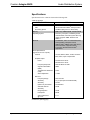
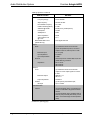
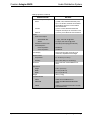
Specifications
Specifications for the AADS are listed in the following table.
AADS Specifications
SPECIFICATION
DETAILS
Processor
®
CPU
32-bit Freescale ColdFire Microprocessor
Processing Speed
100 MIPS (Dhrystone 2.1 Benchmark)
Memory
8MB Flash, 32MB SDRAM, 256KB NVRAM
Operating System
Real-time, preemptive, multitasking kernel,
multi-threaded, FAT32 file system with long
names; supports SIMPL Windows and
®
SIMPL+
Ethernet
10/100BaseT, static IP or DHCP/DNS, SSL,
autonegotiating, full duplex TCP/IP,
UDP/IP, SMTP, SNMP, built-in Web server
and e-mail client; supports Crestron
®
e-Control 2, XPanel and RoomView
applications
Audio Specifications
(Typical of six room outputs)
Controls
Volume, Balance, Bass, Treble, Loudness,
Mute, Mono, Input Compensation
Amplifier Output
Power
45 Watts into 8 Ohms
60 Watts into 4 Ohms
Frequency Response
20Hz to 20kHz ±0.75dB
Signal-to-Noise Ratio
(SNR)
98dB
Total Harmonic Distortion
(THD)
0.05%
Stereo Separation
> 75dB
AM Tuner
Frequency Range
530-1710 kHz
Sensitivity
3.5 µV (RF input level 10dB S+N/N)
Selectivity
10 kHz
Up/Dn Freq Increments
10 kHz/9 kHz
Alternate Channel
Selectivity
55 dB
Image Rejection
35 dB
IF Rejection
60 dB
Audio Output level
@ 1 kHz
1 Vrms
(Continued on following page)
Operations Guide – DOC. 6458A
Audio Distribution System: Adagio AADS • 5
Audio Distribution System
Crestron Adagio AADS
AADS Specifications (Continued)
SPECIFICATION
DETAILS
FM Tuner
Frequency Range
87.50-108 MHz
Step Frequency
50 kHz/ 100 kHz
Intermediate Frequency
10.7 MHz
Usable sensitivity (Mono)
11 dBf
S/N Ratio @ 65 dBf
64 dB (mono), 60 dB (stereo)
IF Rejection
100 dB
AM Rejection
55dB
Stereo separation
40 dB
Audio Output Level
@ 1 KHz
1Vrms
XM Satellite Radio Tuner
(AADS-XM only)
160+ digital channels
Inputs
Audio
(4) unbalanced stereo line-level audio
inputs with parallel loop-thrus; connect to
outputs of sources, with loop-thru to AAE
Maximum Input
3.2 Vrms (flat)
Input Impedance
47k Ohms
Input Compensation
±10dB
Antenna
Impedance
Antenna inputs for included AM, FM, & XM
(AADS-XM only) antennas
FM: 75 ohms
AM: 50 ohms
XM: 50 ohms
Outputs
Tuner
(2) unbalanced stereo line-level audio
outputs for tuner output signals to connect
to AAE
Maximum Output
AM/FM: 1 Vrms
XM: 2 Vrms
Output Impedance
100 Ohms
Infrared
IR output
(4) mini-phone jack, IR/Serial port;
Up to 1.2 MHz
Communication
Cresnet
(6) Cresnet Master ports, provide data and
power for C2N-DBF12 keypads and APAD
devices
(2) Cresnet Master ports, paralleled with six
Cresnet ports previously described, provide
data to connected Adagio Audio Expanders
(AAE)
(Continued on following page)
6 • Audio Distribution System: Adagio AADS
Operations Guide – DOC. 6458A
Crestron Adagio AADS
Audio Distribution System
AADS Specifications (Continued)
SPECIFICATION
DETAILS
Communication (continued)
Serial
(1) DB9, male, bidirectional RS-232 ports;
Up to 115.2k baud, hardware and software
handshaking support for communication
with serial devices
Console
(1) RJ-11 female, bidirectional RS-232
computer console port for connection to PC
Ethernet
(1) RJ-45 port for Ethernet communications
Power
Power Consumption
AADS/AADS-XM/
7 Amps, 120 Volts AC @ 60Hz
AADSI
3.5 Amps, 230 Volts AC @ 50Hz
Available Cresnet Power
20 Watts (0.83 Amps @ 24 Volts DC)
Heat Dissipation*
8-ohm impedance
650 BTU/hr
4-ohm impedance
750 BTU/hr
LCD Display
Green LCD dot matrix, two lines by 20
characters, adjustable LED backlight
Environmental
Temperature
41° to 104°F (5° to 40°C)
Humidity
10% to 90% RH (non-condensing)
Enclosure
Black metal with molded ABS/PC front
panel
Dimensions
Height
5.64 in (14.33 cm)
Width
17.16 in (43.58 cm)
Depth
18.11 in (45.99 cm)
Weight
38 lb (17.2 kg)
Available Models
*
Operations Guide – DOC. 6458A
AADS
AADS with dual AM/FM tuners
AADS-XM
AADS with AM/FM/XM Satellite Radio
tuners
AADSI
AADS for International (230 VAC) use with
Dual AM/FM tuners
BTU/hr ratings made while all channels loaded to 1/8 full power with specified impedance.
Audio Distribution System: Adagio AADS • 7
Audio Distribution System
Crestron Adagio AADS
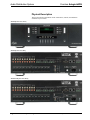
Physical Description
This section provides information on the connections, controls, and indicators
available on your AADS.
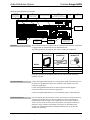
AADS Physical View (Front)
AADS Physical View (Rear),
AADS-XM Physical View (Rear),
8 • Audio Distribution System: Adagio AADS
Operations Guide – DOC. 6458A
Crestron Adagio AADS
Audio Distribution System
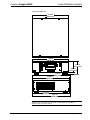
AADS Overall Dimensions
17.09 in
(43.41 cm)
17.16 in
(43.58 cm)
5.64 in
(14.33 cm)
5.03 in
(12.77 cm)
17.56 in
(44.61 cm)
17.71 in
(44.97 cm)
17.96 in
(45.63 cm)
18.11 in
(45.99 cm)
NOTE: Cable connections can extend the overall depth of the AADS by
approximately two to three inches.
Operations Guide – DOC. 6458A
Audio Distribution System: Adagio AADS • 9
Audio Distribution System
Crestron Adagio AADS
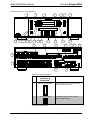
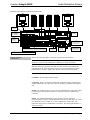
AADS Buttons and Ports (AADS-XM Shown)
1
2
3
4
6
5
8
9
7
11
12
22
14
10
13
23
16
15
18
17
24
19
26
28
29
30
20
21
25
27
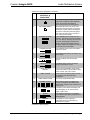
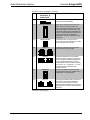
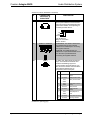
Connectors, Controls, & Indicators
#
CONNECTORS,
CONTROLS, &
1
INDICATORS
DESCRIPTION
1
SELECTION CONTROL
Used to select rooms, sources, and radio
stations (when using tuner).
2
SELECT BUTTON
The SELECT button confirms changes
made to AADS settings.
(Continued on following page)
10 • Audio Distribution System: Adagio AADS
Operations Guide – DOC. 6458A
Crestron Adagio AADS
Audio Distribution System
Connectors, Controls, & Indicators (Continued)
#
CONNECTORS,
CONTROLS, &
1
INDICATORS
3
HARDWARE RESET
Recessed below the front panel. Press
this button to initiate a system hardware
reset. This has the same effect as
disconnecting and reconnecting power.
4
SOFTWARE RESET
Recessed below the front panel. Press
this button while the system is running to
restart the program without rebooting the
processor. Hold during reboot to bypass
the custom program and run the built-in
out-of-the-box functionality.
5
STANDBY BUTTON
The STANDBY button places the unit in
Standby. The button is lit when the AADS
is in use. When in Standby, the button will
not be lit, all switching connections are
broken, and all of the amplifier and preamplifier outputs are powered off. Turning
on a room turns on the AADS.
6
SOURCE BUTTON
The SOURCE button places the AADS in
the Source mode.
7
ROOM BUTTON
The ROOM button places the AADS in the
Room mode.
8
PRESETS BUTTON
9
MENU BUTTON
10
LIQUID CRYSTAL
DISPLAY
11
LABEL ACCESS
12
LABEL STRIP COVER
13
ROOM BUTTONS
14
BKLT
The BKLT button adjusts the display and
key backlighting to one of three levels
(high, medium, low).
15
SCHED
The SCHED button places the AADS in
the Schedule mode that is programmed in
SystemBuilder.
16
DISPLAY
DESCRIPTION
Used to configure and select preset
groups.
The MENU button returns the display
(#10) to the previous screen.
The Liquid Crystal Display (LCD) shows
system information such as audio controls,
tuner controls, and room controls.
A notch in the front panel allows removal
of the label cover with a flat-head
screwdriver.
Covers the engraved label strip.
Room buttons select and indicate the
room(s) controlled by the AADS. Room
buttons also indicate rooms contained in a
room group.
The DISPLAY button toggles the
information shown on the display (i.e.
artist and/or song title).
(Continued on following page)
Operations Guide – DOC. 6458A
Audio Distribution System: Adagio AADS • 11
Audio Distribution System
Crestron Adagio AADS
Connectors, Controls, & Indicators (Continued)
#
CONNECTORS,
CONTROLS, &
1
INDICATORS
17
MORE
18
VOLUME CONTROL
Push “up” to raise the volume of a room;
push “down” to lower the volume of a
room. Pressing and releasing the volume
control will adjust the volume level in fine
increments while pressing and holding the
volume control will adjust the volume level
in larger increments. Volume level is
displayed on the LCD. Operates in Room
mode only.
19
MUTE BUTTON
The MUTE button is used to mute or
unmute the currently selected room. When
lit, the selected room is muted.
20
SOURCES
21
ROOMS
22
TUNER OUT
23
NET 1-6
DESCRIPTION
The MORE button displays additional
information (when available).
(4) Sets of unbalanced, line-level audio
inputs with loop through output.
(6) Sets of speaker-level, mono/stereo
outputs provide 45 watts per channel into
8-ohm impedance speakers (60 watts into
4-ohm impedance speakers). Two-pin
terminal block interface connectors which
2
accept up to 16 – 14 AWG (1.5 – 2.5 mm )
speaker wire are included for each
speaker terminal.
(2) Sets of unbalanced, line-level audio
outputs deliver audio from TUNER A and
TUNER B to a connected AAE.
(6) Four-pin terminal blocks provide home
run Cresnet connections to distribute
power and Cresnet data to rooms for
keypads and/or APADs. Four-pin terminal
block interface connectors are included for
each port.
(Continued on following page)
12 • Audio Distribution System: Adagio AADS
Operations Guide – DOC. 6458A
Crestron Adagio AADS
Audio Distribution System
Connectors, Controls, & Indicators (Continued)
#
CONNECTORS,
CONTROLS, &
1
INDICATORS
DESCRIPTION
24
IR OUT
(4) 3.5mm tip-ring-sleeve (TRS) miniphone ports enables IR communications
using the Crestron Infrared Emitter Probe
(part number STIRP, sold separately) for
controlling infrared devices.
Tip
Ring
Sleeve
Tip: IR Data Out
Ring: No Connection
Sleeve: Ground
25
TUNER A / TUNER B
AADS/AADSI: The AADS & AADSI have
two AM/FM antenna inputs (labeled
TUNER A and TUNER B) for connecting
the supplied antennas.
AADS-XM: The AADS-XM has one
AM/FM tuner input labeled TUNER A and
one XM tuner input labeled XM for
connecting the supplied antennas.
26
COM A
(1) DB9, male, bidirectional RS-232 port;
Up to 115.2k baud with hardware and
software handshaking support for
communication with serial devices. Can
also be used for modem communications.
The following table lists the pin
assignments of the serial ports.
PIN
DIRECTION
DESCRIPTION
1
To AADS
(DCD) Data Carrier
Detect
2
To AADS
(RXD) Receive Data
3
From
AADS
(TXD) Transmit Data
4
From
AADS
(DTR) Data Terminal
Ready
5
Common
(GND) Ground
6
To AADS
(DSR) Data Set
Ready
7
From
AADS
8
To AADS
(CTS) Clear To Send
9
To AADS
(RI) Ring Indicator
(RTS) Request To
Send
(Continued on following page)
Operations Guide – DOC. 6458A
Audio Distribution System: Adagio AADS • 13
Audio Distribution System
Crestron Adagio AADS
Connectors, Controls, & Indicators (Continued)
#
CONNECTORS,
CONTROLS, &
1
INDICATORS
27
POWER INPUT
DESCRIPTION
Fuse terminal and power connector.
The AADS requires a T8AH-type fuse
2
rated at 250 Volts . The AADS requires
120 VAC, 50-60 Hz, 7 Amps.
The AADSI requires a T4AH-type fuse
2
rated at 250 Volts . The AADSI requires
3
230 VAC, 50-60 Hz, 3.5 Amps .
28
COMPUTER
One 6-pin RJ-11 female, computer
console port. Use with included serial
cable.
Pin 1: CTS
Pin 2: GND
Pin 3: RXD
Pin 4: TXD
Pin 5: RTS
Pin 6: N/C (Not connected)
1.
2.
3.
29
LAN
One 8-wire, RJ-45 female connector with
two LED indicators. The green LED
indicates link status while the yellow LED
indicates Ethernet activity. The port
supports 10BaseT/100BaseTX Ethernet
communications.
30
NET
(2) Four-pin terminal block connectors
provide Cresnet connections to AAE
devices. A four-pin terminal block interface
connector is included for each port.
Interface connectors for NET and ROOMS ports are provided with the unit.
Refer to “Fuse Replacement” on page 19 for additional details.
Refer to “Hardware Hookup”, which begins on page 15 for additional cord details.
14 • Audio Distribution System: Adagio AADS
Operations Guide – DOC. 6458A
Crestron Adagio AADS
Audio Distribution System
Setup
Network Wiring
When wiring the AAE Adagio Audio Expander, APAD controller, or C2N-DBF12
keypad to the AADS, consider the following:
•
Use Crestron Certified Wire.
•
Use Crestron power supplies for Crestron equipment.
•
Provide sufficient power to the system.
CAUTION: Insufficient power can lead to unpredictable results or damage
to the equipment. Please use the Crestron Power Calculator to help calculate
how much power is needed for the system
(http://www.crestron.com/calculators).
•
For larger networks, Use a Cresnet Hub/Repeater (CNXHUB) to maintain
signal quality
For more details, refer to “Check Network Wiring” on page 59.
Hardware Hookup
Ventilation
The AADS should be used in a well-ventilated area The venting holes should not be
obstructed under any circumstances. If the AADS is hot to the touch, consider using
forced air ventilation and/or incrementing the spacing between units.
To prevent overheating, do not operate this product in an area that exceeds the
environmental temperature range listed in the table of specifications. Consideration
must be given if installed in a closed or multi-unit rack assembly since the operating
ambient temperature of the rack environment may be greater than the room ambient.
Contact with thermal insulating materials should be avoided on all sides of the unit.
Out-of-the-box Connections
WARNING: To prevent injury and / or equipment damage due to electric shock,
disconnect power from the AADS prior to making any wiring connections.
When using the out-of-the-box functionality, the AADS can support up to one AAE,
one CEN-IDOC, one AAS-1/-2/-4, and any combination of six APAD or
C2N-DBF12 control devices (plus an additional six on the AAE if connected).
Observe the following when connecting hardware to the AADS.
•
CEN-IDOC (Optional): The audio output of the CEN-IDOC must be
connected to source input port 4 on the AADS when using the out-of-thebox configuration. The CEN-IDOC and AADS must be connected to the
same DHCP router.
•
AAS Devices (Optional): Source input ports 1 through 3 are reserved for
the different variations of the AAS. The AAS and AADS must be
connected to