1
Speech EQ
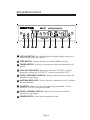
On the back of the transmitter there is a switch labeled “EQ”. With this
function enabled (switch up), the audio dynamics and frequency
response are processed to improve intelligibility of speech. If the
primary audio source is going to be speech, you should enable this
processing! If the main audio source is going to include music
information, you should disable it. You may want to experiment to
determine which position sounds most pleasing with the program
source you intend to use.
Display On and Off
The digital display can be turned on or off using the “DISPLAY”
switch. Disabling the display reduces the current consumption of the
transmitter for battery operation. In environments where the display
could be distracting, disabling the display may also be appropriate.
When the display is disabled, the tuning controls are also disabled,
ensuring the transmitter frequency is not changed inadvertently. With
the display disabled, one segment is turned on as a power indicator.
Additionally, the “LOCK OUT” indicator is illuminated indicating the
tuning is disabled. The VU meter and the “ANTENNA” indicator are
unaffected.
Lock Out
After the transmitting frequency has been determined, the transmitter
tuning function can be disabled with the “LOCK OUT” switch on the
back of the transmitter. This ensures that the transmitter operating
frequency is not inadvertently changed. The “LOCK OUT” indicator
(above the first numeric digit on the display) will illuminate indicating
that the tuning has been disabled. When rack-mounting the transmitter,
this switch must be accessed from behind the rack. This provides
added protection from tampering.
Page 7