1
Mailbox Owner User’s Guide
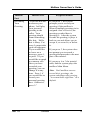
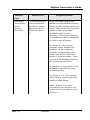
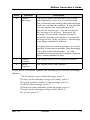
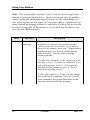
Press
4
Function
Delete
Message
Description
The system marks the message to be deleted,
and temporarily stores it as a saved message.
The system does not actually delete the message
until you exit from the mailbox. If you play the
message again, after requesting that it be
deleted, the system says, “You have asked for
this message to be deleted,” then plays the
message. If you decide you do not want to
delete the message, you can press 3 to save the
message as new. Once you press 3, the message
is no longer marked for deletion.
It is good practice to delete messages as soon as
possible to prevent the mailbox from becoming
full of old, unneeded messages. You can
schedule saved messages for automatic deletion
after a certain number of days.
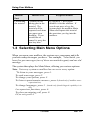
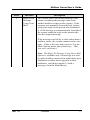
5
Adjust
Volume
The system allows you to adjust the volume.
6
More
Options
The system offers more options.
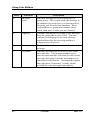
If you press 6 for more options, the system gives you the following
choices:
“To forward a copy of this message, press 1.
To reply to the message using voice mail, press 2.
To speak with the sender of the message, press 3.
To delete the message, press 4.
To hear the time and date of the message, press 5.
To reply to the message using e-mail, press 6.
Or to exit, press #.”
Mar ‘03
Comdial
15