1
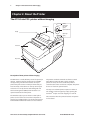
Chapter 2: About the Printer and Imaging
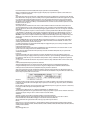
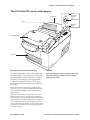
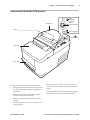
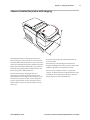
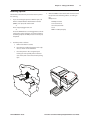
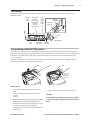
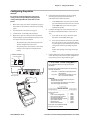
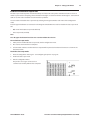
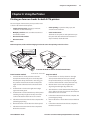
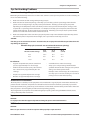
The A776 ColorPOS® printer with imaging
Receipt Cover
On-line,
Paper status,
Error Light
(green)
Paper Feed Button
Receipt
Slip in Light
(green)
Imaging Module Cover
Slip or check
Description of A776 printer with imaging
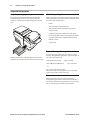
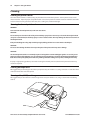
CAUTION
The TPG A776 ColorPOS® printer is also available with
To prevent document or printer damage, top inserted
documents cannot be fed down to the curved paper
path of the slip station.
an imaging feature. This allows you to make scanned
images of checks, ID cards, or other items, and then
print those scanned images. The imaging module
is added to the A776 base printer, so the imaging
printer has all of the same features and electronics as
the original.
TPG can build a dual sided imaging capable printer at
the factory, or you can install an upgrade kit yourself on
an existing A776 ColorPOS® printer and upgrade the
orignal printer.
Items to be imaged can be inserted either at the standard slip position or the scanner front top. Front top inserted items can range in size and thickness from receipt
paper and checks to hard laminated ID cards, depending
on use of either the slip entry or the readily accessible
top front feed entry. Documents can exit at either of the
entry points or at the back of the flat top, going over the
receipt print section.
A776 UG00001 B 10/06 A776 Two-Color Thermal/Impact Hybrid Printer: User Guide