1
User Manual
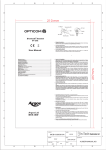
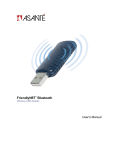
On/Off(S1)
Ear hook
Bluetooth Headset AT-BT210
Volume Down(S3)
Speaker
Headset pictures...................................................................................................2
Charging the battery..............................................................................................2
Turning on the Headset..........................................................................................2
Turning off the Headset..........................................................................................2
Headset in Pairing Mode........................................................................................3
Establishing Bluetooth Link....................................................................................3
Answering incoming calls.......................................................................................3
Transferring calls..................................................................................................4
Muting the microphone...........................................................................................4
Ending calls..........................................................................................................4
To make a new call using voice dialing.....................................................................4
Redialing last dialed number..................................................................................4
Reject a call..........................................................................................................4
Adjusting speaker volume......................................................................................4
Right or left ear......................................................................................................5
Bend the ear hook to fit your ear.............................................................................. 5
To put on the headset.............................................................................................6
Low-battery indication...........................................................................................6
Battery recharging.................................................................................................6
LED Status...........................................................................................................7
Voice Over Internet Protocol (VOIP) Application.......................................................7
Declaration of Conformity ....................................................................................... 8
Office Depot Limited One Year Product Warranty.................................................... 10
1
Lock
LED
DC Socket
Microphone
Volume Up (S2)
●
●
●
Charging the battery
Thank you for buying the new AT-BT210 Headset with Bluetooth wireless technology.Before first
time use, it is important to charge the battery for 12 hours.
Turning on the Headset
While the Headset is powered down, press and hold S1 until Green LED turn on. A low tone
followed by a high tone will indicate that the AT-BT210 is powered up. Afterward, green LED will
flash every 3 seconds.
Turning off the Headset
While the Headset is powered up, press and hold S1 until red LED on. A high tone followed by a
low tone will indicate that the AT-BT210 is powered down.
2