1
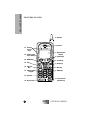
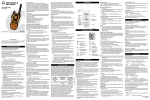
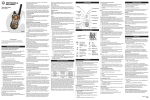
Extend for optimal signal.
2. Earpiece
Hold to your ear to listen during
phone calls and Group/Private (lowaudio) communication.
3. Alphanumeric
Display
View up to four lines (up to 12
characters per line) on the display.
4. Option Keys
Press to select the option that
appears directly above the left or right
key on the fourth line of the display.
5. Scroll Keys
Press the left or right key to scroll
forward or back through options and
lists, such as Phone, Group, or
Private Call lists.
6. Mode Key
Press to change between Phone,
Group, and Private modes.
7. END Key
Press to end phone calls.
8. SEND Key
Press to answer an incoming phone
call or initiate an outgoing phone call.
9. Group/Private
Speaker Key
Press to listen to audio through either
the earpiece or the speaker during
Group and Private calls.
10. Microphone
Speak into it during communications.
11. Speaker
Listen to Group and Private (highaudio) conversations.
12. Alphanumeric
Keypad
Enter telephone numbers, Private
Call IDs, and alphanumeric
characters.
13. On/Off Key
Press to turn your portable on or off.
14. LED
Indicates the service state. See
Table 1 on page 6 for a description of
service states.
15. MENU Key
Scroll through the menu options that
are available on the last line within
each mode.
16. Push-To-Talk (PTT)
Button
Transmit a Group or Private Call, or a
Call Alert. Press and hold the PTT
button to talk; release it to listen.
17. Volume Control
Keys
Press to adjust volume levels.
i600
GETTING STARTED
Your i600 Portable
1. Antenna
3