1
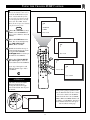
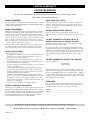
ACTIVATING THE TV’S ON TIMER CONTROL
J
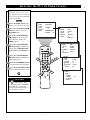
ust like an alarm clock, you can
set the TV to turn itself on at the
same time everyday.
BEGIN
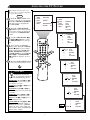
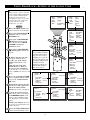
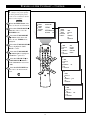
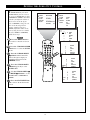
Press the MENU button on the
remote to show the on-screen menu.
Press the CURSOR DOWN ■
button three times to select the
FEATURES menu.
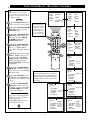
Press the CURSOR RIGHT
button and the menu will shift
to the left to display the TIMER
controls.
..
..
.
REVIEW
MOVIE RATING
PICTURE
––––––
SOUND
TV RATING
FEATURES
––––––
INSTALL
BLOCK UNRATED OFF
NO RATING
..
...
OFF
SmartLock
SOUND
NR
FEATURES
CONTRAST +
INSTALL
PIP
...
.
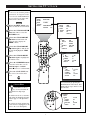
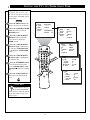
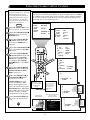
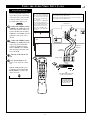
Press the CURSOR RIGHT
FEATURES
TIMER
play left, then CURSOR DOWN
■ to highlight the ACTIVATE
timer control.
..
..
POWER
SLEEP
TV
AV
ON/OFF
VCR
SWAP
SOURCE
POSITION
FREEZE
PIP CH
UP
DN
ACC
1
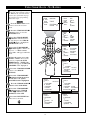
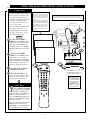
Press the STATUS/EXIT button to remove the menu from the
screen.
SMART
SMART
SOUND
PICTURE
MENU
SURF
VOL
3
4
CH
MUTE
CC
STATUS
CLOCK
EXIT
TV/VCR
VCR
6
SMART HELP
TIMER
PICTURE
CLOSED CAP
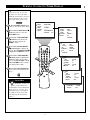
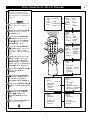
button again to shift the dis-
Press the CURSOR RIGHT
button again to highlight the
ACTIVATE timer option. Then,
press the CURSOR UP or CURSOR DOWN ■ buttons to turn the
timer ON or OFF.
REVIEW
A/CH
MULTI
RECORD
MEDIA
INCREDIBLE
2
4
5
TIME
SmartLock
ACTIVATE
NR
CHANNEL
CONTRAST +
START TIME
PIP
DISPLAY
CLOSED CAP
...
...
..
.
...
...
..
.
...
...
..
.
FEATURES
TIMER
TIME
06:54 PM
ACTIVATE
OFF
CHANNEL
30
START TIME
12:00 PM
DISPLAY
OFF
FEATURES
5
TIMER
TIME
ACTIVATE
.
ON
CHANNEL
STEREO
START TIME
DISPLAY
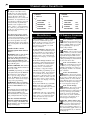
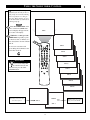
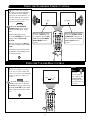
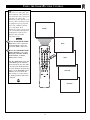
Remember, be sure to
set the time you want the
television to turn on using the
START TIME control as described
on page 10.
FEATURES
TIMER
8
TIME
ACTIVATE
CHANNEL
START TIME
DISPLAY
.
OFF