1
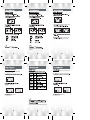
Set the bitrate for line in record.
P25 )
Enter record mode by pressing Function (F) button
for more than 1 second.
FM RADIO
mode. (ST: Stereo,
by pressing.
MO: Mono)
FM 87.5 MHz).
ST (Stereo)
MO (Mono)
Press B.MARK button and SKIP/SEARCH(
)button
to select the store number, then press B.MARK button
again,a preset number is stored.
To pause the recording, press(
)button.
the line in
REC
LINI001.MP3, LINI002.MP3,
LINI003.MP3... in order.
some
time
Enter "LINE IN" folder to play the recorded file.
Select FM RADIO function.
Press MENU button and press
station
To pause the recording, press(
REC
)button.
Enter"Radio"folder to play the recorded file.