1
Programmed Playback
CD
MP3
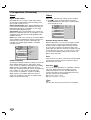
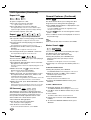
The Program function enables you to store your favorite
tracks from any disc in the player’s memory.
Programmed Playback with MP3/WMA
Audio CD Programmed Playback
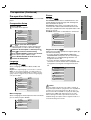
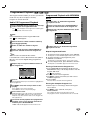
Press PROGRAM during playback or in the Stop
mode to enter the Program Edit mode.
The E mark will appear to the right of the word Program
on the right side of the menu screen.
step 1 of “Audio CD Programmed
1 Follow
Playback” on left.
a track, then press SELECT/ENTER to
2 Select
place the selected track on the Program list.
step 2 to place additional tracks on the
3 Repeat
Program list.
Program
MP3/WMA
Note
Press PROGRAM to exit the Program Edit mode.
The E mark will disappear.
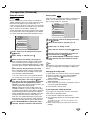
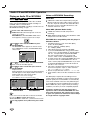
Move to the Disc number selection column by
pressing 3 repeatedly.
2
3 Select an audio disc number using 1/2.
a track, then press SELECT/ENTER to
4 Select
place the selected track on the Program list.
ote
You must select an audio
CD disc number.
3
If selected track is from a different kind of disc (DVD or
MP3 etc.), the track is skipped during programmed
playback.
5
Repeat steps 2-4 to place additional tracks on
the Program list.
Program
CD
1
2
3
4
5
E
TRACK 12
2
TRACK 01
TRACK 08
2
TRACK 02
TRACK 10
1
TRACK 03
TRACK 01
3
TRACK 04
TRACK 06
Clear All
TRACK 07
3
0: 56: 18
2
STER.
NORM.
Audio CD Menu
6
Press 2.
7
4 to select the track you want to start
Use 3/4
playing.
The programmed track you selected last is highlighted on
the program list.
Press TITLE to move to the next page.
Press MENU to move to the previous page.
8 Press PLAY to start.
Playback begins in the order in which you programmed
the tracks and “PROG.” appears on the menu screen.
Playback stops after all of the tracks on the Program list
have played once.
1.mp3
2.mp3
3.mp3
4.mp3
5.mp3
6.mp3
7.mp3
8.mp3
00:00
TRACK 2.mp3
TRACK 4.mp3
TRACK 3.mp3
Clear All
3
OFF
MP3/WMA Menu
steps 6-9 of “Audio CD Programmed
4 Follow
Playback” on left.
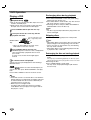
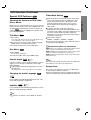
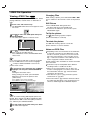
Repeat Programmed Tracks
To repeat the track currently playing, press REPEAT.
The Repeat icon and “TRACK” appear on the menu screen.
To repeat all tracks on the program list, press
REPEAT a second time.
The Repeat icon and “ALL” appear on the menu screen.
To cancel Repeat mode, press REPEAT a third time.
The Repeat icon and “OFF” appear on the menu screen.
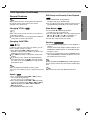
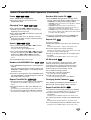
Erasing a Track from the Program List
1. Press PROGRAM during playback (Audio CD and
MP3/WMA disc only) or in the Stop mode to enter the
Program Edit mode.
The
TRACK 05
E
TRACK 8.mp3
TRACK
TRACK
TRACK
TRACK
TRACK
TRACK
TRACK
TRACK
E
mark will appear.
2. Press 2 to move to the Program list.
4 to select the track that you wish to erase
3. Use 3/4
from the Program list.
4. Press CLEAR.
The track will be erased from the Program list.
Erasing the Complete Program List
1. Follow steps 1-2 of “Erasing a Track from Program
List” as above.
4 to select “Clear All”, then press
2. Use 3/4
SELECT/ENTER.
The complete Program for the disc will be erased.
The programs are also cleared when the disc is removed.
resume normal playback from programmed
9 Toplayback,
select a track from the CD track list
and then press SELECT/ENTER.
“PROG.” indicator disappears from the menu screen.
23
OPERATION
discs
Program can contain 30 tracks.
1
WMA