1
ADVANCED FEATURES Menu: Color Balance, Auto Color
Correction, PerfectColor ™, Reset Color
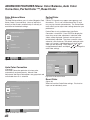
Color Balance Menu
PerfectColor
The Color Balance Menu uses six colors (Magenta, Red,
Yellow, Green, Cyan and Blue). You may adjust the
intensity of these colors automatically or manually or
reset them to the default settings.
Certain TV channels may appear more green or red
than others. This is not a malfunction of the TV and
may vary by channel or broadcaster. The PerfectColor
menu allows you to adjust color settings based on your
preferences.
(Figure 40)
(Figure 38)
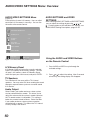
MAIN MENU
ADVANCED FEATURES menu
COLOR BALANCE
TIMER
Video Mute
: On
Black Enhancement
: On
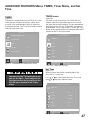
PerfectColor is only available when Auto Color
Correction is turned Off. Press ENTER to display the
menu for manual color adjustment. Individual color
sliders will be displayed and each active input can
be individually adjusted. They have a numeric value,
where 63 is the maximum. The default setting for each
color is 31 (center). Highlighted text will show which
slider you are adjusting. Press Adjust
or
to
navigate between colors and Adjust or to change the
color slider settings.
MAIN MENU
ADVANCED FEATURES MENU
COLOR BALANCE MENU
ADJUST to select
ENTER for menu
or change option
MENU to return
Figure 38. COLOR BALANCE
A/V Memory Input
Magenta(31):
Auto Color Correction
(Figure 39)
Red(31):
Yellow(31):
Green(31):
Cyan(31):
Auto Color Correction optimizes skin tone color
Blue(31):
automatically and continuously. Manual Color
Adjustment and Reset Color options are grayed out and
Figure 40. PerfectColor Menu
unavailable when On is selected.
MAIN MENU
ADVANCED FEATURES MENU
COLOR BALANCE
Auto Color Correction
for Ant-A
: Off
PerfectColorTM
Reset COLOR for Ant-A
ADJUST to select
or change option
ENTER for menu
MENU to return
Figure 39. Auto Color Correction
46
Reset Color
(Figure 39)
Select to reset the PefectColor settings. Each active
input can be individually reset.