1
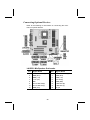
Connecting I/O Dev ices
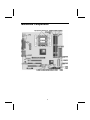
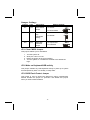
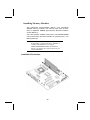
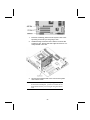
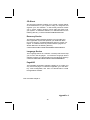
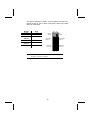
The backplane of the mainboard has the following I/O ports:
PS/2
mouse
PS/2
keyboard
LAN
port
USB
ports
Parallel port (LPT1)
Serial port Serial port
COM 1
COM 2
Game port
Microphone
Line-in
Line-out
PS/2 Mouse
Use the upper PS/2 port to connect a
PS/2 pointing device.
PS/2 Keyboard
Use the lower PS/2 port to connect a
PS/2 keyboard.
USB Ports
Use the USB ports to connect USB
devices.
LPT1
Use LPT1 to connect printers or other
parallel communications devices.
COM1/2
Use the COM ports to connect serial
devices such as mice or fax/modems.
COM1 is identified by the system as
COM1/3. COM2 is identified by the
system as COM2/4.
Game Port
Use the game port to connect a joystick or a MIDI device.
Audio Ports
Use the three audio ports to connect
audio devices. The left side jack is for
a stereo line-out signal. The middle
jack is for a stereo line-in signal. The
right side jack is for a microphone.
LAN Port
Use this port to connect to the network.
33