1
Answering System Operation
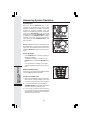
Connect to the Answering System from a Remote Location
You can access many features of this system remotely from a touch tone phone.
1. Dial your telephone number.
2. When the system answers, enter your Remote Access Code (preset to 50). The system
beeps once and then announces the number of new messages.
3. Enter a remote command (see Remote Access Commands below).
4. Press *0 to exit remote operation.
Voice Menu
The system has voice prompts to help you with remote operation. Press *5 to hear
the menu while remotely connected to the answering system.
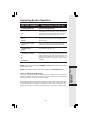
REMOTE ACCESS COMMANDS
FUNCTION:
Play messages
in a mailbox
Press #, then enter the appropriate mailbox
number (1, 2, or 3). The system plays new
messages. If there are no new messages, the
system plays old messages.
Repeat a message
Press #4 while message is playing;
Pressing twice backs up to the previous message.
Skip a message
Press #6 while message is playing; each press
advances another message.
Press #5.
Hang up.
Press #9 while message is playing.
Stop
Save messages
Delete a message
Answering System
Operation
COMMAND:
Review announcement
Press #7; system plays announcement,
then beeps.
Record announcement
Press *7; after beep, record announcement,
Press #5 to stop. System plays back
announcement.
Record memo
Press *8; then mailbox number where
you want memo recorded; speak after
beep; press #5 to exit.
End remote access call
Press *0.
Turn system off
Press #0; the system announces,
“Answering machine off.” Press #0 again
to turn the system back on.
Turn system on
When system is off, it answers after 10
rings and announces, “Please enter your
security code.” Enter your remote access code.
NOTE: If no key is pressed within 10 seconds of entering remote access code, the voice
menu will be announced. After the voice menu announcement, if no key is pressed within
20 seconds, the remote access call will automatically end.
36