1
Connecting the speakers to the Model 20 music center
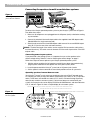
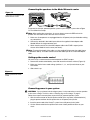
Figure 13
Connecting the speakers to the
Model 20 music center
CAUTION
AVIS
RISK OF ELECTRICAL SHOCK
DO NOT OPEN
RISQUE DE CHOC ELECTRIQUE
NE PAS OUVRIR
LIFESTYLE® POWERED SPEAKER SYSTEM
TO ACCESSORY SPEAKER ONLY
BLACK TO BLACK
VOLTAGE SELECTOR
RED T O RED
LISTED 917D
POWER
AUDIO
INPUT
®
115V
SELECT
PROPER
VOLTAGE
115/230V
AC
50/60Hz 30W MAX.
POWERED [LEFT] SPEAKER
VAR
AUDIO VIDEO
EQUIPMENT
REFER TO OWNER’S
MANUAL FOR FULL
INSTRUCTIONS
SER. NO.
LSSP1U
100823 .
E9931
©2000 BOSE CORPORATION, FRAMINGHAM, MA 01701-9160 MADE IN U.S.A. OF DOMESTIC AND FOREIGN COMPONENTS.
U.S. PATENT NOS. 4,158,756 4,061,890 4,577,069 AND RE.31,679
190140
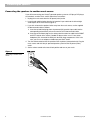
To connect the Lifestyle® powered speaker system to your Lifestyle® system refer to Figure
13. Then follow these steps:
Note: When making the connections, be sure to always connect the RED ends of the
speaker wire to the RED ends of the other wire or terminal.
1. Make sure all components are unplugged from the AC power (mains) outlet before making
any connections.
2. Connect the attached 6-foot audio input cable to the supplied 3-foot adapter cable
labeled VAR on the single-connector end.
3. Attach the other end of the 3-foot VAR adapter cable to the ZONE 2 output jack on
the rear of the Model 20 music center (not shown).
Note: To extend the length of the cables, use the supplied 50-foot extension cable (shown
in dotted line above). This cable connects the 6-foot audio input to the 3-foot VAR adapter
cable.
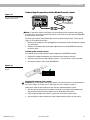
Setting up the remote control
You must set up a second remote control to operate the ZONE 2 output.
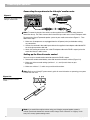
1. Remove the remote control battery cover and locate the miniature switches (Figure 14).
2. Make sure that the house code settings (switches 1, 2, 3, and 4) match those on your
first remote.
3. Slide switch 8 up.
Figure 14
Setting up the RC-20 remote
control
Connecting power to your system
CAUTION: If you purchased a dual-voltage system, it is important that you set the speakers
to the correct voltage. To do this, refer to “Selecting the correct voltage” on page 5.
Follow these steps to connect power to your Lifestyle® powered speaker system:
1. With the volume control on the left speaker turned all the way down (counterclockwise),
plug the power cord from the left speaker into an AC power (mains) outlet.
2. Insert the power cord of the Lifestyle® system into an AC power (mains) outlet.
3. Set the volume control for the speakers to the two-o’clock position and turn on your
music.
12
December 20, 2001
AM262842_00_V.pdf