1
ENGLISH
11 BASIC OPERATION
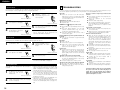
“Tone Control” and “DIMMER”
3
2-1
1
BAND
ON/STAND
FUNCTION
SURROUND
MODE
MEMORY
1
TITLE
CHP
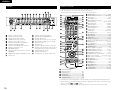
Main unit
1
SLEEP
NTSC/PAL
CLEAR
A-B REPEAT
VCR
TV IN
PWR
TV
TV CH
MODE
MEMO
TV
PWR
-
TV CH
+
VIDEO 2
2
DVD
RT
BAND
VIDEO 1
1
2-1
ZOOM
RDS
PTY
CT
PROG/DIRECT
REPEAT
RANDOM
TUNING /
TV VOL
+
-
3
TUNER
4
5
6
7
8
9
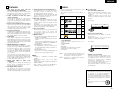
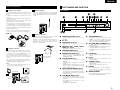
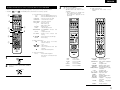
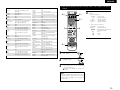
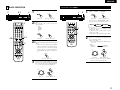
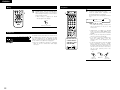
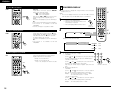
Select a source by pressing the FUNCTION
button.
The selected source is shown on the front
panel's display.
DVD
TUNER
VIDEO 1
VIDEO 2
TV
TEST TONE
2-2
INPUT MODE
SURROUND
TUNER
DVD
A/V
FUNCTION
TV / VCR
AV AMP
TEST TONE
INPUT MODE
SURROUND
TUNER
DVD
A/V
2-1
3
-
SETUP
TONE /DIMMER
2-2
MUTING
TONE /DIMMER
ENTER
SURROUND
PARAMETER
SURROUND
PARAMETER
Remote control unit
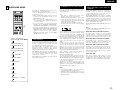
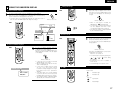
Pressing the INPUT MODE button alternates
between ANALOG and DIGITAL (AUTO, PCM,
DTS).
• When you select a digital source, "DIGITAL"
indicator might blink on the display. It blinks
when the unit cannot perceive the digital
signal. In that case, connect a digital device
to the DIGITAL IN terminal, and switch it
on.
MENU
VCR CH
1
DISPLAY
MENU
VCR CH
+
TOP MENU
PBC
ANGLE
AUDIO
RC-973
SUB TITLE
2
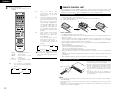
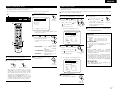
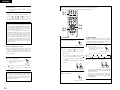
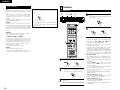
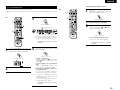
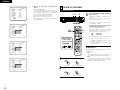
Either turn Volume dial on the main unit or
press “+”, “–” button on the remote Control
unit to change the setting.
“BASS” and “TRE” :
The level can be adjusted in 2dB steps from
–10 to +10.
“DIM” :
DIM OFF
DIM ON
(Volume –)
(Volume +)
+
MASTER VOLUME
/SELECT
-
INPUT MODE
DISPLAY
DIMMER
(TONE OFF)
2
-
TREBLE
To adjust the level of low frequency sound
range, select “BASS”.
To adjust the level of high frequency sound
range, select “TRE”.
To dim the front panel’s display, select “DIM”.
STATUS
CH SELECT
Main unit
STATUS
RETURN
BASS
ENTER
+
CH SELECT
FUNCTION
+
-
SETUP
Main unit
Remote control unit
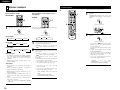
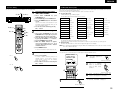
Each time the TONE/DIMMER button is
pressed, the mode is changed as follows :
TV / VCR
AV AMP
DVD
RETURN
DVD
EX
FUNCTION
-
+10
D
MUTING
FUNCTION
+
CH
0/10
P.SCAN
Remote control unit
TUNER
CALL
TONE/DIMMER
CHP
DVD
PHONES
EX
ON
TUNING
FM MODE
TONE/DIMMER
TITLE
STANDBY
D
MEMORY
PROGRESSIVE
SCAN
DVD SURROUND RECEIVER ADV-500SD
DVD
P.SCAN
OFF
SURROUND
MODE
MASTER VOLUME
/SELECT
MASTER VOLUME
/SELECT
STANDBY
1
TONE /DIMMER
FUNCTION
TONE/DIMMER
DVD SURROUND RECEIVER ADV-500SD
PHONES
2
1
BAND
ON/STAND
PROGRESSIVE
SCAN
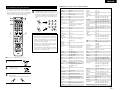
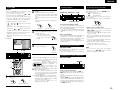
Press the TONE/DIMMER button to select
“BASS”, “TREBLE” or “DIMMER”.
ON
ON/STAND
TUNING
FM MODE
Press the POWER switch to turn the unit on.
+
TOP MENU
PBC
ANGLE
AUDIO
SUB TITLE
Remote control unit
RC-973
3
Play the source, and gradually turn up the
volume to the required level by turn VOLUME
dial on the main unit or press VOLUME button
(+, –) on the remote control unit (RC-973).
Main unit
Remote control unit
• When you set the sleep timer, the dimmer
function is turned on automatically.
+
MASTER VOLUME
/SELECT
Main unit
Remote control unit
21