1
E6581268 ①
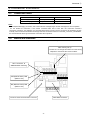
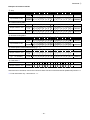
3.4.5.2. Instance 21/71 – DeviceNet Standard (f894 = 1)
Byte
0
1
2
3
Bit 7
-
Bit 6
Net Ref *
Bit 5
Net Ctrl *
Bit 4
-
Bit 3
-
Bit 2
Fault reset
Bit 1
Bit 0
Run reverse Run forward
-1
Drive Reference Speed min (Low byte)
-1
Drive Reference Speed min (High byte)
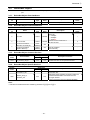
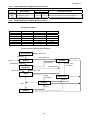
Fig. 3 Output Instance 21 Layout
Byte
0
1
2
3
Bit 7
At
reference **
Bit 6
Ref from
Net **
Bit 5
Ctrl from
Net **
Bit 4
Bit 3
Bit 2
Running
Running
Ready
Reverse
Forward
Drive Status ***
-1
Drive Actual Speed min (Low byte)
-1
Drive Actual Speed min (High byte)
Bit 1
Warning
Bit 0
Faulted/
tripped
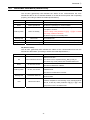
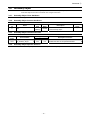
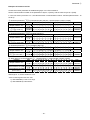
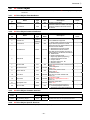
Fig. 4 Input Instance 71 Layout
* Bit 5 and 6 of the instance 21 byte 0 are defined as follows.
Bit 5 (Net Ctrl) ............ When “1” is set, bits 0 (Run forward) and 1 (Run reverse) of byte 0 are enabled.
When “0” is set, Run/Stop is according to setup of the parameter cmod.
Bit 6 (Net Ref) ............ When “1” is set, bytes 2 and 3 are enabled.
When “0” is set, Drive Reference Speed is according to setup of the parameter fmod.
** Bit 5, 6, and 7 of the instance 71 byte 0 are defined as follows.
Bit 5 (Ctrl from Net)......... When RUN/STOP command from DeviceNet is enabled, “1” is set.
Bit 6 (Ref from Net)......... When frequency command from DeviceNet is enabled, “1” is set.
Bit 7 (At reference).......... When output frequency becomes the same as frequency command, “1” is set.
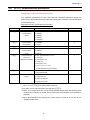
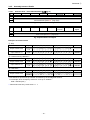
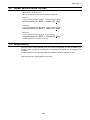
*** Drive Status is same as the Control Supervisor class State attribute (refer to section 3.7.2).
1 (= BN: 00000001): Startup
2 (= BN: 00000010): Not Ready
3 (= BN: 00000011): Ready
4 (= BN: 00000100): Enabled
5 (= BN: 00000101): Stopping
6 (= BN: 00000110): Fault Stop
7 (= BN: 00000111): Faulted
- 13 -