1
User Manual
K1297-G20 Monitor
Protocol Tester
C73000-B6076-C91-14
This document supports software version 3.10 and above
and the device types 7KK1200-B (K1297) and
7KK1200-P (K1297 Compact)
Revised: June 2004
Copyright © Tektronix, Inc. All rights reserved.
Tektronix products are covered by U.S. and foreign patents, issued and pending.
Information in this publication supercedes that in all previously published material.
Specifications and price change privileges reserved.
Valid controlled documentation is only distributed electronically by Tektronix.
Printed copies are considered for reference only.
Tektronix Berlin GmbH & Co. KG
Wernerwerkdamm 5
13629 Berlin
GERMANY
TEKTRONIX and TEK are registered trademarks of Tektronix, Inc.
Adober Acrobatr Reader Version 5.0: Copyright © Adobe Systems Incorporated
1987 - 2001
Microsoftr Windows XPr Embedded: Copyright © Microsoft Corporation
1985 - 2001
Microsoftr Internet Explorerr Version 5.5: Copyright © Microsoft Corporation
1995 – 2000
Berkeley Filter Software: Copyright © The Regents of the University of California
1990 - 1997
Network Time Protocol Software: Copyright © David L. Mills 1992–2003
WARRANTY
Tektronix warrants that this product will be free from defects in materials and workmanship for a
period of one (1) year from the date of shipment. If any such product proves defective during this
warranty period, Tektronix, at its option, either will repair the defective product without charge
for parts and labor, or will provide a replacement in exchange for the defective product.
In order to obtain service under this warranty, Customer must notify Tektronix of the defect
before the expiration of the warranty period and make suitable arrangements for the performance
of service. Customer shall be responsible for packaging and shipping the defective product to the
service center designated by Tektronix, with shipping charges prepaid. Tektronix shall pay for the
return of the product to Customer if the shipment is to a location within the country in which the
Tektronix service center is located. Customer shall be responsible for paying all shipping charges,
duties, taxes, and any other charges for products returned to any other locations.
This warranty shall not apply to any defect, failure or damage caused by improper use or
improper or inadequate maintenance and care. Tektronix shall not be obligated to furnish service
under this warranty a) to repair damage resulting from attempts by personnel other than Tektronix
representatives to install, repair or service the product; b) to repair damage resulting from
improper use or connection to incompatible equipment; c) to repair any damage or malfunction
caused by the use of non–Tektronix supplies; or d) to service a product that has been modified or
integrated with other products when the effect of such modification or integration increases the
time or difficulty of servicing the product.
THIS WARRANTY IS GIVEN BY TEKTRONIX WITH RESPECT TO THE LISTED
PRODUCTS IN LIEU OF ANY OTHER WARRANTIES, EXPRESS OR IMPLIED.
TEKTRONIX AND ITS VENDORS DISCLAIM ANY IMPLIED WARRANTIES OF
MERCHANTABILITY OR FITNESS FOR A PARTICULAR PURPOSE. TEKTRONIX’
RESPONSIBILITY TO REPAIR OR REPLACE DEFECTIVE PRODUCTS IS THE
SOLE AND EXCLUSIVE REMEDY PROVIDED TO THE CUSTOMER FOR BREACH
OF THIS WARRANTY. TEKTRONIX AND ITS VENDORS WILL NOT BE LIABLE
FOR ANY INDIRECT, SPECIAL, INCIDENTAL, OR CONSEQUENTIAL DAMAGES
IRRESPECTIVE OF WHETHER TEKTRONIX OR THE VENDOR HAS ADVANCE
NOTICE OF THE POSSIBILITY OF SUCH DAMAGES.
Contents
General Safety Summary . . . . . . . . . . . . . . . . . . . . . . . . . . . .
iii
Service Safety Summary . . . . . . . . . . . . . . . . . . . . . . . . . . . . .
vii
Preface . . . . . . . . . . . . . . . . . . . . . . . . . . . . . . . . . . . . . . . . . . . .
Prerequisites . . . . . . . . . . . . . . . . . . . . . . . . . . . . . . . . . . . . . . . .
Assistance . . . . . . . . . . . . . . . . . . . . . . . . . . . . . . . . . . . . . . . . .
Contacting Tektronix . . . . . . . . . . . . . . . . . . . . . . . . . . . . . . . . .
1
4
5
8
Getting Started . . . . . . . . . . . . . . . . . . . . . . . . . . . . . . . . . . . . .
Device Description . . . . . . . . . . . . . . . . . . . . . . . . . . . . . . . . . .
Exchanging Measuring Modules . . . . . . . . . . . . . . . . . . . . . . . .
Connecting to the Data Line . . . . . . . . . . . . . . . . . . . . . . . . . . .
Switching on the Device . . . . . . . . . . . . . . . . . . . . . . . . . . . . . .
Software Installation . . . . . . . . . . . . . . . . . . . . . . . . . . . . . . . . .
Security Requirements . . . . . . . . . . . . . . . . . . . . . . . . . . . . . . . .
Ethernet Connection . . . . . . . . . . . . . . . . . . . . . . . . . . . . . . . . .
Remote Operation . . . . . . . . . . . . . . . . . . . . . . . . . . . . . . . . . . .
Connecting Peripherals . . . . . . . . . . . . . . . . . . . . . . . . . . . . . . .
9
10
26
35
36
42
57
58
60
62
Examples . . . . . . . . . . . . . . . . . . . . . . . . . . . . . . . . . . . . . . . . . .
Online Monitoring in a Network . . . . . . . . . . . . . . . . . . . . . . . .
Recording and Reviewing Monitoring Data . . . . . . . . . . . . . . .
Calltrace . . . . . . . . . . . . . . . . . . . . . . . . . . . . . . . . . . . . . . . . . . .
63
64
72
79
Appendix A: Interfaces . . . . . . . . . . . . . . . . . . . . . . . . . . . . . .
System Unit . . . . . . . . . . . . . . . . . . . . . . . . . . . . . . . . . . . . . . . .
AP-4 and AP-4/256 Board . . . . . . . . . . . . . . . . . . . . . . . . . . . . .
BAI Board . . . . . . . . . . . . . . . . . . . . . . . . . . . . . . . . . . . . . . . . .
V./X. Board . . . . . . . . . . . . . . . . . . . . . . . . . . . . . . . . . . . . . . . .
E1/DS1 Monitoring Board . . . . . . . . . . . . . . . . . . . . . . . . . . . . .
Ethernet Board . . . . . . . . . . . . . . . . . . . . . . . . . . . . . . . . . . . . . .
A-1
A-2
A-21
A-27
A-38
A-47
A-51
Appendix B: Keyboard . . . . . . . . . . . . . . . . . . . . . . . . . . . . . .
B-1
Appendix C: Specifications . . . . . . . . . . . . . . . . . . . . . . . . . . .
C-1
K1297-G20 Monitor User Manual
i
Contents
Appendix D: Windows XPe Troubleshooting . . . . . . . . . . . .
Preventive Measures . . . . . . . . . . . . . . . . . . . . . . . . . . . . . . . . .
Repair Measures . . . . . . . . . . . . . . . . . . . . . . . . . . . . . . . . . . . .
E-1
E-1
E-7
Abbreviations . . . . . . . . . . . . . . . . . . . . . . . . . . . . . . . . . . . . . .
F-1
Index . . . . . . . . . . . . . . . . . . . . . . . . . . . . . . . . . . . . . . . . . . . . . Index-1
ii
K1297-G20 Monitor User Manual
General Safety Summary
Review the following safety precautions to avoid injury and prevent
damage to this product or any products connected to it. To avoid potential
hazards, use this product only as specified.
Only qualified service personnel should perform service procedures.
While using this product, you may need to access other parts of the
system. Read the General Safety Summary in other system manuals for
warnings and cautions related to operating the system.
To Avoid Fire or Personal Injury
Use Proper Power Cord. Use only the power cord specified for this product
and certified for the country of use.
Connect and Disconnect Test Leads Properly. Do not connect or disconnect
test leads while they are connected to a voltage source.
Ground the Product. This product is grounded through the grounding
conductor of the power cord. To avoid electric shock, the grounding
conductor must be connected to earth ground. Before making connections
to the input or output terminals of the product, ensure that the product is
properly grounded.
Observe All Terminal Ratings. To avoid fire or shock hazard, observe all
ratings and markings on the product. Consult the Appendix C of the User
Manual for further ratings information before making connections to the
product.
Do not apply a potential to any terminal, that exceeds the permitted rating
of that terminal.
With some interfaces only voltages corresponding to the default of the
relevant connector are applied at the measuring sockets. However, high
voltages from the line may occur at some of the measuring sockets. These
measuring sockets are protected against accidental contact and are
specially labelled.
K1297-G20 Monitor User Manual
iii
General Safety Summary
Use Proper AC Adapter. Use only the AC adapter specified for this product.
Do Not Operate Without Covers. Do not operate this product with covers or
panels removed.
Do Not Look into the End of a Fibreglass Cable. Never look into the end of a
fibreglass cable or a single fibre which could be connected to a laser
source. Laser radiation can damage your eyes because it is invisible and
your pupils do not contract instinctively as with normal bright light. If you
think your eyes have been exposed to laser radiation, you should have your
eyes checked immediately by an eye doctor. The optical output’s radiation
power in our system corresponds to the laser class 1 in accordance with
EN60825–1, IEC 825-1, and U.S. CDRH regulations.
Use Proper Fuse. Use only the fuse type and rating specified for this
product.
Avoid Exposed Circuitry. Do not touch exposed connections and components
when power is present.
Do Not Operate With Suspected Failures. If you suspect there is damage to this
product, have it inspected by qualified service personnel.
Do Not Operate in Wet/Damp Conditions.
Do Not Operate in an Explosive Atmosphere.
Keep Product Surfaces Clean and Dry.
Provide Proper Ventilation. Refer to the manual’s installation instructions for
details on installing the product so it has proper ventilation.
Certifications and Compliances
Consult the product specifications in the Appendix C for certifications and
compliances.
iv
K1297-G20 Monitor User Manual
General Safety Summary
Safety Terms and Symbols
Terms in this Manual. These terms may appear in this manual:
WARNING. Warning statements identify conditions or practices that could
result in injury or loss of life.
CAUTION. Caution statements identify conditions or practices that could
result in damage to this product or other property.
K1297-G20 Monitor User Manual
v
General Safety Summary
Terms on the Product. These terms may appear on the product:
DANGER indicates an injury hazard immediately accessible as you read
the marking.
WARNING indicates an injury hazard not immediately accessible as you
read the marking.
CAUTION indicates a hazard to property including the product.
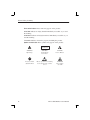
Symbols on the Product. These symbols may appear on the product:
Laser Klasse 1
vi
WARNING
High Voltage
WARNING
Laser Radiation
Laser Class 1
CAUTION
Refer to Manual
Protective Ground
(Earth) Terminal
Observe precautions for handling
electrostatic discharge sensitive
devices
WARNING
End of a Fibreclass Cable
K1297-G20 Monitor User Manual
Service Safety Summary
Only qualified service personnel should perform service procedures. Read
this Service Safety Summary and the General Safety Summary before
performing any service procedures.
Do Not Service Alone. Do not perform internal service or adjustments of this
product unless another person capable of rendering first aid and resuscitation is present.
Disconnect Power. To avoid electric shock, switch off the instrument power,
then disconnect the power cord from the mains power.
Use Care When Servicing With Power On. Dangerous voltages or currents may
exist in this product. Disconnect power, remove battery (if applicable), and
disconnect test leads before removing protective panels, soldering, or
replacing components.
K1297-G20 Monitor User Manual
vii
Service Safety Summary
viii
K1297-G20 Monitor User Manual
Preface
The Protocol Tester K1297 and K1297 Compact analyzes wide area
communication networks with SS#7 (CCS#7), ISDN D channel, V5.x,
GSM 900, DCS 1800, PCS 1900, CDMA, NMT 900, GPRS and internet
protocols.
You can simultaneously monitor up to 16 PCM interfaces and 32 signalling
links using this Protocol Tester. It can automatically capture the signalling
channels and the framing when monitoring PCM routes. E1/DS1, ISDN
BAI S0, and U2B1Q, as well as V./X. and Ethernet interface boards are
currently available.
Using the approximately 150 implemented WAN communication protocols
– including a number of national and manufacturer-specific variants – you
can decode and analyze almost all signalling data online as well as offline.
The required protocols can be combined according to your needs using the
graphical protocol stack editor. You can trigger and filter the data stream in
order to keep data simple for analysis. A series of measuring applications
is available for analyses.
The Protocol Tester is designed with the following in mind:
H Modular form. The modular design using the VME bus enables
optimum adaption to different tasks. The modular concept of the
Protocol Tester with four slots for the interface modules makes it
extendable for almost any future applications.
H Easy to operate. The Windows XP provides a familiar and easy-to-operate interface.
H Easy to transport. The Protocol Tester is light weight and compact so
it’s easy to transport. A transport case is available to protect the
instrument.
K1297-G20 Monitor User Manual
1
Preface
K1297 and K1297 Compact.
The Protocol Tester is available in two variants: The K1297 Compact is a
fairly small, portable device. The K1297 is a slightly bigger benchtop
device.
If both variants do not differ from each other the term Protocol Tester is
used throughout this manual. Differences between K1297 Protocol Tester
(device type 7KK1200-B) and K1297 Compact Protocol Tester (device type
7KK1200-P) are marked specially.
K1297-G20 Monitor software, applications and Online Help are similar in
both variants. Differntiation is not necessary.
2
K1297-G20 Monitor User Manual
Preface
Fields of Application
The K1297 / K1297 Compact has been designed for various purposes:
H to detect interferences in individual network segments
H to support the integration of different network elements
H to develop integration tests and to test new software versions
The Protocol Tester is a passive monitoring device which will not interfere
with the network.
Due to the auto restart mechanism, error-free, long-term measurements
are possible after a power outage.
K1297-G20 Monitor User Manual
3
Preface
Prerequisites
You should have the following qualifications to work with the Protocol
Tester:
H Knowledge of PC and Windows-XPe
H Experience with communications test applications
H Familiarity with the safety requirements for electrical equipment for
measurement, control and laboratory use
4
K1297-G20 Monitor User Manual
Preface
Assistance
To help you use the Protocol Tester, the following documentation is
provided:
H The User Manual assists you when starting the Protocol Tester. The
User Manual is also available as a PDF online manual.
H The online help system is the detailed reference documentation. To
open the Help window with the context-sensitive descriptions, press
<F1> from within an application window.
H The Protocol Assistant is the detailed protocol reference documentation. To open it, press <F2> from within the monitor main window. The
Protocol Assistant reflects the tester’s software implementation of
protocols.
NOTE. The scope of the provided documentation does not necessarily
mirror your order but might go beyond to give you a overview of what is
available.
H The release notes are delivered separately and contain the latest
information on the current software version (readme.txt).
H Windows XP online help: To open the Windows XP online help, click
in the taskbar on Start: Help abd Support.
NOTE. The Windows XP installation is an OEM version. Therefore the
Microsoft Support cannot be used. The Protocol Tester is supported by
Tektronix only.
K1297-G20 Monitor User Manual
5
Preface
About the User Manual
The User Manual gives you an overview on how to work with the Protocol
Tester:
H The most important part of the introductory chapter is the safety
instructions.
H Getting Started tells you how to make the device ready for start-up, for
example how to set up the device and how to establish the measuring
connection, how to exchange modules, how to configure and start
applications.
H Examples describes some applications step by step. If you follow these
steps, you will quickly reach the desired measuring result.
H In the appendices you will find an explanation of the interfaces and
boards, a keyboard description and the technical data.
The following text styles and markings have specific meaning in this
manual:
6
Text style
Description
Courier
The Courier font indicates menus and menu functions as
well as commands, parameters and examples.
<Key>
Keys or key sequences are in angle brackets.
K1297-G20 Monitor User Manual
Preface
Training Information
Contact your local sales office or our service support staff for information
on training for the communications test technology with the K1297 /
K1297 Compact.
Third-Party Products
To offer you complete solutions, it is sometimes necessary to buy products
- such as modems and remote operation software - from third-party
suppliers, and sell them together with our products.
So, if our products are used in a standard configuration that has not been
tested by Tektronix, we kindly ask you for your understanding should we
need to refer you to the supplier for support.
K1297-G20 Monitor User Manual
7
Preface
Contacting Tektronix
Address
Tektronix Berlin GmbH & Co. KG
Wernerwerkdamm 5
13629 Berlin
GERMANY
Web site
www.tektronix.com
Technical
support
For hotline service support, call:
+4930-386-22200
(8:00 a.m. – 00:30 p.m. GMT + 01:00 and
1:30 p.m. – 6:00 p.m. GMT + 01:00)
or
1-800-833-9200 (This phone number is toll free in North
America. After office hours, please leave a voice mail
message. Outside North America, contact a Tektronix
sales office or distributor; see the Tektronix web site for a
list of offices.)
Or fax:
+4930-386-22546
Or contact us by e-mail:
[email protected]
8
K1297-G20 Monitor User Manual
Getting Started
This chapter tells you how to prepare the Protocol Tester for start-up, this
means how to set up the device, how to exchange the measuring modules,
how to connect the data line, and how to switch on the device.
Information on switching off the device and how to prepare the Protocol
Tester for transport is included at the end of this chapter.
NOTE. The device has been delivered according to your requirements.
Please examine the merchandise for visible transport damage and for
completeness using the pick slip.
K1297-G20 Monitor User Manual
9
Getting Started
Device Description
Each K1297 and K1297 Compact Protocol Tester consists of a basic
device and the individual measuring modules (interface boards) which are
for fitting the basic device according to your individual application
purposes.
The basic device is equipped with a powerful PC board, a hard disk of 2
GB and VME bus.
H With K1297 seven slots are available for the measuring modules.
H With K1297 Compact four slots are available for the measuring
modules.
Each basic device also features a TFT display (XGA), two PC card slots
(type II; also called PCMCIA cards), a 3.5’’ floppy disk drive and a
removable keyboard with integrated trackball.
External PE GND. On the right side of the device, next to power cord
connector, power switch, and fuses you will find an external PE GND
screw. You can use this screw terminal to connect a separate protective
earth to the K1297.
To do so, use at least an AWG18 cable. Connect the protective earth cable
between the screw head and flat washer of the PE GND. Make also a good
connection at the point where you connect the other end of the cable.
NOTE. The K1297 is intended to be electrically grounded. The delivered
power cord is equipped with a three-wire grounding plug that has a third
grounding pin. Connect this plug to a grounded AC socket.
If you are not sure that your AC socket has a protective ground, you can
connect a protective earth separately to the K1297 at the rear PE GND
screw terminal.
10
K1297-G20 Monitor User Manual
Getting Started
K1297: Setting-up the Device
Proceed as follows when setting up the device:
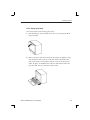
1. Pull the dark-gray release handle above the logo forward and fold the
keyboard down.
2. Remove the gray cable box from the monitor frame by pulling it away
from the device until you hear a loud click: Place both hands at the
sides of the cable box and pull the cable box away from the monitor
frame. Or place one hand between cable box and monitor frame and
press the cable box away from the monitor frame.
K1297-G20 Monitor User Manual
11
Getting Started
3. Take the cable out of the cable box and fold the cable box underneath
the keyboard. The keyboard is now positioned in a working angle in
front of you.
4. Pull on the lower monitor frame to position the monitor in a working
angle. The mains cable must be supplied to the non-heating appliance
socket on the rear of the K1297. The mains plug must be plugged into
a socket with protective ground.
Changing the Fuses for K1297. Spare fuses can you find in the delivered
accessories box. If the fuses need to be changed, proceed as follows:
1. Switch off the device.
2. Disconnect the power cord.
3. The black fuse tray is placed on the right hand side of the mains
switch, on the rear of the device.
Use an appropriate tool, such as a flat screw-driver, insert it into the
slot above the on/off switch. Open the tray, pull the red strip and
exchange the broken fuse.
Make sure to always use two fuses of the proper fuse type and rating.
4. Close the fuse tray.
12
K1297-G20 Monitor User Manual
Getting Started
K1297 Compact: Setting-up the Device
Proceed as follows when setting up the device:
1. Press in both of the lateral handle hinges (handle variant: push up
hinges), fold down the handle and set the device in the desired
position.
2. Pull the dark grey handle above the logo and lift the keyboard from the
device.
The handle can now be used as keyboard rest.
The mains connector and the ON/OFF switch are both located on the right
side of the device. The fuses are located underneath the switch cover.
K1297-G20 Monitor User Manual
13
Getting Started
3. Fold the device cover (top) towards the rear until it locks at the back.
The PC board is located in slot 1. The floppy disk drive and two PC card
slots are also located underneath the device cover on the left side. You can
connect modem or ISDN PC cards for remote control of the Protocol
Tester or portable data carriers to the PC card slots.
CAUTION. To avoid equipment damage, do not insert foreign objects into
the disk drive or the PC card slots.
Insert the 3.5’’ diskettes into the floppy drive with the label field forward.
14
K1297-G20 Monitor User Manual
Getting Started
The following interfaces are located on the cover of the PC module in
slot 1:
H Socket for external PS/2 keyboard (KBD)
H Serial interface (COM1)
H Parallel interface (LPT1)
H 10Base-2 and 10Base-T sockets for LAN connection
H Socket for external monitor (VGA)
For further information on the individual interfaces, please refer to
Appendix A: Interfaces.
To reset the Protocol Tester in an emergency, use a pointed tool and insert
it into the RESET switch located on the cover of the PC module. There is
also an LED indicating the operating state of the hard disk (HD).
Slots 2 to 5 are available for the measuring modules. For further
information on the individual measuring boards, please refer to
Appendix A: Interfaces.
NOTE. You will find information on pin assignment of the individual
sockets also in Appendix A.
K1297-G20 Monitor User Manual
15
Getting Started
4. Push the front cover upwards and fold the cover towards you.
The following interfaces are located behind the front cover and beneath
the display:
H Keyboard connection (KEYBOARD): If the keyboard interface on the
PC module’s cover (KBD) is used with an external keyboard, the
KEYBOARD connector must not be plugged in.
H Connections for alarm triggering and for a programmable relay. The
synchronizing sockets can be used for data or timestamp synchronization of several K1297s (option).
H Serial interface (COM2)
H SCSI connection (SCSI I/O BUS), for example for an external
CD-ROM or CD-RW drive
Furthermore, the LEDs for power supply
are located beneath the display.
(top) and hard disk access
NOTE. You will find information on pin assignment of the individual
sockets also in Appendix A.
16
K1297-G20 Monitor User Manual
Getting Started
Changing the Fuses for K1297 Compact. Spare fuses can you find in the
delivered accessories box. If the fuses need to be changed, proceed as
follows:
1. Switch off the device.
2. Disconnect the power cord.
3. The black fuse tray is placed on the right hand side of the mains switch
on the right sight of the device.
Use an appropriate tool, such as a flat screw-driver, insert it into the
slot above the on/off switch. Open the tray, pull the red strip and
exchange the broken fuse.
Make sure to always use two fuses of the proper fuse type and rating.
4. Close the fuse tray.
K1297-G20 Monitor User Manual
17
Getting Started
Connecting an External Monitor
The PC card of the K1297 provides a Video Graphics Array (VGA) port
for connecting an external monitor. Using a PC-4 or PC-5 board, you can
operate an external monitor in the following use cases:
H Displaying the same information on both monitors
H Expanding the display across both monitors
H Operating only the external monitor
Displaying the Same Information on Both Monitors. To display the same
information on both monitors, proceed as follows:
1. Connect the external monitor to the VGA port of the PC card.
2. Switch on both devices: the K1297 and the external monitor.
3. On the K1297 Desktop, open the context menu by clicking the right
mouse button and click Properties. The Display Properties dialog box
opens.
4. Open the CHIPS tab in the Display Properties dialog box.
5. Select Single Display Mode from the list in the upper part of this dialog
box and BOTH in the Display Device check box.
6. Confirm your settings with OK.
7. To exit this operating mode, open the Display Properties dialog box /
CHIPS tab as described in step 3 and 4.
Select Single Display Mode from the list in the upper part of this dialog
box and LCD in Display Device check box.
Confirm your selection by OK.
18
K1297-G20 Monitor User Manual
Getting Started
Expanding the Display Across Both Monitors – Dual Display Mode. In this mode,
the display is divided horizontally or vertically into two parts. One part is
displayed on the build-in display, the other one on the external monitor. To
set up your computer for dual–display mode, perform the following steps:
1. Connect the external monitor to the VGA port of the PC card.
2. Switch on both devices: the K1297 and the external monitor.
3. On the K1297 Desktop, open the context menu by clicking the right
mouse button and click Properties. The Display Properties dialog box
opens.
4. Open the CHIPS tab in the Display Properties dialog box.
5. Select Dual Display Mode from the list in the upper part of this dialog
box.
6. In the lower part of the dialog box you can now configure further
settings such as vertical or horizontal monitor position.
Here, you can also select whether the external monitor (CRT) or the
K1297 (LCD) should be in left / top or right / bottom position.
7. Start the dual display mode by pressing the Apply button.
Both monitors show full-sized images only when the display resolution
is set correctly.
8. To set the display resolution, open the Display Properties dialog once
again (see step 3) and open the Settings tab.
9. Change the resolution according to the monitor position: set the
Desktop area to 1024x1536 pixels for vertical aligned monitors and
2048x768 pixels for horizontal aligned monitors.
10. To exit the dual display mode, open the Display Properties dialog box
as described in step 3, open the CHIPS tab, and select Single Display
Mode from the list in the upper part of this dialog box. Confirm your
selection by OK.
K1297-G20 Monitor User Manual
19
Getting Started
Operating only the External Monitor. Use this mode, if you want to work with
more screen area. Connect a larger monitor and increase the display
resolution. To operate only the external monitor, proceed as follows:
1. Connect the external monitor to the VGA port of the PC card.
2. Switch on both devices: the K1297 and the external monitor.
3. On the K1297 Desktop, open the context menu by clicking the right
mouse button and click Properties. The Display Properties dialog box
opens.
4. Open the CHIPS tab in the Display Properties dialog box.
5. Select Single Display Mode from the list in the upper part of this dialog
box and CRT in the Display Device check box.
6. Confirm your settings with OK.
The external monitor operates and the built-in LCD display turns gray.
7. To enlarge the screen area, increase the display resolution. Therefore,
open the Display Properties dialog once again (see step 3) and open the
Settings tab. Change the Desktop Area to 1600x1200 maximum.
8. To exit this operating mode, open the Display Properties dialog box /
CHIPS tab as described in step 3 and 4.
Select Single Display Mode from the list in the upper part of this dialog
box and LCD in Display Device check box.
Confirm your selection by OK.
NOTE. Before disconnecting the external monitor, always remember to
switch back to the LCD mode. Otherwise the K1297 display remains gray.
20
K1297-G20 Monitor User Manual
Getting Started
CD-RW Drive (Option)
The external CD-RW drive (Plexwriter) from Plextor can be used to write
CDs and as a CD-ROM drive. The CD-RW drive is delivered with the
original Plextor manual. Read this manual carefully. Pay particular
attention to the safety instructions.
For using the CD-RW drive with K1297 Protocol Testers, you should
adhere to the following instructions as well:
H The SCSI-Bus-ID of the CD-RW drive should be set to a value
between 2 and 6. We recommend to set the SCSI-Bus-ID to 3 before
connecting the device. Then, connect one of the two SCSI interfaces of
the CD-RW drive to the SCSI interface of your Protocol Tester using
the supplied cable.
H Do not install the software of the Plextor Software Utilities (Plex
Tools) CD on your Protocol Tester.
H If you like to write CDs with the CD-RW drive you need to install the
delivered Nero burning software. To install this software insert the
NERO Burning ROM (Plextor Version) from AHEAD. The CD starts
automatically and opens the Ahead Installer dialog box. Start the
installation process by clicking the Nero button. We recommend not to
install the following Nero components:
– NeroMediaPlayer
– InCD Packet-Writing
– UDF reader
NOTE. The delivered Nero software is not usable for Windows 3.11
operating systems. Users of Protocol Testers with Windows 3.11 who like
to write CDs are asked to upgrade their devices. Please contact the
Tektronix hotline.
K1297-G20 Monitor User Manual
21
Getting Started
H Before writing a CD, carefully study the Nero online manual. We
recommend to close all K1297-G20 Monitor applications before
writing. The running applications or the writing process might be
disturbed or interrupted when running simultaneously. Use only
high-quality CDs.
H Do not insert CDs with Autostart mechanism into the CD-RW drive
during the operation of K1297-G20 Monitor applications. Automatically started software may disturb or interrupt your running applications.
22
K1297-G20 Monitor User Manual
Getting Started
Switching Off and Transporting the Device
Before you switch off the Protocol Tester, shut down the operating system,
and then switch off the Protocol Tester using the I/O switch.
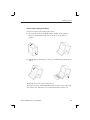
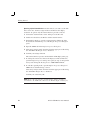
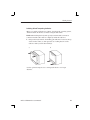
K1297. When folding the keyboard up, keyboard and cable box must be
connected and the cable must be completely inside the cable box.
1. First put the keyboard into the holding pins which are located at the top
of the monitor frame (a); then press the two locking buttons on the
cable box until you hear them click (b).
a.
b.
Use the optional transport case to transport the device over longer
distances.
K1297-G20 Monitor User Manual
23
Getting Started
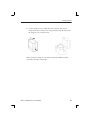
K1297 Compact. For transport purposes fold the cover over the slots.
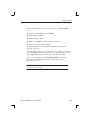
1. The cover beneath the display is folded upwards and the keyboard is
folded back in front of the display to protect it against damage.
2. Press the lateral handle hinges (variant handle: push up hinges) and put
the handle into a vertical position.
24
K1297-G20 Monitor User Manual
Getting Started
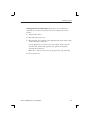
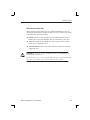
3. Use the transport case in which the device has been delivered to
transport the Protocol Tester over longer distances. Put the device into
the transport case as shown below:
Before closing the transport case make sure that the handle is pointed
toward the rear edge of the device.
K1297-G20 Monitor User Manual
25
Getting Started
Exchanging Measuring Modules
E1/DS1, ISDN BAI S0, and U2B1Q, as well as V./X. and Ethernet interface
boards are available as measuring modules. ATM modules will be
available in the future.
You can easily install and remove the measuring modules from slots 2 to 5
(behind the PC board). You can control the individual measuring modules
and the interface sockets via applications.
CAUTION. The device must be switched off completely. All modules contain
electrostatically sensitive components. Observe the necessary precautions
and ESD safety instructions.
Make sure the VME bus address on the new module is set correctly (see
page 30).
26
K1297-G20 Monitor User Manual
Getting Started
Which Board into which Slot?
The measuring boards and the slots are marked with different colors. So
exchanging the measuring modules is made easy for you. The colors of the
boards have the following meaning:
H GREEN stands for all measuring boards for WAN interfaces such as
E1/DS1, S0, U2B1Q, V.X, Ethernet. Put green boards into green slots.
H YELLOW stands for the AP-4 Board. You can put yellow boards in
either green or transparent slots.
H TRANSPARENT stands for the PC board. Put transparent boards into
transparent slots.
CAUTION. If you put a “wrong” board into a slot, you could damage the
board and the instrument.
Slot 0 and 1 are reserved for the PC boards only. Do not put the PC board
into other slots and do not put other boards into slots 0 and 1.
K1297-G20 Monitor User Manual
27
Getting Started
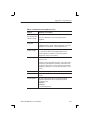
The following color assignment matrix gives you an overview of which
measuring board you can put into which slot:
Table 1: Which board into which slot?
Slot GREEN
TRANSPARENT
Board
GREEN
yes
no*
YELLOW
yes
yes
TRANSPARENT
no**
yes
* Restrictions could occur with some applications due to the P2 backplane
adapter.
** The “transparent” Ethernet board can be installed in a “green” slot.
28
K1297-G20 Monitor User Manual
Getting Started
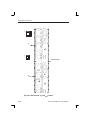
The following figures give you an example which measuring board you
can put into which slot:
K1297. Possible Board Combination
PC Board
PC Board
BAI S0 Board (Power Feeding)
AP-4 Board
BAI S0 Board
E1/DS1 Board
E1/DS1 Board
E1/DS1 Board
E1/DS1 Board
8 7 6 5 4 3 2 1 0
K1297 Compact. Possible Board Combination
PC Board
PC Board
AP-4 Board
BAI Board
Ethernet Board
E1/DS1 Board
5 4 3 2 1 0
NOTE. K1297 and K1297 Compact. For each interface board a cable is
delivered free of charge. Thus you are able to work right away with your
Protocol Tester. Furthermore, we offer a wide range of cables and
adapters, which you can order. For further information please take a look
at our data sheet or contact your local sales partner.
K1297-G20 Monitor User Manual
29
Getting Started
Setting the VME Bus Address
You must adhere to the correct setting of the VME bus address using the
hex switch when installing measuring modules. To avoid conflicts during
initialization, the addresses must be clear. The same hex switch scale
number must not appear more than once.
The hex switch is yellow with the scale from 0 to F around it and it is
located in the center of the upper third of the modules. The display can be
set to the desired value using an appropriate tool.
30
K1297-G20 Monitor User Manual
Getting Started
Before setting the hex switch, check which settings are already used for
other boards. Therefore, open the K1297-G20 Monitor Status Window via
the appropriate button in the tool bar.
The hex switch of one board must be set on value 1. The values 0 and F
are reserved for the AP-4 board. Do not use the values 0 and F for other
boards and do not change the AP-4 settings.
K1297-G20 Monitor User Manual
31
Getting Started
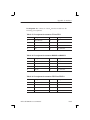
K1297. Make sure that the hex switches are set as follows:
Table 2: Setting the VME bus address
Board
Slot
Hex switch number
PC board
1
9
AP-4 board
2
0
Interface board 1
8
1
Interface board 2
7
2
Interface board 3
6
3
Interface board 4
5
4
Interface board 5
4
5
Interface board 6
3
6
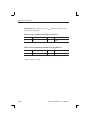
K1297 Compact. Make sure that the hex switches are set as follows:
Table 3: Setting the VME bus address
32
Board
Slot
Hex switch number
PC board
1
9
AP-4 board
2
–
Interface board 1
5
1
Interface board 2
4
2
Interface board 3
3
3
K1297-G20 Monitor User Manual
Getting Started
Installing Modules
CAUTION. Make sure the VME bus address on the new module is set
correctly (see page 30).
If you install modules, proceed as follows:
1. Switch the device off and unplug the mains plug.
2. Remove the cover if necessary and put the module on the guide rails of
the relevant slot.
3. Push the module completely into the slot.
4. Tighten the module with the two cross-head screws.
NOTE. If you have to install a new E1/DS1 board and/or an AP-4 board,
the Protocol Tester reprograms the boot Flash-PROM of this new board.
Reprogramming is done automatically during the start-up sequence of the
application and takes much more time than the normal start-up sequence.
Therefore just be patient. You must not switch off or shut down the
Protocol Tester during this time.
The reprogramming is finished as soon as the LEDs of the new boards are
off and the Protocol Tester shows the Data Flow Window. Although the
tester is then ready to work, you have to close all K1297-G20 Monitor
applications and start them (only the applications, not Windows XPe)
again.
K1297-G20 Monitor User Manual
33
Getting Started
Removing Modules
If you remove modules, proceed as follows:
1. Switch the device off and unplug the mains plug.
2. Unscrew the two cross-head screws of the module’s front cover. The
screws must be completely loosened.
3. Use your thumbs to simultaneously press outwards the levers located
beneath the screws.
4. Then pull the module carefully out of the device. Make sure that the
spring strip on the long side of the module cover is not being damaged.
5. If the two springs located behind the screws on the internal side of the
module’s front cover catch when removing the module, press the
springs carefully back using an appropriate tool. Then pull the module
completely out of the device.
34
K1297-G20 Monitor User Manual
Getting Started
Connecting to the Data Line
The Protocol Tester can be connected to the data line in the on or off state
using the cables available as accessories.
1. Plug the right plug on the one end of the cable into a socket of the
measuring module. In the K1297 they are located on the rear of the
device. In the K1297 Compact the sockets of the measuring modules
are located underneath the cover of the Protocol Tester.
The individual cables available as accessories are listed in the data
sheet. Or ask your local sales partner about them.
We recommend that the cable length be less than 3 m.
You can control the individual measuring modules and the interfaces
(sockets) via the K1297-G20 Monitor application.
CAUTION. Please pay attention to possible impedance differences. The
Protocol Tester is set to high impedance as default. For low input
impedance you must set the tester accordingly. This is done via the
K1297-G20 Monitor application.
K1297-G20 Monitor User Manual
35
Getting Started
Switching on the Device
Make sure that the keyboard cable is connected to the keyboard interface,
the mains cable is supplied to the non-heating appliance socket and the
mains plug is plugged into a socket with protective ground.
1. Switch the device on using the ON/OFF switch (see page 13).
2. The Protocol Tester is set ready-to-run upon delivery. The device
automatically boots after switching on. The operating system is loaded
and the application is then started automatically.
If you start Windows XPe for the first time, you are automatically
logged on as administrator with the following information:
User name: Administrator-K12
Password: xinortket12k
CAUTION. Do not change the pre-configured Administrator-K12 account,
since password changes also require modifications of the automatic logon.
For those changes, precise knowledge about the concept of user accounts
and user groups in Windows XP is required. The risk of changes which the
customer undertakes is carried by the customer.
Reprogramming of Flash-PROMs. During the first start after installation the
Flash-PROM of your interface boards may be reprogrammed. This may
take some time. Do not switch off the Protocol Tester during the
reprogramming process.
After reprogramming is completed you may have to close and restart the
K1297-G20 Monitor application. Depending on the type and number of
interface cards this procedure might have to be repeated once for each
interface card.
36
K1297-G20 Monitor User Manual
Getting Started
Updating Expired Licenses. The K1297-G20 Monitor software will not start
if a product license has expired. To help you avoid this situation, product
license information is available from the Licenses option in the Help Menu
in the Data Flow window. Product expiration warnings will also be
displayed after the system start for products that have licenses, which will
expire in 21 days or less.
If a license does expire however, you can use the normal K1297-G20
Monitor setup program to either uninstall the expired product or update the
license key file.
K1297-G20 Monitor User Manual
37
Getting Started
K1297-G20 Monitor Application
The K1297-G20 Monitor application is started with an initial screen which
shows the version number of your application on top of the screen and
information on the load state of the software at the bottom.
Data Flow Window. If you start the autoconfiguration, the autoconfiguration
feature automatically detects the signalling channels and the framing of
the connected data lines. After the autoconfiguration has been carried out,
the active signalling channels are available and you can start the
measurement: the Data Flow Window appears.
There are two different tabs for setting parameters of interface modules,
links and measurement scenarios: Cards Overview and Measurement Scenarios.
38
K1297-G20 Monitor User Manual
Getting Started
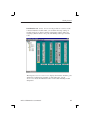
Cards Overview. The Cards Overview tab provides an overview of the
connected interface modules. Here you can define the setup settings of
modules and ports or change existing configuration settings. These are
assigning symbolic names to the ports and defining frame types and line
codes.
The left pane, Tester Overview , displays the interface modules, ports
and the line configurations currently set. The right pane, Cards
Overview, shows the individual sockets on the cards including module
designation.
K1297-G20 Monitor User Manual
39
Getting Started
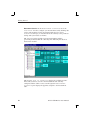
Measurement Scenarios. In the Measurement Scenarios tab of the
Data Flow Window, configure your measurement task by defining data
sources and parameters for the measurement. The Measurement
Scenarios tab keeps you informed about the currently active parameter
settings and system status at all times.
The grey boxes in the pipelines represent measurement modules
(processing elements) with the connecting lines indicating the data flow
between the modules.
The left pane, List of Scenarios, displays the available measurement tasks (scenarios) as well as the measurement tasks currently
configured and the outline sources. On the right, the Measurement
Scenarios pane displays the pipelines assigned to the measurement
tasks.
40
K1297-G20 Monitor User Manual
Getting Started
NOTE. As soon as you are in the K1297-G20 Monitor application, the
K1297-G20 Monitor online help is available: simply click Help in an
application window using the trackball or mouse or press <F1>.
The online help gives you context-sensitive assistance.
K1297-G20 Monitor User Manual
41
Getting Started
Software Installation
Important Hints
The Protocol Tester is ready for use upon delivery. Windows XPe and the
K1297-G20 Monitor application have already been installed.
Base software, application programs, updates, and upgrades are supplied
on CD-ROM, with a setup program and a readme.txt file located directly
under the root directory of the CD-ROM. You should read the readme file
before installing the software.
Device-specific software keys protect the CD-ROM software against
unauthorized access. To enable the software on your Protocol Tester, you
also receive an additional Software Keyfile / License Information Disk (key
disk).
Mixing Different Software Versions. Software products from different CD
versions are NOT designed to be mixed. The Setup program has a security
mechanism that will ensure that such version mixes cannot be installed:
After having selected your software products from this CD, you will be
warned about older software products in your existing configuration that
will be removed.
H If you confirm with Yes, the Setup program removes the old products
automatically and proceeds with the installation of the new products.
H If you want to keep an old product, cancel the Setup program, backup
the software as described below, and then restart the Setup program
again.
If you want to install software products from different CD versions, first
perform a complete backup of the existing software. This will ensure you
the best control about the software configuration on your system and
possible dependencies with other software packages you might have
installed.
42
K1297-G20 Monitor User Manual
Getting Started
Types of Installation. You have two options to install Protocol Tester
software:
H Installation of additional software packages: Install further software
packages in addition to the already installed software version such as
protocols, emulations, application programs.
H Installation of a new software version: Install a complete new version
of the base software and additional software packages.
NOTE. The K1297 Protocol Tester has been pre-configured with Microsoft
Windows XPe and therefore provides you with all possibilities offered by
this industry standard. This enables you to choose from a variety of
available software products for the analysis and evaluation of your
measurement results. Such programs can be installed and used directly on
your Protocol Tester.
Within this context, please observe the following: The installation of
additional software reduces the disk space required for saving measurement results. During the course of a measurement, only Protocol Tester
applications should be run in order to ensure the exclusive availability of
the disposable CPU performance for the measurement task.
User Data. It is important to always save user data to an appropriate back up
system before performing any installation. Detailed instructions for the
back up are given in the appropriate section.
User data are files and directories:
H not provided by Tektronix
H stored under the installation path of the Protocol Tester
NOTE. If you modify files and directories provided by Tektronix, it is
necessary to save them under a different name. Otherwise a subsequent
installation might fail or become incomplete, or your data might be
overwritten.
K1297-G20 Monitor User Manual
43
Getting Started
Pre-Installation Checks
1. Ensure that the system date and time have been set to the actual date
and time. Failure to do so may result in a situation where the software
cannot be started.
2. Ensure that your boards meet the following memory requirements:
H E1/DS1 Monitoring boards: 16 MB RAM minimum
H BAI boards: 8 MB RAM minimum
At least 16 MB (recommended 32 MB) of memory are required for
interface boards that are installed with VME bus address 1. (See
chapter ”Setting the VME Bus Address”).
NOTE. Cards that do not meet these requirements are NOT booted and
CANNOT be operated. A message will appear in the K1297-G20
Monitor Status Window if memory is not sufficient. If a RAM upgrade is
required, please contact your technical support representative.
3. Remove the content of the directory C:K1297\bin
The installation of a new K1297-G20 Monitor software over an
existing K1297-G20 Monitor software can cause problems with
non-existing licenses. To avoid this problem remove the content of the
directory C:\K1297\bin of the exiting software version before you
install the new version. This can be done with the Windows Explorer
or on the command line with
del c:\K1297\bin\*.*
44
K1297-G20 Monitor User Manual
Getting Started
Pre-Installation Checks for K1297-G20 Monitor PC Software. The K1297-G20
Monitor PC Monitoring Software is supported for Windows XP Professional. It requires a dongle (aka. Aladdin Software Hardlock). For
information on obtaining and configuring this special version contact your
Tektronix representative. When using this version with the dongle please
observe the following guidelines:
H Never attempt to attach the dongle to the appropriate port (LPT1 or
USB) without first shutting the PC or Laptop down. This may damage
the dongle or the hardware to which it was attached.
H Never attempt to detach the dongle from the appropriate port (LPT1 or
USB) without first shutting the PC or Laptop down. This may damage
the dongle or the hardware to which it was attached. If the dongle is
removed while the K1297-G20 Monitor software is running, the
software will terminate.
K1297-G20 Monitor User Manual
45
Getting Started
Installation of Additional Software Packages
If you have purchased additional software packages you need to install
them on top of your existing software installation. Therefore, do not
remove the existing software or change its installation path (by default
C:\K1297).
NOTE. There are logical dependencies between single software packages
and the base software package. Such information are provided in the order
information and will be checked during the setup process. Only matching
combinations can be installed.
Missing Destination Drives. The Setup program warns you, if products cannot
be installed on your system because of missing destination drives. The
affected products are reported in a warning dialog box; they will NOT be
listed in the ”List of Available Products” of the Setup program.
1. If such a warning appears, create the necessary destinations drive
outside of the Setup program. Refer to the Microsoft Windows Online
Help on how to do this.
2. Restart the Setup program. The affected products will now become
accessible in the ”List of Available Products”.
46
K1297-G20 Monitor User Manual
Getting Started
To install additional software packages, proceed as follows:
1. Close all applications.
2. Connect the optional external CD drive directly to your Protocol Tester
or create an access to a network CD drive.
If you install the software from a CD network drive, do not browse the
network neighborhood to access this location. Map the share
containing the CD to an unused drive letter instead, such as ”E:”
or ”F:”
3. Insert the key disk into the floppy disk drive of the Protocol Tester.
The key disk contains a serial number, which must be the same as the
nameplate fabrication code (Ser.-No.) on the back of the device.
4. Insert the installation CD into the CD drive. The Setup Guide starts
automatically. The Setup Guide helps you to successfully install your
Protocol Tester software. Follow the Setup Guide instructions.
If the installation does not start automatically, double-click
RunIntro.bat from the CD root directory.
Follow the setup program instructions. Read the enclosed license
agreement carefully and respond to the prompts.
Specify a valid keyfile within the keyfile selection dialog box, if you
do not want to use the keyfile.txt on the key disk in the floppy
disk drive.
In the subsequent dialog boxes, click Next.
K1297-G20 Monitor User Manual
47
Getting Started
5. In the product selection dialog box, installed software packages are
indicated by their version numbers in the column State.
DO NOT deselect any installed products.
Check that all additional software packages that shall be installed are
selected. Their selection might fail if:
a. an incorrect or incomplete keyfile was selected before or
b. not all necessary software packages were purchased or installed.
In case a. choose the correct keyfile using the button that indicates the
currently used keyfile.
In case b. install all software packages that you have purchased for this
system. Therefore, you might need to access all keyfiles you have
received in all deliveries for this software version for this system. If
you cannot proceed, contact the technical support.
6. Press Next to test your selection against the provided keys.
NOTE. The Next button may be disabled. One possible reason is that
not enough space is available on the hard disk. In that case, try to save
space until the setup program displays at least 20 % free disk space.
7. Press Start when the key check finished successfully.
CAUTION. Do not interrupt the installation program once you have clicked
Start. If the program is inadvertently interrupted, rename the file
C:\WINDOWS\UNINSTALL.K12XX.INI.0x with the highest number
for x to C:\WINDOWS\UNINSTALL.K12XX.INI.
Start the installation program again.
8. After the installation is complete, remove the key disk from the floppy
disk drive and reboot your Protocol Tester.
48
K1297-G20 Monitor User Manual
Getting Started
Installation of a New Software Version
Software products from different product CDs are NOT designed to be
mixed. The Setup program has a security mechanism that will ensure that
such version mixes cannot be installed.
If you install a new software version on top of an existing software
version, the existing version will be automatically removed.
If you want to install software products from different CD versions in
parallel on one Protocol Tester, first perform a complete backup of the
existing software.
K1297-G20 Monitor User Manual
49
Getting Started
Back Up the Software. If you want to back up your existing K1297-G20
Monitor installation, proceed as follows:
1. Close all applications.
2. Use the Windows Task Manager to end the process dio.exe.
3. Rename the original K1297 directory C:\K1297 (for example,
C:\K1297.vxxx), or move the directory to a different partition.
4. Rename the file C:\WINDOWS\UNINSTALL.K12xx.INI (for
example, C:\WINDOWS\UNINSTALL.K12xx.INI.vxx) before
you install the new K1297-G20 Monitor software.
CAUTION. If you do not rename this file before installing the new software,
the software will not start.
CAUTION. If you create multiple installation sets on your hard disk by such
back up operations, keys for different software versions will remain in your
keyfile C:\WINDOWS\keyfile.txt. The KeyManager program will
not be able to identify each back up. A subsequent call of this tool might
announce keys of back up installations erroneously as ”obsolete”. Do not
delete “obsolete” keys, as a restored installation will not run without its
keys. To overcome such possible problems rename the keyfile accordingly
(for example C:\WINDOWS\keyfile.txt.vxxx).
50
K1297-G20 Monitor User Manual
Getting Started
Installing the Software. To install a new software version, proceed as
follows:
1. Close all applications.
2. Connect the optional external CD drive directly to your Protocol Tester
or create an access to a network CD drive.
If you install the software from a CD network drive, do not browse the
network neighborhood to access this location. Map the share
containing the CD to an unused drive letter instead, such as ”E:”
or ”F:”
3. Insert the key disk into the floppy disk drive of the Protocol Tester. The
key disk contains a serial number, which must be the same as the
nameplate fabrication code (Ser.-No.) on the back of the device.
4. Insert the installation CD into the CD drive. The Setup Guide starts
automatically. The Setup Guide helps you to successfully install your
Protocol Tester software. Follow the Setup Guide instructions.
If the installation does not start automatically, double-click
RunIntro.bat from the root directory of the CD.
Follow the setup program instructions. Read carefully the enclosed
license agreement and respond to the prompts.
Specify a valid keyfile within the keyfile selection dialog box, if you
do not want to use the keyfile.txt of the key disk in the floppy
disk drive.
In the subsequent dialog boxes, click Next.
NOTE. The Setup program warns you, if products cannot be installed on
your system because of missing destination drives. The affected products
(such as Conformance Tests which require a D: disk drive) are reported in
a warning dialog box; they will NOT be listed in the ”List of Available
Products” of the Setup program.
If such a warning appears, proceed as described on page 46.
K1297-G20 Monitor User Manual
51
Getting Started
5. In the product selection dialog, check that all software packages that
shall be installed are selected. Their selection might fail if:
a. an incorrect or incomplete keyfile was selected before or
b. not all necessary software packages were purchased or installed.
In case a. choose the correct keyfile using the button that indicates the
currently used keyfile.
In case b. install all software packages that you have purchased for this
system. Therefore, you might need to access all keyfiles you have
received in all deliveries for this software version for this system. If
you cannot proceed contact the technical support.
6. Press Next to test your selection against the provided keys.
NOTE. The Next button may be disabled. One possible reason is that
not enough space is available on the hard disk. In that case, try to save
space until the setup program displays at least 20 % free disk space).
7. Press Start when the key check finished successfully.
CAUTION. Do not interrupt the installation program once you have
clicked Start. If the program is inadvertently interrupted, rename the
file C:\WINDOWS\UNINSTALL.K12XX.INI.0x with the highest
number for x to C:\WINDOWS\UNINSTALL.K12XX.INI.
Start the installation program again.
8. After the installation is complete, remove the key disk from the floppy
disk drive and reboot your Protocol Tester.
52
K1297-G20 Monitor User Manual
Getting Started
Removing the Software
To remove K1297-G20 Monitor software, proceed as follows:
1. Close all applications.
2. Start the Tektronix K1297 remove program by selecting:
Start / Settings / Control Panel / Add or Remove
Programs: Tektronix K1297-Mon Protocol Tester
and press Add/Remove.
Remove the K1297-G20 Monitor software by selecting dedicated or all
entries in the list of installed components.
User Data will be preserved.
3. Reboot the system after removing has been completed successfully.
K1297-G20 Monitor User Manual
53
Getting Started
Operating System
The user interface application of the K1297-G20 Monitor runs under
Microsoft Windows XPe.
CAUTION. The K1297 Protocol Tester is delivered with a specially
configured version of Windows XP Embedded (XPe).
The Windows XPe installation is supported by Tektronix only. Microsoft
Support Services do not support this installation.
The risk of changes (software developments or expansions) which the
customer undertakes is carried by the customer. Regarding this Tektronix
assumes no responsibility.
Windows XPe is delivered in the English version. It starts immediately
after you set up and switch on your K1297. Activation is not necessary.
Windows XPe is described in detail in the Windows XP online help. To
open the online help, click Start: Help and Support on the taskbar. Help
and Support is your comprehensive resource for Windows XPe information and tools.
54
K1297-G20 Monitor User Manual
Getting Started
Preconfigured Accounts, Automatic Logon
Upon delivery, the device is configured with the following user accounts:
Table 4: Account Data
User name
Password
State
Administrator-K12
xinortket12k
on (default)
Administrator
xinortkeT21K
on (built-in)
Guest
(none, left blank)
off
CAUTION. Do not rename the accounts and do not change the Group
Memberships of the accounts, because this might make the device
unusable.
K1297-G20 Monitor User Manual
55
Getting Started
Autologon Account. Administrator-K1297 is pre-configured as autologon
account. Use always this account when:
H Operating the K1297
H Operating the Remote Desktop Client
CAUTION. Do not change the pre-configured Administrator-K12 account,
since password changes also require modifications of the automatic logon.
For those changes, precise knowledge about the concept of user accounts
and user groups in Windows XPe is required. The risk of changes which
the customer undertakes is carried by the customer.
The password for the autologon account is visible in the registry for
everyone who has physical access to the device.
CAUTION. For safety reasons, do not use the password of the autologon
account for other accounts and on other system units (PCs, Unix networks,
etc.)
If you change the autologon account you must adapt the automatic logon
as well. To change the automatic logon, proceed as follows:
1. Select Start / All Programs / Powertoys for Windows XP / TweakUI for
Windows XP. The Tweak UI dialog box opens.
2. Select Logon / Autologon from the tree view and change the automatic
logon.
Do not forget the changed passwords, as you might be locked out from
using the device. For further hints on how to select good passwords, see
for example
http://archive.ncsa.uiuc.edu/SCD/Consulting/Security/passwords.html
56
K1297-G20 Monitor User Manual
Getting Started
Security Requirements
Security Requirements for Stand Alone Systems. The pre-configuration of the
device has been chosen for a stand-alone system without enhanced security
requirements for ease of operation. Particular security measures are not
necessary.
Security Requirements for Network Operation. If you apply the Protocol Tester
within a network or by way of a modem, then implement further and
enhanced security measures.
We strongly recommend to observe for instance the following general
statements:
H Access via an individual LAN
If you operate your Protocol Testers within an individual LAN
network, then protect this network against access from other PCs.
H Access via a company-wide Intranet
If you operate your Protocol Testers within an Intranet, then implement
an extended user administration and employ up-to-date virus scanners
and firewalls.
H Access via Internet or modem
If you want to access your Protocol Tester via the Internet, implement
the same security measures as in Intranets (see above). You can also
implement additional security measures with the help of virtual private
networks (VPNs).
To implement additional security measures, contact your local system
administrator or the Tektronix service center.
CAUTION. The implementation of extended security measures is your sole
responsibility. It is realized at customer’s own risk and without liability to
Tektronix.
You should implement these measures especially while applying the
Remote Desktop software or when transferring files via a network.
K1297-G20 Monitor User Manual
57
Getting Started
Ethernet Connection
If you want to operate the protocol tester in a local Ethernet network, you
can use the built-in network adapter of the protocol tester. To establish an
Ethernet connection, connect your Ethernet cable to the 10BaseT /
100BaseTX connector of the K1297 PC board.
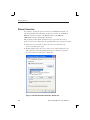
The properties for the default connection can you see in the Local Area
Connection Properties dialog box. To open this dialog box, proceed as follows:
1. Select Start / Control Panel / Network Connections. The Network
Connections dialog box opens.
2. Double-click an active Local Area Connection. A Status dialog box for
this connection opens. By pressing the Properties button you open the
Local Area Connection Properties dialog box.
Figure 1: Local Area Connection Properties, Generals tab
58
K1297-G20 Monitor User Manual
Getting Started
TCP/IP Protocol. The TCP/IP protocol is configured by default upon
delivery. The IP address is automatically assigned to the network card by a
DHCP server.
If your network does not have a DHCP server, ask your network
administrator for the necessary parameters, such as IP address and subnet
mask. Type in the parameters as follows:
1. Open the General tab of the Local Area Connection Properties dialog
box (see figure 1).
2. Press the Properties button in the General tab of the Local Area
Connection Properties dialog box.
The Internet Protocol (TCP/IP) Properties dialog box opens.
3. Select Use the following IP address and enter your IP address and
Subnet Mask.
4. Press the OK button to close the Internet Protocol (TCP/IP) Properties
dialog box and the Close button to close the Local Area Connection
Properties dialog box.
CAUTION. Only the software components configured upon delivery
guarantee faultless operation of the Protocol Tester.
K1297-G20 Monitor User Manual
59
Getting Started
Remote Operation
Remote Desktop
The protocol tester can be remotely operated with the help of Remote
Desktop. Using Remote Desktop you can connect each Windows computer
to a K1297. This allows you to remotely control your K1297 without being
in field or test laboratory.
H Computers with operating system Windows XP Professional can be
connected immediately to your K1297.
H To connect computers running Windows 95 or a more recent version of
Windows to your K1297, you must install the Remote Desktop
Connections Client software.
The Remote Desktop Connections Client software is available under
C:\Setup.etc . To install it, start the msrdpcli.exe .
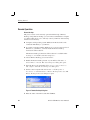
To activate Remote Desktop, proceed as follows:
1. Enable the Remote Desktop feature on your K1297: click Start –>
Control Panel –> System. The System Properties dialog box opens.
2. Open the Remote tab and enable Allow users to connect remotely to
this computer. Close the System Properties dialog box.
3. On the control computer side: Select Start –> All Programs –>
Accessories –> Communications –> Remote Desktop Connection. The
Remote Desktop Connection dialog box opens.
Figure 2: Remote Desktop dialog box
4. Enter the name of the K1297 and click Connect.
60
K1297-G20 Monitor User Manual
Getting Started
Remote Assistance
Use Remote Assistance if you need remote support on your K1297. Using
this feature you can invite somebody to connect to your K1297. During
Remote Assistance both of you can operate the K1297.
To activate Remote Assistance, proceed as follows:
1. Click Start –> Control Panel –> System. The System dialog box opens.
2. Open the Remote tab and enable Allow Remote Assistance invitations
to be sent from this computer.
3. Click Start –> Help and Support. Click Invite a friend to connect to
your computer with Remote Assistance under Ask for assistance.
4. Follow the Remote Assistance wizard.
K1297-G20 Monitor User Manual
61
Getting Started
Connecting Peripherals
External devices can be connected to your K1297 in several ways. Some
devices, such as keyboard, mouse, or USB devices, are connected to the
front panels of the installed boards of your K1297. Other devices, like
printers and external drives, are connected to ports on the rear panel of
your protocol tester.
For a device to work properly with Windows, a device driver must be
installed on the system. Each device is supported by one or more device
drivers, which are typically supplied by the device manufacturer.
However, some device drivers are included with the operating system. If
the device is Plug and Play, Windows XPe can automatically detect it and
install the appropriate device drivers.
If the device is not automatically installed by the operating system, the
Found New Hardware Wizard will appear and ask you to insert any media,
such as compact discs or floppy disks, that were provided with the device.
Non-Plug and Play devices are installed using the Add Hardware Wizard.
To start this wizard, click Start –> Control Panel –> Add Hardware.
Before manually installing device drivers, you should consult the device
documentation provided by the manufacturer.
You must be logged on as an Administrator or as a member of the
Administrators group in order to install or configure a peripheral device.
CAUTION. To avoid product damage, always power off the K1297 before
installing any accessories.
62
K1297-G20 Monitor User Manual
Examples
The following chapter guides you step by step through the different
aspects of working with the Protocol Tester. These are common applications relevant to many users.
NOTE. The following chapter should help you get started by explaining the
basic principles of the Protocol Tester in a clear and simple fashion.
K1297-G20 Monitor User Manual
63
Examples
Online Monitoring in a Network
You can use the Protocol Tester and E1/DS1 interface boards (PRIMO) to
test the signalling in the following type of situations:
H In mobile networks at Abis interfaces between base station controller
(BSC) and base transceiver station (BTS) or at A interfaces between
mobile switching center (MSC) and base station controller (BSC)
H In fixed networks between switching systems or between subscriber
and switching system.
Preliminary Steps
1. Connect the Protocol Tester’s PRIMO interface boards to the
measuring sockets of the data line, using the appropriate cables.
The interfaces on the PRIMO boards are 9-pin Sub-D sockets (refer to
the previous chapter, section Connecting to the data line and to
Appendix A, Section E1/DS-1 Interface Board).
2. Switch the device on.
The operating system boots automatically (refer to the previous
chapter, section Switching on the K1297). The K1297-G20 Monitor
application is started automatically.
The Status Window shows status messages for the individual
modules. If the modules boot without errors, the message “boot OK”
will be displayed.
64
K1297-G20 Monitor User Manual
Examples
3. The following dialog appears for loading the configuration:
4. Click Autoconfiguration.
The autoconfiguration feature automatically detects the signalling
channels and the framing of the connected data lines.
After the autoconfiguration has been carried out, the active signalling
channels are available and you can start the measurement: the Data
Flow Window appears. Make sure you are in the Measurement
Scenarios pane.
K1297-G20 Monitor User Manual
65
Examples
NOTE. The data line has not been connected properly, if the following
message appears: “The initialization of PCM Check has been terminated!
The previous configuration will be loaded.” In this case, check the
connection between the Protocol Tester and the data line measuring
sockets.
If you get the message “No signalling detected on any ports”, please
restart the autoconfiguration. Start it now via the menu Tools:
Autoconfiguration.
Furthermore, take into account, that the autoconfiguration for LAP-based
protocols depends on the received data amount during a measurement
interval.
66
K1297-G20 Monitor User Manual
Examples
Starting Measurements
The autoconfiguration feature automatically defines an online data
source (Scenario) and generates an online measurement scenario as
a pipeline which contains several branches for individual measurement
tasks. An online data source is a group of logical links. A logical link
consists of a channel and a channel data interpretation rule (assigned
protocol).
The settings for each data source, as detected by the autoconfiguration
feature, are displayed in the expanded left part of the window under
List of Scenarios (to expand, click “+”):
The following information is provided:
[1]D(Rx):16:-:64 [Whibisup.stk]
1:
A:
(Rx)
16:-:64
Whibisup.stk
K1297-G20 Monitor User Manual
(example)
first board
port MON A
direction, here: Receive
timeslot 16, no subchannel (-), with 64 kbit/s
detected protocol setting, here: the stack for SS#7
White Book according to ITU-T
67
Examples
The right side of the window Measurement Scenarios contains
the online measurement scenario as a pipeline with the two branches
Monitor and Recording File.
5. To start online monitoring, click the ON/OFF switch of the Monitor
pipeline branch to ON.
The pipeline of the activated data flow is now green: the measurement
is running.
6. To view the signalling data of the activated data flow switch to the
monitor main window by clicking the processing element Monitor
at the right end of the pipeline.
68
K1297-G20 Monitor User Manual
Examples
Online Monitoring
The monitor main window consists of three views (see each title bar). The
Short View is shown in the upper part the window, the Frame View in the
middle and the Packet View in the lower part. These three views display
the data flow at different levels of complexity.
K1297-G20 Monitor User Manual
69
Examples
The data in each view is constantly updated. In Live Mode (indicated in
the main window title bar), you can read the data as it is measured. This
mode is set by default when you switch to the monitor main window.
If you click on a view and scroll the contents using the arrow keys (↓ and
↑), the system automatically switches into Freeze Mode (indicated in the
main window title bar). The continuous display of new data frames is then
suppressed. In the background, the measuring goes on, until the available
storage is full. Then you receive the following error message:
Click the Live Mode button to return to live mode.
70
K1297-G20 Monitor User Manual
Examples
The Short View provides an overview and lists the detected data packets
row by row in summary form.
You can choose which infomation is important for your own overview.
Select Monitor:Column Setup:Short View.
The Frame View decodes the protocol parameters of a frame selected in
Short View bit by bit and displays the results in plain text. The protocol
parameters displayed depend on which protocol stacks are loaded.
You can choose how detailed the information should be displayed. Select
Monitor:Column Setup:Frame View.
The Packet View displays the protocol parameters of a frame selected in
Short View in hexadecimal, ASCII or EBCDIC.
K1297-G20 Monitor User Manual
71
Examples
Recording and Reviewing Monitoring Data
The signalling data of the active data flow can be recorded in a special
recording file for subsequent evaluation and/or offline analysis. This
recording feature can be used in conjunction with or as an alternative to
online monitoring.
Preliminary Steps
The Protocol Tester has been properly connected to the data line and
turned on. The modules booted without errors and the application has
been started.
Once the autoconfiguration has terminated successfully, the Data
Flow Window appears (refer to “Preliminary Steps” in the previous
section). Make sure you are in the Measurement Scenarios pane.
Start Recording
The right side of the window Measurement Scenarios contains a
pipeline branch with the processing element Recording File at the
right end of the pipeline, which displays a file icon. NONE signifies that
no recording file has been created.
72
K1297-G20 Monitor User Manual
Examples
1. Click the processing element Recording File to create a recording file.
The following window appears:
Choose one of the indicated files or create a new one by writing a
name in File name. The following dialog box appears:
Storing all your recording files in c:\k1297\rec\ facilitates the
search for individual files later on.
K1297-G20 Monitor User Manual
73
Examples
Press Browse, if you want to locate an existing file.
You do not need to enter the file extension “.rf5” for the recording files
when entering the file name. The program appends it automatically.
The remaining settings are optional.
2. Confirm your entries with OK. The name of the recording file appears
in the processing element Recording File.
74
K1297-G20 Monitor User Manual
Examples
3. To start recording, click the ON/OFF switch of the Recording
pipeline branch to ON.
The signalling data of the activated data flow are written to the
recording file until the file is full or until you terminate the process.
The data in the recording file can be read after the current measurement is complete.
You can stop recording by clicking the ON/OFF switch of the
Recording branch to OFF.
NOTE. In most cases, data are recorded and reviewed at different times. It
is however possible to check the contents of the recording file immediately
after recording data. A description on how to review recorded data you
find on the following pages.
K1297-G20 Monitor User Manual
75
Examples
Reviewing Recorded Data
Proceed as follows to view the signalling data stored in a recording file
with the record viewer.
1. Start the record viewer by clicking the Rec View icon in the
pipeline selection toolbar and and drag it in the green measurement
scenario window . The pipeline of the Record Viewer appears in the
Measurement Scenarios:
2. Click the left processing element (pipeline element) Recording
File in the Record Viewer pipeline. The following dialog box
appears:
Select the recording file you want to work with by double-clicking it.
K1297-G20 and K1205 recording files end with ”.rf5”. K1103
recording files end with ”.rec”. K1297 and K1197 recording files end
with ”.dat”.
76
K1297-G20 Monitor User Manual
Examples
3. With the following dialog box you can then change the protocol stacks
assigned to the logical links.
Confirm your selection with OK. The name of the recording file is
entered automatically into the Recording File processing
element. The pipeline of the activated data flow is now green.
K1297-G20 Monitor User Manual
77
Examples
4. If you want to filter the signalling data according to certain criteria,
such as error events, proceed as follows: First click the pipeline
processing element Filter, then within the Filter Setup
window click Error Event. The following figure shows the
Filter Setup dialog for the Display Filter.
Proceed with your settings and confirm your selection with OK.
5. To view the signalling data switch to the monitor main window by
clicking the processing element Monitor at the right end of the
pipeline. The monitor main window with the three views appears. You
can scroll through the recorded data flow using the arrow keys (↓ and
↑) in the individual views.
78
K1297-G20 Monitor User Manual
Examples
Calltrace
The Calltrace application can detect and trace one or several calls on the
basis of complete or partial phone numbers. Calltrace analyzes protocolspecific data and produces a text output for any found hit. The Calltrace
can be run in the following three modi:
Calltrace only Mode.In this mode the calltrace searches for a frame that
matches the user selected parameters. The analysis and the result can be
seen at once.
Sequenced Calltrace Mode. In this mode all messages of one call will be
collected (stored) until the CT can make a decision whether the current
call matches the parameters or not. This representation is more focussed,
because it is related to one call.
Sequence only Mode. This mode works just like the sequenced Calltrace
mode, apart from the fact, that no numbers can be entered. All messages
are simply sequenced, i.e. sorted by calls and then displayed if the call has
been released. A search criteria is not possible here.
Calltrace applications are offered for a variety of protocols. All applications are operating according to the same principles. In this section, the
ISUP Calltrace is given as an example.
K1297-G20 Monitor User Manual
79
Examples
Preliminary Steps
The Protocol Tester has been properly connected to the data line and
turned on. The modules booted without error and the application has
been started.
Once the autoconfiguration has terminated successfully, the Data
Flow Window appears (refer to “Preliminary Steps” in the previous
section). Make sure you are in the Measurement Scenarios pane.
80
K1297-G20 Monitor User Manual
Examples
Preparing and Starting a Calltrace
1. Click the processing element Application in the pipeline, which
you will find either in the monitor branch or in the recording branch.
The following dialog box appears:
2. Select CallTr/Seq from the list of available applications and
confirm your selection with OK.
Calltrace analyzes the data traffic of a variety of protocols. Therefore,
you have to select the protocol to be tested before starting Calltrace.
The Calltr/Seq_1 window appears.
K1297-G20 Monitor User Manual
81
Examples
3. Select the protocol from the protocol list on the basis of which the
calltrace is to be performed.
4. Confirm your selection with Load. The CallTr/Seq_1: ISUP
ITU-T White book window then appears (example). Depending on
the Calltrace selected this window can slightly vary.
82
K1297-G20 Monitor User Manual
Examples
5. Enter the phone number you are looking for under Search for. You
can enter up to four numbers divided by commas (,). The following
wildcards for digits are allowed: + for exactly one digit or no digit, *
for any number of digits, ? for exactly one digit.
You can enter more than one asterisk (*) within a calling number (for
example *123*678). One asterisk is always automatically entered at
the end of the number. Thus, numbers that are too long can be found. If
calling numbers are initiated by + or * the filter mode starts working
only after the number is confirmed by an ACM (Address complete) or
an ANM (Answer message). That means that all messages are
transmitted until then, because they belong to a call with a corresponding number.
If you are looking for numbers with prefixes (for example international
area code) at one and the same time, you will get more specific outputs
by entering the exact numbers (for example 4930386,30386) than
by entering numbers initiated by “+” or “*” (++30386,*30386).
6. Specify whether the phone number designates a Calling Party or
a Called Party in the Type of number field.
7. Specify whether it is a National, an International or a
Subscriber number without a national/international area code in
the Nature of Address field. Select don’t care to include
all numbers.
8. For protocols you can specify Cause Values as additional search
criteria. The Calltrace application then searches for calls that contain
the desired number and one of the selected cause values (reason for the
end of call).
9. Specify the number of calls to be traced in the Trace mode field:
one (Single) or any number of matching phone numbers (Multiple).
If you activate the filter mode, only the calltrace messages will be
displayed. Other messages will be suppressed. The asterisk (*) at the
beginning leads to more detailed infomation.
K1297-G20 Monitor User Manual
83
Examples
10. Click Start to start Calltrace.
The results are displayed in the monitor main window.
11. Switch to the monitor main window by clicking the processing element
Monitor at the right end of the pipeline under Measurement
Scenarios in the Data Flow Window.
84
K1297-G20 Monitor User Manual
Examples
Viewing the Results
Click the Short View in the monitor window. Use the arrow keys (↓
and ↑) to scroll through the recorded data flow in the individual views.
Detailed information is displayed in plain text in the Frame View on
the right.
Calltrace outputs the word text in the 2. Protocol column
(Short View) and displays detailed information in the data frame
context.
K1297-G20 Monitor User Manual
85
Examples
Examples. The number you were tracing was found:
You have been connected to the number you were tracing:
The connection has been cleared down (released):
86
K1297-G20 Monitor User Manual
Examples
Ending Calltrace
You end the Calltrace application by clicking the processing element
Application in the pipeline in the monitor window. The window
CallTr/Seq-1: ISUP ITU-T White book appears. Click
Close.
K1297-G20 Monitor User Manual
87
Examples
88
K1297-G20 Monitor User Manual
Appendix A: Interfaces
K1297 and K1297 Compact. The location of the interfaces is shown in the
following figure.
K1297
K1297 Compact
Location of interfaces
K1297. Interfaces are on the rear of the device, on the PC module front
panel and on the front panels of the measuring modules.
K1297 Compact. Interfaces are on the PC module front panel and on the
front panels of the measuring modules on top of the device underneath the
device cover. Further interfaces are located behind the front cover beneath
the display.
The individual interfaces are described in detail in the following sections.
K1297-G20 Monitor User Manual
A-1
Appendix A: Interfaces
System Unit
The system unit contains the system processor PC as its main component.
The processor coordinates control and sequence of the user processes.
Further components are: keyboard, monitor, and floppy disk drive. A
switched mode mains power supply and regulated fans serve for supply
and ventilation of the modules.
CAUTION. Two green LEDs on the front of device indicate the active
operating state of the system processor and the SCSI connection. In alarm
state (fan or cooling alert), the LED turn red. In this case switch off the
device immediately and contact the service support.
A-2
K1297-G20 Monitor User Manual
Appendix A: Interfaces
PC-4 Board / PC-5, 512 Board / PC-6 Board
The Intel-based PC boards are VME bus boards with a Celeron or Pentium
III system processor.
Depending on the display, the K1297 is equipped with either a PC-4 (for
NEC displays) or a PC-5 / PC-6 board (for Hyundai displays).
The VGA graphics card supports flat screen, external monitor, and dual
display mode.
The following interfaces are located on the front panels of the PC boards:
H USB interface
H LPT interface
H Ethernet, twisted pair connections (100BaseTx)
H VGA interface
H Headphone sound port
H Two PC-Card (PCMCIA) slots for type II
H Standard connections for peripherals (keyboard connections, parallel
and serial interfaces)
Table A–1: Pin assignment for the USB interface
Pin
Assignment
Pin
Assignment
1
5V
3
USB_P0+
2
USB_P0-
4
Ground
In addition, the K1297 operates with a PC AT backplane. This bus system
offers the possibility to mount up to three ISA cards, such as an ISDN PC
card for remote control or even for other applications, such as a
multimedia card. The length of the additional cards is designed for two
thirds of AT card format.
K1297-G20 Monitor User Manual
A-3
Appendix A: Interfaces
Reset. To reset the Protocol Tester in an emergency, use a pointed tool and
insert it into the RESET switch located on the cover of the PC board.
There is also an LED indicating the operating state of the hard disk (HD)
and an LED indicating network operation.
A-4
K1297-G20 Monitor User Manual
Appendix A: Interfaces
Keyboard Interface (KEYBOARD)
K1297. The K1297 KEYBOARD interface is accessible from the bottom of
the device. It is covered by a metal sheet which you have to remove first.
K1297 Compact. The K1297 Compact KEYBOARD interface is behind the
bottom cover of the device.
NOTE. If the additional keyboard interface (KBD) is used with an external
keyboard, the keyboard connector must not be plugged in.
2
1
4
3
6
5
Table A–2: Pin assignment for the KEYBOARD interface
(PS/2 interface)
Pin
Assignment
Pin
Assignment
1
Keyboard data
4
+5V
2
PS/2 Mouse data
5
Keyboard clock
3
Ground
6
PS/2 Mouse clock
K1297-G20 Monitor User Manual
A-5
Appendix A: Interfaces
Additional Keyboard’s Interface (KBD)
K1297. The interface of the external keyboard is on the rear of the device
on the PC module front panel.
K1297 Compact. The interface of the external keyboard is on top of the
device on the PC module front panel.
NOTE. If the additional keyboard interface KBD is used with an external
keyboard, the KEYBOARD connector must not be plugged in.
2
1
4
3
6
5
Table A–3: Pin assignment for interface KBD (PS/2 interface)
A-6
Pin
Assignment
Pin
Assignment
1
Keyboard data
4
+5V
2
PS/2 Mouse data
5
Keyboard clock
3
Ground
6
PS/2 Mouse clock
K1297-G20 Monitor User Manual
Appendix A: Interfaces
Serial Interface (COM1)
K1297. The serial interface COM1 is on the rear of the device on the PC
module front panel.
K1297 Compact. The serial interface COM1 is on top of the device on the
PC module front panel.
1
9
Table A–4: Pin assignment for interface COM1
Pin
Assignment
Pin
Assignment
1
DCD
6
DSR
2
RxD
7
RTS
3
TxD
8
CTS
4
DTR
9
RI
5
Ground
K1297-G20 Monitor User Manual
A-7
Appendix A: Interfaces
Parallel Interface (LPT1)
K1297. The parallel interface is on the rear of the device on the PC module
front panel.
K1297 Compact. The parallel interface is on top of the device on the PC
module front panel.
25
1
13
Table A–5: Pin assignment for interface LPT1
A-8
Pin
Assignment
Pin
Assignment
1
STROBE
14
Auto feed
2
DB0
15
Error
3
DB1
16
Initialize
4
DB2
17
Select input
5
DB3
18
Ground
6
DB4
19
Ground
7
DB5
20
Ground
8
DB6
21
Ground
9
DB7
22
Ground
10
ACK
23
Ground
11
BSY
24
Ground
K1297-G20 Monitor User Manual
Appendix A: Interfaces
Table A–5: Pin assignment for interface LPT1 (Cont.)
Pin
Assignment
Pin
Assignment
12
Paper end
25
Ground
13
Select
K1297-G20 Monitor User Manual
A-9
Appendix A: Interfaces
Ethernet BNC Interface (10Base-2)
K1297. The ethernet BNC socket is on the rear of the device on the PC
module front panel.
K1297 Compact. The ethernet BNC socket is on top of the device on the PC
module front panel.
1
Table A–6: Pin assignment for interface 10Base–2
A-10
Pin
Assignment
Pin
Assignment
1
RXI/TXo
2
CDS (Signal ground)
K1297-G20 Monitor User Manual
Appendix A: Interfaces
Ethernet Twisted Pair Interface (10Base-T)
K1297. The ethernet twisted pair interface is on the rear of the device on the
PC module front panel.
K1297 Compact. The ethernet twisted pair interface is on top of the device
on the PC module front panel.
1
Table A–7: Pin assignment for interface 10Base-T
Pin
Assignment
Pin
Assignment
1
TxD +
5
Not connected
2
TxD –
6
RxD –
3
RxD +
7
Not connected
4
Not connected
8
Not connected
K1297-G20 Monitor User Manual
A-11
Appendix A: Interfaces
External Monitor’s Interface (VGA)
K1297. The interface for an external VGA monitor is on the rear of the
device on the PC module front panel.
K1297 Compact. The interface for an external VGA monitor is on top of the
device on the PC module front panel.
The External Monitor’s Interface supports a resolution of up to 1024x768
with 60 Hz.
5
1
6
15
11
Table A–8: Pin assignment for interface VGA
A-12
Pin
Assignment
Pin
Assignment
1
Red
9
Not connected
2
Green
10
Ground
3
Blue
11
Not connected
4
Not connected
12
Monitor data
5
Ground
13
HSY
6
Ground
14
NC
7
Ground
15
Monitor data
8
Ground
K1297-G20 Monitor User Manual
Appendix A: Interfaces
Serial Interface (COM2)
K1297. The serial interface (COM2) is on the rear of the device next to the
PC module front panel.
K1297 Compact. The serial interface (COM2) is behind the front cover
beneath the display.
1
9
Table A–9: Pin assignment for interface COM2
Pin
Assignment
Pin
Assignment
1
DCD
6
DSR
2
RxD
7
RTS
3
TxD
8
CTS
4
DTR
9
RI
5
Ground
K1297-G20 Monitor User Manual
A-13
Appendix A: Interfaces
USB (Universal Serial Bus)
K1297. The USB interface is on the rear of the device on the PC module
front panel.
K1297 Compact. The USB interface is on top of the device on the PC
module front panel.
1
4
Table A–10: Pin assignment for the USB interface
Pin
Assignment
Pin
Assignment
1
Vcc
3
Data+
2
Data-
4
Ground
NOTE. The USB interface is not supported when using Windows NT.
A-14
K1297-G20 Monitor User Manual
Appendix A: Interfaces
Alarm and Synchronising Option (RELAIS and CLK I/O)
K1297. The alarm and synchronising sockets are on the rear of the device in
the left bottom corner.
K1297 Compact. The alarm and synchronising sockets are behind the front
cover beneath the display.
The following voltages are the maximum turn-off voltages that you may
apply:
42 V AC peak with maximum turn-off current 5 A or
30 V DC with maximum turn-off current 5 A or
60 V DC with maximum turn-off current 1.5 A resistive load or
60 V DC with maximum turn-off current 0.5 A non-resistive load.
The maximum relay ratings are:
250 V AC with 5 A or
30 V DC with 5 A or
60 V DC with 1.5 A resistive load or
60 V DC with 0.5 A non-resitive load .
K1297-G20 Monitor User Manual
A-15
Appendix A: Interfaces
The synchronizing sockets can be used for data or timestamp synchronization of several Protocol Tester and for clock synchronization of interface
boards.
1
Table A–11: Pin assignment for interface CLK I/O
Pin
Assignment
Pin
Assignment
1
Rx
2
CDS (Signal ground)
NOTE. The described options will need to be enabled by the appropriate
software.
A-16
K1297-G20 Monitor User Manual
Appendix A: Interfaces
SCSI Interface (SCSI I/O BUS)
K1297. The SCSI interface is on the rear of the device in the right bottom
corner.
K1297 Compact. The SCSI interface is behind the front cover beneath the
display.
25
1
50
26
Up to six peripheral devices can be connected to the controller of the
system processor via the SCSI socket. Each peripheral device must be
assigned an individual address (SCSI ID). The controller occupies address
7 as standard. Since the controller boots from the device with the lowest
address, the internal hard disk of the Protocol Tester is set to address 1.
When not connected with a peripheral device the SCSI socket is
terminated automatically.
The interface is single ended.
NOTE. Assign one of the free addresses 2 - 6 to the devices that you want to
operate via the external SCSI connection. Do not assign address 1, if you
want to boot from an external device. Set the SCSI address to 0.
Switch on the Protocol Tester first and before switching on the SCSI
connected device.
K1297-G20 Monitor User Manual
A-17
Appendix A: Interfaces
Table A–12: Pin assignment for interface SCSI I/O
A-18
Pin
Assignment
Pin
Assignment
1
Ground
26
D0
2
Ground
27
D1
3
Ground
28
D2
4
Ground
29
D3
5
Ground
30
D4
6
Ground
31
D5
7
Ground
32
D6
8
Ground
33
D7
9
Ground
34
DP
10
Ground
35
Ground
11
Ground
36
Ground
12
Ground
37
Ground
13
Ground
38
TERMPWR
14
Ground
39
Ground
15
Ground
40
Ground
16
Ground
41
ATN
17
Ground
42
Ground
18
Ground
43
BSY
19
Ground
44
ACK
20
Ground
45
RST
21
Ground
46
MSG
22
Ground
47
SEL
23
Ground
48
C/D
24
Ground
49
REQ
25
Ground
50
I/O
K1297-G20 Monitor User Manual
Appendix A: Interfaces
Connecting Wide SCSI-3 Devices (68 Pins)
It is possible to connect a wide SCSI-3 device (68 pins) to the K1297
Protocol Tester using the delivered SCSI adapter.
The SCSI interface of your Protocol Tester is wired like a SCSI-1
interface. To connect a wide SCSI-3 device (68 pins) you need this
specially qualified 50-to-68 pins SCSI adapter.
CAUTION. Some commercially-made adapters may cause a short circuit
between TERMPWR and GROUND if they connect pins 12, 13 and 37 of
the 50 pins SCSI interface to pins 17, 18 and 51 of the wide 68 pins SCSI
interface. Such an internal wiring will cause the failure of the SCSI
connection.
Use only the SCSI adapter delivered with your Protocol Tester.
The following table shows the crucial pin connections of the qualified
Tektronix 50-to-68 pin SCSI adapter:
Table A–13: Correct internal pin assignment of 50-to-68 pin SCSI
adapter
Pin of 50-pin
SCSI interface
Required internal connection
Pin of 68-pin
SCSI interface
12
Not connected
17
13
Not connected
18
37
Not connected
51
K1297-G20 Monitor User Manual
A-19
Appendix A: Interfaces
PC Card Slots
K1297. Two PC card slots (for type I or II or PCMCIA cards) are on the rear
of the device on the PC module front panel.
K1297 Compact. The PC card slots are on top of the K1297 Compact.
You can connect modem or ISDN PC cards to the PC card slots for remote
operation of the Protocol Tester or even portable data carriers using the
appropriate plug.
CAUTION. The power input of the PC card must not exceed 600 mA (with
+5 V) or 60 mA (with +12 V).
Please read the documentation for the PC card and follow the PC card
manufacturer’s instructions.
Do not forcibly install or remove a PC card. To avoid equipment damage,
do not insert foreign objects into the PC card slots.
A-20
K1297-G20 Monitor User Manual
Appendix A: Interfaces
AP-4 and AP-4/256 Board
The Additional Processor Board (AP-4) is a single slot card that increases
the K1297-G20 Monitor’s processing power by a factor of 5 to 10
depending on the application.
When using 3 or more measurement cards it is recommended to include
the AP-4 card; it is necessary when using 5 or 6 boards in the K1297
benchtop device.
AP-4 and AP-4/256 boards provide the following features:
H 64 or 256 MB Memory Capacity
H 1 MB Memory L2 Cache
H 140 MHz Memory Cache Bus Clock Frequency
H 350 MHz Processor Clock Frequency
H Serial interface via RJ45 front panel connector
H Ethernet interface (10-BaseT/100-BaseTx) via RJ45 front panel
connector
H Two PCI Mezzanine card slots
NOTE. AP-4/256 boards require software version K1205 V2.30 or above.
K1297-G20 Monitor User Manual
A-21
Appendix A: Interfaces
Figure A–1: AP-4, AP-4/256 Board
A-22
K1297-G20 Monitor User Manual
Appendix A: Interfaces
K1297. For the K1297 the usage of an AP-4 or AP-4/256 board depends on
the number of interface boards.
K1297 Compact. For the K1297 Compact the AP-4 or AP-4/256 board is
optional.
For configurations with 1 or 2 interface boards an AP-4 or AP-4/256 board
will only be needed for heavy demanding applications. Using an AP-4 or
AP-4/256 board speeds up decoding approximately by factor 10. The disk
throughput performance raises by at least factor 2.
For configurations using 3 and 4 interface boards we recomment using an
appropriate processor also for lighter loads.
For configurations with 5 and 6 interfaces the AP-4 or AP-4/256 board is
mandatory.
NOTE. Keep in mind that using an additional application processor in the
K1297/K1297 Compact housing needs an additional VME bus slot.
CAUTION. Before installing a new board ensure that the VME bus address
is set correctly (cf. chapter Getting Started, section Exchanging Measuring
Modules).
Defining new CPU numbers must be performed at an ESD approved
workplace. Electrostatic discharge can permanently destroy components
that have to be temporarily removed from your device.
K1297-G20 Monitor User Manual
A-23
Appendix A: Interfaces
Working With Two AP-4 / AP-4/256 Boards. Upon delivery, AP-4 boards are set
to ”0”. If you work with a second AP-4 board, make sure its VME bus
address (CPU number) is set correctly.
The VME bus addresses throughout the system must be unique. The AP-4
and Ethernet boards require an odd address number. In addition, the next
even address number must NOT be used in the system:
H A system with a second AP-4 board with VME address ”7” (and ”8”
implicitly) works fine if there are no other board conflicts with ”7” and
”8”.
H
A system with a second AP-4 board with VME address ”3” (and ”4”
implicitly) plus an E1/DS1 Emulation board with VME address ”1”
works fine if there are no other board conflicts with ”3”, ”4”, and ”1”.
CAUTION. The PC board is set to address ”9” upon delivery (and ”10”
implicitly), and the first AP board is set to address 0. Never change the
addresses of the PC board and the first AP-4 board.
See the description on how to define CPU numbers of the Ethernet board
on page A-56 and proceed accordingly if you want to work with a second
AP-4 board.
The Status Window displays the VME addresses that are in use (however,
the implicitly used numbers for boards such as AP-4 and ETH-100 are not
displayed).
CAUTION. Only a qualified service technician should perform this
procedure at an ESD approved workplace. To avoid injury and to prevent
damage to the board or any products connected, review all safety
precautions in the User Manual when adapting CPU numbers.
A-24
K1297-G20 Monitor User Manual
Appendix A: Interfaces
The following interfaces are located on the front panel of the AP-4 /
AP-4/256 board:
H Serial interface
H 10BaseT / 100BaseTX
The SERIAL interface (RJ45 connector) can be used as asynchronous
serial debug port for service purposes.
1
Table A–14: Pin assignment for the SERIAL interface (DTE)
Pin
Assignment
Pin
Assignment
1
DCD
5
RxD
2
RTS
6
Ground
3
Ground
7
CTS
4
TxD
8
DTR
K1297-G20 Monitor User Manual
A-25
Appendix A: Interfaces
In addition an RJ45 10-BaseT/100-BaseT connector is provided on the
AP-4 or AP-4/256 front panel (for future use, not yet supported).
1
Table A–15: Pin assignment for the 10Base-T/100Base-Tx interface
Pin
Assignment
Pin
Assignment
1
TD +
5
Not connected
2
TD –
6
RD –
3
RD +
7
Not connected
4
Not connected
8
Not connected
The two switches on the front panel have the following function:
ABT
RST
Abort (for future use, not yet software supported)
Reset all onboard devices
CAUTION. ABT and RST are for future use. They are not yet supported.
Please do not touch.
The four status LEDs on the front panel have the following meaning:
BFL
CPU
PMC
PMC
A-26
Board failure
CPU is accessing the bus
Top PCI mezzanine card, if installed, is active
Bottom PCI mezzanine card, if installed, is active
K1297-G20 Monitor User Manual
Appendix A: Interfaces
BAI Board
The BAI board (Basic Access Interface) is required for measurements on
ISDN lines and connections. The BAI board can be fitted with up to two
interface modules depending on the purpose of application. The interface
modules establish the necessary different circuits dependent on the
interface standard.
NOTE. EN 60950, IEC 950, UL 1950: The interface boards are designed
for connecting to a telecommunication network (TNV-1 circuits); the
appropriate interfaces are provided.
The supply voltage necessary for supplying power to the terminal
equipment to be tested is supplied by a separate supply module, which is
plugged on the interface board and connected to the base module.
WARNING. High voltages may occur on the following supply connectors
and sockets: under “S0 Simulation / Monitoring” with “TE A” or “TE M”,
“MON A B” or “MON M N”, “TE/NT B” or “TE/NT N”;
under “U2B1Q Simulation / active Monitoring” with “LT A” or “LT M”
and “NT/LT B” or “NT/LT N”.
With older front panels the following supply connectors and sockets are
concerned: “to NT”, “S-BUS MON”, “to TE(NT)”, “to LT”, “to NT(LT)”.
These older terms are marked in the following with old.
K1297-G20 Monitor User Manual
A-27
Appendix A: Interfaces
8
1
S0
4
1
Supply module
U2B1Q
Figure A–2: BAI board with S0 and U2B1Q Interface
A-28
K1297-G20 Monitor User Manual
Appendix A: Interfaces
S0 Interface Module
The S0 interface module provides three RJ45 connectors for line
connection, which are designated as follows:
H “TE A” or “TE M” (old: “to NT”)
H “MON A B” or “MON M N” (old: “S-BUS MON”)
H “TE/NT B” or “TE/NT N” (old: “to TE(NT”)
Modes of Operation. To monitor lines with the S0 interface module, proceed
as follows:
1. Deactivate the line and connect the S bus with connector “MON A B”/
“MON MN”.
2. Activate the line from the NT or TE.
CAUTION. Make sure to only use the “MON A B”/“MON M N” connector
when connecting the S bus.
K1297-G20 Monitor User Manual
A-29
Appendix A: Interfaces
Line status. Two LEDs, “L1” (Layer 1 activated) and “PF” (Power
Feeding), are assigned to each line connector. The LEDs indicate the line
status, as shown in the following table.
Table A–16: Line status S0 interface module
A-30
L1
PF
Meaning
on
on
After booting: Reset of the interface.
Else: Activated, normal power feeding
alternating
with PF
alternating
with L1
Port is initialized and deactivated: Activate. Internal:
deactivated, no power feeding
on
off
Activated, no power feeding
off
on
Deactivated, normal power feeding
off
blinking
Deactivated, restricted power feeding
on
blinking
Activated, restricted power feeding
off
off
Port not active
K1297-G20 Monitor User Manual
Appendix A: Interfaces
Pin Assignment. The connectors of the S0 interface module have the
following pin assignment:
Table A–17: Pin assignment for connectors TE A and TE M
Pin
Assignment
Pin
Assignment
1
Not connected
5
Rx–
2
Not connected
6
Tx–
3
Tx+
7
Not connected
4
Rx+
8
Not connected
Table A–18: Pin assignment for connectors MON A B and MON M N
Pin
Assignment
Pin
Assignment
1
Not connected
5
Rx TE–
2
Not connected
6
Rx NT–
3
Rx NT+
7
Not connected
4
Rx TE+
8
Not connected
Table A–19: Pin assignment for connectors TE/NT B and TE/NT N
Pin
Assignment
Pin
Assignment
1
Not connected
5
Tx–
2
Not connected
6
Rx–
3
Rx+
7
Not connected
4
Tx+
8
Not connected
K1297-G20 Monitor User Manual
A-31
Appendix A: Interfaces
U2B1Q Interface Module
The U2B1Q interface module provides two connectors for line connection,
which are designated as follows:
H “LT A” or “LT M” (old: “to LT”)
H “NT/LT B” or “NT/LT N” (old: “to NT(LT)”)
Modes of Operation. To monitor lines with the U2B1Q interface module,
proceed as follows:
1. Deactivate the line concerned and separate it.
2. Connect the network to the socket labelled “LT A”/“LT M” and
connect the NT to the socket labelled “NT/LT B”/“NT/LT N”. The
interface module responds in the line like a U-repeater.
A-32
K1297-G20 Monitor User Manual
Appendix A: Interfaces
Line status. Two LEDs, “L1” (Layer 1 activated) and “PF” (Power
Feeding), are assigned to each line connector. The LEDs indicate the line
status, as shown in the following table.
Table A–20: Line status U2B1Q interface module
L1
PF
Meaning
on
on
After booting: Reset of the interface.
Else: Activated, normal power feeding
alternating
with PF
alternating
with L1
Port is initialized and deactivated: Activate. Internal:
deactivated, no power feeding
on
off
Activated, no power feeding
off
on
Deactivated, normal power feeding
off
blinking
Deactivated, restricted power feeding
on
blinking
Activated, restricted power feeding
off
off
Port not active
K1297-G20 Monitor User Manual
A-33
Appendix A: Interfaces
Pin Assignment. The connectors of the U2B1Q interface module have the
following pin assignment:
Table A–21: Pin assignment for connectors LT A and LT M
Pin
Assignment
Pin
Assignment
1
TIP*
2
RING*
Table A–22: Pin assignment for connectors NT/LT B and NT/LT N
Pin
Assignment
Pin
Assignment
1
TIP*
2
RING*
* Either polarity is possible.
A-34
K1297-G20 Monitor User Manual
Appendix A: Interfaces
Auxiliary Connections
The modules also provide the following auxiliary connections:
H Headphones: A 3.5-mm stereo jack is used as headphone connector.
Software has not been not implemented yet but is coming soon: a
B channel can be monitored bidirectionally via the stereo headphones.
NOTE. Use a headphone with a ferrit part in order to fulfill EMC
regulations.
H B channel connection “64k EXT”: The B channels can be accessed
externally with the appropriate setting in the configuration menu (also
see below B Channel Access Adapter).
H Supply module, auxiliary connection “EXT”, red and black, for supply
voltage: Two 4-mm banana jacks are provided for measuring the
supply voltage (red: normal + and black: normal –) supplied by the NT
(with S0) or the LT (with U2B1Q) when monitoring.
CAUTION. Due to EMC reasons, use only high quality, shielded cables!
K1297-G20 Monitor User Manual
A-35
Appendix A: Interfaces
B Channel Access Adapter. B channel data is extracted using an optional
accessories adapter cable, which features two connectors: a 10-pin mini
plug for the interface module (“64k EXT”) on one end and a female 15-pin
D-Sub plug on the other end with the following pin assignment.
9
8
1
Figure A–3: B channel connection
Table A–23: Pin assignment for B channel connection
A-36
Pin
Assignment
Pin
Assignment
1
Output RxD/B1 from
network-side when monitoring
9
Output RxD/B2 from user-side
when monitoring
2
Not connected
10
Output RxD/B2 from network-side
when monitoring
3
Output RxD/B1 from user-side
when monitoring
11
Not connected
4
Input TxD/B2
12
Input TxD/B1
5
Not connected
13
Output TxC (64 kHz inverted to
RxC)
6
Output RxC (64 kHz)
14
Not connected
7
Output frame signal B1 (8kHz)
15
Digital Ground
8
Output frame signal B2 (8kHz)
K1297-G20 Monitor User Manual
Appendix A: Interfaces
The signals are TTL level with an impedance of 75 W.
Frame sync
RxC
RxD
BIT 0
BIT 1
BIT 2
BIT 3
BIT 4
BIT 5
BIT 6
BIT 7
BIT 0
BIT 1
BIT 2
BIT 3
BIT 4
BIT 5
BIT 6
BIT 7
TxC
TxD
Figure A–4: Time diagrams
K1297-G20 Monitor User Manual
A-37
Appendix A: Interfaces
V./X. Board
The V./X. interface module contains two socket connectors per V./X.
interface for line connection, which are designated as follows:
H “to DCE”
H “to DTE”
The interface standards V.24, X.21 and V.35 are supported.
The connection to the various interfaces is made with a special adapter
cable. Since the V./X. board can be used in K1297-G20 applications it is
shipped with monitoring and simulation cables. Be sure to use only the
monitoring cables for V.35, X.21 and X.24 (see figures in the appropriate
sections).
A-38
K1297-G20 Monitor User Manual
Appendix A: Interfaces
Figure A–5: V./X. board
K1297-G20 Monitor User Manual
A-39
Appendix A: Interfaces
Each terminal socket is equipped with two LEDs for displaying the line
status. Each of the line connectors labelled “to DTE” and “to DCE” are
assigned two LEDs. These display the line status as shown in the following
table.
Table A–24: Line status: V./X. interface module
S0
S1
Meaning
on
on
While booting: Reset of the interface
off
off
After booting: Port not in operation
alternating
with S1
alternating
with S0
Port initialized. No adapter cable connected (operational
state)
on
off
Port initialized. Adapter cable connected (operational
state)
on
on
Port initialized. Data traffic is possible (operational state):
Case 1:
– with V.35 or V.24 cable to DTE
– receiver ready
– line status Data Terminal Ready has been reached
Case 2:
– with V.35 or V.24 cable to DCE
– and receiver ready
– line status Data Set Ready has been reached
Case 3:
– with X.21 cable to DTE
– and receiver ready
– if line status Control has been reached
Case 4:
– with X.21 cable to DCE
– receiver ready
– if line status Indication has been reached
A-40
K1297-G20 Monitor User Manual
Appendix A: Interfaces
Adapter Cables and Adapter Cable Interfaces
V.35 Monitor Adapter Cable.
V.35 Monitor Adapter Cable Interface.
A
B
C
Z
NN
AA
Table A–25: V.35 Monitor
Pin
Assignment
Pin
Assignment
A
101 Cable shield (connected with the connector
housing)
V
115 Rx Clk A (IN)
–––X
B
102 Signal ground
W
113 Tx ext clk B (IN)
C
105 RTS (IN)
X
115 Rx Clk B (IN)
D
106 CTS (IN)
Y
114 Tx Clk A (IN)
–––AA
E
107 DSR (IN)
Z
Not connected
K1297-G20 Monitor User Manual
A-41
Appendix A: Interfaces
Table A–25: V.35 Monitor (Cont.)
Pin
Assignment
Pin
Assignment
F
109 carrier detect (IN)
AA
114 Tx Clk B (IN)
H
108 DTR (IN)
BB
Not connected
J
125 ring detect (IN)
CC
Not connected
K
Not connected
DD
Not connected
L
Not connected
EE
Not connected
M
Not connected
FF
Not connected
N
Not connected
HH
Not connected
P
103 send data A (IN)
–––S
JJ
Not connected
R
104 Rx data A (IN)
–––T
KK
Not connected
S
103 send data B (IN)
LL
Not connected
T
104 Rx data B (IN)
MM
Not connected
U
113 tx ext clk A (IN)
–––W
NN
Not connected
–––n
A-42
Reference to a symmetrical pair
K1297-G20 Monitor User Manual
Appendix A: Interfaces
X.21 Monitor Adapter Cable
X.21 Monitor Adapter Cable Interface
9
8
1
Table A–26: X.21 Monitor
Pin
Assignment
Pin
Assignment
1
Cable shield (connected
with the connector housing)
9
B lead (IN)
2
T Tx data A (IN)
–––9
10
B lead (IN)
3
C Control A (IN)
–––10
11
B lead (IN)
4
R Rx data A (IN)
–––11
12
B lead (IN)
5
I indic. A (IN)
–––12
13
B lead (IN)
K1297-G20 Monitor User Manual
A-43
Appendix A: Interfaces
Table A–26: X.21 Monitor (Cont.)
Pin
Assignment
Pin
Assignment
6
S tx clk A (IN)
–––13
14
Not connected
7
Not connected
15
Not connected
8
G-Signal ground
–––n
A-44
Reference to a symmetrical pair
K1297-G20 Monitor User Manual
Appendix A: Interfaces
V.24 Monitor Adapter Cable
V.24 Monitor Adapter Cable Interface
14
13
1
Table A–27: V.24 Monitor
Pin
Assignment
Pin
Assignment
1
Cable shield (connected with the
connector housing)
14
Not connected
2
103 send data (IN)
15
114 send data clk (IN)
3
104 receive data (IN)
16
Not connected
4
105 request to send (IN)
17
115 rec data clk (IN)
5
106 clear to send (IN)
18
141 local loopback (IN)
6
107 data set ready (IN)
19
Not connected
7
102 signal ground
20
108 data term ready (IN)
8
109 carrier detect (IN)
21
110 signal quality detect (IN)
K1297-G20 Monitor User Manual
A-45
Appendix A: Interfaces
Table A–27: V.24 Monitor (Cont.)
A-46
Pin
Assignment
Pin
Assignment
9
Not connected
22
125 ring indicate (IN)
10
Not connected
23
111 clk select (IN)
11
116 select DCE STDBY (IN)
24
113 ext. clock (IN)
12
Not connected
25
142 test indicator (IN)
13
Not connected
K1297-G20 Monitor User Manual
Appendix A: Interfaces
E1/DS1 Monitoring Board
Each E1/DS1 monitoring board (PRIMO: primary rate monitoring) has
four independent PCM monitor interfaces and can receive eight signalling
links with HDLC data. The Protocol Tester can be extended to simultaneously monitor 16 PCM interfaces and 32 signalling links.
NOTE. EN 60950, IEC 950, UL 1950: The interface boards are designed
for connecting to a telecommunication network (TNV-1 circuits); the
appropriate interfaces are provided.
K1297-G20 Monitor User Manual
A-47
Appendix A: Interfaces
The following overview shows the supported framing formats and the
electrical specifications:
E1
Framing Format
E1
PCM30
2.048 MBIT/S
HDB3
CRC4 ON/OFF
HDB3
Receiver input:
DS1
0 - 36 dB
75 ohms / 120 ohms / >650 ohms
Framing Format
DS1
F4
1.544 MBIT/S
AMI / B8ZS
F12 D3/D4
AMI / B8ZS
ESF CRC6 ON/OFF
AMI / B8ZS
F72
AMI / B8ZS
Receiver input:
A-48
0 - 36 dB
75 ohms / 100 ohms / >650 ohms
K1297-G20 Monitor User Manual
Appendix A: Interfaces
9
5
6
1
Figure A–6: E1/DS1 monitoring board (PRIMO)
K1297-G20 Monitor User Manual
A-49
Appendix A: Interfaces
9-pin D-Sub connectors are available as interfaces.
Table A–28: Pin assignment D-Sub connectors
Pin
Assignment
Pin
Assignment
1
RX– MON A, C, E, G
6
RX+ MON A, C, E, G
2
Not connected
7
Not connected
3
Not connected
8
Not connected
4
Not connected
9
RX+ MON B, D, F, H
5
RX– MON B, D, F, H
In addition a headphone connector with a mini jack is provided for
listening to audio data.
NOTE. Use a headphone with a ferrit part in order to fulfill EMC
regulations.
The status LEDs on the front panel have the following meaning:
Synchronous: Receive frame recognized, if LED is on.
Signal ok: Receive signal recognized, if LED is on.
A-50
Blinking LED
Port is configured for data receiving, but no valid signal
is received
Off
Port has not yet been configured
On
Board is beeing booted (after reset) or port is configured
and valid signal is received.
K1297-G20 Monitor User Manual
Appendix A: Interfaces
Ethernet Board
The set of Ethernet boards is equipped with two Ethernet single-wide PCI
mezzanine modules for special applications such as GPRS and IP.
The Ethernet modules comply with the IEEE 802.3 for 10 BaseT and
100 BaseTx. Both full duplex and half duplex modes are supported.
NOTE. EN 60950, IEC 950, UL 1950: The interface boards are designed
for connecting to a telecommunication network (TNV-1 circuits); the
appropriate interfaces are provided.
K1297-G20 Monitor User Manual
A-51
Appendix A: Interfaces
8
1
Ethernet module 1
Ethernet module 2
Figure A–7: ETH board with two Ethernet PCI mezzanine modules
A-52
K1297-G20 Monitor User Manual
Appendix A: Interfaces
The SERIAL interface (RJ45 connector) can be used as asynchronous
serial debug port for service purposes.
1
Table A–29: Pin assignment for the SERIAL interface (DTE)
Pin
Assignment
Pin
Assignment
1
DCD
5
RxD
2
RTS
6
Ground
3
Ground
7
CTS
4
TxD
8
DTR
In addition an RJ45 10-BaseT/100-BaseT connector is provided on the
front panel (for future use, not yet supported).
Table A–30: Pin assignment for the 10-BaseT/100-BaseT interface
Pin
Assignment
Pin
Assignment
1
TX +
5
Not connected
2
TX –
6
RX –
3
RX +
7
Not connected
4
Not connected
8
Not connected
K1297-G20 Monitor User Manual
A-53
Appendix A: Interfaces
The two switches on the front panel have the following function:
ABT
RST
Abort (for future use, not yet software supported)
Reset all onboard devices
The four status LEDs on the front panel have the following meaning:
BFL
CPU
PMC
PMC
A-54
Board failure
CPU is accessing the bus
Top PCI mezzanine card, if installed, is active
Bottom PCI mezzanine card, if installed, is active
K1297-G20 Monitor User Manual
Appendix A: Interfaces
Ethernet Modules
Two independant high performance Fast Ethernet interface controller ports
(RJ45 connectors) are on an Ethernet module.
1
Table A–31: Front Panel I/O Pin Assignment
Pin
Signal
Pin
Signal
1
TX +
5
Not connected
2
TX –
6
RX –
3
RX +
7
Not connected
4
Not connected
8
Not connected
Each Ethernet port provides a set of four LED status indicators on the front
panel with the following information:
Rx
Tx
Traffic is sensed on the network.
A data packet is sent.
The LEDs have the following meaning:
LINK
Link integrity: LED is on means, link is good in
either 10 or 100 Mbps mode.
LED is off means, link is bad.
100
Speed: LED is on means, the data rate is 100 Mbps.
LED is off means, the data rate is at 10 Mbps.
LED retains its last known state when the link is down.
K1297-G20 Monitor User Manual
A-55
Appendix A: Interfaces
Defining CPU Numbers
The following section describes how to define CPU numbers (VME bus
addresses) if you work with a second Ethernet board consisting of a
Power-PC board plus hooked up mezzanines. Only an experienced service
technician should perform this setting procedure.
CAUTION. The following steps must be performed at an ESD approved
workplace. Electrostatic discharge can permanently destroy components
that have to be temporarily removed from your device.
In order to operate several Ethernet boards within one device, the default
CPU numbers of the second (third, fourth) board have to be changed.
1. Check that the address is set correctly for each board. Typical addresses
are as follows:
Table A–32: Ethernet boards: address settings
Board
Address
1st Ethernet board
07 (with 08 implicitly); no changing necessary
2nd Ethernet board
05 (with 06 implicitly)
3rd Ethernet board
03 (with 04 implicitly)
NOTE. Only select odd numbers when changing the address for an
additional Ethernet board, and follow the recommended settings as listed
in the table above.
The CPU numbers being stored within NVRAM of the Ethernet board are
an integral part of the CPU’s bootline. You can modify this bootline as
described in the following.
A-56
K1297-G20 Monitor User Manual
Appendix A: Interfaces
2. To check the used CPU numbers, open the K1297-G20 Monitor Status
Window via the appropriate button in the toolbar.
Write down the CPU numbers displayed in square brackets in order to
identify which numbers are free for addressing.
Not all displayed and existing CPU numbers are free for defining new
CPU numbers. Additional restrictions are listed in the Caution
statement below.
CPU #7 is the currently installed Ethernet board.
3. Now you can change the default CPU number for example to #3 by
entering the following command via Start: Run:
ntterm 7
This command will open a window that gives you basic access to the
VxWorks operating system. Enter the command bootChange and
press the return key until you see:
processor number : 7
Enter 3 on the same line and press the return key until the prompt (–>)
reappears.
–>
CAUTION. Due to hardware restrictions it is not possible to use odd
numbers on a ETH-100 board if the number + 1 is used in the system. In
other words, do not use #7 if there is a #8 CPU in the system.
The same applies to the PC-Board CPU, which is CPU #9; #10 cannot be
used for any board!
Example:
If there is no board with #3 or #4, you can use #3 or #4 for ETH-100.
Now you have changed the default CPU number. Therefore #7 and #8
are no longer in use and you may insert your new ETH-100 board,
which will now become the new CPU #7.
K1297-G20 Monitor User Manual
A-57
Appendix A: Interfaces
A-58
K1297-G20 Monitor User Manual
Appendix B: Keyboard
After the device is switched on, the keyboard LEDs light up twice; the
keyboard is now ready for operation.
All keys are repeat-action keys; the character repeats automatically if you
hold down the key.
The keyboard features several key groups and key rows with the following:
H Alphanumeric keys
H Function keys
H Cursor keys
H Integrated numeric keypad (with the K1297 Protocol Tester the
numeric keys are part of the alphanumeric keypad)
The different key groups are described in detail on the following pages.
Further information on language support, the trackball and how to connect
an external mouse are also provided.
K1297-G20 Monitor User Manual
B-1
Appendix B: Keyboard
Alphanumeric Keypad
The largest keypad is the alphanumeric keypad with keys for letters,
numbers and special characters. The character arrangement mainly
corresponds to a normal typewriter keyboard. In addition there are some
keys that have certain special functions.
The keyboard is international and labeled in localized form.
Keyboard assignment
Shift
Unshift
localized
... for example German
?
Type height reduced
ß <
together with
Alt–Gr
The functions of the special keys in the alphanumeric keypad are described
in Table B-1.
B-2
K1297-G20 Monitor User Manual
Appendix B: Keyboard
The special keys in the alphanumeric keypad have the following functions:
Table B–1: Special keys
Key
Function
|<–
–>|
The tabulators move the cursor to the left or right
according to the tabulator positions.
CAPS
LOCK
If the caps lock key is pressed, an LED display lights up.
Capital letters are used; all other characters remain
normal. If you want to enter lowercase letters, you must
press the SHIFT key.
CTRL
This control key is used only in combination with other
keys; CTRL+ALT+DEL for example restarts the
operating system. The online help describes situations in
which CTRL is used.
Fn
This key activates the special function of a multi-labelled
key. The special function, for example Num, is printed in
rimmed form on the key.
ALT
This key is used only in combination with other keys: for
example, you can enter the hex value of an ASCII
character (as well as additional special characters) in
combination with the numeric keypad.
ALT-GR
This key is used only in combination with other keys to
generate further key codes.
<–
The backspace key moves the cursor by one position to
the left and deletes the character.
<–/
The RETURN or ENTER key is mainly used to end a
command line. This means the command entered is
carried out after pressing this key.
PRINT
This key is used to print the current screen on a
connected printer.
K1297-G20 Monitor User Manual
B-3
Appendix B: Keyboard
Table B–1: Special keys (Cont.)
Key
Function
PAUSE
This key holds up the program session in most of the
applications.
NUM
K1297 benchtop device: The numeric keypad switches
from cursor control to numeric keys via this key; an LED
lights up. Pressing the key again clears this function.
Function Keys
Twelve programmable function keys are arranged in the top row of the
keyboard. The assignment of these keys depends on the software.
The key combination CTRL+ALT+DEL does not automatically reboot the
PC. Instead a secure attention sequence (SAS) occurs which allows you to
logoff, reboot, change the password, start the task manager, or lock the PC.
The following overview shows possible key combinations:
Table B–2: Function keys and key combinations
B-4
Keys
Function
CTRL+ALT+DEL
This key combination triggers a warm start.
Fn+<Tilde key>
This key combination switches the trackball on or off.
K1297-G20 Monitor User Manual
Appendix B: Keyboard
Cursor Keys
The following cursor keys are available:
Table B–3: Cursor keys
Key
Function
HOME
This key moves the cursor to the beginning.
PAGE
This key scrolls backwards and forwards.
END
This key moves the cursor to the end.
<Arrow keys>
These keys moves the cursor: up, down, left, right.
Numeric Keypad, Numeric Keys
To switch on the integrated numeric keys, press Fn+Num. Press any other
key, to clear this function.
K1297-G20 Monitor User Manual
B-5
Appendix B: Keyboard
Language Support
The device is pre-configured with two selectable keyboard layouts:
H EN English (United States), Layout: US
H DE German (Standard), Layout: German, IBM
In the corner opposite of the Start button of the taskbar you either see
EN or DE for the active keyboard layout.
The German IBM layout is different from the usual German PC keyboard
layout. The <CAPS–LOCK> key only shifts the alphabetic character keys
and no decimal digits or punctuation characters.
You can temporarily change the keyboard layout by pressing
<ALT>+<LEFT–SHIFT> . To change the keyboard layout permanently,
proceed as follows:
1. Click on Start: Settings.
2. Click on Control Panel.
3. Double-click on Keyboard.
4. Click on the tab Input Locales.
5. Select from the list and press Set as Default.
B-6
K1297-G20 Monitor User Manual
Appendix B: Keyboard
Trackball
The trackball is used to control the cursor and the menu. The cursor can be
moved to any position on the screen by moving the trackball.
Characters or words are highlighted by pressing the left trackball key. The
assignment of the right trackball key depends on the user program. Using
the trackball, you can select objects, edit menus and trigger functions.
The trackball is covered by a housing that usually protects the ball and the
transmission mechanism from dust. However, the ball should be cleaned at
regular intervals. Proceed as follows:
1. Remove the cover from the ball housing by turning it counter-clockwise. You can use a pair of tweezers, for example, which you put into
the holes on the ring. Then you can take the ball out of the housing.
2. Clean the ball with tap water and a mild detergent. Blow the remaining
dust out of the ball housing and put the ball back in.
3. Then put the cover back on and tighten it.
K1297-G20 Monitor User Manual
B-7
Appendix B: Keyboard
Switching the Trackball Off or On (PC-3 Board only)
CAUTION. In the following you find descriptions on how to change certain
parameters of the PC BIOS of the Protocol Tester if you are using a PC-3
board). Follow the instructions and do not change other parameters in the
PC BIOS as the device might become unusable or the performance might
degrade. If you have opened a menu that is not described here, press the
<ESC> key immediately in order to leave the menu.
If you want to switch off the trackball so that only the external mouse is
functional, you must change the PC BIOS.
Change the PC BIOS as follows (the procedure can also be used to switch
the trackball on again):
1. Switch on the device. A blue framed screen appears with a title that
starts with:
Power Bios
2. Press <CTRL> +<ALT> +<ESC> as fast as possible.
A window appears titled Award Software International,
Inc. Power BIOS 1.00 Setup
3. Now use the <CURSOR DOWN> key in order to move to the menu item
called Peripherals
4. Press the <ENTER> Key. Press the <TAB> key until the value for the
PS/2 Mouse item is highlighted.
5. Use the <CURSOR–DOWN> key to change to select the appropriate
value:
Enabled
Disabled
6. Press <ENTER> , <ESC> and <ENTER> to save the change. The device
will restart.
B-8
K1297-G20 Monitor User Manual
Appendix B: Keyboard
Connecting an External Mouse
If you want to connect an external mouse (serial mouse) and use it instead
of the built-in trackball, proceed as follows:
1. Shut down and switch off the device.
2. Connect the external mouse to the COM1 interface.
3. Switch on the device.
The system restarts.
PC-3 board only: During this restart you can switch off the trackball,
proceed as described in the section Switching the Trackball Off or ON.
NOTE. Do not change the mouse driver via the Control Panel applet. This
could make the keyboard unusable.
K1297-G20 Monitor User Manual
B-9
Appendix B: Keyboard
Deactivating an External Mouse
If you connected an external mouse and you want to use the trackball
again, proceed as follows:
1. Shut down and switch off the device.
2. Disconnect the mouse from the serial port.
3. PC-3 board only: Switch the device on and make sure that the
trackball is enabled in the PC BIOS as described above (section
Switcing the Trackball Off or On). If you forget this step, there will be
no pointing device at the next start of Windows XP; press
<CTRL> +<ALT> +<Delete> on the keyboard and select Shut Down
to repeat the cycle.
4. Restart the device.
B-10
K1297-G20 Monitor User Manual
Appendix B: Keyboard
Switching the Trackball Off or On (PC-3 Board only)
CAUTION. In the following you find descriptions on how to change certain
parameters of the PC BIOS of the Protocol Tester if you are using a PC-3
board). Follow the instructions and do not change other parameters in the
PC BIOS as the device might become unusable or the performance might
degrade. If you have opened a menu that is not described here, press the
<ESC> key immediately in order to leave the menu.
If you want to switch off the trackball so that only the external mouse is
functional, you must change the PC BIOS.
Change the PC BIOS as follows (the procedure can also be used to switch
the trackball on again):
1. Switch on the device. A blue framed screen appears with a title that
starts with:
Power Bios
2. Press <CTRL> +<ALT> +<ESC> as fast as possible.
A window appears titled Award Software International,
Inc. Power BIOS 1.00 Setup
3. Now use the <CURSOR DOWN> key in order to move to the menu item
called Peripherals
4. Press the <ENTER> Key. Press the <TAB> key until the value for the
PS/2 Mouse item is highlighted.
5. Use the <CURSOR-DOWN> key to change to select the appropriate
value:
Enabled
Disabled
6. Press <ENTER> , <ESC> and <ENTER> to save the change. The device
will restart.
K1297-G20 Monitor User Manual
B-11
Appendix B: Keyboard
B-12
K1297-G20 Monitor User Manual
Appendix C: Specifications
The K1297/K1297 CompactProtocol Tester is a portable protocol analyzer
with integrated TFT color display and keyboard.
The K1297 Protocol Tester consists of an AT compatible PC system and a
VME bus system in a single housing. Various measurement interface
modules can be plugged to the VME bus system.
Table C–1: Environmental conditions
Temperature range
Operating: 5_C to 40_C
Non-operating: -20_C to +55_C
Relative humidity
Operating: up to 80 % below 30_C, derate to 45 % at
40_C, non-condensing
Non-operating: up to 90 % below 30_C, derate to 60 %
at 20_C, non-condensing
Altitude
Operating: 0 to 3000 m
Non-operating:0 to 12 000 m
Table C–2: Power supply
Line adapter
Safety class 1, (protective grounding)
Line voltage
Rated range of use 100 .. 240 V, 10%, automatic
changeover
Line frequency
Rated range of use 50/60 Hz,
-6% to +5%
Power consumption
K1297: Maximum value 650 VA
K1297 Compact: Maximum value 460 VA
K1297-G20 Monitor User Manual
C-1
Appendix C: Specifications
Table C–3: K1297. Overall dimensions and weight
Width
400 mm
Height
321 mm
Depth
275 mm
Weight
Approximately 14 to 18 kg (depending on configuration
level)
Table C–4: K1297 Compact. Overall dimensions and weight
C-2
Width
288 mm (without handle)
Height
344 mm (without handle)
Depth
190 mm (without handle)
Weight
8 to 10 kg (depending on equipment)
K1297-G20 Monitor User Manual
Appendix C: Specifications
Table C–5: Hardware
Central computer
Intel Pentium CPU
133 MHz
64 MB RAM
Connections
2 x serial
1 x parallel (Centronics)
Keyboard
SCSI
VGA (external monitor)
With Pentium Processor PC card:
Ethernet (10Base-2, 10Base-T) or
With Celeron Processor PC card:
Ethernet (10BaseT), USB
Display
TFT (Thin Film Transistor)
External screen interface
Mass memory
SCSI hard disk drive ( 1 GByte formatted total
capacity, access time < 11ms or better)
3.5’’ floppy disk drive (1.44 MB formatted overall
capacity)
External CD-RW drive (option)
Keyboard
PS/2 compatible keyboard, Trackball
K1297-G20 Monitor User Manual
C-3
Appendix C: Specifications
Table C–6: Interface boards
C-4
VME-bus backplane
Layers with automatic daisy chain and 5 VME slots:
slot 1, system computer; slots 3, 4, 5, interface modules
Interface modules
(except Ethernet)
CPU 68EC040 (25 MHz) with up to 32 MByte RAM
Application Processor
AP–4
Power PC 750, 350 MHz, 1 MB L 2 Cache,
64 MB RAM
with the following connectors:
1 x RJ45 Serial
1 x RJ45 10-BaseT/100-BaseTx Ethernet
Application Processor
AP–4/256
Power PC 750, 350 MHz, 1 MB L 2 Cache,
256 MB RAM
with the following connectors:
1 x RJ45 Serial
1 x RJ45 10-BaseT/100-BaseTx Ethernet
BAI
Interface module for performing measurements on ISDN
S0 and U2B1Q lines with the following connectors:
2 x monitoring (duplex)
E1/DS1 (PRIMO)
Interface module for performing measurements on
PCM-24 and PCM-30 lines with the following connectors:
quadruple monitoring (duplex)
V./X.
Interface module for performing measurements on V.24,
X.21 or V.35 lines with the following connectors:
2 x monitoring (duplex)
With E1/DS1: 4 additional RISC processors 68360
(QUICC) for I/O tasks
K1297-G20 Monitor User Manual
Appendix C: Specifications
Table C–6: Interface boards (Cont.)
Ethernet
K1297-G20 Monitor User Manual
The Ethernet modules comply with the IEEE 802.3 for
10BaseT and 100BaseTx:
64 MB RAM
2 x emulation / simulation
2 x monitoring (duplex) or
4 x monitoring (half-duplex)
C-5
Appendix C: Specifications
Table C–7: Certifications and compliances
Category
Standards or description
EC Declaration of
Conformity – EMC*
Meets intent of Directive 89/336/EEC for Electromagnetic
Compatibility. Compliance was demonstrated to the following
specifications as listed in the Official Journal of the European
Communities:
EN 61326
EMC requirements for Class A
electrical equipment for measurement,
control and laboratory use.
IEC 61000-4-2
Electrostatic discharge immunity
(Performance Criterion B)
IEC 61000-4-3 RF electromagnetic field immunity
(Performance Criterion A)
IEC 61000-4-4 Electrical fast transient / burst
immunity
(Performance Criterion B)
IEC 61000-4-5 Power line surge immunity
(Performance Criterion B)
IEC 61000-4-6 Conducted RF immunity
(Performance Criterion A)
IEC 61000-4-11 Voltage dips and interruptions
immunity (Performance Criterion B)
EN 61000-3-2
EN 61000-3-3
AC power line harmonic emisions
Flicker
Australia / New Zea- Complies with EMC provision of Radiocommunications Act per
land Declaration of
the following standard(s):
Conformity – EMC
AS/NZS 2064.1/2
Industrial, Scientific, and Medical
Equipment: 1992
EC Declaration of
Conformity –
Low Voltage
Compliance was demonstrated to the following specification as
listed in the Official Journal of the European Communities:
Low Voltage Directive 73/23/EEC as amended by 93/68/EEC
EN 61010-1/A2: 1995
C-6
Safety requirements for electrical
equipment for measurement, control,
and laboratory use
K1297-G20 Monitor User Manual
Appendix C: Specifications
Table C–7: Certifications and compliances (Cont.)
Category
Standards or description
U.S. Nationally
Recognized Testing
Laboratory Listing
Only for devices with UL symbol on the back of the housing:
Canadian
Certification
Only for devices with UL symbol on the back of the housing:
Installation (Overvoltage) Category
Overvoltage Category II (as defined in IEC 61010-1, Annex J)
Pollution Degree
Pollution Degree 2 (as defined in IEC 61010-1). Note: Rated for
indoor use only.
UL 3111-1: Standard for electrical measuring and test
equipment
CAN/CSA C22.2 No. 1010.1: Safety requirements for electrical
equipment for measurement, control and laboratory use
Local-level mains (wall sockets). Equipment at this level
includes appliances, portable tools, and similar products.
Equipment is usually cord-connected.
Normally only dry, nonconductive pollution occurs. Occasionally
a temporary conductivity that is caused by condensation must
be expected. This location is a typical office/home environment.
Temporary condensation occurs only when the product is out of
service.
Equipment Type
Test and measuring
Safety Class
Class 1 (as defined in IEC 61010-1, Annex H) – grounded
product
Laser Compliance
All lasers used in this product are in compliance with the
applicable requirements of the following, and are Class I
according to each:
EN60825–1
IEC60825–1
U.S. CDRH Regulations
K1297-G20 Monitor User Manual
C-7
Appendix C: Specifications
CAUTION. To reduce the risk of fire, use only No. 26 AWG or larger
telecommunications line cords for the K1297 Protocol Tester. Use only the
telecommunication line cords designed and specified for the K1297.
EMC Compliance was achieved under the following conditions: Shielded cables
on all external I/O ports; front panel screws properly tightened; conductive
chassis rails of the boards connected to chassis ground; cable shields
connected to chassis ground via metal shell connectors bonded to a
conductive module front panel; all peripherals conformed.
For minimum RF emissions, it is essential that the conditions above be
implemented. Failure to do so could compromise the EMC compliance of
the equipment containing the board.
Ferrite sleeves on all headphone or headset cables. The ferrite sleeve with
hinged plastic housing is included in the accessory box, in a plastic bag. It
has to be mounted on the cable near the termination that is connected to
the headphone interface. The cable has to be turnt twice around the ferrite
before closing the ferrite.
WARNING. EN 55022: This is a class A product. In a domestic environment, this
product may cause radio interference in which case the user may be required to take
adequate measures.
C-8
K1297-G20 Monitor User Manual
Appendix D: Windows XPe Troubleshooting
Preventive Measures
This Appendix describes how you can protect yourself against unexpected
system failures and how you can deal with them.
The best preventive measure you can take is having a current backup. We
recommend to backup your system on a regular basis as follows:
H Perform regular system backups for your Windows XPe configuration
using the System Restore tool.
H Perform regular system backups for your K1297-G20 user data using
the Backup tool.
K1297-G20 Monitor User Manual
E-1
Appendix D: Windows XPe Troubleshooting
System Restore
System Restore is a component of Windows XPe that you can use to
restore your operating system to a previous state, if a problem occurs,
without losing your personal user data.
NOTE. System Restore is installed and activated at the factory. It needs at
least 200 MB of disk space available to work properly.
System Restore monitors changes to the system and automatically creates
easily identified restore points. Restore points are stored states of your
operating system that allow you to revert the system to a previous time.
Create restore points each time you make significant changes to your
operating system, e.g. before and after installations of new or different
device drivers or before and after software installations.
E-2
K1297-G20 Monitor User Manual
Appendix D: Windows XPe Troubleshooting
Creating Restore Points. Follow these steps to create restore points:
1. Exit all applications.
2. Select Start / All Programs / Accessories / System Tools / System Restore.
The System Restore Wizard opens. Follow the instructions in the wizard.
3. Click Create a restore point, and then click Next.
4. In the Restore point description box, type a name to identify this
restore point. System Restore automatically adds to this name the date
and time that this restore point is created.
H To finish creating this restore point, click Create.
H To cancel restore point creation and return to the Welcome to
System Restore screen, click Back.
H To cancel restore point creation and exit the System Restore Wizard,
click Cancel.
If you do not like the state of your computer after you restore it, you can
undo the restoration or select another restore point. All successful
restorations are reversible. All failed restorations are automatically
reversed by System Restore.
NOTE. The possible number of restore points depends on the available
space on the partition where your operating system folder is located. If you
do not have sufficient space available, System Restore is not activated.
K1297-G20 Monitor User Manual
E-3
Appendix D: Windows XPe Troubleshooting
Restore the K1297-G20 by Restore Points. Follow the following steps to
restore states of your operating system by restore points:
1. Exit all applications.
2. Access the System Restore Wizard via Start / All Programs / Accessories / System Tools / System Restore. Click Restore my computer to an
earlier time, and then click Next.
3. Select the date when the restore point was created from the calendar in
the Select a Restore Point dialog box. All of the restore points that
were created on the selected date are listed by name in the list box to
the right of the calendar. Click Next.
4. Confirm your selection in the Confirm Restore Point Selection dialog
box and click Next.
System Restore shuts down Windows and restores your K1297-G20 to
the selected date and time.
After the restoration Windows restarts using the settings from the date
and time listed above.
E-4
K1297-G20 Monitor User Manual
Appendix D: Windows XPe Troubleshooting
Backup Tool
Windows XPe includes Backup, a tool that backups and restores your
K1297-G20 user data.
We recommend to backup your K1297-G20 user data each time you make
significant changes to your K1297-G20 software.
Backup the K1297-G20 User Data. To backup your K1297-G20 user data,
proceed as follows:
1. Exit all applications.
2. Select Start / All Programs / Accessories / System Tools / Backup. The
Backup or Restore Wizard opens.
3. Click Next to start configuring the backup process.
4. In the second wizard window (Backup or Restore), select Backup Files
and Settings and click Next.
5. In the following wizard windows, select which folder, files and items
you want to backup as well as type, destination, and name of the
backup process.
Follow the wizard instructions to define these settings.
6. At the end of the configuration, the backup process starts automatically.
The Backup Progress dialog box opens and displays all information
about this process.
K1297-G20 Monitor User Manual
E-5
Appendix D: Windows XPe Troubleshooting
Restore the K1297-G20 User Data. To restore your K1297-G20 user data,
proceed as follows:
1. Exit all applications.
2. Select Start / All Programs / Accessories / System Tools / Backup. The
Backup or Restore Wizard opens.
3. Click Next to start configuring the restore process.
4. In the second wizard window (Backup or Restore) select Restore Files
and Settings and click Next.
5. In the following wizard windows, select which folder, files and items
you want to restore as well as type, destination, and name of the
restored process.
Follow the wizard instructions to define these settings.
6. The last wizard window (Completing the Backup or Restore Wizard)
lists all restore settings you have created.
Specify additional restore options by clicking the Advanced button or close
the wizard and start the restore process by clicking the Finish button.
The Restore Progress dialog box opens and displays all information about
this the restore process.
E-6
K1297-G20 Monitor User Manual
Appendix D: Windows XPe Troubleshooting
Repair Measures
The following pages describe how to repair or reinstall a damaged
Windows XPe installation on the K1297.
NOTE. For general troubleshooting tips read the Windows online help. To
open the online help, click Start: Help and Support on the taskbar.
Under rare circumstances, the K1297 may not start (boot). These
circumstances include:
1. Installation of faulty third-party drivers
2. Erroneous changes in the Registry
3. Deleting or replacing system files by mistake
In these circumstances the Windows XPe boot process might crash with
error messages, dark or blue screen.
Another problem occurs when the passwords of all accounts have been
changed and have been forgotten. In this case the device starts, but does
not log on automatically and no one can log on manually.
In all these instances, switch off your device and try to restart it. If
Windows does not start again, carry out the Windows XPe installation
repair process.
To carry out the repair process restart the K1297 by the delivered K12
Recovery-CD as described on the following pages.
K1297-G20 Monitor User Manual
E-7
Appendix D: Windows XPe Troubleshooting
Recovery Disk
New devices always contain a K12 Recovery CD.
Using this CD you can reproduce the user accounts and the driver
configuration that existed when the device was produced. The reproduction of the user accounts is necessary if the passwords have been lost (after
being changed).
This CD can be used to restart the device in case of a major hardware or
software failure. It contains the state of the device at the time of production without K1297-G20 software.
NOTE. Store this backup software in a safe location where you can easily
retrieve the software for maintenance purposes.
E-8
K1297-G20 Monitor User Manual
Appendix D: Windows XPe Troubleshooting
Repair the K1297 by Recovery Disk. To repair the K1297 by the recovery disk,
proceed as follows:
CAUTION. Make sure that the protocol tester and the external CD-RW drive
are both powered off!
1. Attach the SCSI cable of the CD-RW drive to the SCSI I/O BUS
connector of the instrument. The SCSI connector is located on the front
of the K1297 compact and on the rear of the K1297.
2. Turn on the CD-RW drive .
3. Insert the CD ROM labeled “K1297, Recovery CD (Build XPe)” into
the CD-RW drive.
4. Switch on the device. Press <Del>, when the initial BIOS screen
appears. This opens the BIOS Setup dialog.
5. Use the arrow keys to select the option “BIOS FEATURES SETUP”
and press <Enter>.
6. In the dialog that opens, verify the settings of the “Boot Sequence”
option. If the sequence A,C,SCSI is currently not selected, change it
using the <PgUp> / <PgDn> keys.
7. Press <ESC> to return to the previous dialog.
8. Press <F10> to “SAVE & EXIT SETUP”.
K1297-G20 Monitor User Manual
E-9
Appendix D: Windows XPe Troubleshooting
9. Confirm by pressing <Y> and <Enter>. The instrument boots from
CD-ROM and the Recovery CD Welcome screen will appear. See
Figure D–1.
Figure D–1: Recovery CD Welcome screen
10. Continue by pressing <Y> and then <Enter>.
The EasyRestore program starts.
E-10
K1297-G20 Monitor User Manual
Appendix D: Windows XPe Troubleshooting
11. Follow the instructions in the EasyRestore wizard and start the
recovery process. The recovery process may take some minutes. A
progress indicator displays the percentage of the process that has been
completed.
12. Wait until completion and remove the Recovery CD from the CD-RW
drive.
13. Press <CTRL> <ALT> <DELETE> to restart the device.
H Windows XPe starts. The initialization phase takes some minutes.
H An XPe by Tektronix dialog box opens displaying the current
windows settings (computer name, domain name, and account).
Confirm these settings with OK.
H Another XPe by Tektronix dialog box opens. Enter the actual
computer name or your device number into this dialog box and
confirm your entry with OK.
Windows XPe restarts once again. The image of the Recovery CD
has been restored on your K1297.
Reinstall the K1297-G20 Software. After the Windows XPe repair process, you
must reinstall the K1297-G20 Monitor software. To reinstall the
K1297-G20 Monitor software, proceed as described in the Software
Installation chapter.
K1297-G20 Monitor User Manual
E-11
Appendix D: Windows XPe Troubleshooting
E-12
K1297-G20 Monitor User Manual
Abbreviations
ATM
Asynchronous transfer mode
ATS
Abstract test suite
BSC
Base station controller
BSS
Base station subsystem
BSSAP
BSS Application part
BTS
Base transceiver station
CIC
Circuit identity code
EIR
Equipment identification register
ETSI
European telecommunications standards institute
GMSC
Gateway mobile service switching center
GPRS
General radio packet service
GSM
Global system for mobile communication
K1297-G20 Monitor User Manual
F-1
Abbreviations
HLR
Home location register
IMSI
International mobile subscriber identity
IN
Intelligent network
INAP
Intelligent network application part
IP
Internet protocol
ISDN
Intergrated serviced digital network
ISO
International standards organization
ISUP
ISDN User part
ITU TS
International telecommunication union, telecommunication standards
section
LU
Location update
MAP
Mobile application part
MOC
Mobile originating call
MS
Mobile station
F-2
K1297-G20 Monitor User Manual
Abbreviations
MSC
Mobile services switching center
MSISDN
Mobile subscriber ISDN address
MSRN
Mobile station roaming number
MTC
Mobile terminating call
MTP
Message transfer part (SS#7)
O&M
Operation and maintenance
OMC
Operation and maintenance center
OSI
Open systems interconnection
PCM
Pulse code modulation
PDU
Protocol data unit
PLMN
Public land mobile network
PRIMO
Primary rate monitoring: E1/T1 interface board
PSTN
Public switched telephone network
K1297-G20 Monitor User Manual
F-3
Abbreviations
SMS
Short message service
SPC
Signalling point code
SS#7
Signalling system number 7, also:
Common channel signalling system number 7; ITU Q.700 series
SSN
Subsystem number
SSP
Service switching point
SSS
Switching subsystem
TCAP
Transfer capability application part
TMSI
Temporary mobile station identity
TUP
Telephone user part
V..., X...
CCITT Interfaces
VLR
Visitor location register
F-4
K1297-G20 Monitor User Manual
Index
A
C
Accessories, 29, 35
Connecting accessories, 62
Account, 55
Addresses, Hex switch, 30
Alarm triggering, 16
Application, 38
Application processor, AP–4, A-21
Assistance, 5
Audio data, A-50
Auto Restart Mechanism, 3
Autoconfiguration, 38, 65, 67
Autologon, 56
Cables, 29, 35
Calltrace, 79
Tracing examples, 86
Cards, 39
CD-RW drive, 21
Certifications, C-6
COM1, A-7
COM2, A-13
Compliances, C-6
Connecting, the data line, 35
Connecting peripherals, 62
Connectors, A-50
For headphones, A-50
Contacting Tektronix, 8
Cursor keys, B-5
B
Backup, E-1
K15 user data, E-5
Windows XPe data, E-3
Backup tool, E-5
BAI Board, 1, A-27
Boards (also see Modules)
AP-Board, A-21
BAI, A-27
E1/DS1 (PRIMO), A-47
Ethernet Board, A-51
S0, A-29
U2B1Q, A-32
V./X., A-38
Booting, 36
K1297-G20 Monitor User Manual
D
Data Flow Window, 38
Data Line, 35
Connecting, 35
Default configuration, 55
Device, 36
Description, 10
Dimension, C-2
Setting-up, 13
Switching off, 23
Switching on, 36
Device cover , 14
Documentation, A-20
Index-1
Index
E
I
E1/DS1 Monitoring Board, A-47
Environmental conditions, C-1
Ethernet Board, A-51
Ethernet connection, 58
External Keyboard’s Interface KBD,
A-6
External mouse, B-9, B-10
Impedance, 35
Installation, Installing additional
hardware, 62
Installing, Modules, 30
Interface boards (also see Boards and
Modules), 26
Interfaces, 15
Alarm and synchronizing, A-15
B channel, A-36
Control of, 35
Ethernet BNC, A-10
Ethernet twisted pair, A-11
External monitor, A-12
K1297 keyboard, A-5
Parallel, A-8
USB, A-14
PCM, 1
SCSI, A-17
Serial, A-13
Internet operation, 57
Intranet operation, 57
ISDN , 1
F
Fields of Application, 3
Floppy disk drive, 14
Frame View, 71
Freeze Mode, 70
Front cover, 16
Function keys, B-4
Fuses, iv, 12, 17
H
Help, Online, 41
Hex switch, 30
High voltages, A-27
K
K1297\–G20 Application, 38
Keyboard, 16, A-5, B-1
Language support, B-6
Keys
Alphanumeric, B-2
Cursor, B-5
Function, B-4
Numeric, B-5
Special, B-2
Index-2
K1297-G20 Monitor User Manual
Index
L
O
LAN operation, 57
Language support, B-6
LEDs, 15, A-3, A-30, A-33
Live Mode, 70
Logon, 36
LPT, A-8
Online
Help, 41
Manuals, 5
Monitoring, 64, 69
M
Packet View, 71
Password, 55
PC
Card, 14
Card Slots, A-20
Module, 15
PCM
Check, 66
Interfaces, 1, A-47
Routes, 1
Transmission rates, A-48
Power Supply, C-1
Prepare the Protocol Tester, 9
Prerequisites, 4
PRIMO (see Boards, E1/DS1), A-47
Protocol, 59
Protocol Assistant, 5
Protocols, 1
Manual, 5
Application, 5
Online, 5
User, 5
Markings, 6
Measurement
Descriptions, 5
Scenarios, 40
Unit, C-4
Measuring Modules, 14, 15, 26
Exchanging, 26
Modem operation, 57
Modules, 1, 10, 33, 34
Connecting, 35
Installing, 30, 32, 33
Removing, 34
Mouse, External, B-9, B-10
N
P
Q
Qualifications, 4
Network operation, Security, 57
K1297-G20 Monitor User Manual
Index-3
Index
R
Record Viewer, 76
Recording
Data, 72
File, 72
Recovery disk, E-8
Release notes, 5
Remote operation, 60
Reset, 15, A-3
Restore
K15 user data, E-6
Windows XPe data, E-4
Reviewing Recorded Data, 76
S
S0 Interface Module, A-29
Safety, iii, iv, v, vii, 4, 6, 26
Symbols, v
Terms, v
SCSI, Interface, A-17
Security, 36, 57
Serial Interface (COM1), A-7
Setting-up the Device, 13
Setting-up, 11
Short View, 71
Sockets, also see Interfaces, 15
Software, Repair, E-7
Software Installation, 42
Special keys, B-2, B-3
Specifications, C-1
Starting a Calltrace, 81
Switching on/off, 13, 23, 36
System
Processor, A-2, A-3
Unit, A-2
Index-4
System restore, E-2
T
Text styles, Markings, 6
Trackball, B-7
Cleaning of, B-7
Switching off/on, B-8, B-11
Training Information, 7
Transport, 1, 9, 23
Troubleshooting, Recovery disk, E-8
U
U2B1Q Interface Module, A-32
User Manual, 5, 6
V
V./X. Board, A-38
Ventilation, iv
VGA, A-12
VME
Bus address, 32
Setting, 32
VME Bus, 10, 30, A-56
Setting the Address, 30, A-56
W
Wildcards, 83
Windows XPe, 5, 54
Configuration, 55
Repair, E-9
Security requirements, 57
Troubleshooting, E-1
K1297-G20 Monitor User Manual