1
proc3
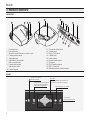
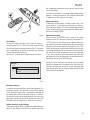
4 PRODUCT OVERVIEW
PROJECTOR
20
5
4
2
3
6
1
13
10
7
12
+12
11
V
USB
1
1.1
9
R/P
r
CO
C/Y
NTR
OL
3
(RS2
B/P
32)
b
HV
GR
APH
19
ICS
S-VI
DEO
RG
B
4
2
S-VI
DEO
REM
OTE
AU
1
DIO
OU
T
MEN
U
18
HD
MI
17
1
MEN
U ES
C
HD
MI
2
SO
UR
CE
O
I
16
15
14
1
2
3
4
5
6
7
8
9
10
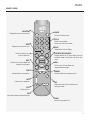
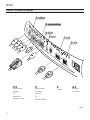
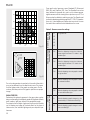
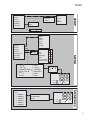
11 Composite video input.
12 S-Video input.
13 RGB / YCrCb input.
14 2 HDMI input
15 Audio output.
16 Remote control input
17 VGA input
18 RS232 serial interface.
19 USB 1.1 interface
20 Motorised screen control outputs.
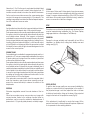
Projection lens.
Lens shift knob.
Remote control IR sensor on front of unit.
Cooling air inlet vents.
Adjustable feet.
Adjustable carry-handle.
Bulb compartment.
Fused power socket.
Main power switch.
Control keypad
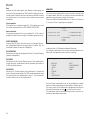
KEYPAD
Set the unit to ON or
Stand-by modes.
Activates the On Screen Display
menus and allows navigation
through the various pages
▲,▼,◀,▶
Navigates between the On Screen Display menus and parameter settings.
Deactivates the On Screen
Calls up the
Source Selection menu.
MENU
ESC
SOURCE