1
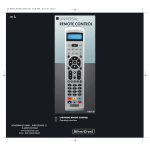
Number buttons o
Enter programme and device
code numbers.
RECALL button a
Accesses the last selected programme slot
Button for one/two digit programme numbers s
F or two digit programme numbers first
press the s button then via the number
buttons o enter the programme number.
When pressed again the display becomes
single digit once more.
Playback buttons and teletext function buttons
The playback buttons d control devices such as DVD/
CD players and video recorders:
Record.
Stop Playback/Record/Wind
Rewind
Start playback
Stop playback
Wind forward
In teletext operation the buttons have the following functions:
Access time
Cancel page access
Enlarge page presentation
Access Index page
Stop automatic page forwarding
for multi page teletexts.
Mystery button
In addition the CH+/- buttons y control the following teletext
functions:
Leaf one page forward
Leaf one page backward
Coloured Fast text buttons f
The coloured fast text buttons open categories in the teletext
selection.
GUIDE button g
The GUIDE button accesses the device's
electronic programme guide.
-7-