1
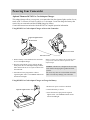
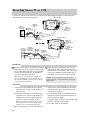
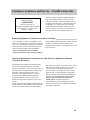
Recording from a TV or VCR
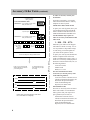
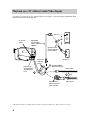
To record on your camcorder from a TV or VCR having AUDIO/VIDEO OUT jacks, use the audio/video
cable that came packed with the camcorder.
AV IN/OUT Switch
PUSH
Pull Here to
Remove
AV TERMINAL
Cover
MIC
Included
Audio/Video
Cable
VIDEO
IN
AV
OUT
Back of
Mono VCR or
TV Monitor
Yellow
VIDEO Jack
White
AUDIO Jack
AUDIO
1
White
Audio Plug
AUDIO
OUT
2
VIDEO
OUT
Yellow
Video Plug
2 Yellow Video Plug
AV IN/OUT Switch
1 White
Audio Plug
PUSH
OR
MIC
IN
VIDEO
Pull Here to
Remove
AV TERMINAL
Cover
AV
OUT
AUDIO
Y-Adapter
Back of
(available from
Stereo VCR or electronics
TV Monitor supply store)
1 White
L
Included
Audio/Video
Cable
R
2
Audio
Plug
AUDIO
OUT
Yellow
VIDEO Jack
White
AUDIO Jack
Yellow
Video Plug
VIDEO
OUT
2 Yellow Video Plug
1 White
Audio Plug
Installation
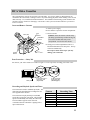
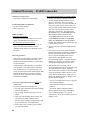
1 Attach the white plug on one end of the included
audio/video cable to the AUDIO OUT jack on the
TV or VCR and the other white plug to the white
AUDIO jack located under the AV TERMINAL
cover on the side of the camcorder.
Note: If your TV or VCR has stereo AUDIO jacks,
attach the AUDIO plug to the one labeled MONO. If
one is not labeled MONO, you may need a Y-adapter
to hear sound from both channels.
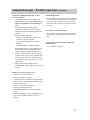
2 Attach the yellow video plug on one end of the
included audio/video cable to the VIDEO OUT
jack on the TV or VCR and the other yellow plug
to the yellow VIDEO jack located under the AV
TERMINAL cover on the side of the camcorder.
Caution: The unauthorized recording of television
programs and other recorded material may infringe the
rights of others.
Operation
1. A. Camcorder connected directly to TV monitor:
Turn on the TV and tune it to the channel you
want to record.
B. Camcorder connected to VCR that is already
connected to TV: Turn on VCR and tune it to
the channel you want to record (or place the
cassette you want to copy in the VCR).
Note: If you want to see what is being recorded,
turn on the TV and tune it to the channel that you
normally use to see the signal from the VCR.
2. Place the camcorder’s AV IN/OUT switch to IN.
34
3. Attach a power supply and slide the camcorder’s
POWER switch to VCR. Insert a blank cassette
with the safety tab intact.
4. Press the small red REC (record) button located
under the viewfinder on the camcorder (REC on
remote) to begin recording.
If you are copying a tape, press PLAY on the VCR
when you are ready to start copying.
5. Press STOP when you are finished.