1
DVR16_LUI_DFUv1_1.book Page 9 Thursday, January 23, 2003 6:38 PM
English
Viewing pictures
Zoom
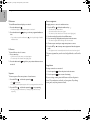
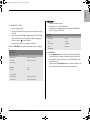
To zoom in on a camera picture:
1. Press the ALT key
.
> The ALT indicator lights.
2. Press the zoom key
.
> The zoom indicator lights.
> The picture is enlarged by a factor of 2.
3. Use the arrow keys to select the area of the picture to be displayed.
4. Press the zoom key
again to zoom in further.
> The picture is enlarged by a factor of 4.
5. Use the arrow keys to select the area of the picture you want to see.
6. Press the zoom key
mode.
again to return to a full picture and leave the zoom
> The zoom indicator no longer lights.
7. Press the ALT key
to return the keys to normal operation.
> The ALT indicator no longer lights.
Philips Communication, Security & Imaging
9