1
Understanding Your DSS
00
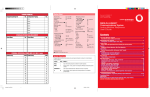
Fixed Page Buttons
Press the fixed Page buttons to change the page
of telephone numbers accessible to your DSS. The
green light turns on next to the Page button that is
active. If you have one DSS, Page 1 accesses the
first 50 extensions, Page 2 accesses the second
50 extensions, Page 3 accesses the third 50
extensions. If you have two DSSs, Page 1
accesses the first 100 extensions, Page 2
accesses the second 100 extensions, Page 3
accesses the third 100 extensions.
Message Status Button
When Message Status is on, the red lights next
to the DSS buttons turn on for extensions with
messages from system operators. Messages from
other sources (such as co-workers and fax
machines) do not cause the red lights to turn on.
The green light next to the Message Status
button turns on when the button is pressed to
tell you that the lights on the DSS are showing
Message Status. Pressing the button again turns
off Message Status and the green light.
10
20
30
40
41
01
11
21
31
02
12
22
32
42
03
13
23
33
43
04
14
24
34
44
05
15
25
35
45
06
16
26
36
46
07
17
27
37
47
08
18
28
38
48
09
19
29
39
49
DSS Buttons
Each DSS has 50 DSS buttons, arranged in 5 columns of 10 buttons each.
DSS buttons have numbers assigned in consecutive order, starting with
the top left corner button. Each button can have 3 numbers assigned to it,
which can correspond to the following:
• Extension numbers for directing or making calls to co-workers
(see pp. 10–12)
• Paging numbers for paging co-workers over speakerphones or
loudspeaker system (see p. 22)
• Numbers for parking calls to the system operator park zones (see p. 22)
• Pools and lines for monitoring the pools’ current status
Direct Voice Mail
Press this button to transfer a call directly to a co-worker’s voice mail
(see p. 15).
Reserved Buttons
These buttons are reserved for future use.
- DSS Button Lights Light
Off
Steady
Fast flashing
Slow flashing
Button/Meaning
Extensions. Phone is not in use and Do Not Disturb is off. With the Message
Status button, the Message light is off at the extension.
Pool. One or more lines in the pool are available.
Line. Not in use (available).
Group Page, Page All, Park Zone. Not in use (available).
Calling Group. The numbering of calls waiting for calling group are fewer than the
programmed maximum.
Extensions. A co-worker is on phone, a call is on hold, or Do Not Disturb is on.
With the Message Status button, the Message light is on at the extension.
Pool. All lines in the pool are busy.
Line. In use (not available).
Group Page, Page All. In use (not available).
Calling Group. The number of calls waiting for the calling group is equal to or
more than the programmed maximum.
Extensions. A co-worker is calling you, or a parked call or call on hold is
returning to you.
Line. A parked or held call is returning to you.
Extensions. A call directed to this extension is returning to you.
Line. A call is ringing on this line at your console or at a co-worker’s phone.
2
QCC FOLDOUT p.2/ 3.0
1
4/14/97, 9:50 AM