1
HOOKUP AND SETTINGS
Precautions
•
Depending on the camera and other equipment there are various ways to connect the
unit. Please refer to the camera manual or manuals for other devices as necessary for
additional connection information.
•
Be sure to switch off the camera before installation and connection.
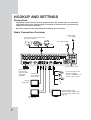
Basic Connection Overview
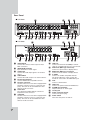
Connect audio
(line input)
Connect the coaxial-type cameras
(Up to 16 cameras).
For audio amplifier
Connect power code
Use this port to
connect PTZ
cameras, DVRs
or keypads
(optional).
Connect mouse for use
with this operating
system or USB device for
backup, copy or others.
Connect network cable for
client control.
Connect
spot monitor.
Connect VGA monitor.
Select the VGA output mode
to use the main monitor. (See
page 19)
BNC or S-VIDEO
type Monitor
12
VGA Monitor