1
Step 1: Install paper options
and printer
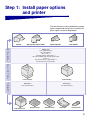
The table illustrates various combinations of paper
options supported by your printer. All models support a duplex unit and envelope feeder.
High-capacity output stacker
Finisher
O
u
t
p
u
t
P
r
i
n
t
e
r
I
n
p
u
t
Output expander
5-Bin mailbox
Attach up to:
Three output expanders,
Two 5-bin mailboxes,
One of each, or
One high-capacity output stacker, or
One output expander and one high-capacity output
stacker, or
One finisher and one output expander or
One finisher and one 5-bin mailbox.
Lexmark T622(n)
Lexmark T620(n)
Attach up to:
Three optional drawers.
Attach up to:
Four optional drawers.
2000-Sheet drawer
250-Sheet drawer
500-Sheet drawer
Duplex unit
Envelope feeder
3