1
Setting Oven
Changing
Controls
temperature
display (°F
The electronic
oven control
when shipped
from the factory.
changed
is set to display
or °C)
°F (Fahrenheit)
The timer
may be
interferring
The display
to show either Fahrenheit
Setting Timer
or Celsius oven
allows you to track your cooking
the cooking
times without
process. The timer
may be set from
1 minute up to 11 hours and 59 minutes.
temperatures.
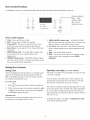
To set the timer:
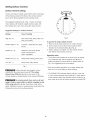
To change temperature display made from °F to °C
(Celsius) or from °C to °F (Fahrenheit):
1. Press Timer Set/Off
1. Press Broil key pad.
2. Press the A
----
appears
in the display.
increments.
2. Press and hold A
until HI appears
in display.
time appears
count down.
in the
3. When
display.
(Fahrenheit)
or V
key pad to toggle
between
F
selection,
press any control
wilt begin to
mode cannot
key pad once. The
To cancel the Timer
be changed
important
this feature
notes:
does not start or stop the cooking
if
may
" The indicator
process.
It
in the kitchen that will beep
alone or when any other oven function
Energy
Saving feature that wilt turn the oven off automatically
the oven is left on for more than 12 hours. The control
to override
the set time has run out:
when the set time has run out. The timer
preset 12-Hour
or V
key pad once.
serves as an extra timer
continuous bake setting or
Energy Saving feature
be programmed
before
A
any time remaining.
when
or Select Clean is active.
has a factory
in Timer:
the timer is active, press and hold the
" The timer
between
The oven control
time remaining
Press Timer Set/Off
display
the oven is set for cooking
12-Hour
The timer
key pad to increase or decrease
note:
The temperature
Changing
in the display.
the time in
when the desired
the set time has run out, the Timer wilt sound with
To change
mode is displayed.
will return to the time of day.
important
to increase
3 beeps and will continue to beep 3 times every 60
seconds until Timer Set/Off key pad is pressed.
While
display
A
Release A
or C (Celsius) mode choices. Release key
pad when desired
5. To accept
the time in one minute
Press and hold
10 minute increments.
3. Press and hold Broil key pad until F or C appears
4. Press either A
key pad.
to increase
light located
above
may be used
is active.
the Timer
Set/Off
key
pad will glow when the timer is active.
to continuously
bake.
The timer
To change
to continuous
Press and hold Timer
beeps once (about
display
indicating
bake mode:
Set/Off
6 seconds).
the control
key pad until the control
- - hr will appear
is now set for continuous
If the timer is active
beeps once (about
indicating
feature.
important
note:
Changing
between
Set/Off
key pad until the control
6 seconds). 12hr will now appear
the control
continuous
saving mode does not change
is set for 12-Hour
bake or the 12-Hour
how the cooktop
by default.
will display.
the minute timer
To view information
of any other active oven function, press the key pad once
for the active function to view status.
Energy Saving feature:
Press and hold Timer
only seconds
when oven cooking,
will show in the display
To change to 12-Hour
Saving
hours and minutes until 1 hour
less than 1 minute remaining
in
bake setting.
display
will display
remains. When less than 1 hour remains, the display will
count down in minutes and seconds. Once the timer has
in
Energy
Energy
controls
operate.
12