1
IR Keyboard.fm Page 10 Wednesday, March 3, 2004 1:25 PM
or division ( / ), and enter decimal points ( . ) using the keys
designated as ten-key function keys. The keys in the numeric
keypad are marked on the front edge of the key to indicate
their secondary functions.
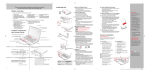
Function Keys
Fn Key
Start Key
Numeric Keypad
Cursor Keys
(surrounded by
black line)
Application Key
Figure 8. Key Layout
Windows Keys
Your keyboard has two Windows keys, consisting of one
Start key and one Application key. The Start key displays the
Start menu. This button functions the same as your onscreen Start menu button. The Application key functions the
same as your right mouse button and displays shortcut
menus for the selected item. (Refer to your Windows documentation for additional information regarding the
Windows keys.)
10