1
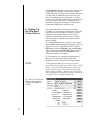
Select Algebraic if you would like the printer
driver to make very simple, yet fast, color balance
adjustments. This option gives you more natural
looking images without actually utilizing any
specific color matching software and without
slowing down the processing speed of the printer
driver. When selected, this color matching method
can be customized by selecting the Controls button.
The FargoColor™ option is only available when the
printerÕs optional color matching software upgrade
has been installed. Select this option to enable color
matching profiles written specifically for your
printer. The FargoColor option automatically
adjusts the color of your image according to
preconfigured printer profiles and default system
profiles. This results in a very precise color match
compliant with ICC standards. Please note that
since the FargoColor option is intended to match
photographic color hues as closely as possible, you
may notice that some colors may appear slightly
muted when printing simple spot colors.
34
Dither Mode
This option only effects objects printed with a
monochrome resin ribbon type or those objects
printed with the monochrome resin panel of a fullcolor ribbon. Click on the Dither Mode down
arrow and select the appropriate dither method
according to the type of image you are printing.
Overlay
This option is only applicable if you are using a
ribbon with a clear overlay panel. If using such a
ribbon, select this option to enable the printer to
place a clear overlay over the entire printable area
of the given card size. Do not select this option,
however, if you are not using a ribbon with a clear
overlay panel or if you intend to apply a separate
overlaminate to the card. Remember that all dyesublimation prints must have either the ribbonÕs
overlay or a separate overlaminate applied to them
to prevent premature wear or fading.
K Panel Graphics
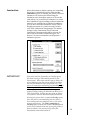
In most application programs, when printing with
a Full-Color YMCKO ribbon, the Color ID Card
Printer driver prints all bitmapped images with the
ribbonÕs yellow, magenta, and cyan color panels
(YMC). Any black contained in these bitmapped
images is printed by combining equal amounts of
yellow, magenta, and cyan. This type of black is
called a ÒcompositeÓ black. The resin black (K)
panel of the ribbon is only used when printing
TrueType black text and TrueType bar codes.