1
Proof Sign-off:
M.Otsuka, CRE M.Moriyama_______
N.Nomoto
_______
_______
R4C624Setup Guide
Rev_C
A5 size
6/15/00
SETUP.FM
Pass 0
Connecting the Printer
If you are connecting the printer to a PC, it is possible to use either the
parallel or USB interface. Macintosh computers must be connected via
the USB interface. Depending upon your geographic location, you may
need to acquire the appropriate cable. See "Options and Consumable
Products" in the Daily Use guide for details.
Note:
In order to connect your PC via the USB interface, your computer must be
equipped with a USB port.
Using the parallel interface for PCs
To connect the printer to a parallel port, you need a shielded, twistedpair parallel cable. Follow the steps below.
1. Make sure both the printer and computer are turned off.
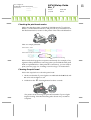
2. Plug the cable connector securely into the printer's interface
connector. Then squeeze the wire clips together until they lock in
place on both sides. If your cable has a ground wire, connect it to the
ground connector below the interface connector.
3. Plug the other end of the cable into the computer's parallel interface.
If there is a ground wire at the computer end of the cable, connect it
to the ground connector at the back of the computer.
R