1
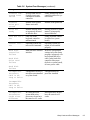
drives, 1-17, 4-9
DSKT connector, 1-12, 4-16
dual-processing, 1-5
E
ECC DIMMs, 1-2
EDO DIMMs, 1-2, 1-13
H
hard-disk drive access indicator, 1-4
hard-disk drives
about, 1-6
bracket, 1-4, 4-12
connectors, 1-12, 4-9, 4-16
location, 1-4
removal, 4-13
help, getting, 2-6
EIDE connectors, 1-12, 4-9, 4-16
eject button
removal, 4-5
I
enhanced dual-interface EIDE subsystem,
IDE1 connector, 1-12, 4-9, 4-16
1-6
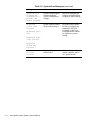
error messages, system, list of, 3-3
ESD, 4-2
expansion cards
card-slot opening, 1-4, 4-17, 4-18
connectors, 1-12, 4-16
removal, 4-18
expansion slots, 1-5
expansion subsystem, advanced, 1-5
IDE2 connector, 1-12, 4-9, 4-16
indicator card, removal, 4-7
indicators, 1-4
initial procedures, 2-1
initialization, error messages, 3-3
interface cables, 1-4
interrupt assignments, list of, 1-14
ISA expansion cards, 1-5, 1-12, 4-16, 4-17,
expansion-card cage
removal, 4-17
4-18
external visual inspection, 2-2
J
F
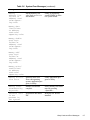
jumpers, list of, 1-14
fan connector, 1-12, 4-16
fatal error messages, 3-3
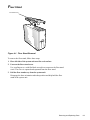
floor stand, removal, 4-3
front panel, 1-4
front-panel inserts, removal, 4-6
2
Dell OptiPlex GXpro Systems Service Manual
K
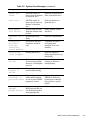
key combinations, to enter System Setup
program, A-1
keyboard connector
location, 1-4, 1-12, 4-16