1
6. SETTING ON THE MENU SCREEN
MENU OPERATION
Note:
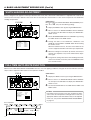
To register the setting values which are changed on the MENU screen to the FILE, select the FILE with the set up SW and the
SELECT button before displaying the MENU screen. Also, make sure to turn off the power before switching the set up SW.
1.7.
<How To Operate>
2. 3.5. 6.
LOCK
MENU
ITEM+
SET
ITEM-
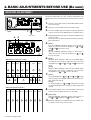
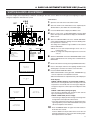
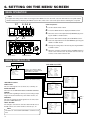
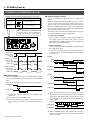
1. Set the LOCK switch to OFF.
2. Press the MENU button to display the MENU screen.
3. Move the cursor to the required item (SUB MENU) by press-
DATA+
ON
BARS
ON
1 2 3 4 RESET
DATA-
OFF
ing the ITEM+ or ITEM– button.
4.7.
CAMERA CONTROL UNIT KY-F58
LOCK
MENU
ITEM+
SET
ITEM-
DATA+
ON
FILES
1
2
3
FREEZE
ITEM+ or ITME– button.
4
BARS
ON
1 2 3 4 RESET
DATA-
SELECT
MEMORY
OFF
POWER
TO CAMERA
WHITE PAINT
VIDEO LEVEL
SET
FULL AUTO
R
4. Press the SET button to display the SUB MENU screen.
5. Select the required item in the SUB MENU by pressing the
LEVEL
ON
B
OFF
PAINT
6. Change the setting value of the item by pressing the DATA+
or DATA– button.
7. When the change is completed, press the MENU button to
return to the normal screen. To prevent from the error operation, set the LOCK switch to ON.
Set up switch
SELECT button
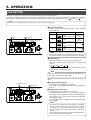
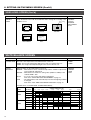
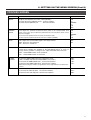
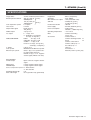
MENU SCREEN FLOW
Normal screen
CURSOR
MENU
(SUB MENU SCREEN)
MENU
– – – MENU – – –
1:VIDEO LEVEL..
2:WHITE BALANCE..
3:FREEZE..
4:PROCESS..
5:TOTAL SETTING..
MAIN MENU screen
– – – SIGNAL LEVEL – – –
Move the cursor with the ITEM+
or ITEM- button to select the SUB
MENU with the SET button.
(Press the MENU button to
return to the normal screen.)
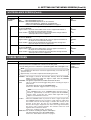
<Sub Menu screen>
VIDEO LEVEL
This sets video signals such as shutter, iris, sensitivity, etc.
WHITE BALANCE
This sets items for WHITE BALANCE and WHITE SHADING.
FREEZE
This sets items regarding the memory such as timing to input
images into the KY-F58 memory, slow shutter function, etc.
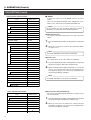
LENS TYPE
IRIS CONTROL
SHUTTER
LEVEL
GAIN
LEVEL
ALC MAX
IRIS DETECT
DETECT AREA
:
:
:
:
:
:
:
:
:
AUTO
AUTO
NORMAL
---------0dB
---------+18dB
NORMAL
NORMAL
Note:
The data set at the TOTAL SETTING is common to all
files.
18
COLOR TEMP
WHITE BAL
SHADING MODE
LEVEL <R>
LEVEL <G>
LEVEL <B>
:
:
:
:
:
:
3200K
AUTO
OFF
----------------------------
– – – MEMORY – – –
FREEZE
FREEZE TRG
HI-RESO
CAPTURE
RANDOM SHUT
SLOW SHUT
:
:
:
:
:
:
NORMAL
ALTERNATE
OFF
FRAME
-------------------
White balance setting menu screen
– – – PROCESS(1/2) – – –
Memory environment setting screen
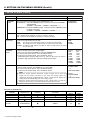
PROCESS
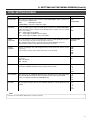
This sets fine settings for output signals such as contour compensation, KNEE POINT, etc.
TOTAL SETTING
For setting the connection to units other than KY-F58 such as
D-SUB terminal, lens control terminal, external sync, etc.
– – – WHITE BALANCE – – –
Image setting menu screen
– – – TOTAL SETTINGS – – –
D-SUB OUT
ON SYNC
LENS CONTROL
INDICATOR
CABLE LENGTH
H PHASE
SC CORASE
SC FINE
:
:
:
:
:
:
:
:
R/G/B
OFF
CONTROLLER
OFF
5M
0
0
0
Total setting menu screen
DETAIL
MASTER BLACK
NEGA
AUTO KNEE
KNEE POINT
WHITE CLIP
GAMMA
FLARE<R>
FLARE<B>
:
:
:
:
:
:
:
:
:
NORMAL
NORMAL
OFF
OFF
100%
110%
ON
NORMAL
NORMAL
– – – PROCESS(2/2) – – –
ABL
LEVEL
: ADJUST
: NORMAL
Process setting screen
ITEM+, –
button