1
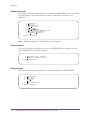
User’s Guide: CUA Interface
OMEGAMON II ® for DB2
Version 540
G251246500
August 2004
Candle Corporation
100 North Sepulveda Blvd.
Registered trademarks and service marks of Candle Corporation: AF/OPERATOR, AF/REMOTE, Availability Command Center, Candle, Candle
CIRCUIT, Candle Command Center, Candle Direct logo, Candle eDelivery, Candle Electronic Customer Support, Candle logo, Candle Management Server,
Candle Management Workstation, CandleLight, CandleNet, CandleNet Command Center, CandleNet eBusiness Platform, CandleNet Portal,
CL/CONFERENCE, CL/SUPERSESSION, CommandWatch, CT, CT/Data Server, CT/DS, DELTAMON, DEXAN, eBA, eBA*ServiceMonitor,
eBA*ServiceNetwork, eBusiness at the speed of light, eBusiness Assurance, eBusiness Institute, ELX, EPILOG, ESRA, ETEWatch, IntelliWatch, IntelliWatch
Pinnacle, MQSecure, MQView, OMEGACENTER, OMEGAMON, OMEGAMON II, OMEGAMON Monitoring Agent, OMEGAMON Monitoring Agents,
OMEGAVIEW, OMEGAVIEW II, PQEdit, Response Time Network, Roma, SitePulse, Solutions for Networked Applications, Solutions for Networked
Businesses, TMA2000, Transplex, and Volcano.
Trademarks and service marks of Candle Corporation: AF/Advanced Notification, AF/PERFORMER, Alert Adapter, Alert Adapter Plus, Alert Emitter,
AMS, Amsys, AutoBridge, AUTOMATED FACILITIES, Availability Management Systems, Business Services Composer, Candle Alert, Candle Business Partner
Logo, Candle Command Center/SentinelManager, Candle CommandPro, Candle eSupport, Candle Insight, Candle InterFlow, Candle Managing what matters
most, Candle Service Suite, Candle Technologies, CandleNet, CandleNet 2000, CandleNet Conversion, CandleNet eBP, CandleNet eBP Access for S.W.I.F.T.,
CandleNet eBP Administrator, CandleNet eBP Broker Access for Mercator or MQSI, CandleNet eBP Configuration, CandleNet eBP Connector, CandleNet eBP
File Transfer, CandleNet eBP Host Connect, CandleNet eBP Object Access, CandleNet eBP Object Browser, CandleNet eBP Secure Access, CandleNet eBP
Service Directory, CandleNet eBP Universal Connector, CandleNet eBP Workflow Access, CandleNet eBusiness Assurance, CandleNet eBusiness Exchange,
CandleNet eBusiness Platform Administrator, CandleNet eBusiness Platform Connector, CandleNet eBusiness Platform Connectors, CandleNet eBusiness
Platform Powered by Roma Technology, CandleNet eBusiness Platform Service Directory, Candle Vision, CCC, CCP, CCR2, CEBA, CECS, CICAT,
CL/ENGINE, CL/GATEWAY, CL/TECHNOLOGY, CMS, CMW, Command & Control, Connect-Notes, Connect-Two, CSA ANALYZER, CT/ALS,
CT/Application Logic Services, CT/DCS, CT/Distributed Computing Services, CT/Engine, CT/Implementation Services, CT/IX, CT/Workbench, CT/Workstation
Server, CT/WS, !DB Logo, !DB/DASD, !DB/EXPLAIN, !DB/MIGRATOR, !DB/QUICKCHANGE, !DB/QUICKCOMPARE, !DB/SMU, !DB/Tools,
!DB/WORKBENCH, Design Network, e2e, eBA*SE, eBAA, eBAAuditor, eBAN, eBANetwork, eBAAPractice, eBP, eBusiness Assurance Network, eBusiness at
the speed of light, eBusiness at the speed of light logo, eBusiness Exchange, eBX, End-to-End, eNotification, ENTERPRISE, Enterprise Candle Command
Center, Enterprise Candle Management Workstation, Enterprise Reporter Plus, ER+, ERPNet, ETEWatch Customizer, HostBridge, InterFlow, Candle InterFlow,
Lava Console, Managing what matters most, MessageMate, Messaging Mastered, Millennium Management Blueprint, MMNA, MQADMIN, MQEdit,
MQEXPERT, MQMON, NBX, NC4, NetGlue, NetGlue Extra, NetMirror, NetScheduler, New Times, New Team, New Readiness, OMA, OMC Gateway, OMC
Status Manager, OMEGACENTER Bridge, OMEGACENTER Gateway, OMEGACENTER Status Manager, OMEGAMON/e, OMEGAMON Management
Center, OSM, PathWAI, PC COMPANION, Performance Pac, Powered by Roma Technology, PowerQ, PQConfiguration, PQScope, Roma Application
Manager, Roma Broker, Roma BSP, Roma Connector, Roma Developer, Roma FS/A, Roma FS/Access, RomaNet, Roma Network, Roma Object Access, Roma
Secure, Roma WF/Access, Roma Workflow Access, RTA, RTN, SentinelManager, Somerset, Somerset Systems, Status Monitor, The Millennium Alliance, The
Millennium Alliance logo, The Millennium Management Network Alliance, Tracer, Unified Directory Services, WayPoint, and ZCopy.
Trademarks and registered trademarks of other companies: AIX, DB2, MQSeries and WebSphere are registered trademarks of International Business
Machines Corporation. Citrix, WinFrame, and ICA are registered trademarks of Citrix Systems, Inc. Multi-Win and MetaFrame are trademarks of Citrix Systems,
Inc. SAP is a registered trademark and R/3 is a trademark of SAP AG. UNIX is a registered trademark in the U.S. and other countries, licensed exclusively
through X/Open Company Ltd. HP-UX is a trademark of Hewlett-Packard Company. SunOS is a trademark of Sun Microsystems, Inc. All other company and
product names used herein may be trademarks or registered trademarks of their respective owners.
Copyright © August 2004, Candle Corporation, a California corporation. All rights reserved. International rights secured.
Threaded Environment for AS/400, Patent No. 5,504,898; Data Server with Data Probes Employing Predicate Tests in Rule Statements (Event Driven
Sampling), Patent No. 5,615,359; MVS/ESA Message Transport System Using the XCF Coupling Facility, Patent No. 5,754,856; Intelligent Remote Agent for
Computer Performance Monitoring, Patent No. 5,781,703; Data Server with Event Driven Sampling, Patent No. 5,809,238; Threaded Environment for
Computer Systems Without Native Threading Support, Patent No. 5,835,763; Object Procedure Messaging Facility, Patent No. 5,848,234; End-to-End
Response Time Measurement for Computer Programs, Patent No. 5,991,705; Communications on a Network, Patent Pending; Improved Message Queuing
Based Network Computing Architecture, Patent Pending; User Interface for System Management Applications, Patent Pending.
NOTICE: This documentation is provided with RESTRICTED RIGHTS. Use, duplication, or disclosure by the Government is subject to restrictions set forth in
the applicable license agreement and/or the applicable government rights clause.
This documentation contains confidential, proprietary information of Candle Corporation that is licensed for your internal use only. Any unauthorized use,
duplication, or disclosure is unlawful.
2
OMEGAMON II for DB2 User’s Guide: CUA Interface, Version 540
Contents
List of Figures
. . . . . . . . . . . . . . . . . . . . . . . . . . . . . . . . . . . . . . . . . . . . . . . . . . . . . . . . . . . . . .5
Preface
. . . . . . . . . . . . . . . . . . . . . . . . . . . . . . . . . . . . . . . . . . . . . . . . . . . . . . . . . . . . . .7
About This Book . . . . . . . . . . . . . . . . . . . . . . . . . . . . . . . . . . . . . . . . . . . . . . . . . . . . . . .8
Adobe Portable Document Format . . . . . . . . . . . . . . . . . . . . . . . . . . . . . . . . . . . . . . . . .9
Documentation Conventions . . . . . . . . . . . . . . . . . . . . . . . . . . . . . . . . . . . . . . . . . . . . .10
Candle Customer Service and Satisfaction . . . . . . . . . . . . . . . . . . . . . . . . . . . . . . . . . .12
What’s New
. . . . . . . . . . . . . . . . . . . . . . . . . . . . . . . . . . . . . . . . . . . . . . . . . . . . . . . . . . . . . 15
Chapter 1.
Getting Started . . . . . . . . . . . . . . . . . . . . . . . . . . . . . . . . . . . . . . . . . . . . . . . . . 19
Signing On . . . . . . . . . . . . . . . . . . . . . . . . . . . . . . . . . . . . . . . . . . . . . . . . . . . . . . . . . .20
Setting Logon Options. . . . . . . . . . . . . . . . . . . . . . . . . . . . . . . . . . . . . . . . . . . . . . . . . .22
Signing Off . . . . . . . . . . . . . . . . . . . . . . . . . . . . . . . . . . . . . . . . . . . . . . . . . . . . . . . . . .24
Panel Features . . . . . . . . . . . . . . . . . . . . . . . . . . . . . . . . . . . . . . . . . . . . . . . . . . . . . . . .25
Data Panels . . . . . . . . . . . . . . . . . . . . . . . . . . . . . . . . . . . . . . . . . . . . . . . . . . . . . . . . . .27
Action Bar . . . . . . . . . . . . . . . . . . . . . . . . . . . . . . . . . . . . . . . . . . . . . . . . . . . . . . . . . . .29
Action Codes. . . . . . . . . . . . . . . . . . . . . . . . . . . . . . . . . . . . . . . . . . . . . . . . . . . . . . . . .33
Function Keys . . . . . . . . . . . . . . . . . . . . . . . . . . . . . . . . . . . . . . . . . . . . . . . . . . . . . . . .34
Getting Help . . . . . . . . . . . . . . . . . . . . . . . . . . . . . . . . . . . . . . . . . . . . . . . . . . . . . . . . .36
Chapter 2.
Customizing OMEGAMON II . . . . . . . . . . . . . . . . . . . . . . . . . . . . . . . . . . . . . . 39
Introduction . . . . . . . . . . . . . . . . . . . . . . . . . . . . . . . . . . . . . . . . . . . . . . . . . . . . . . . . .40
Specifying Panel Preferences . . . . . . . . . . . . . . . . . . . . . . . . . . . . . . . . . . . . . . . . . . . . .41
Specifying Terminal Options . . . . . . . . . . . . . . . . . . . . . . . . . . . . . . . . . . . . . . . . . . . . .43
Setting Thresholds . . . . . . . . . . . . . . . . . . . . . . . . . . . . . . . . . . . . . . . . . . . . . . . . . . . . .46
Assigning User Authorities . . . . . . . . . . . . . . . . . . . . . . . . . . . . . . . . . . . . . . . . . . . . . . .48
Maintaining Profiles. . . . . . . . . . . . . . . . . . . . . . . . . . . . . . . . . . . . . . . . . . . . . . . . . . . .49
Setting Filtering Options for Near-Term Thread History . . . . . . . . . . . . . . . . . . . . . . . . .54
Specifying Save Options for SQL Text . . . . . . . . . . . . . . . . . . . . . . . . . . . . . . . . . . . . . .56
Using the Callable Interface . . . . . . . . . . . . . . . . . . . . . . . . . . . . . . . . . . . . . . . . . . . . . .57
Chapter 3.
Using OMEGAMON II . . . . . . . . . . . . . . . . . . . . . . . . . . . . . . . . . . . . . . . . . . . 65
Monitoring from the System Status Panel . . . . . . . . . . . . . . . . . . . . . . . . . . . . . . . . . . .66
System Status Components and Related Exceptions . . . . . . . . . . . . . . . . . . . . . . . . . . .69
Investigating an Active Threads Alert . . . . . . . . . . . . . . . . . . . . . . . . . . . . . . . . . . . . . . .77
Evaluating and Modifying Thresholds . . . . . . . . . . . . . . . . . . . . . . . . . . . . . . . . . . . . . .78
Reviewing Near-Term History Data . . . . . . . . . . . . . . . . . . . . . . . . . . . . . . . . . . . . . . . .80
Using the OMEGAMON II for DB2 Background Application Trace Facility . . . . . . . . . .82
Using the IFCID Trace Facility . . . . . . . . . . . . . . . . . . . . . . . . . . . . . . . . . . . . . . . . . . . .85
3
Chapter 4.
Using OMEGAMON II for DB2 with !DB/EXPLAIN . . . . . . . . . . . . . . . . . . . . . 89
Background about !DB/EXPLAIN for DB2 . . . . . . . . . . . . . . . . . . . . . . . . . . . . . . . . . .90
Using OMEGAMON II and !DB/EXPLAIN Complementary Functions . . . . . . . . . . . . . .91
Using the OMEGAMON II for DB2 Callable Interface . . . . . . . . . . . . . . . . . . . . . . . . . .93
Moving Interactively between !DB/EXPLAIN and OMEGAMON II . . . . . . . . . . . . . . .102
Using the Copy-and-Paste Facility in OMEGAMON II . . . . . . . . . . . . . . . . . . . . . . . . .104
Accessing OMEGAMON II Trace Information from !DB/EXPLAIN. . . . . . . . . . . . . . . .106
Appendix A.
Panel Navigation Flowcharts . . . . . . . . . . . . . . . . . . . . . . . . . . . . . . . . . . . . . . 109
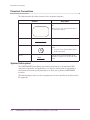
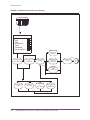
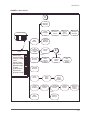
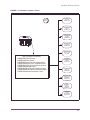
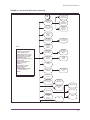
Flowchart Conventions . . . . . . . . . . . . . . . . . . . . . . . . . . . . . . . . . . . . . . . . . . . . . . . .110
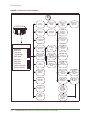
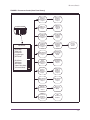
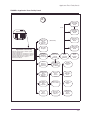
Workloads Panels . . . . . . . . . . . . . . . . . . . . . . . . . . . . . . . . . . . . . . . . . . . . . . . . . . . .112
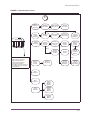
Resources Panels . . . . . . . . . . . . . . . . . . . . . . . . . . . . . . . . . . . . . . . . . . . . . . . . . . . . .115
Alerts Panels . . . . . . . . . . . . . . . . . . . . . . . . . . . . . . . . . . . . . . . . . . . . . . . . . . . . . . . .118
Installation Parameters Panels . . . . . . . . . . . . . . . . . . . . . . . . . . . . . . . . . . . . . . . . . . .120
Application Trace Facility Panels . . . . . . . . . . . . . . . . . . . . . . . . . . . . . . . . . . . . . . . . .122
Object Analysis Panels. . . . . . . . . . . . . . . . . . . . . . . . . . . . . . . . . . . . . . . . . . . . . . . . .124
Thread Detail GoTo Panels . . . . . . . . . . . . . . . . . . . . . . . . . . . . . . . . . . . . . . . . . . . . .126
Index
4
. . . . . . . . . . . . . . . . . . . . . . . . . . . . . . . . . . . . . . . . . . . . . . . . . . . . . . . . . . . . 129
OMEGAMON II for DB2 User’s Guide: CUA Interface, Version 540
List of Figures
FIGURE 1.
FIGURE 2.
FIGURE 3.
FIGURE 4.
FIGURE 5.
FIGURE 6.
FIGURE 7.
FIGURE 8.
FIGURE 9.
FIGURE 10.
FIGURE 11.
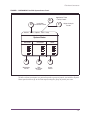
OMEGAMON II for DB2 System Status Panel . . . . . . . . . . . . . . . . . . . . . . . . . . . . . . .111
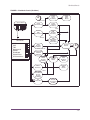
Workloads Panels (Realtime) . . . . . . . . . . . . . . . . . . . . . . . . . . . . . . . . . . . . . . . . . . . .113
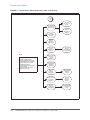
Workloads Panels (Near-term history) . . . . . . . . . . . . . . . . . . . . . . . . . . . . . . . . . . . . .114
Resources Panels (Realtime) . . . . . . . . . . . . . . . . . . . . . . . . . . . . . . . . . . . . . . . . . . . .116
Resources Panels (Near-Term History) . . . . . . . . . . . . . . . . . . . . . . . . . . . . . . . . . . . . .117
Alerts Panels . . . . . . . . . . . . . . . . . . . . . . . . . . . . . . . . . . . . . . . . . . . . . . . . . . . . . . . .119
Installation Parameters Panels . . . . . . . . . . . . . . . . . . . . . . . . . . . . . . . . . . . . . . . . . . .121
Application Trace Facility Panels . . . . . . . . . . . . . . . . . . . . . . . . . . . . . . . . . . . . . . . . .123
Object Analysis Panels. . . . . . . . . . . . . . . . . . . . . . . . . . . . . . . . . . . . . . . . . . . . . . . . .125
Thread Detail GoTo Panels (Realtime). . . . . . . . . . . . . . . . . . . . . . . . . . . . . . . . . . . . .127
Thread History Detail GoTo Panels (Near-Term History) . . . . . . . . . . . . . . . . . . . . . . .128
5
6
OMEGAMON II for DB2 User’s Guide: CUA Interface, Version 540
P
Preface
This guide is an introduction to the CUA™ interface for OMEGAMON II® for DB2®,
Version 540. The CUA interface is based on IBM's Common User Access™ standards
designed to facilitate ease of learning and use. OMEGAMON II® for DB2 is a component
of OMEGAMON XE for DB2 on z/OS.
This manual is intended for data center personnel who are responsible for monitoring
DB2 performance, systems programmers and performance analysts who are responsible
for a DB2 subsystem, application programmers who wish to monitor their programs, and
database administrators.
This document covers basic information you need to get started using OMEGAMON,
including signing on and off, getting help, and customizing OMEGAMON II to meet the
requirements of your installation. It also provides an overview of the main navigation
paths in OMEGAMON in “Panel Navigation Flowcharts” on page 109.
Note: OMEGAMON II for DB2 also supports the classic interface, which allows you to
navigate in OMEGAMON using a menu system. If you are interested in learning
about the classic interface, refer to the OMEGAMON II for DB2 Tuning Guide,
Version 540.
7
About This Book
About This Book
Who should read this book
This manual is intended for data center personnel who are responsible for monitoring
DB2 performance, systems programmers and performance analysts who are responsible
for a DB2 subsystem, application programmers who wish to monitor their programs, and
database administrators.
Documentation set information
I
OMEGAMON II for DB2 Users Guide: CUA Interface, Version 540
I
OMEGAMON II for DB2 Reference Manual: Classic Interface, Version 540
I
OMEGAMON II for DB2 Tuning Guide, Version 540
I
OMEGAMON II for DB2 Historical Reporting Guide, Version 540
I
OMEGAMON II for DB2 Configuration and Customization Guide, Version 540
I
Installation and Configuration of Candle Products on OS/390 and z/OS, Version 350
I
!DB/Tools Installation and Customization Guide, Version 510
I
Candle Products Messages Manual
Where to look for information
For more information related to this product, please see the
8
I
technical documentation CD-ROM that came with your product
I
technical documentation information available on the Candle Web site at
www.candle.com
I
online help provided with this product
OMEGAMON II for DB2 User’s Guide: CUA Interface, Version 540
Adobe Portable Document Format
Adobe Portable Document Format
Introduction
Candle supplies documentation in the Adobe Portable Document Format (PDF). The
Adobe Acrobat Reader prints PDF documents with the fonts, formatting, and graphics in
the original document. To print a Candle document, do the following:
1. Specify the print options for your system. From the Acrobat Reader Menu bar, select
File > Print Setup... and make your selections. A setting of 300 dpi is highly
recommended as is duplex printing if your printer supports it.
2. To start printing, select File > Print on the Acrobat Reader Menu bar.
3. On the Print popup, select one of the Print Range options for
– a single page
–
a range of pages
–
all of the document
4. (Optional) To fit oversize pages to the paper size currently loaded on your printer,
select the Shrink to Fit option.
Printing problems?
Your printer ultimately determines the print quality of your output. Sometimes printing
problems can occur. If you experience printing problems, potential areas to check are:
I
settings for your printer and printer driver. (The dpi settings for both your driver and
printer should be the same. A setting of 300 dpi is recommended.)
I
the printer driver you are using. (You may need a different printer driver or the
Universal Printer driver from Adobe. This free printer driver is available at
www.adobe.com.)
I
the halftone/graphics color adjustment for printing color on black and white printers.
(Check the printer properties under Start > Settings > Printer. For more
information, see the online help for the Acrobat Reader.)
I
the amount of available memory in your printer. (Insufficient memory can cause a
document or graphics to fail to print.)
For additional information on printing problems, refer to the documentation for your
printer or contact your printer manufacturer.
9
Documentation Conventions
Documentation Conventions
Introduction
Candle documentation adheres to accepted typographical conventions for command
syntax. Conventions specific to Candle documentation are discussed in the following
sections.
Panels and figures
The panels and figures in this document are representations. Actual product panels may
differ.
Required blanks
The slashed-b (!) character in examples represents a required blank. The following
example illustrates the location of two required blanks.
!eBA*ServiceMonitor!
!0990221161551000
Revision bars
Revision bars (|) may appear in the left margin to identify new or updated material.
Variables and literals in command syntax examples
In examples of command syntax for the OS/390, VM, OS/400, and NonStop Kernel
platforms, uppercase letters indicate actual values (literals) that the user should type;
lowercase letters indicate variables that represent data supplied by the user:
LOGON APPLID (cccccccc)
However, for the Windows and UNIX platforms, variables are shown in italics:
-candle.kzy.instrument.control.file=instrumentation_control_file_name
-candle.kzy.agent.parms=agent_control_file_name
Note: In ordinary text, variable names appear in italics, regardless of platform.
Symbols
The following symbols may appear in command syntax:
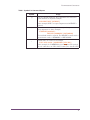
Table 1. Symbols in Command Syntax
Symbol
|
Usage
The “or” symbol is used to denote a choice. Either the argument
on the left or the argument on the right may be used. Example:
YES | NO
In this example, YES or NO may be specified.
10
OMEGAMON II for DB2 User’s Guide: CUA Interface, Version 540
Documentation Conventions
Table 1. Symbols in Command Syntax
Symbol
[]
Usage
Denotes optional arguments. Those arguments not enclosed in
square brackets are required. Example:
APPLDEST DEST [ALTDEST]
In this example, DEST is a required argument and ALTDEST is
optional.
{}
Some documents use braces to denote required arguments, or to
group arguments for clarity. Example:
COMPARE {workload} REPORT={SUMMARY | HISTOGRAM}
The workload variable is required. The REPORT keyword must be
specified with a value of SUMMARY or HISTOGRAM.
_
Default values are underscored. Example:
COPY infile outfile - [COMPRESS={YES | NO}]
In this example, the COMPRESS keyword is optional. If specified,
the only valid values are YES or NO. If omitted, the default is YES.
11
Candle Customer Service and Satisfaction
Candle Customer Service and Satisfaction
Background
To assist you in making effective use of our products, Candle offers a variety of
easy-to-use online support resources. The Candle Web site provides direct links to a
variety of support tools that include these services:
eSupport
allows you to create and update service requests opened with Customer
Service and Satisfaction (CSS).
eDelivery
allows you to download products, documentation, and maintenance 24
hours a day, 7 days a week.
eNotification notifies you of product updates and new releases.
In addition, you can find information about training, maintenance plans, consulting and
services, and other useful support resources. Refer to the Candle Web site at
www.candle.com for detailed customer service information.
Candle Customer Service and Satisfaction contacts
You will find the most current information about how to contact Candle CSS by
telephone or email on the Candle Web site. Go to the www.candle.com support section,
and choose the link to Support Contacts to locate your regional support center.
12
OMEGAMON II for DB2 User’s Guide: CUA Interface, Version 540
13
14
OMEGAMON II for DB2 User’s Guide: CUA Interface, Version 540
W
What’s New
This section identifies the enhancements for Version 540 of OMEGAMON II for DB2.
OMEGAMON II® for DB2 is a component of OMEGAMON XE for DB2 on z/OS, Version
300. The changes and additions in OMEGAMON II for DB2 provide new function in
addition to reflecting support for features in IBM DB2 Version 8.1. OMEGAMON II for
DB2 enables you to obtain additional information about the performance of your
systems. This additional information allows you more flexibility in managing various types
of threads. An overview of each new or changed function follows.
Note: With this version, OMEGAMON II for DB2 no longer supports IBM DB2 Version
5.
Historical Reporter redesign
With OMEGAMON II for DB2, significant enhancements were made to the historical
reporting component. Some of these new features are:
I
Sequential output files are produced from the online collector.
I
All record types can be loaded into DB2 tables using either the LOAD utility or using
SQL INSERT.
I
Near term history collector for displays is configured separately from long term history
for reports.
I
New fields have been added to the Summarizer.
New IFCID-based reports
I
Numerous new IFCID-based reports are provided. See the OMEGAMON II for DB2
Historical Reporting Guide, Version 540, for a list of the supported IFCIDs. See the
README provided with this product for instructions on generating the IFCID-based
reports.
I
You can generate your own reports, based on the IFCIDS selected, using the
product-provided COBOL, C, and SAS record layouts. All instrumentation record
types (IFCIDs) are supported. The data are extracted from SMF, GTF or from the
Online Collector input.
15
64-bit addressing support
Version 8 of DB2 UDB for z/OS supports 64-bit virtual storage. The zSeries 64-bit
architecture allows DB2 UDB for z/OS to move various storage areas above the 2-GB bar.
OMEGAMON II for DB2 Version 540 now provides the ability to display information from
above the 2-GB bar structures.
64-bit addressing support applies to the:
I
EDM pool
I
buffer pools
I
sort pools
I
RID pools
Long name support
OMEGAMON II for DB2 Version 540 includes support for long object names. New
displays are provided in support of this feature.
Unicode support
Unicode support includes character conversion from Unicode to EBCDIC for online
displays and batch reports.
Enclave support
New displays for stored procedures using Work Load Manager (WLM) enclaves include:
I
Enclave Token
I
Service Class Period
I
Performance Index
I
Service Class
I
WLM Environment Name
Stored procedure Address Spaces is being phased out in DB2 Version 8. All stored
procedures now use WLM.
New filtering for Near Term History display
These keywords are added to the Near Term History display:
16
I
COMMIT
I
CORRID
I
DB2 CPU TIME
I
DB2 ELAP TIME
I
DEADLK/TIMEOUT
I
I/O ELAP TIME
OMEGAMON II for DB2 User’s Guide: CUA Interface, Version 540
I
GETPAGES
I
LOCK ESCAL
I
PACKAGE
See the OMEGAMON II for DB2 Reference Manual, Version 540, for descriptions of
these new fields.
New DSNZPARM fields
The DSNZPARM Thread Parameters panel now includes numerous new fields.
Distributed Thread display improvements
The Distributed Thread display improvements include the addition of these fields:
I
Host Name
I
Workstation identifier
I
End user ID on workstation
I
Transaction ID on workstation
17
18
OMEGAMON II for DB2 User’s Guide: CUA Interface, Version 540
1
Getting Started
Introduction
This chapter is intended to help you get started using the CUA interface for OMEGAMON
II for DB2 to monitor your DB2 subsystem.
Chapter Contents
Signing On . . . . . . . . . . . . . . . . . . . . . . . . . . . . . . . . . . . . . . . . . . . . . . . . . . . . . . . . .
Setting Logon Options . . . . . . . . . . . . . . . . . . . . . . . . . . . . . . . . . . . . . . . . . . . . . . . .
Signing Off . . . . . . . . . . . . . . . . . . . . . . . . . . . . . . . . . . . . . . . . . . . . . . . . . . . . . . . . .
Panel Features . . . . . . . . . . . . . . . . . . . . . . . . . . . . . . . . . . . . . . . . . . . . . . . . . . . . . .
Data Panels . . . . . . . . . . . . . . . . . . . . . . . . . . . . . . . . . . . . . . . . . . . . . . . . . . . . . . . .
Action Bar . . . . . . . . . . . . . . . . . . . . . . . . . . . . . . . . . . . . . . . . . . . . . . . . . . . . . . . . .
Action Codes . . . . . . . . . . . . . . . . . . . . . . . . . . . . . . . . . . . . . . . . . . . . . . . . . . . . . . .
Function Keys . . . . . . . . . . . . . . . . . . . . . . . . . . . . . . . . . . . . . . . . . . . . . . . . . . . . . . .
Getting Help . . . . . . . . . . . . . . . . . . . . . . . . . . . . . . . . . . . . . . . . . . . . . . . . . . . . . . . .
Getting Started
20
22
24
25
27
29
33
34
36
19
Signing On
Signing On
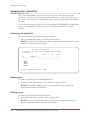
Logging on to the application
You access the CUA interface for OMEGAMON II by logging on to a VTAM® application.
The name of the application (the applid) is defined at your site when the product is
installed. Depending on the system configuration at your site, you may be required either
to select the application from a menu, or issue a command.
To log on to the application: Select the application from the menu or issue the following
command from a VTAM terminal:
LOGON APPLID(applid)
where applid is the application name.
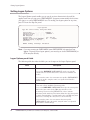
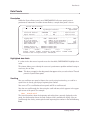
Note: The Candle logo panel appears. The logo panel identifies the product by name
and version, and presents copyright information. Use this panel to verify that you
have logged on to the correct application.
Sign On panel
To begin the sign-on, from the logo panel:
I
Press Enter
Result: The Sign On panel appears.
OMEGAMON II for DB2 - V540
D203-0330
Sign On panel
Type the requested information, and press Enter.
Identification
Userid . . . . . .______
Password . . . . .
Change Password. . No +
Yes/No
Additional Information
Group . . . . . .______
Account . . . . ._____________________________________________
F1=Help
F3=Exit
F4=Prompt
F6=panel ID
F11=Logon Options
You are required by OMEGAMON II to enter information for only two fields on the
Sign-On Panel: Userid and Password. Other fields may be optional or required depending
on the security system at your site. Contact your security administrator for more
information.
When you complete your sign-on information, press Enter to display the System Status
panel. If this is the first time you are signing on to OMEGAMON, the Logon Options panel
will appear instead of the System Status panel.
Note: During the sign-on, you can display help by pressing F1. You can stop the sign-on
at any time by pressing F3.
20
OMEGAMON II for DB2 User’s Guide: CUA Interface, Version 540
Signing On
Sign On panel fields
The fields of the Sign On Panel are defined in the table below.
Field
Description
Userid
Your 1–8 character user ID, which authorizes your access to
OMEGAMON II.
Password
Your 1–8 character private password, which authorizes your access to
OMEGAMON II.
Change Password
This field enables you to change your password.
To leave your password unchanged, accept the default, No.
To change your password, type Yes. You are prompted for a new
password.
Group
Your product administrator may assign users who need to do the same
tasks or have the same authorization to a particular group. If you have a
group identifier, enter it here.
Account
For auditing or security purposes, your product administrator may assign
users to a particular account. If you have an account identifier, enter it
here.
Accessing OMEGAMON from OMEGAVIEW
To access OMEGAMON II from OMEGAVIEW, Candle’s centralized status manager,
select an OMEGAMON II for DB2 CUA status item. The panel that you zoom to will
depend on which status item you selected within OMEGAVIEW.
For information about creating a status item under OMEGAVIEW and defining zoom
destinations, see the OMEGAVIEW Configuration and Customization Guide.
Getting Started
21
Setting Logon Options
Setting Logon Options
The Logon Options panel enables you to specify session characteristics that will be
applied each time you sign on to OMEGAMON II. It appears automatically the first time
you sign on as a new OMEGAMON II user. To modify your logon options at any time,
press F11 from the Sign On panel.
Logon Options
Type the correct values, then press Enter.
User Profile . . . . . . . . . $DEFAULT +
Subsystem Profile . . . . . . . $DEFAULT +
Application ID . . . . . . . .
DB2 Subsystem . . . . . . . . .
Logical Rows . . . . . . . . . 255 100-999
Migrate Profile from OMEGAMON . No
+ (Yes/No)
OMEGAMON Profile to Migrate . .
User Data . . . . . . . . . . .
ENTER
F1=Help
F4=Prompt
F12=Cancel
Note: If you are zooming to OMEGAMON from OMEGAVIEW, this panel will not
appear. To specify these logon options, you must log on to the OMEGAMON for
CUA interface directly.
Logon Options panel fields
The following table describes the fields you can change on the Logon Options panel.
Field
User Profile
Description
The name of the user profile to be used for this session.
If you select $DEFAULT, OMEGAMON II uses the user profile
named with your user ID. Press F4 to view a list of available user
profiles.
If you enter the name of a nonexistent user profile, OMEGAMON II
creates the profile, using the name you specified and Candle’s
default settings.
Subsystem Profile
The name of your subsystem profile to be used for this session. Press
F4 to view a list of available subsystem profiles.
If you select $DEFAULT, OMEGAMON II uses the subsystem profile
that has the same name as the DB2 subsystem ID you are
monitoring. You must select $DEFAULT in order to activate
automatic profile switching. This feature allows the subsystem profile
to switch automatically to one that matches the new DB2 subsystem
whenever you change the subsystem you are monitoring.
If you enter the name of a non-existent subsystem profile,
OMEGAMON II creates the profile, using the name you specified
and Candle’s default settings.
22
OMEGAMON II for DB2 User’s Guide: CUA Interface, Version 540
Setting Logon Options
Field
Description
Application ID
The OMEGAMON II classic interface VTAM mode application
identifier.
DB2 subsystem
The DB2 subsystem ID that you want to monitor.
Logical rows
The number of logical rows (100–9999).
Migrate Profile from
OMEGAMON
Enter Yes if you want to migrate a classic interface user profile to a
CUA subsystem profile. Use this feature only to provide a set of
values to use as a starting point for customizing the CUA subsystem
profile.
When you migrate classic threshold values, they become CUA critical
values.
If a CUA exception is set to trip when it exceeds its threshold, then
the warning threshold is set to 80% of the critical threshold. If a CUA
exception is set to trip when it falls below its threshold, then the
warning threshold is set to 125% of the critical threshold.
For exceptions that are not associated with threshold values, the CUA
critical value is set to on, and the warning value is set to off. If the
classic STATE= value is ON, the CUA monitor value is YES. If the
value for STATE= is OFF, the monitor value is NO.
OMEGAMON Profile to
Migrate
The suffix of the profile you want to migrate from the classic
OMEGAMON II system.
User Data
Additional classic interface options, such as USER=cc.
Note: During normal operations, this field should be left blank.
Getting Started
23
Signing Off
Signing Off
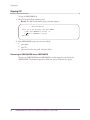
To sign off OMEGAMON II:
1. Press F3 from the System Status panel.
Result: The Exit Confirmation pop-up window appears.
Exit Confirmation
Select one of the following, then press ENTER.
_ 1. Exit from OMEGAMON II for DB2
2. Return to OMEGAMON II for DB2
F3
F12=Cancel
2. Exit OMEGAMON using any of these methods:
I
press Enter
I
press F3
I
type x or 1 in the entry field, and press Enter
Returning to OMEGAVIEW from OMEGAMON
To return to OMEGAVIEW from OMEGAMON, use the trigger key you defined in
OMEGAVIEW. The default trigger key is PA2 and can be used from any panel.
24
OMEGAMON II for DB2 User’s Guide: CUA Interface, Version 540
Panel Features
Panel Features
IOMEGAMON II panels share a number of common features. In the following section, we
use the System Status panel to show the panel features you will find throughout
OMEGAMON II.
1___ Actions GoTo Options Tools Help
------------------------------------------------------------ mm/dd/yy 16:13:49
OMEGAMON II for DB2 System Status
System: D41A+
N-T History
Select one component with a “/” or an action code.
S=Show details A=Analyze problems H=Near-term history L=Control
+-----------------------------------------------------------------------------+
Workloads
| Resources
| Alerts
|
|-------------------------+-------------------------+-------------------------|
| _ CICS
==== | _ Buffer Mgr
==== | _ DB2 Activity
==== |
| _ IMS
==== | _ EDM Pool
==== | _ Active Threads
==== |
| _ TSO
==== | _ Lock Stats
==== | _ Inact. Threads
==== |
| _ Background
==== | _ Log Manager
==== | _ Locks
==== |
| _ Utility
==== | _ DDF Stats
==== | _ Active Traces
==== |
| _ Distributed
==== |
| _ Volume Activity ==== |
|
| _ Bind Stats
==== | _ Stored Procs
==== |
| _ All Connections ==== | _ SSS Stats
==== | _ Functions
==== |
|
| _ SQL Stats
==== | _ Triggers
==== |
|
| _ Open/Close Stat ==== |
|
|
| _ Command Stats
==== | _ DB2 Messages
==== |
+-----------------------------------------------------------------------------+
2
3
4
5
6 F1=Help
F2=Keys
F24=CUA/TSO
F3=Exit
F4=Prompt
F5=Refresh
F6=Console
F10=Action Bar
The System Status panel is the first panel you see when you sign on to OMEGAMON II.
Panel features
This table describes features common to all OMEGAMON II panels.
Part
1
2
Feature
Description
Action Bar
Provides access to OMEGAMON II functions.
System Field
Displays the DB2 subsystem that you are monitoring.
Note: To begin monitoring a different DB2 subsystem, type the
new DB2 subsystem into the System field, and press
Enter. To display a selectable list of available DB2
subsystems, put the cursor in this field, and press F4.
3
Collector Status Displays the status of the online data collector.
Field
I
N-T History indicates the collector is active and near-term
history data is available.
I
.Realtime indicates the collector is not active and near-term
history data is not available.
Getting Started
25
Panel Features
Part
26
Feature
Description
4
Action Codes
5
Panel Body
Displays performance data or status information. Highlighting or
color is used to indicate status.
6
Function Keys
Provide navigation and various functions.
Displays available action codes.
Note: Action codes do not apply to every product panel.
OMEGAMON II for DB2 User’s Guide: CUA Interface, Version 540
Data Panels
Data Panels
Description
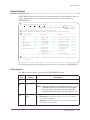
Unlike the System Status panel, most OMEGAMON II full-screen panels present
performance information in tabular format. Below, a sample data panel is shown.
____ Actions GoTo Tools Help
+----------------------------------------------------------- mm/dd/yy 8:01:00
|
Log Manager Statistics
System:D41B
|
+----------------------------------------------------------------------------+
| Collection Interval . . : REALTIME
|
Start . . . : 10/20 11:50:29
|
| Report Interval . . . . :
7 sec
|
End . . .
: 10/20 11:50:36
|
+---------------------------------------------------------------------------+
|
|
+----------------------------------------------------------------------------+
| Logging Mode . . . . :
DUAL
Archive Mode . . . . .
:
DUAL |
| No of Logs Defined . :
3
Number of Logs Available :
2 |
| Checkpoint Frequency :
5000
Records Until Checkpoint :
4329 |
| Input Buffer Size . . :
28K
Output Buffer Size . . . :
400K |
| Write Thresholds . . :
20
Current Log Record RBA . :000035DC696C |
|
|
| Primary Active Log . : TDDB241A.LOGCOPY1.DS02
|
| Secondary Active Log : TDDB241A.LOGCOPY2.DS02
|
+----------------------------------------------------------------------------+
( Stats )
< Reads >
< Write >
< Log >
< Log DS >
F1=Help F2=Keys F3=Exit F5=Refresh F6=DB2 Console **=Bkwd **=Fwd
F10=Action Bar F15=System Status F24=CUA/TSO
Highlighted data fields
If a value in the data area of a panel exceeds a threshold, OMEGAMON II highlights that
value.
This feature allows you to identify the source of a performance problem without having to
read every line of data.
Note: This does not apply to the data panels that appear when you select Active Threads
from the System Status panel.
Scrolling
You can scroll from one panel of data to the next by using function keys, or scroll to a
specific line of data by specifying a beginning line number.
You can use F7 to scroll backward one panel and F8 to scroll forward.
You also can scroll through the data using the scroll indicator, which appears in the upper
right corner of the panel. For example:
Lines __23 to 51 of 117
The first two numbers show the beginning and ending lines currently displayed on the
panel; the third number shows the total number of lines available for display. You can
scroll through the data by entering the desired beginning line number in the field following
Line.
Getting Started
27
Data Panels
Pushbuttons
OMEGAMON II provides pushbuttons as a way to navigate to panels that are closely
related to the current panel.
Pushbuttons appear between brackets < > or parentheses ( ) at the bottom of some
panels, directly above the function keys. Only selections in brackets < > are selectable.
The pushbutton for the current panel appears in parentheses ( ) and is not selectable.
To use a pushbutton, place the cursor on the phrase or word in brackets, and press Enter.
28
OMEGAMON II for DB2 User’s Guide: CUA Interface, Version 540
Action Bar
Action Bar
The action bar appears as the top line of every panel. It has an entry field on the left side
and selectable keyword choices across the length of the line. When you select a choice
from the action bar, a pull-down menu appears. Then you can select a menu item to
navigate to other panels in the product.
The action bar keyword choices are as follows:
I
I
I
I
I
I
Actions
GoTo
View
Options
Tools
Help
Selecting from the action bar
To select a keyword choice from the action bar:
1. Type the first letter of the choice in the action bar entry field, and press Enter.
Result: A pull-down menu appears from which you can make a selection. (When
selecting Actions from the action bar, you must first select an object on the panel body by
typing (/) in the entry field of the object.)
2. Type the number of the menu selection in the entry field, and press Enter.
Result: The selected panel appears.
Fast pathing from the action bar
Fast pathing is a method of quickly navigating to OMEGAMON II panels from the action
bar without using menus and submenus.
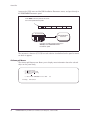
For example, using fast pathing, you can access the DSNZPARM IRLM Parameters panel
directly by entering GDR on the action bar entry field of the System Status panel. This
Getting Started
29
Action Bar
bypasses the GoTo menu and the DB2 Installation Parameters menu, and goes directly to
the DSNZPARM Parameters panel.
Enter GDR in the entry field on the action
bar of the System Status panel.
GDR
Actions
Goto
Options
Tools
Help
System Status
DSNZPARM IRLM
Parameters
Using the fast path mnemonic brings you
directly to the DSNZPARM IRLM
Parameters panel.
The mnemonic character (G, D, R) for each selection is underlined on the panel or menu
on which it appears.
Actions pull-down
The Actions pull-down menu allows you to display more information about the selected
object on the panel body.
_ 1.
2.
3.
4.
Show details
Analyze Problems
Near term History
Control
5. Exit from OMEGAMON II for DB2
F1=Help
30
F3
F12=Cancel
OMEGAMON II for DB2 User’s Guide: CUA Interface, Version 540
Action Bar
GoTo pull-down
The GoTo menu enables you to quickly move to panels that are related to the current
panel, as well as to other product areas. The selections on this menu vary from panel to
panel.
_ 1.
2.
3.
4.
5.
6.
7.
DB2 Installation Parameters...
Address Space Info and OMEGAMON Commands Menu
Online Collector Information...
IRLM Startup Options
Stored Procedure Startup Options
Panel Index...
OMEGAMON II for DB2 Classic Interface
F1=Help
F12=Cancel
You can also use the GoTo menu to
I
select the panel Index, which enables you to move to a wider selection of panels
I
navigate to the OMEGAMON classic interface
View pull-down
The View pull-down menu allows you to sort and display your panel data in a variety of
ways. You can display all fields, only fields with values that you specify, or only fields with
warning and critical status. The selections on the View menu vary.
1
1. All
2. Some...
3. Problems
Sort by
1 1. Plan name
2. Elapsed time
3. Current CPU percentage
4. Current DB2 status
5. Number of getpages
6. Number of page updates
7. Number of commits
8. Jobname
Sort order
1 1. Ascending
2. Descending
F12=Cancel
Note: View is not available on all panels.
Getting Started
31
Action Bar
Options pull-down
The Options pull-down menu enables you to customize OMEGAMON II. You can change
the panel display, select a different startup profile, set thresholds, and assign user
authorities.
1.
2.
3.
4.
5.
6.
7.
8.
9.
Preferences...
Controls...
Set thresholds...
Authority List...
User Profiles...
Subsystem Profiles...
Near-term Thread History Filter...
Save SQL Text Parameters...
D2/Explain Parameters...
F1=Help
F12=Cancel
Note: Additional options may be available from other panels.
Tools pull-down
The Tools pull-down menu allows you to access OMEGAMON II tool facilities. You can
select Application Trace or Object Analysis.
_ 1. Application Trace Facility
2. DB2 Object Analysis Facility
F1=Help
F12=Cancel
Help pull-down
The Help pull-down menu provides access to the help facilities in OMEGAMON II.
_ 1.
2.
3.
4.
5.
6.
Help for help...
Keys help...
Help index...
Glossary...
About...
User Information...
F1=Help
32
F12=Cancel
OMEGAMON II for DB2 User’s Guide: CUA Interface, Version 540
Action Codes
Action Codes
Action codes let you easily analyze the performance of your DB2 subsystem by allowing
you to get more information about or perform actions on panel objects. You can use
action codes as an alternative to using the Actions menu.
Available action codes
You can use these action codes in OMEGAMON II.
Action
Code
Show Details
S
Analyze Problems
A
Description
Shows more detail about the selected item.
Provides information about
I
I
I
causes of warning or critical conditions
existing threshold settings
current values which are compared to existing thresholds
Near-term History
H
Shows statistical data about recent DB2 activity.
Control
L
Allows you to change threshold values and turn on and off
monitoring for specific exceptions.
Using an action code
To use an action code on a panel object:
I
Type the action code letter in the entry field of the panel object, and press Enter.
Result: Another data panel appears, depending on the action code you entered.
Getting Started
33
Function Keys
Function Keys
Function keys enable you to perform certain tasks in OMEGAMON II. These keys are
displayed along the bottom line of the panel. Each panel lists the available function keys
and their assignments for the current panel. If your panel does not display the function
keys, press F2 to turn on the display.
Function key assignments
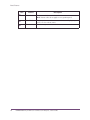
The default function key assignments are listed below.
Function
Key
Name
Assignment
F1
Help
Displays a help window for the current panel, pull-down menu,
pop-up window, or field.
F2
Keys
Turns on (or off) the function key display at the bottom of the
panel.
F3
Exit
Exits the current panel, saving all changes made to any of the
fields, and returns you to a previous panel.
From System Status panel, exits the product.
34
F4
Prompt
Displays a list of valid selections for an input field, or toggles
between two selections, such as ON/OFF. Promptable fields are
denoted with a plus (+) sign.
F5
Refresh
Updates the panel with current data.
F6
DB2 Console
Goes to the DB2 or MVS console where you can issue DB2 or
MVS commands.
F7
Backward
Scrolls backward if there are more lines of information than can fit
on the screen. If you cannot scroll backward, two asterisks
(**=Bkwd) appear instead of this function key.
F8
Forward
Scrolls forward if there are more lines of information than can fit
on the screen. If you cannot scroll forward, two asterisks
(**=Fwd) appear instead of this function key.
F9
Retrieve
Retrieves the last command from the DB2 or MVS console.
F10
Action bar
Moves the cursor back and forth between the action bar and the
panel body.
F11
Logon Options Displays the Logon Options panel. (Only available from the Sign
On panel.)
F12
Cancel
Exits panel without saving any data that was entered since you last
pressed Enter. Backs up one panel at a time.
F15
System Status
Returns to the System Status panel.
F20
Repeat
Repeats the last command from the DB2 or MVS console.
OMEGAMON II for DB2 User’s Guide: CUA Interface, Version 540
Function Keys
Function
Key
Name
Assignment
F21
Process SQL
Copies SQL statements from the SQL Call Being Executed panel
or from the SQL Text panel and pastes them into a specified
destination. (This function key assignment may differ at your site.)
From the DB2 or MVS console, retrieves and executes the last
command.
F24
CUA/TSO
Toggles between the CUA interface and a TSO session. (The
assigned key may be different at your site.)
PA1
Switch
Displays a selectable list of OMEGAMON sessions defined to
OMEGAVIEW.
PA2
OMEGAVIEW
Returns to the OMEGAVIEW status panel. Returns to the CUA
interface, if you zoomed from CUA to the classic interface. (The
assigned key may be different at your site.)
Note: F5, F9, and F11 are assigned differently on Help panels. See “Help function keys”
on page 38 for a description of these keys.
Getting Started
35
Getting Help
Getting Help
Help from a panel
Panel help is available for all panels. To obtain help for a panel:
I
Move the cursor to a non-input field, and press F1.
Result: The associated help panel appears.
The word More+, More-, or More-+ in the upper right corner of a help window
indicates that you can scroll. When you have finished viewing the help window, press F12
to return to the previous panel, or press F3 to exit Help.
Help from the action bar
The Help choice on the action bar provides a menu listing all the types of help
information available in OMEGAMON II.
To access help from the action bar:
I
Type H in the action bar entry field, or move the cursor to the entry field next to Help,
and press Enter.
Result: The Help menu appears, as shown below.
_ 1.
2.
3.
4.
5.
6.
Help for help...
Keys help...
Help index...
Glossary...
About...
User Information...
F1=Help
F12=Cancel
The help menu provides the following selections:
Selection
36
Description
Help for help
Explains how to navigate through the OMEGAMON help panels.
Keys help
Describes the function keys and special purpose keys used in the help
system.
Help index
Provides an index of help information.
Glossary
Defines words and phrases used in help panels.
About
Shows logo, copyright, and product version information.
User information
Shows information about your current session such as user ID, terminal ID,
system ID, VTAM logmode name, and current ACB name.
OMEGAMON II for DB2 User’s Guide: CUA Interface, Version 540
Getting Help
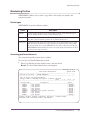
Using the Glossary
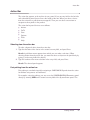
The glossary contains definitions of terms used in OMEGAMON II. The glossary is
available from any help window or from any panel through the Help menu.
There are three ways to access the glossary.
IF you are...
THEN...
on the action bar of any panel
enter fast path hg to bypass the Help menu and go straight to
the glossary
in a help window
press F5
in a help window containing a
highlighted phrase
tab to the phrase, and press Enter
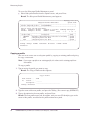
Searching the glossary
The glossary allows you to search for a specific term without scrolling through the list of
entries.
1. Press F6 to display the Search Glossary window.
Search Glossary
Type a search term, then press Enter.
Search term . . drain
F1=Help
F3=Exit
F12=Cancel
2. Type in the term that you want to find (drain, in the example), and press Enter.
Result: All glossary entries containing the word drain appear.
3. Select from the list, and press Enter.
Result: The glossary definition of drain appears, as shown in the figure below.
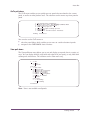
Glossary Term - Drain
To acquire a locked resource by quiescing access to
that object.
F1=Help F2=Ex Help
F12=Cancel
F3=Exit
F9=Keys
F11=Index
Getting Started
37
Getting Help
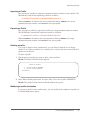
Help function keys
The following table describes how function keys work within the help system.
Function
Key
F1
Name
Field level help
Assignment
Displays field-level help if pressed on an entry field. Displays
panel-level help if pressed outside an entry field.
Note: Field-level help is not available for all entry fields.
38
F2
Extended help
Displays additional help information.
F3
Exit
Exits the help system.
F5
Glossary
Accesses the glossary.
F6
Search
Enables you to search the glossary or help index for a
particular term or phrase.
F7
Backward
Scrolls backward.
F8
Forward
Scrolls forward.
F9
Function keys help Describes the assignments for each function key.
F11
Index
Displays the help index.
F12
Cancel
Cancels the current window.
OMEGAMON II for DB2 User’s Guide: CUA Interface, Version 540
2
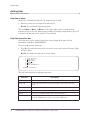
Customizing OMEGAMON II
Chapter Contents
Introduction . . . . . . . . . . . . . . . . . . . . . . . . . . . . . . . . . . . . . . . . . . . . . . . . . . . . . . . .
Specifying Panel Preferences. . . . . . . . . . . . . . . . . . . . . . . . . . . . . . . . . . . . . . . . . . . .
Specifying Terminal Options . . . . . . . . . . . . . . . . . . . . . . . . . . . . . . . . . . . . . . . . . . . .
Setting Thresholds . . . . . . . . . . . . . . . . . . . . . . . . . . . . . . . . . . . . . . . . . . . . . . . . . . .
Assigning User Authorities . . . . . . . . . . . . . . . . . . . . . . . . . . . . . . . . . . . . . . . . . . . . .
Maintaining Profiles . . . . . . . . . . . . . . . . . . . . . . . . . . . . . . . . . . . . . . . . . . . . . . . . . .
Setting Filtering Options for Near-Term Thread History . . . . . . . . . . . . . . . . . . . . . . . .
Specifying Save Options for SQL Text . . . . . . . . . . . . . . . . . . . . . . . . . . . . . . . . . . . .
Using the Callable Interface . . . . . . . . . . . . . . . . . . . . . . . . . . . . . . . . . . . . . . . . . . . .
Customizing OMEGAMON II
40
41
43
46
48
49
54
56
57
39
Introduction
Introduction
You can adjust many features of the OMEGAMON environment to meet your work and
system requirements. All customization options are available from the Options pull-down
menu.
To access the Options menu:
I
Select Options from the action bar.
Result: The Options menu appears.
1. Preferences...
2. Controls...
3. Set thresholds...
4. Authority List...
5. User Profiles...
6. Subsystem Profiles...
7. Near-term Thread History Filter...
8. Save SQL Text Parameters...
F1=Help
40
F12=Cancel
OMEGAMON II for DB2 User’s Guide: CUA Interface, Version 540
Specifying Panel Preferences
Specifying Panel Preferences
Use the Preferences pop-up window to customize the appearance of information on
OMEGAMON II panels.
Accessing the Preferences window
To access the Preferences pop-up window:
I
Select Preferences from the Options menu.
Result: The Preferences window appears.
Preferences
Type any changes, then press Enter.
Mnemonics . . . .
Beep . . . . . .
Panel ID. . . . .
Time/Date Display
Function Key Area
Implicit Action .
National Language
Date Format . . .
.
.
.
.
.
.
.
.
.
.
.
.
.
.
.
.
On_ + On/Off
On_ + On/Off
Off + On/Off
On_ + On/Off
On_ + On/Off
On_ + On/Off
English_ +
mm/dd/yy
+
Time
Format . . . . . .
Separator character
Morning indicator .
Afternoon indicator
.
.
.
.
24 +
:
AM
PM
F1=Help
F4=Prompt
.
.
.
.
.
.
.
.
12/24 hour
F12=Cancel
You are now ready to specify your preferences for OMEGAMON II panel features.
Using the Preferences window
The following table describes the fields on the Preferences pop-up window.
Field
Mnemonics
Description
Enables fast path access to the menus and submenus of the action bar choices.
For example, if you are at the System Status panel and want to go quickly to
the DB2 Installation Parameter panel, type GD (G for Goto, D for DB2
Installation Parameters) in the entry field of the action bar, and press Enter.
If you select Off, the action bar entry field does not appear and you must tab
to the choice, and press Enter.
Beep
Enables the terminal to beep when OMEGAMON II detects invalid input.
Panel ID
Displays the panel ID for the current panel in the upper-left portion of the
panel.
Time/Date
Display
Displays the time and date on the right side of the action bar separator line.
Customizing OMEGAMON II
41
Specifying Panel Preferences
Field
Description
Function Key
Area
Displays a list of the currently available function keys at the bottom of the
panel.
Implicit Action
Allows for an implicit action for selectable items on a display panel. If you
select On, a default action occurs when you place the cursor on an entry field,
and press Enter.
If you select Off, you must type an action code in the entry field for an
action to occur.
National
Language
Controls the language you want to use for your session.
Date Format
Specifies the date format you want to use for your session. For example,
mm/dd/yy or dd.mm.yy.
Time Format
Specifies the time format you want to use for your session.
I
I
42
Type 12 to use the 12 hour format.
Type 24 to use the 24 hour format.
Time
Separator
Character
Specifies a character that is inserted between the hours, minutes, and seconds
portion of the time stamp.
Morning
indicator
Specifies the morning time indicator when you select the 12 hour format. You
can use any two characters.
Afternoon
indicator
Specifies the afternoon time indicator when you select the 24 hour format. You
can use any two characters.
OMEGAMON II for DB2 User’s Guide: CUA Interface, Version 540
Specifying Terminal Options
Specifying Terminal Options
Use the Terminal Options pop-up window to customize settings for the CUA interface.
Accessing the Terminal Options window
To access the Terminal Options pop-up window:
I
Select Controls from the Options menu.
Result: The Terminal Options window appears.
KD2PTRMP
Terminal Options
Type a new setting or press Enter.
Auto Refresh Interval
. . . OFF Sec. (5-999 / Off)
Use Status Words . .
Critical Status Word
Warning Status Word
Normal Status Word .
Idle Status Word . .
.
.
.
.
.
.
.
.
.
.
.
.
.
.
.
.
.
.
.
.
YES +(Yes/No)
Crit
Warn
OK
Idle
Display threads by:
. . . . PLAN +
SQL Process Level . . . . . Manual +
SQL Process PF Keys . . . . F21 +
CUA/TSO Toggle Key . . . . . F24 +
F1=Help
F4=Prompt
F12=Cancel
You are now ready to specify your preferences for the OMEGAMON II terminal options.
Using the Terminal Options window
The following table describes the fields on the Terminal Options pop-up window.
Field
Description
Auto Refresh
Interval
Amount of time between updates to panels that display performance
information. OMEGAMON II collects performance data continually and
displays the new data automatically at the frequency you enter in this field.
Use Status Words
On color terminals, color status bars represent the performance of status
items. You also can specify a word or a series of characters to appear for
each level of status. The word or characters appear in a row within the
colored status bar. On noncolor terminals only the word, or characters,
appear.
Critical Status
Word
Word you want to appear when OMEGAMON II displays a critical status
(red). For example: Crit.
Warning Status
Word
Word you want to appear when OMEGAMON II displays a warning status
(yellow). For example: Warn.
Normal Status
Word
Word you want to appear when OMEGAMON II displays a normal status
(green). For example: OK.
Customizing OMEGAMON II
43
Specifying Terminal Options
Field
Description
Idle Status Word
Word you want to appear when OMEGAMON II is not monitoring an object
(turquoise). For example: Idle.
Display Threads
by:
To display plan names on thread summary displays, enter PLAN in this
field. To display package names on thread summary displays, enter PACK.
SQL Process
Level
Options available for copying, pasting, and saving SQL text. You can copy
or save text by pressing the SQL Process PF Key.
Values for the
SQL Process
Level are
described in the
following table.
You can process SQL from the following screens:
I
SQL Call being Executed (Thread Detail). See “EXPLAINing SQL
Code” on page 61.
I
I
SQL Text (ATF). You can access the SQL Text screen through the
application trace facility. Select the SQL TEXT pushbutton from the
Application Trace SQL Detail screen.
Thread History Dynamic SQL Detail
SQL Process PF
Key
If you have set up !DB/EXPLAIN for direct access, pressing this PF key will
directly invoke !DB/EXPLAIN. Otherwise, it will invoke the SQL copy and
paste facility to perform the EXPLAIN.
CUA/TSO Toggle
Key
Use to toggle between CUA and TSO sessions.
The following table provides a list of fields and valid values for completing the SQL
Process Level field on the Terminal Options panel.
Values for SQL
Process Level
MANUAL
Description
After you have selected the SQL text to be EXPLAINed, you must use the PF
key defined (SQL Process Key) to copy the SQL. Then switch to TSO/ISPF
(CUA/TSO toggle), and paste the SQL, again using the PF key you defined.
Note: To use MANUAL or AUTO, a TSO/ISPF edit session must be
active in the background.
AUTO
After selecting SQL text, use the SQL Process key to copy and automatically
insert the text into the member currently in use in the TSO/ISPF edit session.
The placement of SQL text depends on the cursor position within the
TSO/ISPF session.
Note: To use MANUAL or AUTO, a TSO/ISPF edit session must be
active in the background.
44
SAVE
After selecting the SQL text, use the SQL Process key to copy and
automatically save the SQL text to the partitioned dataset member defined
on the Save SQL Text Parameters panel. Text will either overwrite the
existing contents of the member or be appended to it, depending on the type
of save defined on the same panel. This option does not require a TSO/ISPF
edit session.
EXPLAIN
This option invokes !DB/EXPLAIN, which produces a variety of
!DB/EXPLAIN reports. Use the pushbuttons to view the various report
sections. Complete the required options for the EXPLAIN option on the
!DB/EXPLAIN panel.
OMEGAMON II for DB2 User’s Guide: CUA Interface, Version 540
Specifying Terminal Options
Values for SQL
Process Level
SAVE/EXPLAIN
Description
Use this option to perform SAVE and EXPLAIN functions. Complete the
required fields for the SAVE/EXPLAIN option.
Saving Terminal Options
When you finish entering your terminal preferences:
I
Press Enter.
Result: The Save Profile Confirmation pop-up window appears.
Save Profile Confirmation
1.- Save values for this session only
2.- Save values into profile
F12=Cancel
Saving for current session
To use the new terminal options only for the current session:
I
Select Save values for this session only.
Result: The new terminal options are used only for your current session, and the
active profile is not changed.
Saving to a profile
If you own the currently active user profile or you have authorization, you can save the
new terminal options to the profile.
To save the new terminal options to the active profile:
I
Select Save values into profile, and press Enter.
Result: The new terminal options become active for the current session and are
saved in the user profile.
Note: If you do not have authorization, the Save values into profile option is not
available to you. See “Assigning User Authorities” on page 48.
Customizing OMEGAMON II
45
Setting Thresholds
Setting Thresholds
Use the Set Thresholds option window to set performance standards for your subsystem.
Accessing the Thresholds window
To access the various thresholds windows using the Set Thresholds option, follow these
steps:
Step
1
Action
Select Set Thresholds from the Options pull-down menu.
Result: The Threshold Index menu appears.
2
Select one of the following, and press Enter:
3
I
Workloads
Result: The Workloads Index menu appears.
I
Resources
Result: The Resource Index menu appears.
I
Alerts
Result: The Alerts Index menu appears.
Select the workload, resource, or alert whose threshold values you want to change,
and press Enter.
Result: A pop-up window with the setting for that selection appears. For example, if
you select Active Threads from the Alerts Index menu, the Active Threads Thresholds
pop-up window appears.
Using the thresholds windows
Follow these steps to change threshold values:
Step
46
Action
1
Change any Warning or Critical threshold value as necessary.
2
Enter either Yes or No in the Monitor column to turn monitoring on or off for a
particular exception. If you turn off monitoring for all exceptions for the status item,
then the status is Idle, and the color bar on color terminals is turquoise.
OMEGAMON II for DB2 User’s Guide: CUA Interface, Version 540
Setting Thresholds
Saving threshold values
When you finish entering your threshold values:
I
Press Enter.
Result: The Save Profile Confirmation pop-up window appears.
1.- Save values for this session only
2.- Save values into profile
F12=Cancel
Saving for current session
To use the new threshold values only for the current session:
I
Select Save values for this session only, and press Enter.
Result: The new thresholds are used only for your current session, and the subsystem
profile is not changed.
Saving to a profile
If you have authorization, you can save the new threshold values in the subsystem profile.
To save the new threshold values in the subsystem profile:
I
Select Save values into profile, and press Enter.
Result: The new threshold values become active for the current session and are
saved in the subsystem profile.
Note: If you do not have authorization, the Save values into profile option is not
available to you. See “Assigning User Authorities” on page 48.
Customizing OMEGAMON II
47
Assigning User Authorities
Assigning User Authorities
The system administrator at your site has access to all user and subsystem profile
maintenance functions and can perform profile maintenance functions for other users.
The system administrator also can authorize other users to perform profile maintenance
functions.
The ID of the first person to log on to the CUA interface of OMEGAMON II automatically
becomes an authorized user. This person then can add other user IDs to the list as
needed.
Accessing user authorities
To access the Specify User Authorities pop-up window:
I
Select User Authorities from the Options pull-down menu.
Result: The Specify User Authorities window appears. Unauthorized users can view
this list, but cannot make any changes.
Specify User Authorities
To add a new user type the ID, Comment and press ENTER.
D = Delete
Lines 1
to 4
of 4
ID
-------________
Comments
------------------------------------------___________________________________________
TDMX07
TDO213
TDTDA3
TDTD88
F1=Help
F12=Cancel
**=Bkd
**=Fwd
Adding a user
To assign user authority to an OMEGAMON II user:
I
Type the user ID and comment on the blank lines, and press Enter.
Result: The user ID is added to the list of users authorized to perform profile
maintenance functions for all profiles.
Deleting a user
To delete a user ID from the authorized user list:
I
Type D next to the ID you want to delete, and press Enter.
Result: The user ID is deleted from the list. This user is no longer authorized to
perform profile maintenance functions for all profiles.
48
OMEGAMON II for DB2 User’s Guide: CUA Interface, Version 540
Maintaining Profiles
Maintaining Profiles
OMEGAMON II allows you to switch, copy, delete, and modify user profiles and
subsystem profiles.
Profile types
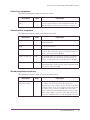
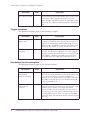
OMEGAMON II uses three different profiles.
Profile
Description
Startup
Contains values specified on the Logon Options panel. Used during the logon
process. Startup profiles cannot be shared among users.
User
Contains values specified on the Terminal Options panel. Although users should
have their own user profiles, profiles can be shared among users.
Subsystem
Contains threshold values. Subsystem profiles can be shared among users. Each
DB2 subsystem should have its own customized subsystem profile, named with
the subsystem ID. If you enter $DEFAULT for the name of the subsystem profile,
OMEGAMON II automatically selects the subsystem profile that matches the ID of
the subsystem being monitored.
Accessing profile maintenance
You can perform profile maintenance as follows:
To access the User Profile Maintenance panel:
I
Select User Profiles from the Options menu, and press Enter.
Result: The User Profile Maintenance panel appears.
------------------------------------------------------------ mm/dd/yy 18:00:52
User Profile Maintenance
System: D41B
+---------------------------------------------------------------------------+
|Current user profile : TDTDA3($DEFAULT)
|
+---------------------------------------------------------------------------+
Type an action code and press Enter.
C=Copy D=Delete M=Modify description S=Switch a Profile
Lines
1 to
10 of
10
+---------------------------------------------------------------------------+
| Profile name |
Description
| Owner |
|--------------+---------------------------------------------------+--------|
| _ TDDB40
| user profile
| TDDB40 |
| _ TDO213B
| user profile
| TDO213B|
| _ TDTD45
| user profile
| TDTD45 |
| _ TDO214
| user profile
| TDO214 |
| _ TDO210
| user profile
| TDO210 |
| _ $DEFAULT
| Automatic user profile selection
| System |
| _ TDO213
| user profile
| TDO213 |
| _ TDTDA3
| user profile
| TDTDA3 |
| _ TDTD88
| user profile
| TDTD88 |
+---------------------------------------------------------------------------+
F1=Help F2=Keys F3=Exit F5=Refresh F6=Console **=Bkwd F8=Fwd
F10=Action Bar F15=System Status F24=CUA/TSO
Customizing OMEGAMON II
49
Maintaining Profiles
To access the Subsystem Profile Maintenance panel:
I
Select Subsystem Profiles from the Options menu, and press Enter.
Result: The Subsystem Profile Maintenance panel appears.
------------------------------------------------------------- mm/dd/yy 22:45:54
Subsystem Profile Maintenance
System: D61B
+----------------------------------------------------------------------------+
|Current subsystem profile : D61A($DEFAULT)
|
+----------------------------------------------------------------------------+
Type an action code and press Enter.
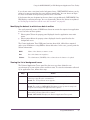
C=Copy
I=Import a Profile
S=Switch to a Profile
M=Modify description
D=Delete X=Export a Profile
E=Edit a Profile
Lines
1 to
3 of
3
+----------------------------------------------------------------------------+
| Profile name |
Description
| Owner |
|--------------+---------------------------------------------------+---------|
| _ $DEFAULT
| Automatic subsystem profile selection & switching | System |
| _ D411
| subsystem profile for D23B
| System |
| _ D61A
| subsystem profile for D31A
| System |
+----------------------------------------------------------------------------+
F1=Help F2=Keys
F10=Action
F3=Exit
F5=Refresh
F6=Console
**=Bkwd
F8=Fwd
Copying a profile
You can create a new user or subsystem profile by copying an existing profile and giving
the copy a new name.
Note: If you copy a profile to an existing profile, the values in the existing profile are
overwritten.
To copy a profile:
1. Type C next to the profile you want to copy.
Result: The Copy a Profile window appears.
Copy a Profile
From: Profile . . . D41B
To:
F1=Help
Profile . . . ________
Description . __________________________________
F12=Cancel
2. Type the name of the new profile, and press the Tab key. (You cannot copy $DEFAULT.)
3. Type a description for the new profile, and press Enter.
Result: The new profile name and description, with your user ID identifying you as the
owner of the profile, are added to the profile maintenance panel.
50
OMEGAMON II for DB2 User’s Guide: CUA Interface, Version 540
Maintaining Profiles
Importing a Profile
You can import a profile by copying the partitioned dataset member into the profile. The
MVS Modify command for importing a profile is as follows:
/F OMIIDB2,NTD KD2IMP ‘PDSNAME MEMBER PROFILE’
Where PDSNAME is the name of the source partitioned dataset, MEMBER is the source
partitioned dataset member, and PROFILE is the target profile.
Exporting a Profile
You can export a profile by copying the profile to the target partitioned dataset member.
The MVS Modify command for exporting a profile is as follows:
/F OMIIDB2,NTD KD2EXP ‘PDSNAME MEMBER PROFILE’
Where PDSNAME is the name of the target partitioned dataset, MEMBER is the target
partitioned dataset member, and PROFILE is the source profile.
Deleting a profile
If you own a profile or have authorization, you can delete a profile that is no longer
needed. If you delete a profile that is currently active, sessions that were started with that
profile are not affected.
To delete a profile:
1. Type D next to the profile you want to delete, and press Enter.
Result: The Delete a Profile window appears.
Delete a Profile
1.- Delete Profile TDTDA3A
2.- Do not delete profile
F12=Cancel
2. Select Delete Profile profile name, and press Enter. (You can not delete $DEFAULT.)
Result: The profile is deleted from the Profile Maintenance panel.
Modifying a profile description
If you own a profile or have authorization, you can modify the description of a profile on
the Profile Maintenance panel.
Customizing OMEGAMON II
51
Maintaining Profiles
To modify a profile description:
1. Type M next to the profile whose description you want to modify and press Enter.
Result: The Modify Description window appears.
Modify Description
Current : User Profile
New
: _________________________________________
F1=Help
F12=Cancel
2. Type the new description, and press Enter. (You cannot modify the description of
$DEFAULT.)
Result: The profile description is changed on the Profile Maintenance panel.
Switching profiles
At any time during an active session, you can activate a different user and subsystem
profile using the S (Switch) action code.
To switch profiles:
I
Enter S next to the profile you want to switch to, and press Enter.
Result: The profile you selected becomes the active profile. The name of the active
profile appears in the Current User/Subsystem Profile field.
Note: If you select $DEFAULT for a user profile, OMEGAMON II automatically selects
the user profile that matches your ID. If you select $DEFAULT for a subsystem
profile, OMEGAMON II automatically selects the subsystem profile that matches
the ID of the subsystem being monitored.
Using the Dynamic Profile Update Facility
The Dynamic Profile Update Facility lets you dynamically import and export individual
OMEGAMON II profiles to and from a partitioned dataset by creating import and export
dialogs that are invoked externally through MVS.
Observe these considerations when using the import and export dialogs:
52
I
Invoke KD2EXP and KD2IMP by using the MVS Modify command.
I
Use KD2EXP to export a profile to a partitioned dataset and KD2IMP to import a
profile from a partitioned dataset.
I
When you export a profile, its data is written in a standard format to a partitioned
dataset member.
I
The partitioned dataset should be allocated as fixed blocked, LRECL of 80, and
BLKSIZE of 8880, with an appropriate number of directory blocks.
I
Make sure OMIIDB2, the OMEGAMON II for DB2 started task name, has write
authority to the partitioned dataset.
OMEGAMON II for DB2 User’s Guide: CUA Interface, Version 540
Maintaining Profiles
I
Use importing to reverse the above process to recreate a profile based on the
exported information.
Example command for exporting a profile
The MVS Modify command for exporting a profile is as follows:
/F OMIIDB2,NTD KD2EXP ‘PDSNAME MEMBER PROFILE’
Where PDSNAME is the name of the target partitioned dataset, MEMBER is the target
partitioned dataset member, and PROFILE is the source profile.
Example command for importing a profile
The MVS Modify command for importing a profile is as follows:
/F OMIIDB2,NTD KD2IMP ‘PDSNAME MEMBER PROFILE’
Where PDSNAME is the name of the source partitioned dataset, MEMBER is the source
partitioned dataset member, and PROFILE is the target profile.
Customizing OMEGAMON II
53
Setting Filtering Options for Near-Term Thread History
Setting Filtering Options for Near-Term Thread History
Use the Near-Term Thread History Filter Options pop-up to specify the reporting period
and filtering criteria for data that appears on near-term thread history panels.
Accessing the Filter Options window
To access the Filter Options pop-up window:
I
Select Near-term Thread History Filter from the Options menu.
Result: The Near-Term Thread History Filter window appears.
Near-Term Thread History Filter Options
Oldest Record
--------------------------02/15/2001 10:13:09.123456
Latest Record
--------------------------02/15/2001 16:37:55.123456
Total Records
------------45632
Specify options, then press ENTER.
START-DATE/TIME
END-DATE/TIME
RELATIVE-START
RELATIVE-END
REPORT-INTERVAL
=
=
=
=
=
__________ _____
__________ _____
__ _____ ago
__ _____ from start
__ minutes
(mm/dd/yyyy, dd.mm.yyyy, hh:mm)
(mm/dd/yyyy, dd.mm.yyyy, hh:mm)
(1-nn, MINS or HOURS)
(1-nn, MINS or HOURS)
(5-60 MINS, in 5 min increments)
Field
Operator
Values
--------------------------------------------------------------PLAN
EQ +
________
________
________
________
________
AUTHID
EQ +
________
________
________
________
________
CONNID
EQ +
________
________
________
________
________
CONNTYPE filtering is accomplished by viewing via Workloads
F1=Help
F4=Prompt
F12=Cancel
Using the Filter Options window
The following table describes the fields on the Filter Options pop-up window.
Field
Start-Date/Time
Description
Specify the starting date and time that you want thread information to be
reported. Specify date and time as follows:
DATE
mm/dd/yyyy
dd.mm.yyyy
yyyy-mm-dd
TIME
hh:mm
hh.mm
End-Date/Time
54
The end date and time of the thread information that is being reported.
OMEGAMON II for DB2 User’s Guide: CUA Interface, Version 540
Setting Filtering Options for Near-Term Thread History
Field
Description
Relative-Start
The number of minutes or hours before the current time on which the
reporting period begins. You can specify a relative start instead of an
absolute start date and time.
Relative-End
The number of minutes or hours after the start time on which the reporting
period ends. You can specify a relative end instead of an absolute end date
and time.
Report Interval
The number of minutes by which the report period is partitioned. You
must specify a value that is a multiple of the subinterval value that is evenly
divisible into 60. The subinterval is the smallest allowable interval
(displayed in parentheses to the right of the input field).
Plan
The plan names by which thread history displays are restricted.
Authid
The authorization identifiers by which thread history displays are restricted.
Connid
The connection identifiers by which thread history displays are restricted.
Conntype
The types of workloads that can be connected: CICS, IMS, TSO,
Background, Utility, and Distributed.
Customizing OMEGAMON II
55
Specifying Save Options for SQL Text
Specifying Save Options for SQL Text
Use the Save SQL Text Parameters pop-up window to specify options for saving SQL text
to a partitioned dataset.
Accessing the Save SQL Text Parameters window
To access the Save SQL Text Parameters pop-up window:
I
Select Save SQL Text Parameters from the Options window.
Result: The Save SQL Text Parameters Window appears.
Save SQL Text Parameters
SQL Statement PDS . . : _____________________
Member Name . . . . : _____________________
Type of Save. . . . : REPLACE +
F1=Help
F4=Prompt
F12=Cancel
Using the Save SQL Text Parameters window
The following table describes the fields on the SQL Text Parameters window.
Field
56
Description
SQL Statement PDS
The name of the partitioned dataset into which you want to save the
SQL statement text.
Member Name
The name of the partitioned dataset member into which you want to
save the SQL statement text. If you do not specify a member name, a
system-generated name is used.
Type of Save
The type of save process to use when saving SQL text to the specified
member in the SQL statement PDS.
Replace
Overwrites the existing member with the name you
specified or creates the member if it does not exist.
This is the default.
Append
Concatenates the new SQL text to the existing
member.
Prompt
Prompts user at each instance for Replace or Append.
OMEGAMON II for DB2 User’s Guide: CUA Interface, Version 540
Using the Callable Interface
Using the Callable Interface
The callable interface feature of OMEGAMON II for DB2, Version 500, lets you make
direct calls to the.EXP command on the OMEGAMON II commands panel without having
to first access TSO. Before using this feature, you should do the following:
1.
2.
3.
4.
Customize the Classic started task.
Set up !DB/EXPLAIN
Set up the CUA options.
Set up the !DB/EXPLAIN options.
Customizing the Classic Started Task to Implement the OMEGAMON II for DB2
Interface
Use the following procedure to customize the Classic started task.
Step
1
Action
From the Define OMEGAMON II for DB2 Configuration Values menu, select option 1,
Realtime monitor interfaces.
--- DEFINE OMEGAMON II FOR DB2 CONFIGURATION VALUES /RTE RTE01--OPTION ===>
Select the following options to configure OMEGAMON II for DB2.
1
2
Realtime monitor interfaces
DB2 specification/selection
F1=Help F3=End
Result: The Started Task and VTAM Information panel is displayed.
2
Press Enter.
Result: The OMEGAMON II for DB2 - Classic Interface - DB/EXPLAIN panel is
displayed.
3
Specify the appropriate information on the Classic Interface - DB/EXPLAIN panel and
press Enter.
Result: The system returns you to the Define OMEGAMON II for DB2 Configuration
Values menu.
4
Press the End function key.
Result: The system displays the Configure OMEGAMON II for DB2 menu.
5
From the Configure OMEGAMON II for DB2 menu, select option 3, Create runtime
members.
Result: The system displays the Install OMEGAMON II for DB2 Members menu.
Customizing OMEGAMON II
57
Using the Callable Interface
Step
6
Action
Use option 1, Realtime monitor interface members, to submit the job.
This job creates a started task in RKD2PAR. The name of this started task is D2TE or the
value entered on this panel for the parameter TESTC. Copy this started task to the JES2
procedure library for started tasks. This task dynamically allocates the !DB/EXPLAIN
profile dataset. Configuration options for !DB/EXPLAIN will be obtained from this
dataset.
Note: Do not start this task. OMEGAMON II for DB2 starts this task whenever a
!DB/EXPLAIN function is performed and stops it when the function has
completed.
Setting Up !DB/EXPLAIN
Use the following procedure to set up !DB/EXPLAIN on the OMEGAMON II for DB2
Commands screen.
Step
Action
1
Ensure that !DB/EXPLAIN V300 PSP 9602 (or greater) is installed on every DB2
subsystem where you want to EXPLAIN statements. For information on installing
!DB/EXPLAIN, see the !DB/Tools for DB2 Installation and Customization Guide.
2
Define Destination Plan_Tables. The Destination PLAN_TABLE will be the current
SQLID.PLAN_TABLE.
If the current SQLID.PLAN_TABLE does not exist, !DB/EXPLAIN attempts to
create the tablespace PLANTBLS in the !DB/TOOLS default database.
I
If the PLAN_TABLE cannot be created there, !DB/EXPLAIN attempts to create the
PLAN_TABLE in the database DSNDB04.
I
If it cannot create the table, !DB/EXPLAIN issues an error message indicating that
the EXPLAIN could not be performed.
The current SQLID is determined by:
I
I
I
whether EXP_POWERX is defined in the !DB/Tools profile dataset concatenation as
a non-blank value (for example, EXP_POWERX=SAMHILL), if so, the current
SQLID is the value specified for EXP_POWERX,
or the current SQLID is determined by the DB2 security exit.
Setting Up the CUA Options
Use the following procedure to set up CUA options and to use the new !DB/EXPLAIN
feature.
Step
1
58
Action
Log onto CUA.
OMEGAMON II for DB2 User’s Guide: CUA Interface, Version 540
Using the Callable Interface
Step
2
Action
From the main CUA panel, select Options from the task bar and press Enter. The
following pop-up appears.
1.
2.
3.
4.
5.
6.
7.
8.
Preferences...
Controls...
Set thresholds...
User authorities...
User Profiles...
Subsystem Profiles...
Near-term Thread History Filter...
D2/Explain Options...
F1=Help
3
F12=Cancel
Select Option 2, Controls, from the pop-up and press Enter. Use the fields on the
Terminal Options panel, shown below, to specify preferences for terminal options. For
EXPLAIN, the key field on this panel is the SQL Process Level field. Type EXPLAIN or
SAVE/EXPLAIN in this field to enable the function.
For a list of the fields and valid values for completing the Terminal Options panel, see
“Using the Terminal Options window” on page 43.
Setting Up the D2/EXPLAIN Options
Use the following procedure to set up the D2/EXPLAIN options.
Step
Action
1
If you are not already logged onto CUA, then do so now.
2
From the main CUA panel, select Options from the task bar and press Enter. The
following pop-up appears.
1.
2.
3.
4.
5.
6.
7.
8.
Preferences...
Controls...
Set thresholds...
User authorities...
User Profiles...
Subsystem Profiles...
Near-term Thread History Filter...
D2/Explain Options...
F1=Help
F12=Cancel
Customizing OMEGAMON II
59
Using the Callable Interface
Step
3
Action
Select Option 8, D2/Explain Parameters, from this panel and press Enter. Use the
D2/EXPLAIN Options panel, shown below, to specify parameters required to invoke
!DB/EXPLAIN during your OMEGAMON session.
D2/EXPLAIN Options
Extract Id . . . .
User Profile DSN .
Group Profile DSN.
SQL Statement PDS.
Member Name. . .
Type of Save . .
Default Qualifier.
Qualifier Option
Gather Statistics.
Initial Report . .
F1=Help
F4=Prompt
.
.
.
.
.
.
.
.
.
.
.
.
.
.
.
.
.
.
.
.
:
:
:
:
:
:
:
:
:
:
DB41
REPLACE +
SYSIBM
PROMPT +
YES +
EPATH+
F12=Cancel
The following table provides a list of fields and valid values for completing the
D2/EXPLAIN Options panel.
Field
Description
Extract ID
1- to 8-character field that identifies an extract of plans and packages. It
represents a logical grouping that typically identifies a DB2 subsystem
and an MVS system. An Extract ID must be configured within
!DB/EXPLAIN before it is used, but an actual extract is not required for
the EXPLAIN.
User Profile DSN
Optional field names the dataset containing the !DB/EXPLAIN user
profile. Contains overrides to the !DB/EXPLAIN options specified in the
group profile and the system profile.
Group Profile DSN
Optional field names the dataset containing the !DB/EXPLAIN group
profile. Contains overrides to the !DB/EXPLAIN options specified in the
system profile.
SQL Statement PDS
Name of the dataset where the SQL statement is saved. Must be a PDS.
The SQL Process Level is specified on the Terminal Options panel under
the Options pull-down (fastpath O2). If SAVE, the text is saved but
!DB/EXPLAIN is not invoked. If SAVE/EXPLAIN, !DB/EXPLAIN saves
the text and invokes the EXPLAIN function.
Member Name
60
Name to use when saving the SQL text into the SQL statement PDS. If
omitted, the system generates a name. When you define a member, the
system prompts for whether the member should be replaced or
appended.
OMEGAMON II for DB2 User’s Guide: CUA Interface, Version 540
Using the Callable Interface
Field
Type of Save
Description
Type of save to be executed when saving SQL text to the member
specified within the SQL statement PDS. Values are REPLACE and
APPEND.
I
I
REPLACE writes over an existing member or creates the member if it
does not currently exist. System default.
APPEND concatenates the new SQL text to the existing number.
Default Qualifier
Qualifier to use to qualify unqualified tables, views, and aliases in SQL
statements.
Qualifier Option
Type of qualifier. Values are USE and PROMPT.
I
I
Gather Statistics
I
I
Initial Report
USE indicates the current Default Qualifier for unqualified SQL text.
PROMPT indicates you want to be prompted for a Qualifier
whenever an SQL statement is used.
Type YES to have !DB/EXPLAIN gather statistics.
Type NO to bypass.
Type the name of the initial !DB/EXPLAIN report to be displayed:
ESTMT, EPATH, EPTBL, EOBJ, or ERECM.
ESTMT is the actual SQL statement text being explained. If there is
an SQL error, SQL error text also appears. Use the pushbuttons to
select from the other !DB/EXPLAIN report sections that follow.
I
EPATH is a narrative describing the access path for the SQL
statement.
I
EPTBL reports the plan table entries for the SQL statement in
tabular form.
I
EOBJ reports the DB2 catalog statistics for objects referenced by the
SQL statement. This section is available if you specified Yes for
Gather Statistics in the D2/EXPLAIN Options panel under the
Option pull-down (fastpath 08).
I
ERECM provides suggestions for optimizing the SQL statement.
For more information about !DB/EXPLAIN parameters, see the
!DB/EXPLAIN Reference Manual.
I
EXPLAINing SQL Code
Use the following procedure to EXPLAIN SQL.
Step
1
Action
Log onto CUA.
Customizing OMEGAMON II
61
Using the Callable Interface
Step
2
Action
From the main CUA panel, select Active Threads and press Enter. The Thread Connected to DB2
panel appears.
_____ Actions GoTo View Options Tools Help
+------------------------------------------------------------ mm/dd/yy 8:07:07
|
All Threads Connected to DB2 (Some)
System: D41
|
Lines
1 to
4 of 4
+---------------+---------+-------+-------------+-------+------+------+--------+
|
Planname
| Elapsed | CPU % |
Status
| Getpg |Update|Commit|Jobname |
+---------------+---------+-------+-------------+-------+------+------+--------+
|
DSNTEP41
|
31.4m | 05.3% | IN-SQL-CALL | 5153K| 61490|
0|DLKEX212|
|
KO2400HP
|
1.3d | 00.0% | NOT IN-DB2 |
0|
0|
0|TDO2S03 |
|
KO2400HP
|
2.1d | 00.1% | NOT IN-DB2 |
0|
0|
0|TDO2S44 |
|
KTWPLNR
|
1.0s | 00.0% º IN-SQL-CALL |
0|
0|
0|RBRIN3 |
+---------------+---------+-------+-------------+-------+------+------+--------+
F1=Help F2=Keys F3=Exit F5=Refresh F6=Console
F10=Action Bar F15=System Status F24=CUA/TSO
3
**=Bkwd
F8=Fwd
Select the PLANNAME you want and press Enter. The Thread Detail panel appears. If SQL calls are
being executed by the thread, the message (IN-SQL-CALL) also appears. The Thread Detail panel
shows detailed information about the activity of an individual thread or a parallel task, including
wait time information.
GoTo Options Tools Help
+------------------------------------------------------------ mm/dd/yy 8:09:18
|
Thread Detail
System: D41A
|
+--------------------------------------+---------------------------------------+
| Thread: Plan . . . . :
KTWPLNR | Attach: TSO Userid . . :
RBRIN3 |
|
Connid . . . :
DB2CALL |
Region ASID . :
225
|
|
Corrid . . . :
RBRIN3 |
|
|
Authid . . . :
RBRIN3 |
|
| Collection . . :
| Package . . . . . . . :
|
| DB2 Status . . . . . :
IN-SQL-CALL | MVS Status . . . . . . :
USING CPU |
| Elapsed Time . . . . : 00:00:05.932 | CPU Utilization . . . :
|
| Total CPU Time . . . : 00:00:03.586 | Total Parallel Tasks . :
|
| Total Stored Proc CPU: 00:00:00.000 | Current Parallel Tasks :
|
+--------------------------------------+---------------------------------------+
+--------------------------------------+-------------------+-------------------+
|
IN-DB2 Times
|
Total
|
Current
|
+--------------------------------------+-------------------+-------------------+
| Elapsed Time
|
00:00:05.928
|
00:00:05
|
| CPU Time
|
00:00:03.584
|
00:00:03
|
| Stored Procedure CPU Time
|
00:00:00.000
|
N/A
|
+--------------------------------------+-------------------+-------------------+
( IN-DB2 Times ) < Waits > < Current Wait Resource >
F1=Help F2=Keys F3=Exit F5=Refresh F6=Console
F10=Action Bar F15=System Status F24=CUA/TSO
4
62
**=Bkwd
**=Fwd
Select Option 3, SQL Call Being Executed, from the GoTo pull-down menu.
OMEGAMON II for DB2 User’s Guide: CUA Interface, Version 540
Using the Callable Interface
Step
5
Action
Press the Process SQL key.
GoTo Options Tools Help
+------------------------------------------------------------ mm/dd/yy
8:47:27
|
SQL Call Being Executed
System: D41A
|
+--------------------------------------+--------------------------------------+
| Thread: Plan . . . . . :
DSNESPCS | Attach: TSO Userid . . :
RBRIN3 |
|
Connid . . . . :
TSO |
Region ASID . :
|
|
Corrid . . . . :
RBRIN3 |
|
|
Authid . . . . :
RBRIN3 |
|
+--------------------------------------+--------------------------------------+
|
Lines
1 to
15 of 15 |
+-----------------------------------------------------------------------------+
|SQL call is active, call information is as follows :
|
|
|
|Thread Status = IN-SQL-CALL
SQL Request Type
= DYNAMIC
|
|Total SQL Reqs =
2
SQL Call Type
= OPEN CURSOR
|
|SQL DBRM Name = DSNESM68
SQL Statement Number = 00193
|
|Collection ID = DSNESPCS
|
|
|
|
SELECT
A.PLNAME, SECTNO, STMTNO, CARD
|
|
FROM
SYSIBM.SYSSTMT A,
|
|
SYSIBM.SYSPLAN B,
|
|
SYSIBM.SYSTABLES C
|
|
WHERE
A.PLNAME = B.NAME
|
|
AND
A.STMTNO > C.CARD
|
|
ORDER BY SECTNO DESC, STMTNO ASC
|
|
|
+-----------------------------------------------------------------------------+
Customizing OMEGAMON II
63
Using the Callable Interface
64
OMEGAMON II for DB2 User’s Guide: CUA Interface, Version 540
3
Using OMEGAMON II
Introduction
This chapter describes how to use OMEGAMON II.
Chapter Contents
Monitoring from the System Status Panel . . . . . . . . . . . . . . . . . . . . . . . . . . . . . . . . . .
System Status Components and Related Exceptions. . . . . . . . . . . . . . . . . . . . . . . . . .
Investigating an Active Threads Alert . . . . . . . . . . . . . . . . . . . . . . . . . . . . . . . . . . . . .
Evaluating and Modifying Thresholds . . . . . . . . . . . . . . . . . . . . . . . . . . . . . . . . . . . . .
Reviewing Near-Term History Data . . . . . . . . . . . . . . . . . . . . . . . . . . . . . . . . . . . . . . .
Using the OMEGAMON II for DB2 Background Application Trace Facility . . . . . . . . .
Using the IFCID Trace Facility . . . . . . . . . . . . . . . . . . . . . . . . . . . . . . . . . . . . . . . . . . .
Using OMEGAMON II
66
69
77
78
80
82
85
65
Monitoring from the System Status Panel
Monitoring from the System Status Panel
The System Status panel provides a central point of control for monitoring your DB2
subsystem.
____ Actions GoTo Tools Help
------------------------------------------------------------ mm/dd/yy 16:13:49
OMEGAMON II for DB2 System Status
System: D41A+
N-T History
Select one component with a “/” or an action code.
S=Show details A=Analyze problems H=Near-term history L=Control
+-----------------------------------------------------------------------------+
|
Workloads
|
Resources
|
Alerts
|
|-------------------------+-------------------------+-------------------------|
| _ CICS
==== | _ Buffer Mgr
==== | _ DB2 Activity
==== |
| _ IMS
==== | _ EDM Pool
==== | _ Active Threads
==== |
| _ TSO
==== | _ Lock Stats
==== | _ Inact. Threads
==== |
| _ Background
==== | _ Log Manager
==== | _ Locks
==== |
| _ Utility
==== | _ DDF Stats
| _ Active Traces
==== |
| _ Distributed
==== |
| _ Volume Activity ==== |
|
| _ Bind Stats
==== | _ Stored Procs
==== |
|
| _ SSS Stats
==== | _ Functions
==== |
|
| _ SQL Stats
==== | _ Triggers
==== |
| _ All Connections ==== | _ Open/Close Stat ==== |
|
|
| _ Command Stats
==== | _ DB2 Messages
==== |
|
|
|
|
+-----------------------------------------------------------------------------+
F1=Help F2=Keys
F24=CUA/TSO
F3=Exit
F4=Prompt
F5=Refresh
F6=Console F10=Action Bar
Through this panel, OMEGAMON II:
I
informs you via status lights of the realtime performance of each monitored DB2
component or application
I
allows you to obtain detailed performance data on any monitored DB2 component
DB2 subsystem components
The System Status panel body displays the three major components of the subsystem that
are monitored.
Workloads
Information about threads, the links between allied agents and a DB2
subsystem.
Resource
DB2 subsystem resource statistics.
Alerts
Summary of DB2 activity, active and inactive threads connected to DB2,
locking conflicts, active traces, volume activity, and console messages.
Monitored objects
Each monitored object on the System Status panel has
66
I
a status indicator to its right, which reports its realtime performance
I
an entry field to its left, which allows you to select it for detailed analysis
OMEGAMON II for DB2 User’s Guide: CUA Interface, Version 540
Monitoring from the System Status Panel
Status indicators
A status indicator is a color bar or a word (for example, Warn) that represents the
performance of your DB2 subsystem. Color terminals can display both colors and words;
noncolor terminals can display only words.
The meaning of the status indicator colors is shown in the following table.
Color
Status
Green
Satisfactory performance.
Yellow
A potential problem exists. A warning threshold was met or exceeded.
Red
A critical problem exists. A critical threshold was met or exceeded.
Turquoise
Monitoring for this item is disabled. The Monitor field on the Thresholds panel is
set to NO for all exceptions for this item.
Blue
No exceptions apply to this item, so no performance data is being collected.
Alert notification
When you see a status indicator change for a monitored object, you know that
OMEGAMON II is alerting you to a change in performance. For example, when a status
indicator changes from green to red, you know that a condition for that object has
changed from normal to critical.
The yellow and red color bars also are used on data panels to highlight the values that do
not meet performance standards.
Note: This does not apply to panels that appear when you select Active Threads from
the System Status panel.
Investigating an alert
When a status indicator turns yellow or red, you can begin to investigate the problem
from the System Status panel.
I
Move the cursor to the monitored object with the yellow or red status indicator, and
press Enter.
Result: A panel appears that provides more information about the object you
selected.
When you press Enter in an action entry field, a default action is invoked.
Using OMEGAMON II
67
Monitoring from the System Status Panel
Performing actions from the System Status panel
You can investigate a change in status for a monitored object by entering one of these
action codes.
S
Shows more detail.
A
Shows which exceptions tripped, the current values for the tripped exceptions, and the
threshold values set for the exceptions.
H
Shows near-term historical data.
L
Shows all the exceptions that roll up to an object and allows you to change threshold
settings and rules.
Note: Not all action codes apply to every monitored object.
68
OMEGAMON II for DB2 User’s Guide: CUA Interface, Version 540
System Status Components and Related Exceptions
System Status Components and Related Exceptions
OMEGAMON II monitors your DB2 subsystem by comparing the performance of your
subsystem against a set of performance standards. These standards are called thresholds.
When the performance of a workload or a resource exceeds a threshold, an exception
condition occurs.
The status indicators on the System Status panel summarize the status of the thresholds
that you set in OMEGAMON. When OMEGAMON detects that a threshold has been
exceeded, the status indicators for all panels that report on that threshold are affected,
including the System Status panel.
The following tables are a quick reference to the exceptions that affect the status indicators
for components on the System Status panel.
CICS exceptions
The following exceptions apply to threads related to CICS connections.
Description
Code
Explanation
Available pool thread % POLU
The percentage of active CICS POOL threads to THRDA
exceeds the specified threshold. The THRDA value is
specified in the CICS resource control table (RCT).
CICS threadmax %
CICT
The percentage of active CICS threads to THRDMAX
exceeds the specified threshold. The THRDMAX value is
specified in the CICS RCT.
CICS transaction
waiting
ENTW
The number of CICS transactions waiting for a thread
exceeds the specified threshold. This exception detects
transactions that are waiting, because all threads defined for
use in the RCT ENTRY definition are already in use. This
exception limits its analysis to ENTRY definitions that
specify TWAIT=YES.
ENTRY thread %
ENTU
The percentage of active threads that originate from a CICS
ENTRY definition to THRDA exceeds the specified
threshold. The THRDA value is specified in the resource
RCT.
Pool overflow threads
ENTO
The number of POOL threads in use due to ENTRY thread
overflow activity exceeds the specified threshold. This
exception limits its analysis to ENTRY definitions that
specify TWAIT=POOL and THRDA>0.
Pool thread waits
POLW
The number of CICS transactions waiting for a POOL
thread that originates from a CICS connection exceeds the
specified threshold.
Using OMEGAMON II
69
System Status Components and Related Exceptions
IMS exceptions
The following exceptions apply to threads related to IMS connections.
Description
Code
Explanation
No dependent region IMND
There are no IMS dependent regions defined to DB2 for the
IMSID.
Region connection
failed
The specified IMS dependent region for the IMSID failed to
connect to DB2 due to an error.
IMCN
TSO exceptions
The following exceptions apply to threads related to TSO connections.
Description
Foreground
connection %
Code
IDFR
Explanation
The percentage of active foreground connections to IDFORE
exceeds the specified threshold.
Background exceptions
The following exceptions apply to threads related to background job connections.
Description
Background
connection %
Code
IDBK
Explanation
The percentage of active background connections to
IDBACK exceeds the specified threshold.
Utility exceptions
The following exceptions apply to threads related to utility job connections.
Description
Utility ID is stopped
Code
UTIS
Explanation
A DB2 utility was started but did not finish running due to
abnormal termination.
Distributed exceptions
The following exceptions apply to threads related to distributed connections.
Description
DBAT thread wait
70
Code
DWAT
Explanation
A distributed allied thread has been waiting for a response to
a remote SQL request for a period of time greater than the
specified threshold.
OMEGAMON II for DB2 User’s Guide: CUA Interface, Version 540
System Status Components and Related Exceptions
Description
Code
Explanation
DDF bytes received
TRCV
The amount of data received by a requestor (allied) or server
(distributed) DB2 thread in response to SQL requests
exceeds the threshold.
DDF bytes sent
TSND
The amount of data sent by a requestor (allied) or server
(distributed) DB2 thread in response to SQL requests
exceeds the threshold.
DDF remote CPU
time
RCPU
The amount of CPU time used by a distributed data access
thread exceeds the specified threshold.
Active thread exceptions
The following exceptions apply to active threads.
Description
Archive log mount
needed
Code
ARCM
Explanation
Thread backout processing is waiting for an archive tape
mount.
DB2 requires the archive tape mount during abort
processing to backout changes made in the current unit of
recovery. The thread does not do any processing until the
tape is mounted. It holds DB2 resources until the abort
request is complete.
CPU utilization %
TCPU
CPU utilization for an address space that has DB2
connections and threads exceeds the specified threshold.
Getpage/read ratio
GETP
The ratio of logical page read (getpage) requests to physical
page read (read I/O) requests is less than the specified
threshold.
In-DB2 CPU time
IDBC
The amount of CPU time used by DB2 to process a thread is
greater than the specified threshold.
In-DB2 time
IDBT
The length of time that DB2 has been processing a thread is
greater than the specified threshold.
Page lock owned %
LKUS
The percentage of page locks owned by an active thread to
the total allowable number of held page locks exceeds the
specified threshold.
Page update rate
PGUP
The number of row updates per second on behalf of a
thread exceeds the specified threshold.
Resource limit
percent
RELM
The ratio of the resource limit high water mark (CPU
seconds) to the resource limit in effect (CPU seconds) is
greater than the current threshold value of nn.n%.
Sequential prefetch
rate
PREF
The number of sequential prefetch requests per second
exceeds the specified threshold.
Synch read I/O rate
RIO
The physical read I/O rate per second on behalf of a thread
exceeds the specified threshold.
Using OMEGAMON II
71
System Status Components and Related Exceptions
Description
Code
Explanation
Thread elapsed time
ETIM
The elapsed time for a DB2 thread (from sign-on or create
thread) exceeds the specified threshold.
Thread terminated
indoubt
INDB
The thread has terminated and is indoubt.
Update commit
COMT
The ratio of updates to commits for the thread exceeds the
specified threshold.
Wait for archive log
mode
WLGQ
The amount of time that a thread has been suspended due
to ARCHIVE LOG MODE (QUIESCE) exceeds the specified
threshold value.
Wait for DB2 service WSRV
The amount of time a thread has been waiting for a DB2
service to complete exceeds the specified threshold value.
Wait for
thread-create
CTHD
An application is waiting for DB2 to create a thread.
Stored procedure
wait
WSPS
The amount of time a thread has been waiting for an
available TCB to schedule a stored procedure exceeds the
specified threshold.
Inactive thread exceptions
The following exceptions apply to inactive threads. An inactive thread does not hold any
cursors or database resources, but remains connected to DB2.
Description
DBAT over maximum
wait
Code
MDBW
Explanation
The number of distributed data access threads (DBAT)
waiting because the preset maximum has been reached
exceeds the specified threshold.
Queuing of conversations when the MAXDBAT limit is
reached can greatly impact response time.
Buffer pool exceptions
The following exceptions apply to buffer pool resources.
Description
Buffer pool utilization
72
Code
BMTH
Explanation
Buffer pool nn has exceeded the specified threshold.
OMEGAMON II for DB2 User’s Guide: CUA Interface, Version 540
System Status Components and Related Exceptions
EDM pool exceptions
The following exceptions apply to EDM pool resources.
Description
EDM pool utilization
Code
EDMU
Explanation
The percentage of environmental descriptor manager
(EDM) pool pages in use to total pool size exceeds the
specified threshold.
Lock statistics exceptions
The following exception applies to lock statistics resources.
Description
Lock conflict
suspensions
Code
SUSL
Explanation
The number of threads that are unable to continue
execution because of lock waits exceeds the specified
threshold.
Log manager exceptions
The following exceptions apply to log manager resources.
Description
Code
Explanation
Primary logs available LOGN
The number of available primary active logs is less than or
equal to the specified threshold.
Recovery log archive
An active DB2 log is full and must be archived, and a tape
mount is outstanding for the archive log.
ARCV
DDF statistics exceptions
The following exceptions apply to DDF resources.
Description
DBAT thread %
Code
MDBT
Explanation
The number of database access threads (DBAT) in use
exceeds the specified threshold.
When the MAXDBAT limit is reached, conversations are
queued (waiting on DBAT allocation), which can greatly
increase response time.
DDF not active
DDFS
The distributed data facility was requested for this DB2
subsystem but it is not active. This could indicate that the
DDF terminated abnormally or that it was not started.
DDF receive rate
DRCV
The amount of data received by a requestor (local) or server
(remote) DB2 subsystem in response to SQL requests
exceeds the specified threshold.
Using OMEGAMON II
73
System Status Components and Related Exceptions
Description
Code
Explanation
DDF send rate
DSND
The amount of data sent to a requestor (local) or server
(remote) DB2 subsystem exceeds the specified threshold.
Max logmode
conversations
MCNV
The number of conversations in use exceeds the specified
threshold. When the percentage reaches 100%, the
exception message displays the number of threads waiting
because the preset maximum is exceeded.
Queuing conversations can greatly increase response time.
DB2 activity exceptions
The following exceptions apply to DB2 activity alerts.
Description
Code
Explanation
Create-thread waits
THDQ
The number of users waiting for create thread processing
exceeds the specified threshold.
Indoubt threads
INDT
The number of terminated threads that are indoubt exceeds
the specified threshold.
Thread use %
TMAX
The percentage of active threads to the specified maximum
exceeds the specified threshold.
Lock exceptions
The following exceptions apply to lock alerts.
Description
74
Code
Explanation
Resource wait time
WTRE
The amount of time a thread is waiting for a resource
exceeds the specified threshold.
Wait for drain lock
WDLK
The amount of time a thread has been waiting for a drain
lock exceeds the specified threshold.
Wait for drain of
claims
WCLM
The amount of time a utility has been waiting for claims to
be released after acquiring drain lock exceeds the specified
threshold.
Global lock wait
WGLK
The amount of time a thread has been waiting for a global
lock exceeds the specified threshold.
OMEGAMON II for DB2 User’s Guide: CUA Interface, Version 540
System Status Components and Related Exceptions
Active trace exceptions
The following exceptions apply to active trace alerts.
Description
DB2 global trace
active
Code
GTRC
Explanation
The DB2 global trace is active. It should not be active unless
there is a specific purpose, such as diagnostic testing. The
DB2 global trace can increase performance overhead.
Volume activity exceptions
The following exceptions apply to volume activity alerts.
Description
Code
Explanation
Volume DB2 I/O rate
VDIO
A DB2 I/O rate per second for the volume exceeded the
specified threshold.
Volume extents per
DSN
VEDR
The dataset-to-dataset extent ratio of a volume exceeded
the specified threshold.
Volume service time
VSRV
The service time for the volume exceeded the specified
threshold. The threshold is expressed in milliseconds and
must be an integer between 0–9999.
Volume TL I/O rate
VTIO
The total I/O rate per second for the volume exceeded the
specified threshold. The threshold is the total number of
I/Os per second and must be an integer between 0–9999.
Volume utilization
VUTL
The utilization percentage for the volume exceeded the
specified threshold. The threshold is a percentage and must
be an integer between 0–100.
Stored procedures exceptions
The following exceptions apply to stored procedures alerts.
Description
ASIDs executing
stored procedures
Code
SPAC
Explanation
Indicates that the number of ASIDs executing stored
procedures exceeds the threshold. The threshold is
expressed as a count of address spaces capable of executing
stored procedures. It can be an integer from 0 to 99. Stored
procedures can be executed in a DB2 stored procedure
address space and in any WLM-managed stored procedure
address space. SPAC is a member of the DB2 system (SY)
group. The default threshold is 3 and the default state is On.
Using OMEGAMON II
75
System Status Components and Related Exceptions
Description
Number of stored
procedures executing
Code
STPE
Explanation
Indicates that the number of stored procedures executing
exceeds the threshold. The threshold is expressed as a count
of stored procedures currently executing. It can be an
integer from 0 to 99. STPE is a member of the DB2 system
(SY) group. The default threshold is 10 and the default state
is On.
Triggers exceptions
The following exceptions apply to alerts relating to triggers.
Description
Code
Explanation
Depth of largest
trigger stack
TRGD
Indicates that the depth of the largest trigger stack exceeds
the threshold. The threshold is expressed as the number of
triggers in the largest trigger stack. The threshold can be an
integer from 0 to 99.TRGD is a member of the DB2 system
(SY) group. The default is 1 and the default state is On.
Number of triggers
executing
TRGE
Indicates that the number of triggers executing exceeds the
threshold. The threshold is expressed as a count of triggers
currently executing. The threshold can be an integer from 0
to 99. TRGE is a member of the DB2 system (SY) group.
The default threshold is 10 and the default state is On.
User-defined functions exceptions
The following exceptions apply to user-defined functions.
Description
76
Code
Explanation
Number of
user-defined
functions executing
UDFE
Indicates that the number of user-defined functions
executing exceeds the threshold. The threshold is expressed
as a count of user functions currently executing. The
threshold can be an integer from 0 to 99. UDFE is a member
of the DB2 system (SY) group. The default threshold is 10
and the default state is On.
Number of ASIDS
executing user
functions
UFAC
Indicates that the number of ASIDs executing user functions
exceeds the threshold. The threshold is expressed as a count
of address spaces capable of executing user-defined
functions. It can be an integer from 0 to 99. User-defined
functions can be executed only from WLM-managed stored
procedure address spaces. UFAC is a member of the DB2
system (SY) group. The default threshold is 3 and the default
state is On.
OMEGAMON II for DB2 User’s Guide: CUA Interface, Version 540
Investigating an Active Threads Alert
Investigating an Active Threads Alert
IntroductionThis is an example of how you might investigate a red light from the System
Status panel. You can use this information to help you understand how to use the features
of OMEGAMON to resolve other DB2 subsystem problems.
Active threads alert
In this example, the Active Threads alert on the System Status panel has turned red.
I
Select Active Threads with the A (Analyze Problems) action code, and press Enter.
Result: The Analyze Problems window appears.
KD2APROB
Analyze Problems
System D41B
For additional information move cursor to a threshold entry, then press Enter
Threshold Description
Type
Current
Warning
Critical
---------------------- ----- ---------- ---------------Plan: DSNTIB31
Connid: BATCH
Corrid: TDO214MI
Authid: TDO214
Update commit
COMT
0
0
1
In-DB2 time
IDBT
18 s
5 s
6 s
Synch read I/O rate
RIO
12.5 s
10 s
12 s
Plan: K02510HP
Connid: DB2CALL Corrid: D2DB020
Authid: D2DB020
Update commit
COMT
0
0
1
Thread elapsed time
ETIM
4041
2
3
In-DB2 CPU time
IDBC
4
0
1
F1=Help F3=Exit **=Bkwd F8=Fwd F10=Action Bar
Rule
---None
None
None
None
None
None
F15=System Status
The Analyze Problems panel shows the exceptions that tripped for Active Threads and
caused the status alert. The current value for each tripped exception is highlighted or
appears in either yellow (warning status) or red (critical status).
Note: You can use the A action code only for components with a warning or critical
status.
Exception recommendations
For an explanation of an exception that appears on the Analyze Problems window and for
a recommendation about how to resolve the problem that caused the exception to trip:
I
Move the cursor to the threshold description, and press F1.
Investigating the exception condition
To continue investigating a tripped exception:
I
Move the cursor to a threshold description, and press Enter.
Result: A panel appears showing information related to the tripped exception.
Using OMEGAMON II
77
Evaluating and Modifying Thresholds
Evaluating and Modifying Thresholds
When you investigate a yellow or red status light from the System Status panel, you may
determine that the threshold values that caused the exception to trip did not really
indicate a problem in your DB2 subsystem. In this case, you need to change the current
threshold values for the exception to values that are appropriate for your site.
Displaying all exceptions
To display a list of exceptions and their threshold values for a monitored object on the
System Status panel:
I
Select a monitored object with the L (Control) action code, and press Enter.
Result: A pop-up window appears, which contains the exceptions and the threshold
values associated with the object. In this example, the Active Threads Thresholds
panel is shown.
Active Thread Thresholds
R=Rules
Threshold description
Code Warning Critical
Units
Monitor
------------------------------------------------------------------------_ Archive log mount need
ARCM
OFF +
ON + (On/Off)
Yes +
_ CPU utilization %
TCPU
16
20
%
Yes
_ Getpage/read ratio
GETP
18
15
getpages Yes
_ In-DB2 CPU time
IDBC
56
70
100th
Yes
_ In-DB2 time
IDBT
4
5
seconds
Yes
_ Page locks owned %
LKUS
64
80
%
Yes
_ Page update rate
PGUP
8
10
seconds
Yes
_ Resource limit percent
RELM
64
80
%
Yes
_ Sequential prefetch rate
PREF
8
10
/sec
Yes
_ Synch read I/O rate
RIO
8
10
/sec
Yes
_ Thread elapsed time
ETIM
480
600
seconds
Yes
_ Thread terminated indoubt INDB
OFF +
ON + (On/Off)
Yes
_ Update commit
COMT
80
100
pag/comm Yes
_ Wait for Archive Log Mode WLGQ
48
60
seconds
Yes
_ Wait for DB2 Service
WSRV
24
30
seconds
Yes
_ Wait for thread-create
CTHD
OFF +
ON + (On/Off)
Yes
F1=Help
F4=Prompt
**=Bkwd
**=Fwd
F12=Cancel
Modifying thresholds
To modify any threshold or status setting on a thresholds panel:
I
Move the cursor to the field you want to change and type in the new value.
Result: The Save Profile Confirmation pop-up appears. You can choose to save the
new setting for this session only or you can save them to a profile.
78
OMEGAMON II for DB2 User’s Guide: CUA Interface, Version 540
Evaluating and Modifying Thresholds
Adding or modifying rules
You can specify rules for an exception condition to control how the thresholds are applied.
To add or modify a rule for an exception:
I
Select an exception with the R (Rules) action code, and press Enter.
Result: The Rules panel appears. You can add rules to an exception or change rules
from this panel.
Add Rule for ARCM Exception
Modify Parameters, than press Enter
Rule number. .
Plan name. . .
Auth Id. . . .
Conn type. . .
1
+
CICS Parameters:
Tran Id. . . .
IMS Parameters:
PSB Name . . .
Threshold Values:
Warning. . . . N/A
Exclude. . . .
Conn Id . . .
IMS Id. . . .
Critical. . .
N/A
No
F1=Help F4=Prompt F12=Cancel
Using OMEGAMON II
79
Reviewing Near-Term History Data
Reviewing Near-Term History Data
Near-term history panels provide information about DB2 subsystem activity and about
completed thread executions. You can use near-term history panels to quickly gain some
historical perspective on system activity.
Note: To display near-term history data, the online data collector must be active.
Accessing near-term history data
To access near-term historical data from the System Status panel, you select a panel
object with the H (Near-term history) action code.
The following is an example of how to access near-term history data:
I
Select a connection type under Workloads with the H action code, and press Enter.
Result: The Thread History by Report Interval panel appears.
Thread activity for a reporting period
The Thread History by Report Interval panel provides an overview of DB2 thread activity
for a specified reporting period.
Note: The reporting period and reporting intervals are set on the Near-Term Thread
History Filter Options panel.
___ Actions GoTo View Options Tools Help
------------------------------------------------------------ mm/dd/yy 8:48:15
Thread History by Report Interval
System:D31A
P=Plan A=Authid L=Plan,Authid U=Authid,Plan S=Thread Summary I=Subinterval
+------------------------------------------------------------------------------+
| Report Interval . .: 1 hour
|
Start . : 07/14 18:00:00.000000 |
| Report Filtered . .: YES
|
End . . : 07/14 13:59:59.999999 |
+------------------------------------------------------------------------------+
Lines
1 to
7 of
7
+------------------------------------------------------------------------------+
|
|
|
|
|
|DLk/| In-DB2 | In-DB2| In-DB2|
|GetP/|
|
Time |Thrds|Commit|Abort| DML |TOut| Elap Tm| CPU Tm|Wait Tm|Getpage|RIO |
|---------+-----+------+-----+-----+----+--------+-------+-------+-------+-----|
| _ 13:00 |
4|
3|
1| 342|
0| 1213.8 |
1.77| 287.7|
2573| 6.9|
| _ 12:00 |
17|
21|
0| 6516|
0| 317.3 |
5.12| 189.4|
9609| 53.9|
| _ 11:00 | 132|
132|
0|45332|
1| 1245.4 | 80.34| 445.1| 73342|416.3|
| _ 10:00 | 140| 1157|
12| 8190|
7|13657.2 | 39.69|12031.3| 69301| 6.7|
| _ 09:00 |
89|
124|
7|11206|
0| 734.2 | 75.10|
76.0| 96763| 15.6|
| _ 08:00 |
12|
12|
0|
63|
0|
32.5 |
2.11|
4.9|
456| 50.3|
+------------------------------------------------------------------------------+
F1=Help F2=Keys F3=Exit F5=Refresh F6=DB2 Console **=Bkwd **=Fwd
F10=Action Bar F15=System Status F24=CUA/TSO
The Start and End dates and times show the beginning and end of the reporting period.
The Time column indicates the start of a report interval.
80
OMEGAMON II for DB2 User’s Guide: CUA Interface, Version 540
Reviewing Near-Term History Data
Thread activity for a report interval
You also can view summarized information about thread activity for a single report
interval.
To access thread activity for a single interval:
I
Select an interval with the I (Subinterval) action code, and press Enter.
Result: The Thread History by Report Subinterval panel appears.
Using OMEGAMON II
81
Using the OMEGAMON II for DB2 Background Application Trace Facility
Using the OMEGAMON II for DB2 Background Application Trace Facility
The background application trace facility provides
I
the ability to start an application trace to run in the background asynchronously to
your OMEGAMON II session. Use the panels available from the CUA component of
OMEGAMON II. Initiate the application trace and specify the values the application
trace to use during execution.
I
the ability to allocate trace datasets dynamically using the characteristics you specify
on an OMEGAMON II panel or the characteristics you specify at install time.
In order to make best use of this facility, you should be familiar with the existing functions
of the application trace facility. This information is provided in the OMEGAMON II for
DB2 Reference Manual, in the section entitled “Application Trace Facility”.
The panels for running an application trace in the background are similar to those used
for running an application trace in the foreground. Access the online help for the panel to
obtain detailed descriptions of the fields each panel contains.
Initiating a background application trace
The background application trace facility is available only from the CUA component for
OMEGAMON II for DB2. To initiate a background application trace follow these steps.
Step
1
Action
On the OMEGAMON II for DB2 main panel, select Tools from the action bar or type T
on the command line.
Result: The Tools pull-down menu appears.
2
From the Tools pull-down menu, select option 1 for the application trace facility.
Result: OMEGAMON II displays a pop-up menu having both foreground and
background application trace options.
From this pop-up menu, you can access panels to start an application trace, either in
the foreground or background, review the data collected by a trace, stop a foreground
application trace, create a trace dataset, or view existing background traces.
3
From the pop-up menu, select option 5 to specify the collection options for a
background trace.
Specifying background application trace options
Selecting option 5 from the pop-up menu displays a panel on which you can specify the
options for your background trace. Three fields on this panel are required. These are
I
DB2 plan name. To specify tracing of all plans, type ALL in the field.
I
active time, the duration of the trace, to a maximum of 60 minutes.
I
the name of the dataset to which trace data is written.
All other fields on this panel are optional.
82
OMEGAMON II for DB2 User’s Guide: CUA Interface, Version 540
Using the OMEGAMON II for DB2 Background Application Trace Facility
If you do not enter a start time for the background trace, OMEGAMON II informs you by
means of a pop-up panel that the trace will start immediately. You can choose to begin
the trace or to return to the previous panel to enter a start time.
If the dataset that you designate for the trace data is not preallocated, OMEGAMON II for
DB2 displays a warning message. You can dynamically allocate the dataset as explained
in “Identifying the dataset to which trace data is written” on page 83.
Identifying the dataset to which trace data is written
You can dynamically create a VSAM linear dataset to contain the output of an application
trace. Use either of these options.
I
Select option 7 from the pop-up panel displayed from the application trace main
menu.
I
Select option 4 from the pop-up actions displayed from the panel that lists the
background traces.
The Create Application Trace DSN panel contains three fields. All fields are required
unless your installation is using SMS for dataset allocation. In this case, you may omit the
Volume information.
DSN
Name of the dataset you want to create
Size
Size of the dataset in megabytes
Volume
The identification (VOLSER) of the volume where the data is to be placed
Viewing the list of background traces
The Deferred Application Traces panel lists the traces you have defined to run
asynchronously to your online session and their status. To view the information collected
by an application trace, follow these steps.
Step
1
Action
Return to the OMEGAMON II for DB2 main panel and select Tools from the
action bar or type T on the command line.
Result: The Tools pull-down menu appears.
2
From the Tools pull-down menu, select option 1 for the application trace facility.
Result: This results in OMEGAMON II displaying a pop-up menu having both
foreground and background application trace options.
3
From the pop-up menu, select option 6 to display a panel that lists the background
traces which you have defined to be started.
Result: OMEGAMON II displays the Deferred Application Traces panel.
Using OMEGAMON II
83
Using the OMEGAMON II for DB2 Background Application Trace Facility
Activities you can perform in a background trace request
When you select a trace from the list of traces on the Deferred Application Traces panel,
OMEGAMON II displays a pop-up panel that permits you to perform these activities.
I
modify or cancel a deferred trace request (if the status of the trace is Waiting)
I
view summary data for a completed trace
I
create a linear dataset to hold the trace data
You can also perform the same actions by selecting Actions from the action bar. Select
the View pull-down from the action bar to sort the list of traces on any column.
84
OMEGAMON II for DB2 User’s Guide: CUA Interface, Version 540
Using the IFCID Trace Facility
Using the IFCID Trace Facility
Overview
The IFCID Trace facility provides the ability to start an IFCID trace to run in the
background asynchronously to your OMEGAMON II session. You can initiate the IFCID
trace from the OMEGAMON II for DB2 System Status panel.
To access the IFCID Trace Facility, follow these steps:
1. On the OMEGAMON II for DB2 System Status panel, select T (Tools). The pull-down
menu shows IFCID Trace facility as option 3.
2. Select option 3 (IFCID Trace Facility). The pull-down menu displays the options to start,
display, and stop the IFCID trace.
Note: By pressing PF3 (Exit) from any IFCID Trace panel, the display returns to the
OMEGAMON II for DB2 System Panel with the Tools pull-down menu.
Starting an IFCID Trace
From Step 2 above, select option 1 (Start IFCID Trace). The IFCID Trace Start panel
displays. From this panel, you must enter a dataset name and select one or more trace
types. The dataset name identifies the dataset that will contain the trace data that is
collected. The dataset name is a required field. The dataset must have the following
characteristics:
I
physical sequential
I
variable length, blocked
I
logical record length =32756
I
block size =32760
You can select the IFCIDs to be traced by trace type (one-digit number), by trace class (a
two-digit number) or by individual IFCID records (three-digit number) within a trace class.
I
To select all IFCIDs associated with a trace type, enter S (Select all entries) next to the
trace type. You can select as many trace types as needed. After pressing Enter to
confirm your selections, the IFCID trace begins immediately for the trace type or types
selected.
I
To select particular IFCIDs within a trace type, enter D (Display subentries) next to the
trace type. OMEGAMON II for DB2 displays the list of trace classes within the trace
type. You can display the trace classes for only one trace type at a time.
–
To select all IFCIDs in multiple trace classes, enter S next to each trace class. After
pressing Enter to confirm your selections, the IFCID trace begins immediately.
–
To select particular IFCIDs within a trace class, enter D next to the trace class.
OMEGAMON II for DB2 displays a list of individual IFCID records. Enter an S
next to one or more IFCIDs to start the trace for those selected IFCIDs.
Using OMEGAMON II
85
Using the IFCID Trace Facility
At the point when you enter option S to select the IFCIDs (whether by trace type, trace
class, or IFCID record) and to start the IFCID trace, OMEGAMON II for DB2 asks you to
confirm your selection. If you choose to alter your selection, you can enter option R (reset
selection). OMEGAMON II for DB2 then allows you to re-enter your selections.
Displaying IFCID Trace Data
To display the result of an IFCID trace, follow these steps:
I
enter option T (Tools) to display the Tools pull-down menu.
I
enter option 3 (IFCID Trace Facility) to display the IFCID Trace pull-down menu.
I
enter option 2 (Display IFCID Trace Counts) to view the Display IFCID Trace
Collection panel.
The Display IFCID Trace Collection panel provides the following fields:
Field
Description
DSN
The user-specified dataset name provided when starting the IFCID trace.
Trace Records
Lost
The number of trace records that could not be written to the dataset.
Status=
The status of the IFCID trace facility. The status is either active or inactive.
Start time
The timestamp when the IFCID trace started.
Run time
The amount of time that the IFCID trace has been active.
ID
The identification number associated with each IFCID record. The leading
zeroes are omitted.
Count
The number of times the event or action associated with an IFCID record
took place.
Size
The total amount of collected IFCID data in bytes.
Description
A brief description of the IFCID record’s contents.
The header information for each IFCID Trace record is 64 bytes in length. The following
table describes each field in the header information, in the sequence in which they
appear.
Field
86
Length (in bytes)
Record length
2 (hexadecimal)
QSAM fill characters
2 (hexadecimal)
Plan name
8 (character)
Date and time (in the form YYYYMMDDHHMMSSHH)
8 (hexadecimal)
Secondary authid (or primary authid)
8 (character)
Original authid
8 (character)
OMEGAMON II for DB2 User’s Guide: CUA Interface, Version 540
Using the IFCID Trace Facility
Connection identifier
8 (character)
Correlation identifier
12 (character)
DB2 system identifier
4 (character)
IFCID number
2 (numeric)
Number of self-defining sections
2 (numeric)
Stopping an IFCID Trace
To stop the IFCID Trace facility, follow these steps:
I
enter option T (Tools) to display the Tools pull-down menu.
I
enter option 3 (IFCID Trace Facility) to display the IFCID Trace pull-down menu.
I
enter option 3 (Stop IFCID Trace). OMEGAMON II for DB2 prompts you to confirm
that you want to stop the IFCID trace.
I
Press Enter to confirm. A message displays indicating that the IFCID trace was
successfully stopped.
Using OMEGAMON II
87
Using the IFCID Trace Facility
88
OMEGAMON II for DB2 User’s Guide: CUA Interface, Version 540
4
Using OMEGAMON II for DB2
with !DB/EXPLAIN
Introduction
By integrating the two Candle products, OMEGAMON II for DB2 and !DB/EXPLAIN, you
create the most complete view possible for understanding and optimizing SQL and DB2
applications.
The combination of the OMEGAMON II for DB2 and !DB/EXPLAIN interfaces permits
you to
I
capture and analyze ad-hoc, dynamic SQL—SQL that is not stored in a place
accessible to !DB/EXPLAIN users
I
analyze executing SQL
I
access OMEGAMON II application trace and historical reporting information to
validate access path analysis
This chapter tells how to make optimum use of the functionality these products offer when
used together.
Chapter Contents
Background about !DB/EXPLAIN for DB2 . . . . . . . . . . . . . . . . . . . . . . . . . . . . . . . . . 90
Using OMEGAMON II and !DB/EXPLAIN Complementary Functions . . . . . . . . . . . . 91
Using the OMEGAMON II for DB2 Callable Interface . . . . . . . . . . . . . . . . . . . . . . . . . 93
Moving Interactively between !DB/EXPLAIN and OMEGAMON II . . . . . . . . . . . . . . 102
Using the Copy-and-Paste Facility in OMEGAMON II . . . . . . . . . . . . . . . . . . . . . . . . 104
Accessing OMEGAMON II Trace Information from !DB/EXPLAIN . . . . . . . . . . . . . . 106
Using OMEGAMON II for DB2 with !DB/EXPLAIN
89
Background about !DB/EXPLAIN for DB2
Background about !DB/EXPLAIN for DB2
This section provides an overview of the !DB/EXPLAIN functionality.
Functions provided by !DB/EXPLAIN for DB2
!DB/EXPLAIN provides a window into the operation of DB2. !DB/EXPLAIN offers
benefits for
I
extracting DB2 data
You can extract all or a portion of the data in the DB2 catalog according to the criteria
you specify. This flexible technology lets you
I
–
Extract and combine data from multiple PLAN_TABLES.
–
Access data when DB2 is not active.
–
Avoid contention on the DB2 catalog.
–
Retain histories of plan, package, and DBRM catalog data and their EXPLAINs.
DB2 database administration
You can use !DB/EXPLAIN functions to review and improve SQL. These features let
you
I
–
Review application code and monitor specific SQL performance to understand
the access paths and their relative costs.
–
Store historical information to perform impact analysis, historical analysis, and
perform “what-if” analysis.
–
Manage DB2 objects by viewing statement use by package or plan and DBRMs
and BIND, REBIND, or FREE DB2 objects.
–
Facilitate migration to a newer version of DB2.
application development
You can use !DB/EXPLAIN to analyze your design and improve SQL. These features
let you
90
–
Analyze SQL code within an ISPF session to obtain access path information.
–
Identify potential trouble spots.
–
Execute SQL code within a batch facility and obtain a report.
–
Obtain direct access from the IBM Query Management Facility (QMF) to different
types of queries.
–
Tune your SQL code efficiently by suggesting more efficient alternative
techniques.
OMEGAMON II for DB2 User’s Guide: CUA Interface, Version 540
Using OMEGAMON II and !DB/EXPLAIN Complementary Functions
Using OMEGAMON II and !DB/EXPLAIN Complementary Functions
This section describes the functions of !DB/EXPLAIN and OMEGAMON II for DB2 that
work together to help improve DB2 performance, and suggests ways you can use them.
If you use Version 6 or Version 7 of DB2, refer to the !DB/Tools for DB2 Installation and
Customization Guide, Version 510, for information on installing !DB/EXPLAIN.
Assumptions
The activities in this chapter presume the following:
I
You have started a trace for the application you want to review and the results of that
trace are available. Application trace results can be kept in memory, or you can write
them to datasets for long-term retention.
Review your Application Trace Facility (ATF) information to ensure that
I
–
It contains information about the plan or plans you want to study.
–
It was run at a time that reflects the most current version of the plan or plans you
want to study.
By using the historical reporting capabilities of OMEGAMON II for DB2 from
!DB/EXPLAIN, you can determine the names of the VSAM datasets or DB2 tables
that contain the stored application trace data for OMEGAMON II. You can use the
OPTIONS command from the OMEGAMON II Historical Reporter to specify the
–
input datasets
–
DB2 table names to use for reporting
–
report filtering selection criteria.
When to use the complementary functions
Using !DB/EXPLAIN together with OMEGAMON II for DB2 assists you in resolving
problems and making decisions related to the performance of an application.
Here are some example situations.
I
You are running OMEGAMON II for DB2 and observe performance problems in an
application. You want to analyze the SQL statements the application contains to
determine what the problem may be.
I
You are developing an application and want to
I
–
obtain predictive access path information from !DB/EXPLAIN about the SQL
contained in the application
–
obtain cost information from !DB/EXPLAIN about the SQL contained in the
application
–
verify the predictive information from !DB/EXPLAIN with the real-time execution
information provided by the OMEGAMON II Application Trace Facility
You are testing your application by executing an SQL call within !DB/EXPLAIN and
want to review online performance information.
Using OMEGAMON II for DB2 with !DB/EXPLAIN
91
Using OMEGAMON II and !DB/EXPLAIN Complementary Functions
I
92
In a review of an application, !DB/EXPLAIN highlights some potentially
poorly-performing access paths and you want more detail about actual execution.
OMEGAMON II for DB2 User’s Guide: CUA Interface, Version 540
Using the OMEGAMON II for DB2 Callable Interface
Using the OMEGAMON II for DB2 Callable Interface
The callable interface feature of OMEGAMON II for DB2 lets you make direct calls to
!DB/EXPLAIN without first having to access TSO.
Before using this feature, you should do the following:
1.
2.
3.
4.
Customize the Classic started task.
Set up !DB/EXPLAIN.
Set up the CUA options.
Set up the OMEGAMON II for DB2/EXPLAIN options.
Customizing the Classic started task to implement the OMEGAMON II for DB2 interface
Use the following procedure to customize the Classic started task.
Note: You may have already completed this procedure during the installation of
OMEGAMON II for DB2.
Step
1
Action
From the Configure OMEGAMON II for DB2 for Runtime Environment Default menu,
select option 2, Realtime Monitor Interfaces.
----- CONFIGURE OMEGAMON II FOR DB2 FOR RUNTIME ENVIRONMENT DEFAULT ---OPTION ===>
Select the following options to configure OMEGAMON II for DB2.
You may type ALL to update the entire configuration or you may update
specific sets of values by making selections from the list below.
1
2
3
4
DB2 Subsystem Information
Realtime Monitor Interfaces
Event Collection Manager and ATF configuration
Historical Components
F1=Help F3=End
Result: The system displays the Started Task and VTAM Information Panel.
Using OMEGAMON II for DB2 with !DB/EXPLAIN
93
Using the OMEGAMON II for DB2 Callable Interface
Step
2
Action
Press Enter.
Result: The system displays the Classic Interface - DB/EXPLAIN panel.
OMEGAMON II for DB2 ------- Classic Interface - DB/EXPLAIN -------- SSID:
DIRT
Option ===>
The following information will be used to customize the DB/EXPLAIN
interface.
Specify:
Configure?
===> Y (Y/N Y = Configure N= Do not configure)
Started Task Name:
TESTC
===> D2TE
Maximum concurrent DB/EXPLAIN users:
TEMAX
===> 10
Specify the following DB/TOOLS data set names:
Messages
===> TDKT.DBTOOLS.MSGS
Loadlib
===> TDKT.DBTOOLS.LOAD
System Profile ===> TDKT.DBTOOLS.SYSTEM.PROFILE
Group Profile ===>
(Optional)
User Profile
===> TDKT.DBTOOLS.USER.PROFILE
(Optional)
Press: ENTER to continue END for previous panel HELP for more information
3
Specify the appropriate information on the Classic Interface - DB/EXPLAIN panel and
press Enter.
Result: The system returns you to the Configure OMEGAMON II for DB2 for Runtime
Environment Default Menu.
4
Press the End function key.
Result: The system displays the Configure OMEGAMON II for DB2 Menu.
5
Use option 4, Create Runtime Members, to submit the job.
This creates a started task in RKANPAR. The name of this started task is D2TE or the
value entered on this panel for the parameter TESTC. Copy this started task to the
JES2 procedure library for started tasks. This task dynamically allocates the
!DB/EXPLAIN profile dataset. Configuration options for !DB/EXPLAIN will be
obtained from this dataset.
Note: Do not start this task. OMEGAMON II for DB2 starts this task whenever a
!DB/EXPLAIN function is performed and stops it when the function has
completed.
94
OMEGAMON II for DB2 User’s Guide: CUA Interface, Version 540
Using the OMEGAMON II for DB2 Callable Interface
Setting Up !DB/EXPLAIN
Use the following procedure to set up !DB/EXPLAIN for OMEGAMON II for DB2.
Step
Action
1
Ensure that !DB/EXPLAIN V510 PSP is installed on every DB2 subsystem where you
want to EXPLAIN statements. For information on installing !DB/EXPLAIN, see the
!DB/Tools for DB2 Installation and Customization Guide, Version 510.
2
Define Destination Plan_Tables. The Destination PLAN_TABLE will be the current
SQLID.PLAN_TABLE.
I
I
I
If the current SQLID.PLAN_TABLE does not exist, !DB/EXPLAIN attempts to
create the tablespace PLANTBLS in the !DB/TOOLS default database.
If the PLAN_TABLE cannot be created there, !DB/EXPLAIN attempts to create
the PLAN_TABLE in the database DSNDB04.
If it cannot create the table, !DB/EXPLAIN issues an error message indicating that
the EXPLAIN could not be performed.
The current SQLID is determined by:
I
whether EXP_POWERX is defined in the !DB/Tools profile dataset concatenation
as a non-blank value (for example, EXP_POWERX=SAMHILL), if so, the current
SQLID is the value specified for EXP_POWERX,
or
I
the current SQLID is determined by the DB2 security exit.
Setting Up the CUA Options
Use the following procedure to set up CUA options and to use the new !DB/EXPLAIN
feature.
Step
Action
1
Log onto CUA.
2
From the main CUA panel (KD2001), select Options from the task bar and press Enter.
The following pop-up appears.
1.
2.
3.
4.
5.
6.
7.
8.
Preferences...
Controls...
Set thresholds...
User authorities...
User Profiles...
Subsystem Profiles...
Near-term Thread History Filter...
D2/Explain Options...
F1=Help F12=Cancel
Using OMEGAMON II for DB2 with !DB/EXPLAIN
95
Using the OMEGAMON II for DB2 Callable Interface
Step
3
Action
Select option 2, Controls, from the pop-up and press Enter. Use the fields on the
Terminal Options panel, shown below, to specify preferences for terminal options. For
EXPLAIN, the key field on this panel is the SQL Process Level field. Type EXPLAIN
or SAVE/EXPLAIN in this field to enable the function.
Terminal Options
Type a new setting or press Enter.
Auto Refresh Interval . . . OFF Sec. (5-999 / Off)
Use Status Words . . . . . . YES + (Yes/No)
Critical Status Word . . . . Crit
Warning Status Word . . . . Warn
Normal Status Word . . . . . OK
Idle Status Word . . . . . . Idle
SQL Process Level . . . . .
SQL Process PF Key
. . . .
CUA/TSO Toggle Key . . . . .
F1=Help
F4=Prompt
EXPLAIN
F21 +
F24 +
<---
Invokes Explain
with PF21
F12=Cancel
Using the Terminal Options Window
The following table describes the fields on the Terminal Options pop-up window.
Fields for Terminal
Options
Description
Auto Refresh Interval
Amount of time between updates to panels that display performance
information. OMEGAMON II for DB2 collects performance data
continually and displays the new data automatically at the frequency
you enter in this field.
Use Status Words
On color terminals, color status bars represent the performance of status
items. You can also specify a word or a series of characters to appear for
each level of status. The word or characters appear in a row within the
colored status bar. On non-color terminals, only the word or characters
appear.
Critical Status Word
Word you want to appear when OMEGAMON II for DB2 displays a
critical status (red). For example: Crit
Warning Status Word Word you want to appear when OMEGAMON II for DB2 displays a
warning status (yellow). For example: Warn
96
Normal Status Word
Word you want to appear when OMEGAMON II for DB2 displays a
normal status (green). For example: OK
Idle Status Word
Word you want to appear when OMEGAMON II for DB2 is not
monitoring an object (turquoise). For example: Idle
OMEGAMON II for DB2 User’s Guide: CUA Interface, Version 540
Using the OMEGAMON II for DB2 Callable Interface
Values for the SQL Process Level are described in the following table.
Fields for Terminal
Options
SQL Process Level
Description
Type of processing to use for SQL text when pressing the SQL Process
function key.
You can process SQL from the following panels:
I
I
I
SQL Process PF Key
SQL Call being Executed (Thread Detail). See “EXPLAINing SQL
Code” on page 61.
SQL Text (ATF). You can access the SQL Text panel through the
Application Trace Facility. Select the SQL TEXT pushbutton from the
Application Trace SQL Detail screen.
Thread History Dynamic SQL Detail
If you have set up !DB/EXPLAIN for direct access, pressing this function
key directly invokes !DB/EXPLAIN. Otherwise, it invokes the SQL copy
and paste facility to perform the EXPLAIN.
CUA/TSO Toggle key Use to toggle between CUA and TSO sessions.
The following table provides a list of fields and valid values for completing the SQL
Process Level field on the Terminal Options panel.
Values for SQL
Process Level
MANUAL
Description
After you have selected the SQL text to be EXPLAINed, you must use the
function key defined (SQL Process key) to copy the SQL. Then, switch to
TSO/ISPF (CUA/TSO toggle), and paste the SQL, again using the
function key you defined.
Note: To use MANUAL or AUTO, a TSO/ISPF edit session must be
active in the background.
AUTO
After selecting SQL text, use the SQL Process key to copy and
automatically insert the text into the member currently in use in the
TSO/ISPF edit session. The placement of SQL text depends on the cursor
position within the TSO/ISPF session.
Note: To use MANUAL or AUTO, a TSO/ISPF edit session must be
active in the background.
SAVE
After selecting the SQL text, use the SQL Process key to copy and
automatically save the SQL text to the partitioned dataset member
defined on the Save SQL Text Parameters panel. Text will either overwrite
the existing contents of the member or be appended to it, depending on
the type of save defined on this panel. This option does not require a
TSO/ISPF edit session.
EXPLAIN
This option invokes !DB/EXPLAIN, which produces a variety of
!DB/EXPLAIN reports. Use the pushbuttons to view the various report
sections. Complete the required options for the EXPLAIN option on the
!DB/EXPLAIN panel.
Using OMEGAMON II for DB2 with !DB/EXPLAIN
97
Using the OMEGAMON II for DB2 Callable Interface
Values for SQL
Process Level
SAVE/EXPLAIN
Description
Use this option to perform SAVE and EXPLAIN functions. Complete the
required fields for the SAVE/EXPLAIN option.
Setting Up the D2/EXPLAIN Options
Use the following procedure to set up the D2/EXPLAIN options.
Step
Action
1
If you are not already logged onto CUA, then do so now.
2
From the main CUA panel (KD2001), select Options from the task bar and press
Enter. The following pop-up appears.
1.
2.
3.
4.
5.
6.
7.
8.
Preferences...
Controls...
Set thresholds...
User authorities...
User Profiles...
Subsystem Profiles...
Near-term Thread History Filter...
D2/Explain Options...
F1=Help
3
F12=Cancel
Select option 8, D2/Explain Options, from this panel and press Enter. Use the
D2/EXPLAIN Options panel, shown below, to specify parameters required to
invoke !DB/EXPLAIN during your OMEGAMON session.
D2/EXPLAIN Options
Extract Id . . . .
User Profile DSN .
Group Profile DSN.
SQL Statement PDS.
Member Name. . .
Type of Save . .
Default Qualifier.
Qualifier Option
Gather Statistics.
Initial Report . .
F1=Help
98
F4=Prompt
.
.
.
.
.
.
.
.
.
.
.
.
.
.
.
.
.
.
.
.
:
:
:
:
:
:
:
:
:
:
DB41
REPLACE +
SYSIBM
PROMPT +
YES +
EPATH+
F12=Cancel
OMEGAMON II for DB2 User’s Guide: CUA Interface, Version 540
Using the OMEGAMON II for DB2 Callable Interface
Using the D2/EXPLAIN Options Panel
The following table provides a list of fields and valid values for completing the
D2/EXPLAIN Options panel.
Field
Description
Extract Id
1– to 8–character field that identifies an extract of plans and packages. It
represents a logical grouping that typically identifies a DB2 subsystem and
an MVS system. An Extract ID must be configured within !DB/EXPLAIN
before it is used, but an actual extract is not required for the EXPLAIN.
User Profile DSN
Optional field names the dataset containing the !DB/EXPLAIN user
profile. Contains overrides to the !DB/EXPLAIN options specified in the
group profile and the system profile.
Group Profile DSN
Optional field names the dataset containing the !DB/EXPLAIN group
profile. Contains overrides to the !DB/EXPLAIN options specified in the
system profile.
SQL Statement
PDS
Name of the dataset where the SQL statement is saved. Must be a PDS.
Member Name
Name to use when saving the SQL text into the SQL statement PDS. If
omitted, the system generates a name. When you define a member, the
system prompts for whether the member should be replaced or appended.
Type of Save
Type of save to be executed when saving SQL text to the member
specified within the SQL statement PDS. Values are REPLACE and
APPEND.
The SQL Process Level is specified on the Terminal Options panel under
the Options pull-down (fastpath O2). If SAVE, the text is saved but
!DB/EXPLAIN is not invoked. If SAVE/EXPLAIN, !DB/EXPLAIN saves the
text and invokes the EXPLAIN function.
I
I
REPLACE writes over an existing member or creates the member if it
does not currently exist.
APPEND concatenates the new SQL text to the existing number.
Default Qualifier
Qualifier to use to qualify unqualified tables, views, and aliases in SQL
statements.
Qualifier Option
Type of qualifier. Values are USE and PROMPT.
I
I
Gather Statistics
USE indicates the current default qualifier for unqualified SQL text.
PROMPT indicates you want to be prompted for a qualifier whenever
an SQL statement is used.
Type YES to have !DB/EXPLAIN gather statistics; type NO to bypass.
Using OMEGAMON II for DB2 with !DB/EXPLAIN
99
Using the OMEGAMON II for DB2 Callable Interface
Field
Initial Report
Description
Type the name of the initial !DB/EXPLAIN report to be displayed: ESTMT,
EPATH, EPTBL, EOBJ, or ERECM.
I
I
I
I
I
ESTMT is the actual SQL statement text being explained. If there is an
SQL error, SQL error text also appears. Use the pushbuttons to select
from the other !DB/EXPLAIN report sections that follow.
EPATH is a narrative describing the access path for the SQL
statement.
EPTBL reports the plan table entries for the SQL statement in tabular
form.
EOBJ reports the DB2 catalog statistics for objects referenced by the
SQL statement. This section is available if you specified Yes for Gather
Statistics in the D2/EXPLAIN Options panel under the Option
pull-down (fastpath 08).
ERECM provides suggestions for optimizing the SQL statement.
EXPLAINing SQL Code
Use the following procedure to process SQL from the Thread Detail panel.
Step
Action
1
Log onto CUA.
2
From the main CUA panel (KD2001), select Active Threads and press Enter.
Result: The system displays the All Threads Connected to DB2 panel.
Actions GoTo View Options Tools Help
+------------------------------------------------------------ mm/dd/yy
8:07:07
|
All Threads Connected to DB2 (Some)
System: D41
|
Lines
1 to
4 of 4
+-----------+---------+-------+-------------+-------+------+------+-------+
| Planname | Elapsed | CPU % |
Status
| Getpg |Update|Commit|Jobname |
+-----------+---------+-------+-------------+-------+------+------+-------+
| DSNTEP41 |
31.4m | 05.3% | IN-SQL-CALL | 5153K| 61490|
0|DLKEX212|
| KO2400HP |
1.3d | 00.0% | NOT IN-DB2 |
0|
0|
0|TDO2S03 |
| KO2400HP |
2.1d | 00.1% | NOT IN-DB2 |
0|
0|
0|TDO2S44 |
| KTWPLNR |
1.0s | 00.0% ½ IN-SQL-CALL |
0|
0|
0|RBRIN3 |
+-----------+---------+-------+-------------+-------+------+------+-------+
F1=Help F2=Keys F3=Exit F5=Refresh F6=Console **=Bkwd F8=Fwd
F10=Action Bar F15=System Status F24=CUA/TSO
100
OMEGAMON II for DB2 User’s Guide: CUA Interface, Version 540
Using the OMEGAMON II for DB2 Callable Interface
Step
3
Action
Select the PLANNAME you want and press Enter.
Result: The system displays the Thread Detail panel. If SQL calls are being executed by
the thread, the message (IN-SQL-CALL) also appears. The Thread Detail panel shows
detailed information about the activity, an individual thread, or a parallel task, including
wait time information.
GoTo Options Tools Help
+---------------------------------------------------------- mm/dd/yy 8:09:18
|
Thread Detail
System: D41A
|
+-------------------------------------+-------------------------------------+
| Thread: Plan . . . . :
KTWPLNR | Attach: TSO Userid . . :
RBRIN3 |
|
Connid . . . :
DB2CALL |
Region ASID . :
225
|
|
Corrid . . . :
RBRIN3 |
|
|
Authid . . . :
RBRIN3 |
|
| DB2 Status . . . . . : IN-SQL-CALL | MVS Status . . . . . . : USING CPU |
| Elapsed Time . . . . : 00:00:05.932 | CPU Utilization . . . :
|
| Total CPU Time . . . : 00:00:03.586 | Total Parallel Tasks . :
|
| Total Stored Proc CPU: 00:00:00.000 | Current Parallel Tasks :
|
+-------------------------------------+-------------------------------------+
+-------------------------------------+-------------------+-----------------+
|
IN-DB2 Times
|
Total
|
Current
|
+-------------------------------------+-------------------+-----------------+
| Elapsed Time
|
00:00:05.928
|
00:00:05
|
| CPU Time
|
00:00:03.584
|
00:00:03
|
| Stored Procedure CPU Time
|
00:00:00.000
|
N/A
|
+-------------------------------------+-------------------+-----------------+
( IN-DB2 Times ) < Waits > < Current Wait Resource >
F1=Help F2=Keys F3=Exit F5=Refresh
Bar F15=System Status F24=CUA/TSO
4
F6=Console
**=Bkwd
**=Fwd F10=Action
Select Option 3, SQL Call Being Executed, from the GoTo pull-down menu.
Result: The system displays the SQL Call Being Executed panel.
GoTo Options Tools Help
+---------------------------------------------------------- mm/dd/yy
8:47:27
|
SQL Call Being Executed
System: D41A
|
+--------------------------------------+-------------------------------------+
| Thread: Plan . . . . . :
DSNESPCS | Attach: TSO Userid . . :
RBRIN3 |
|
Connid . . . . :
TSO |
Region ASID . :
|
|
Corrid . . . . :
RBRIN3 |
|
|
Authid . . . . :
RBRIN3 |
|
+--------------------------------------+-------------------------------------+
|
Lines
1 to
15 of 15 |
+----------------------------------------------------------------------------+
|SQL call is active, call information is as follows :
|
|
|
|Thread Status = IN-SQL-CALL
SQL Request Type
= DYNAMIC
|
|Total SQL Reqs =
2
SQL Call Type
= OPEN CURSOR
|
|SQL DBRM Name = DSNESM68
SQL Statement Number = 00193
|
|Collection ID = DSNESPCS
|
|
|
|
SELECT
A.PLNAME, SECTNO, STMTNO, CARD
|
|
FROM
SYSIBM.SYSSTMT A,
|
|
SYSIBM.SYSPLAN B,
|
|
SYSIBM.SYSTABLES C
|
|
WHERE
A.PLNAME = B.NAME
|
|
AND
A.STMTNO > C.CARD
|
|
ORDER BY SECTNO DESC, STMTNO ASC
|
|
|
+----------------------------------------------------------------------------+
5
Press the Process SQL key.
Using OMEGAMON II for DB2 with !DB/EXPLAIN
101
Moving Interactively between !DB/EXPLAIN and OMEGAMON II
Moving Interactively between !DB/EXPLAIN and OMEGAMON II
This unit tells you how to move interactively between OMEGAMON II for DB2 and
!DB/EXPLAIN using the copy-and-paste facility to review and EXPLAIN poorly
performing SQL. It also describes how you can use the full functionality of !DB/EXPLAIN.
What functions can you use?
When using OMEGAMON II and !DB/EXPLAIN together, you can use the following
OMEGAMON II for DB2 functions:
I
ATF or thread detail displays to isolate poorly performing SQL statements
I
Copy-and-paste facility to move poorly performing SQL identified in OMEGAMON II
to !DB/EXPLAIN for detailed analysis and recommendations
The cut SQL text is pasted in a correctly formatted form so that it can be EXPLAINed
without further editing.
I
ATF to view actual access paths chosen by the DB2 optimizer and compare these with
the access path information predicted by !DB/EXPLAIN
I
CUA/TSO toggle function key to access the full range of !DB/EXPLAIN functions
I
Historical reports to review accounting performance information about application
plans and packages that are most frequently used, consume the greatest amount of
resources, or have the biggest negative impact on performance
Modes of operation
When using !DB/EXPLAIN and OMEGAMON II for DB2 together, you can operate in the
following modes:
1. You can move back and forth between OMEGAMON II and !DB/EXPLAIN in real
time.
– Access OMEGAMON II by means of its CUA interface.
–
Use the copy-and-paste facilities in OMEGAMON II to isolate poorly performing
SQL statements and paste them to an ISPF member. !DB/EXPLAIN can then
analyze the SQL using the ISPF edit macro KTEXPL or a CLIST such as KTEON.
2. You can access the full range of !DB/EXPLAIN functions from within OMEGAMON II
for DB2.
– Use the CUA/TSO toggle to jump to a TSO session in which you have started or
can start !DB/EXPLAIN.
–
Use !DB/EXPLAIN as you would normally.
3. You can access OMEGAMON II Historical Reporter from !DB/EXPLAIN to compare
actual access path information with the predicted access path information.
– The direction of the access is only one-way, from !DB/EXPLAIN to OMEGAMON
II for DB2.
–
102
You access OMEGAMON II Historical Reporter from the !DB/EXPLAIN Plans
panel using the A or P Select.
OMEGAMON II for DB2 User’s Guide: CUA Interface, Version 540
Moving Interactively between !DB/EXPLAIN and OMEGAMON II
–
To use the A (Application Trace Facility) Select, you must have previously
run an ATF trace for the plans of interest and placed the results into a
dataset.
–
To use the P (Plan Accounting) Select, you must have previously used the
OMEGAMON II for DB2 Historical Collector to collect accounting trace
data for analysis.
Prerequisites for real time access
The Application Trace Facility (ATF) of OMEGAMON II for DB2 provides detailed
runtime performance information at the thread, unit of work, program, and SQL
statement level. To move interactively between !DB/EXPLAIN and OMEGAMON II, you
must use the OMEGAMON II for DB2 CUA interface. You must also ensure that you have
completed the prerequisite activities for access described in the !DB®/EXPLAIN User’s
Guide.
Procedure to use the full function of !DB/EXPLAIN
If you are using OMEGAMON II for DB2, there are two procedures to access
!DB/EXPLAIN and use its full functionality. The first way is discussed in the
!DB®/EXPLAIN User’s Guide. The second procedure involves use of the function key
assigned as the CUA/TSO toggle. The next table documents this procedure.
The procedure in the next table assumes that you have not previously logged onto TSO
from within the current OMEGAMON II for DB2 session. If you have already logged onto
a TSO application from within OMEGAMON II, use the CUA/TSO toggle to switch
between OMEGAMON II and !DB/EXPLAIN.
Step
1
Action
From the OMEGAMON II for DB2 System Status panel, press the CUA/TSO program
function key.
Result: One of the following can occur depending on the way in which your
OMEGAMON II for DB2 system has been installed:
I
I
You may be prompted for a TSO applid. Ensure you know the applid for logging
onto your TSO system.
The TSO applid can be displayed for your confirmation.
2
Start !DB/EXPLAIN using a TSO CLIST. See !DB/EXPLAIN for DB2 User’s Guide for
information.
3
As you toggle between OMEGAMON II and !DB/EXPLAIN TSO sessions, you are
presented in each instance with the last-used display (that is, the panel you were on
when you pressed the toggle).
4
When you are ready to exit !DB/EXPLAIN running under TSO for the last time, you
must fully exit the product using the END key. If you merely toggle to OMEGAMON
II, your !DB/EXPLAIN session continues to run.
What happens when you cancel the OMEGAMON II session?
If you cancel your OMEGAMON II for DB2 session, the !DB/EXPLAIN session is also
cancelled.
Using OMEGAMON II for DB2 with !DB/EXPLAIN
103
Using the Copy-and-Paste Facility in OMEGAMON II
Using the Copy-and-Paste Facility in OMEGAMON II
This unit describes how to use the copy-and-paste facility in OMEGAMON II to capture
static or dynamic SQL and move it to !DB/EXPLAIN for analysis. This feature is for use
with OMEGAMON II for DB2 versions below 300. If you are using OMEGAMON II for
DB2 Version 300 or higher, the callable interface feature is recommended.
Prerequisites to using the copy-and-paste facility
Within OMEGAMON II for DB2, be sure you know the location of the PF keys defined for
the copy-and-paste and the CUA/TSO toggle functions. These default function keys are
F21 and F24 respectively. You can choose to assign these functions to other function keys
if you want.
If you are using OMEGAMON II V270 at the current maintenance level, a profile variable
is provided that permits you to select either manual or automated copy-and-paste. If you
are using this profile variable, you may need to modify the following instructions based on
the value you specified.
Capturing SQL from a running thread
You can use the copy-and-paste facility to capture running SQL from DB2 control blocks
by following the steps in the table.
Step
1
Action
From OMEGAMON II for DB2 System Status panel, select the connection (for
example, IMS, CICS, TSO) you want to view. Also select Thread Activity under Alerts.
Result: The Thread Detail panel displays.
2
On the Thread Detail panel, select G4 (SQL Text).
Result: The SQL Text panel displays.
3
On the SQL Text panel, press the copy-and-paste function key to isolate and save the
SQL text you want to EXPLAIN.
Result: OMEGAMON II displays a pop-up indicating that the SQL text has been
saved.
104
4
The CUA/TSO toggle permits you to switch back and forth between your
OMEGAMON II session and a TSO session. Press the CUA/TSO toggle function key to
switch to a TSO session.
5
Initiate an ISPF session and access the dataset member into which you will paste the
saved SQL text.
6
Press the function key you have assigned as copy-and-paste to paste the saved SQL to
the ISPF member.
7
Invoke the ISPF edit macro KTEXPL to EXPLAIN the SQL text. For information on
using KTEXPL, see the !DB/EXPLAIN for DB2 User’s Guide.
8
When you have completed your work with !DB/EXPLAIN, return to OMEGAMON II by
pressing the CUA/TSO function key.
OMEGAMON II for DB2 User’s Guide: CUA Interface, Version 540
Using the Copy-and-Paste Facility in OMEGAMON II
Capturing SQL using the ATF
You can use the OMEGAMON II ATF to capture SQL statements and move them to
!DB/EXPLAIN using the copy-and-paste facility. Follow these summary steps.
Step
1
Action
From the Application Trace Facility in OMEGAMON II, select the SQL TEXT
pushbutton on the Application Trace SQL Detail panel.
Result: The SQL Text panel displays.
2
On the SQL Text panel, press the copy-and-paste function key to isolate and save the
SQL text you want to EXPLAIN.
Result: OMEGAMON II displays a pop-up indicating that the SQL text has been
saved.
3
The CUA/TSO toggle permits you to switch back and forth between your
OMEGAMON II session and a TSO session. Press the CUA/TSO toggle function key to
switch to a TSO session.
4
Initiate an ISPF session and access the dataset member into which you will paste the
saved SQL text.
5
Press the function key you have assigned as copy-and-paste to paste the saved SQL to
the ISPF member.
6
Invoke the ISPF edit macro KTEXPL to EXPLAIN the SQL text. For information on
using KTEXPL, see the !DB/EXPLAIN for DB2 User’s Guide.
7
When you have completed your work with !DB/EXPLAIN, return to OMEGAMON II by
pressing the CUA/TSO function key.
Using OMEGAMON II for DB2 with !DB/EXPLAIN
105
Accessing OMEGAMON II Trace Information from !DB/EXPLAIN
Accessing OMEGAMON II Trace Information from !DB/EXPLAIN
This unit describes how you can obtain OMEGAMON II Application Trace and
Accounting Report information when you are working in !DB/EXPLAIN.
Direction of access
The direction of access when obtaining OMEGAMON II Application Trace and
Accounting Report information is always one-way: from !DB/EXPLAIN to OMEGAMON
II, with OMEGAMON II operating under ISPF.
Prerequisites for using the OMEGAMON II trace information
Ensure the Application Trace Facility has previously been used to trace your applications
and that you have current application and accounting trace information available to you
in datasets whose names are known to you. You must know the name of the dataset
containing the history information for the facility you want to use. You can use the
OMEGAMON II OPTIONS menu to specify the input datasets or DB2 table names to use
for reporting or to change their names, and to specify the report filtering selection criteria.
Procedure to obtain current trace information
If the trace information you have is not current or does not contain information about the
plan or plans you want to study, follow the steps below.
Step
Action
1
Toggle to OMEGAMON II using the appropriate function key.
2
Start the Application Trace Facility writing to a VSAM dataset.
3
Access !DB/EXPLAIN and select the plan or plans you want to study.
For information about using the OMEGAMON II for DB2 Application Trace Facility, see
OMEGAMON II for DB2 Reference.
Procedure
To perform the tasks, take the actions described in the table.
Task You Want to Perform
Access the OMEGAMON II
Application Trace Facility from
!DB/EXPLAIN
Action to Take
On the !DB/EXPLAIN Plans panel, in the SEL (selects)
column, type A in the SEL field of the plan for which you
want to display application trace information.
Result: OMEGAMON II displays the Application Trace
Facility Menu panel.
106
OMEGAMON II for DB2 User’s Guide: CUA Interface, Version 540
Accessing OMEGAMON II Trace Information from !DB/EXPLAIN
Task You Want to Perform
Access the OMEGAMON II
Accounting Reports Facility from
!DB/EXPLAIN
Action to Take
On the !DB/EXPLAIN Plans panel, in the SEL (selects)
column, type P in the SEL field of the plan for which you
want to display accounting report summary information.
Result: OMEGAMON II displays the Accounting Reports
Facility Historical Reporter Options panel.
Sources of information
Refer to the table for sources of information about the OMEGAMON II for DB2
Application Trace Facility and Accounting Reports.
Task You Want to Perform
Source of Information
Access the OMEGAMON II
Application Trace Facility from
!DB/EXPLAIN
OMEGAMON II for DB2 Reference Manual
Access the OMEGAMON II
Accounting Reports Facility from
!DB/EXPLAIN
OMEGAMON II for DB2 Historical Reporting Guide
OMEGAMON II for DB2 Tuning Guide for the Classic
Interface
Using OMEGAMON II for DB2 with !DB/EXPLAIN
107
Accessing OMEGAMON II Trace Information from !DB/EXPLAIN
108
OMEGAMON II for DB2 User’s Guide: CUA Interface, Version 540
A
Panel Navigation Flowcharts
Introduction
The flowcharts in this appendix document the panels available for monitoring DB2. They
provide an overview of the main navigation paths in OMEGAMON. You can use these
flowcharts to help you understand how to access the panels you need in order to analyze
and resolve DB2 problems.
Most of the navigation begins at the System Status panel using the default action code S
(Show details) on System Status panel objects. Some of the navigation begins at the Tools
pull-down menu. Navigation via a GoTo is shown if this is the only way to access a panel
or series of panels.
Appendix Contents
Flowchart Conventions. . . . . . . . . . . . . . . . . . . . . . . . . . . . . . . . . . . . . . . . . . . . . . .
Workloads Panels . . . . . . . . . . . . . . . . . . . . . . . . . . . . . . . . . . . . . . . . . . . . . . . . . . .
Resources Panels . . . . . . . . . . . . . . . . . . . . . . . . . . . . . . . . . . . . . . . . . . . . . . . . . . .
Alerts Panels . . . . . . . . . . . . . . . . . . . . . . . . . . . . . . . . . . . . . . . . . . . . . . . . . . . . . . .
Installation Parameters Panels . . . . . . . . . . . . . . . . . . . . . . . . . . . . . . . . . . . . . . . . . .
Application Trace Facility Panels . . . . . . . . . . . . . . . . . . . . . . . . . . . . . . . . . . . . . . . .
Object Analysis Panels . . . . . . . . . . . . . . . . . . . . . . . . . . . . . . . . . . . . . . . . . . . . . . .
Thread Detail GoTo Panels . . . . . . . . . . . . . . . . . . . . . . . . . . . . . . . . . . . . . . . . . . . .
110
112
115
118
120
122
124
126
109
Flowchart Conventions
Flowchart Conventions
The following table describes elements in the navigation diagrams.
Element
Description
Box
Represents a panel and shows the panel
title.
(Menu choices may not match the title of
the destination panel.)
Arrowhead
Shows direction of navigation flow.
Circles
Indicates continuation of the diagram from
either
A
I
I
GoTo
GoTo
a section of the System Status panel
another flowchart
Indicates that you must navigate to the
destination panel from a GoTo pull-down
menu.
System Status panel
The OMEGAMON System Status panel shows performance for all monitored DB2
subsystem components and applications. It is also the starting point for navigation to
other panels that detail system performance or allow you to perform OMEGAMON
functions.
The following figure shows you the navigation areas that are detailed in the flowcharts in
this appendix.
110
OMEGAMON II for DB2 User’s Guide: CUA Interface, Version 540
Flowchart Conventions
FIGURE 1. OMEGAMON II for DB2 System Status Panel
E
D
Installation
Parameter Panels
Application Trace
Facility Panels
F
Object Analysis
Panels
Actions GoTo Options Tools Help
System Status
Workloads
Resources
Alerts
A
B
C
Workloads
Panels
DB2
Resources
Panels
Alerts
Panels
To find out how to navigate to a particular panel or group of panels, start with the System
Status panel and then go to the letter representing the group of panels you want.
111
Workloads Panels
Workloads Panels
The next two figures show how you can access the realtime and near-term history panels
for the objects from the Workloads portion of the System Status panel.
For realtime information, use the S (Show details) action code. For near-term history
information, do the following:
I
verify that the online collector is running
I
enter the H (Historical) action code next to a monitored DB2 Subsystem component
For information about starting the online historical data collector, refer to the
OMEGAMON II for DB2 Configuration and Customization Guide.
112
OMEGAMON II for DB2 User’s Guide: CUA Interface, Version 540
Workloads Panels
FIGURE 2. Workloads Panels (Realtime)
CICS
RCT
Detail
CICS
RCT
Summary
A
Actions
System Status
CICS
Thread
Summary
CICS
Connections
GoTo
IMS
Thread
Summary
IMS
Connections
Actions
Workloads
__CICS
__IMS
__TSO
__Background
__Utilities
__Distributed
__Stored Procs
__All Connections
GoTo
IMS
Subsystem
Member
Information
Thread
Detail
TSO
Thread
Summary
GoTo
X
GoTo
Background
Thread
Summary
GoTo
Distributed
Allied
Thread
Summary
GoTo
Distributed
Thread
Detail
Distributed
SQL
Statistics
Detail
GoTo
Stopped
Utility
Detail
Utilities
Summary
GoTo
Distributed
Database
Access
Thread
Summary
All
Connections
All
Threads
Connected
to DB2
113
Workloads Panels
FIGURE 3. Workloads Panels (Near-term history)
System Status
Workloads
__CICS
__IMS
__TSO
__Background
__Utility
__Distributed
__All Connections
Thread History
Buffer Pool
Summary
GoTo
Thread History
by
Report Interval
Thread History
by
Subinterval
Thread History
Summary
Thread History
DB2 Time
Summary
GoTo
Thread History
DB2
Lock/Scan/Sort
Thread History
by Plan
114
Thread History
by Authid
Thread History
by
Plan, Authid
Thread History
by
Authid, Plan
OMEGAMON II for DB2 User’s Guide: CUA Interface, Version 540
Thread History
Detail
Y
Resources Panels
Resources Panels
The next two figures show how you can access the realtime and near-term history panels
for objects from the Resources portion of the System Status panel. For realtime
information, use the S (Show details) action code. For near-term history information, do
the following:
I
verify that the online collector is running
I
enter the H (Historical) action code next to a monitored DB2 Subsystem component
For information about starting the online historical data collector, refer to the
OMEGAMON II for DB2 Configuration and Customization Guide.
115
Resources Panels
FIGURE 4. Resources Panels (Realtime)
B
Buffer
Manager
Buffer Pool
Statistics
Detail
Buffer Pool
Snapshot
Open
Pagesets
EDM Pool
Statistics
Snapshot
Summary
EDM
Snapshot
Database
Descriptors
Buffer Pool
Snapshot
Datasets
System Status
EDM Snapshot
Package Table
Summary
Lock Manager
Statistics
Resources
__Buffer Mgr
__EDM Pool
__Lock Stats
__Log Manager
__DDF Stats
__Bind Stats
__SSS Stats
__SQL Stats
__Open/Close Stats
__Command Stats
Remote
Location
Detail
Log Manager
Statistics
GoTo
Distributed
Data Facility
Statistics
Distributed
Database
Facility VTAM
Summary
EDM
Snapshot
Cursor Tables
Bind
Statistics
Distributed
Database
Facility VTAM
Detail
EDM
Snapshot
Skeleton
Cursor Tables
Subsystem
Support
Manager
EDM Snapshot
Skeleton
Package Table
Summary
EDM
Snapshot
Skeleton
Package Table
Detail
DB2 SQL
Statistics
Dynamic
SQL Cache
by Authid
Dynamic
SQL Cache
Statistics
Open/Close
Statistics
DB2
Command
Statistics
116
EDM
Snapshot
Authorization
Cache
Storage
OMEGAMON II for DB2 User’s Guide: CUA Interface, Version 540
EDM
Snapshot
Dyn. SQL
Cache SQL
Detail
EDM
Snapshot
Dyn. SQL
Cache
Statistics
Resources Panels
FIGURE 5. Resources Panels (Near-Term History)
System Status
Resources
__Buffer Mgr
__EDM Pool
__Lock Stats
__Log Manager
__DDF Stats
__Bind Stats
__SSS Stats
__SQL Stats
__Open/Close Stats
__Command Stats
Buffer Pool
Statistics
Summary by
Report
Buffer Pool
Statistics
Detail by
Report
EDM Pool
Statistics by
Report
EDM Pool
Statistics
Detail by
Report
Lock Manager
Statistics
Summary by
Report
Lock Manager
Statistics
Detail by
Report
Log Manager
Statistics
Summary by
Report
Log Manager
Statistics
Detail by
Report
DDF Statistics
Summary by
Report
Distributed
Data Facility
Statistics
Detail
Bind
Statistics
Summary by
Report
Bind Statistics
Detail by
Report
Subsystem
Support
Manager
Summary by
Report
Subsystem
Support
Manager
Detail by
Report
SQL Statistics
Summary by
Report
SQL Statistics
Detail by
Report
Open/Close
Statistics
Summary by
Report
Historical
Open/Close
Detail
DB2
Command
Statistics
Summary by
Report
DB2
Command
Statistics
Remote
Location
Detail
117
Alerts Panels
Alerts Panels
You can access the following panels by selecting a monitored object from the Alerts
portion of the System Status panel.
118
OMEGAMON II for DB2 User’s Guide: CUA Interface, Version 540
Alerts Panels
FIGURE 6. Alerts Panels
C
Lock
Manager
Statistics
Buffer
Manager
System Status
Alerts
__DB2 Activity
__Active Threads
__Inactive Threads
__Locks
__Active Traces
__Volume Activity
__DB2 Messages
__Triggers
__User functions
__Stored Proc
__Sysplex Parallel
DB2
Activity
Subsystem
Support
Manager
All
Threads
Connected
to DB2
Thread
Detail
Buffer Pool
Statistics
Detail
GoTo
GoTo
Buffer Pool
Snapshot
Datasets
X
GoTo
GoTo
Inactive
Threads
Buffer Pool
Snapshot
Open
Pagesets
Distributed
Allied
Thread
Summary
Distributed
Thread
Detail
Distributed
SQL
Statistics
Detail
Locking
Conflicts
Active
Traces
Volume
Activity
Summary
Active
Trace
Detail
(IFCIDs)
Active
Trace
Detail
Volume
Database
Activity
Volume
Spacename
Activity
Volume
Dataset
Activity
Volume
Dataset/
Extent
Activity
GoTo
DB2
Console
Volume
Service
119
Installation Parameters Panels
Installation Parameters Panels
You can access the following panels by selecting GoTo from the System Status panel.
120
OMEGAMON II for DB2 User’s Guide: CUA Interface, Version 540
Installation Parameters Panels
FIGURE 7. Installation Parameters Panels
D
DSNZPARM
Thread
Parameters
DSNZPARM
Trace
Parameters
System Status
DSNZPARM
Logging
Parameters
DSNZPARM
Archiving
Parameters
DSNZPARM
Access and
Security
DB2 Installation Parameters
1.
2.
3.
4.
5.
6.
7.
8.
9.
DSNZPARM Thread Parms
DSNZPARM Trace Parms
DSNZPARM Archiving and Logging Parms
DSNZPARM Access, RLF, and DDF Parms
DSNZPARM IRLM and Data Sharing Parms
DSNZPARM Storage Parms
DSNZPARM Dataset and Databases Parms
DSNZPARM Data Definition Control Support
DSNZPARM Stored Procedures Parms
DSNZPARM
IRLM
Parameters
DSNZPARM
Storage
Parameters
DSNZPARM
Dataset and
Database
Parameters
Data
Definition
Control
Support
Parameters
DSNZPARM
Stored
Procedures
Parameters
121
Application Trace Facility Panels
Application Trace Facility Panels
You can access the following panels by selecting Tools, and then selecting Application
Trace Facility from the System Status panel.
122
OMEGAMON II for DB2 User’s Guide: CUA Interface, Version 540
Application Trace Facility Panels
FIGURE 8. Application Trace Facility Panels
E
Application
Trace SQL
Index
GoTo
Application
Trace SQL
Detail
System Status
Specify
Application
Trace
Collection
Options
Application Trace Facility
1. Specify foreground trace collection options.
2. Stop foreground trace.
3. View foreground trace summary from storage.
4. View foreground trace summary from dataset.
5. Specify background trace collection options.
6. Display background trace requests.
7. Create trace dataset.
Application
Trace Lock
Detail
(Starts ATF)
Application
Trace Event
Detail
Stop ATF
Request
Application
Trace Thread
Summary
from Storage
Application
Trace Unit
of Work
Summary
Application
Trace
Program
Summary
Select
Dataset
and Trace
Parameters
Application
Trace Thread
Summary
View Dataset
Specify
Background
Trace
Collection
Options
Deferred
Trace
Actions
Cancel
Application
Trace
Display
Background
Trace
Requests
Deferred
Trace Views
View
Application
Trace
Create
Trace
Dataset
Deferred
Trace CUA
Options
Create
Application
Trace
Dataset
Application
Trace
Program
Detail
Modify
Application
Trace
123
Object Analysis Panels
Object Analysis Panels
You can access the following panels by selecting Tools, and then selecting Object Analysis.
124
OMEGAMON II for DB2 User’s Guide: CUA Interface, Version 540
Object Analysis Panels
FIGURE 9. Object Analysis Panels
F
Object
Application
Summary
Database
Allocations
Spacename
Allocations
Dataset
Allocations
Spacename
Activity
Thread
Activity by
Spacename
Thread
Activity by
Database
Volume
Dataset
Activity
Volume
Dataset/
Extent
Activity
GoTo
Object
Activity
Summary
Database
Activity
GoTo
System Status
Volume
Activity
Summary
Volume
Database
Activity
Volume
Spacename
Activity
GoTo
GoTo
GoTo
Thread
Activity by
Volume
Volume
Service
GoTo
Action Selection
1. Object Allocation Summary
2. Object Activity Summary
3. Volume Activity Summary
4. Dataset Extend Activity
5. Start Object Allocation Collection
6. Stop Object Allocation Collection
7. Display Options
Volume
Thread
Activity by
Dataset
Dataset
Extent
Activity
Dataset
Allocations
Volume
Thread
Activity by
Database
Volume
Thread
Activity by
Spacename
Start
Collection
Stop
Collection
Action
Selection
Volume
Activity
Display
Options
Object
Display
Options
Database
Display
Options
125
Thread Detail GoTo Panels
Thread Detail GoTo Panels
You can access the following realtime thread detail panels by using the GoTo pull-down
menu from either the Thread Details panel or the Distributed Thread Detail panel.
You can access the following thread history detail panels by using the GoTo pull-down
menu from either the Thread History Details panel or the Distributed Thread History
Details panel.
Note: The online historical data collector must be active for near-term historical data to
appear.
126
OMEGAMON II for DB2 User’s Guide: CUA Interface, Version 540
Thread Detail GoTo Panels
FIGURE 10. Thread Detail GoTo Panels (Realtime)
Locks/Claims
Causing a
Thread To Wait
X
Lock/Claims
Owned by a
Thread
Thread
Lock/Claim/
DrainActivity
Current SQL
Counts
Thread
Global Lock
Activity
SQL Call
Being
Executed
Thread
Group Buffer
Pool Activity
Thread Buffer
Pool Activity
GoTo
1.Thread Lock Information
2.Current SQL Counts
3.SQL Call Being Executed
4.Thread Buffer Pool Activity
5.Thread Resource Limits
6.Distributed Detail
7.Thread Package Summary
8.Utility Detail
9.Parallel Task Summary’
10.Cancel Thread
11.Objects
12.Thread Dataset I/O
13.Application Trace
14.Panel Index
15.OMEGAMON II for DB2
Classic Interface
16.Exit
Thread
Resource
Limits
Statistics
Distributed
Thread Detail
Distributed
SQL Statistics
Detail
Thread
Package
Summary
Thread
Package
Detail
Utility
Detail
Thread Detail
(for Parallel
Task)
Parallel Task
Summary
Cancel
Thread
Objects Used
by Thread
Thread
Dataset Detail
Workloads
Application
Trace
Resources
Panel Index
Omegamon II
for DB2
Classic
Interface
Alerts
Exit
127
Thread Detail GoTo Panels
FIGURE 11. Thread History Detail GoTo Panels (Near-Term History)
Y
Thread
History Lock
Waits
Thread History
Lock/Claim/
Drain Activity
Thread
History
Global Lock
Activity
Thread
History SQL
Activity
Thread
History
Dynamic
SQL Detail
Thread
History
Buffer Pool
Activity
GoTo
1.Thread Lock Information
2.Current SQL Counts
3.SQL Call Being Executed
4.Thread Buffer Pool Activity
5.Thread Resource Limits
6.Distributed Detail
7.Thread Package Summary
8.Utility Detail
9.Parallel Task Summary’
10.Cancel Thread
128
Thread
History
Group Buffer
Pool Activity
Thread History
Resource
Limit
Statistics
Thread History
Distributed
Statistics
Summary
Thread
History
Package
Summary
Thread History
Distributed
Statistics
Detail
Thread
History Sort
and Scan
Statistics
Thread
History
Package
Detail
Thread
History
Parallel Task
Summary
Thread
History Detail
(for Parallel
Task)
OMEGAMON II for DB2 User’s Guide: CUA Interface, Version 540
Index
Symbols
!DB/EXPLAIN
setting up CUA options 95
setup CUA options 96
setup for OMEGAMON II 95
SQL process level 97
Terminal Options pop-up 97
!DB/EXPLAIN and OMEGAMON II
moving between products 102
!DB/EXPLAIN and OMEGAMON II for DB2 91
combining functions 89
sample situations 91
!DB/EXPLAIN, functions 90
!DB/EXPLAIN, setting up options 98
A
account
specifying at logon 21
action bar 29
fast path 29
action codes
analyze problems 77
Actions menu 30
active profile 52
active thread exceptions 71
active trace exceptions 75
administrator 48
Adobe portable document format 9
afternoon indicator, setting 42
alerts panels 118
Analyze Problems panel 77
analyzing exceptions 77
application
logging onto 20
application ID 22
application trace facility panels 122
authorizing users 48
Auto Refresh Interval 96
auto refresh interval 43
B
background exceptions 70
blue status 67
buffer pool exceptions 72
C
callable interface, using 93
Candle Web site 12
changing password
at logon 21
CICS exceptions 69
Classic Interface - !DB/EXPLAIN panel 93
Classic Interface - .EXP command on the
OMEGAMON II commands panel 57
Classic started task 93
colors of status lights 67
conventions
documentation 10
Copy a Profile panel 50
copy and paste key 43
copy-and-paste facility in OMEGAMON II 104
critical status 67
Critical Status Word 96
CUA options 58, 95
CUA/TSO Toggle function key 97
customizing
Options menu 40
overview 40
panel appearance 41
save options for SQL text 56
thresholds 69
user authorities 48
D
D2/EXPLAIN Options panel 99
D2TE started task 94
data display area 27
dataset requirements
IFCID trace facility 85
date format, setting 41
DB2 activity exceptions 74
DB2 database administration 90
DB2 subsystem 22
DDF statistics 73
Delete a Profile panel 51
deleting a profile 51
dictionary 37
disabled status 67
displaying IFCID trace data 86
format of header information 86
distributed exceptions 70
129
documentation conventions 10
dynamic profile update facility 52
E
EDM pool exceptions 73
exception recommendations 77
exceptions 69
active thread 71
active trace 75
analyzing 77
background 70
buffer pool 72
CICS 69
DB2 activity 74
DDF statistics 73
distributed 70
EDM pool 73
IMS 70
inactive thread 72
lock 74
lock statistics 73
log manager 73
rules 79
TSO 70
utility 70
volume activity 75
Exit Confirmation panel 24
exiting OMEGAMON II 24
EXPLAINing SQL code 61, 100
extracting DB2 catalog data 90
F
fast path 29
function keys
displaying 41
within the help system 38
G
Glossary 36
glossary 37
searching 37
GoTo menu 31
green status 67
group
specifying at logon 21
User Information 36
Help menu 32
help system
function keys 38
glossary 37
panel help 36
hierarchy of panels 109
highlighted fields 27
highlighted phrase in a help window 37
I
idle status 67
Idle Status Word 96
IFCID trace facility
displaying output data 86
header information 86
output dataset requirements 85
starting 85
stopping 87
using 85
implicit action 41
IMS exceptions 70
inactive thread exceptions 72
Index (help) 36
installation parameters panels 120
K
keyword choices 29
L
lock exceptions 74
lock statistics exceptions 73
log manager exceptions 73
log off
procedure 24
logging off 24
logging on 20
logical rows 22
logo panel 20
logon
procedure 20
logon options 22
Logon Options panel 22
field descriptions 22
M
H
help
About (help) 36
Glossary 36
Index 36
130
migrate profile from OMEGAMON II 22
Modify Profile Description panel 51
modifying a profile description 51
monitoring
status indicators 67
morning indicator, setting 42
OMEGAMON II for DB2 User’s Guide: CUA Interface, Version 540
moving between !DB/EXPLAIN and OMEGAMON
II 102
N
national language 41
navigation
fast pathing 29
flow charts 109
near-term history panels 115, 117
Normal Status Word 96
O
object analysis panels 124
OMEGAMON II profile to migrate 22
OMEGAVIEW
trigger key 24
zooming to OMEGAMON II 21
optimizing SQL and DB2 applications 89
Options menu 32, 40
options, logon
modifying 22
output dataset requirements
IFCID trace facility 85
Resources (realtime) 115
Sign On 20
Specify User Authorities 48
System Status 25
system status 110
Terminal Options 43
workloads 112
password
for logon 21
PDF
see adobe portable document format 9
portable document format, Adobe 9
Preferences panel 41
field descriptions 41
profile maintenance 48
profiles
active 52
copying 50
creating 50
deleting 51
dynamic profile update facility 52
modifying description 51
switching 52
Pushbuttons 28
P
PA1 function key 21
panel features 25
customize 41
panel help 36
panels
alerts 118
Analyze Problems 77
Application Trace Facility 122
colors 27
common features 25
Copy a Profile 50
D2/EXPLAIN Options 99
data display area 27
Delete a Profile 51
Exit Confirmation 24
flow charts 109
GoTo from Thread Detail 126
GoTo from Thread History Detail 126
highlighting 27
historical 117
installation parameters 120
Modify Profile Description 51
navigation 109
object analysis 124
Options menu 40, 57 , 93
Preferences 41
Resources (near-term history) 115
R
red status 67
Resource panels
near-term history 117
Resources panels 115
rules for exceptions 79
S
save options 56
for SQL text 56
Scrolling 27
search facility 37
security account information 21
setting thresholds 78
Sign On panel
accessing 20
field descriptions 21
signing off 24
signing on 20
Specify User Authorities panel 48
SQL analysis and tuning 90
SQL copy and paste facility 43
SQL Process function key 97
SQL Process Level 97
SQL text 56
starting IFCID trace 85
status indicators
131
colors 67
definition 67
specifying 43
status words
specifying 43
stopping IFCID trace facililty 87
subsystem profile 22
switching a profile 52
system administrator 48
System Status panel
monitored components 66
panel parts 25
system status panel
navigating from 110
V
View menu 31
volume activity exceptions 75
VTAM applid
logging onto 20
W
warning status 67
Warning Status Word 96
Web site, Candle 12
workloads panels 112
Y
yellow status 67
T
terminal features 43
terminal options 45
Terminal Options panel 43
Terminal Options pop-up 96, 97
thread detail GoTo panels 126
thread history detail GoTo panels 126
thresholds
evaluating 77
highlighted fields 27
logon options 22
setting 78
time format, setting 41
time separator character, setting 42
time/date, displaying 41
toggle key (CUA/TSO) 43
Tools menu 32
TSO exceptions 70
turquoise status 67
U
Use Status Words 96
user authorities 48
deleting a user ID 48
setting 48
user data 22
user ID
for logon 21
user information help 36
user profile 22
Using the Callable Interface
Classic Interface - .EXP command on the
OMEGAMON II commands panel 57
Using the OMEGAMON II for DB2 Callable Interface
Classic Interface - !DB/EXPLAIN panel 93
utility exceptions 70
132
OMEGAMON II for DB2 User’s Guide: CUA Interface, Version 540