1
USING THE DELAY BAKE TIMER
13 Hour
Delay Bake Timer
You can preset your Breadman® to delay baking from 10 minutes to
13 hours in advance.
Caution
NOTE: Do not use the Delay Bake Timer if your recipe includes
eggs, fresh milk or other perishable ingredients that may spoil.
To preset your Breadman®, follow these steps:
1. Add the ingredients as usual, taking care not to let the yeast and
liquid ingredients contact one another.
2. Close the Breadman® Lid and plug it in.
3. Select the Baking Cycle you want. The time needed for the selected
Baking Cycle appears in the Display Window.
4. Press the TIMER (+) Button once for each 10 minutes you want to
add to the clock. Press the TIMER (-) Button to decrease the time
in 10 minute intervals. The amount of time set is shown in the
Display Window.
NOTE: To fast forward time, continually press down the
(+) or (-) TIMER Buttons.
• Simply count the number of hours between start and finish. For
example, if it is now 6 :00 PM and you want a loaf of bread ready
at 7:00 AM breakfast, press the (+) TIMER Button until the
display reads 13:00. (This is the number of hours between
6:00PM (present time) and 7:00AM (finished time).
5. Press START Button to begin the Timer. The colon (: ) in the
Display Window begins to flash, letting you know the Timer is
started. The remaining amount of time left to finish is shown as the
Timer counts down to completion. When the Display Window
indicates 0:00, baking is completed.
6. If you make an error after you have activated the Timer and want to
start over, press and hold the STOP Button. The unit will reset to
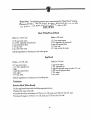
auto default programming of :
1 (Basic) b (medium crust) 2 lb. loaf
and if you wish, you may begin again.
Auto Default
Screen
13