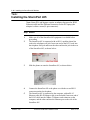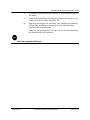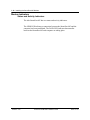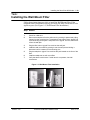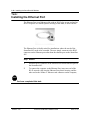
1
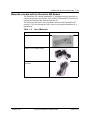
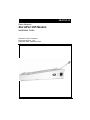
08-01141-01 Elastic Networks StormPort 405 Modem Installation Guide Document Version: Standard Document Revision: 1.00 Publication Date: September 2000 2 ©2000 Elastic Networks The StormPort 405 Modem Installation Guide is copyrighted and all rights are reserved. This document may not, in whole or in part, be copied, photocopied, reproduced, translated, or reduced to any electronic medium or machine readable form without prior consent in writing from Elastic Networks. EtherLoop is a trademark of Elastic Networks. IBM is the trademark of International Business Machines, Incorporated; Windows 95, Windows NT and Windows 3.1 are trademarks of Microsoft, Incorporated; Quadra 610, OS 7.5, Mac, and Macintosh are trademarks of Apple Computer. Revision 1.00 StormPort 405 Modem Installation Guide 08-01141-01 Elastic Networks StormPort 405 Modem Installation Guide Publication Number: 08-01141-01 Document Version: Standard Document Revision: 1.00 Publication Date: September 2000 2000 Elastic Networks All rights reserved All information contained in this document is subject to change without notice. Elastic Networks reserves the right to make changes to equipment design or program components, as progress in engineering, manufacturing methods, or other circumstances may warrant. EtherLoop is a trademark of Elastic Networks. Revision 1.00 StormPort 405 Modem Installation Guide 08-01141-01 iv Revision 1.00 StormPort 405 Modem Installation Guide 08-01141-01 v Publication history September 2000 Standard document released for general publication. Revision 1.00 StormPort 405 Modem Installation Guide 08-01141-01 vi Revision 1.00 StormPort 405 Modem Installation Guide 08-01141-01 Contents 7 Contents About this document vii Safety Considerations StormPort 405 Modem Requirements vii viii Installing the StormPort 405 Modem 1-12 1-12 1-12 1-12 1-13 1-15 1-16 1-16 1-17 Appendix A: Troubleshooting A-1 Appendix B: Regulatory Information B-1 FCC Compliance Information FCC Information to User Customer Instructions Industry Canada Compliance Information Appendix C. Warranty and Disclaimers Coverage Exclusions Revision 1.00 1-11 The StormPort 405 Modem The StormPort 405 Modem and the EtherLoop System Always-on Internet connection Factory-tested components Materials Included with the StormPort 405 Modem Task: Installing the Modem Modem Indicators Status and Activity Indicators Additional telephones on the modem phone line B-1 B-2 B-2 B-4 C-1 C-1 C-2 StormPort 405 Modem Installation Guide 08-01141-01 8 Contents Revision 1.00 StormPort 405 Modem Installation Guide 08-01141-01 ix About this document 1- This document provides instructions for installing, using and troubleshooting the StormPort 405 Modem. Before installing or using the modem, be sure to read the Safety Considerations and Modem Requirements in this section. ! Safety Considerations The StormPort 405 Modem complies with the regulatory requirements of CSA C22.2#950-M95 for Canada and UL 1950 Edition 3 for the United States. Although this product is designed with your complete safety in mind, there are precautions you should adhere to for your individual safety as well as the safety of your equipment. These precautions include, but are not limited to the following: • Read and understand all instructions. • Place your modem on a stable surface. Dropping the modem can cause damage that is not covered under the manufacturer’s warranty. • Do not disassemble the modem! Opening the unit may expose you to electrical shock! • Use caution when installing or modifying telephone lines. • Do not use modem near water to avoid shock hazard. • Never install telephone jacks in wet locations unless the jack is specifically designed for wet locations. • Never touch uninsulated telephone wires or terminals unless the telephone line has been disconnected. • Avoid installing telephone wiring during an electrical storm. • Do not place objects on top of modem. Revision 1.00 StormPort 405 Modem Installation Guide 08-01141-01 x About this document StormPort 405 Modem Requirements The StormPort 405 Modem has specific requirements. Please insure that all of the information and equipment is available prior to the installation procedure. The requirements are as follows: Requirement Description StormPort 405 Modem Service Once you have purchased the StormPort 405 modem directly or through a distributor, contact your local Internet service provider (ISP) and subscribe to high-speed Internet service. Your modem will not function until the common local exchange carrier activates the service. Network Access A 10Base-T Ethernet Card with a standard RJ-45 connector must be installed and configured in your computer. Any computer (MAC, PC, UNIX workstation) that can run Windows 3.1 or higher, or Mac OS5 or higher can be used with the StormPort 405 Modem. Network Address Internet Protocol (IP) address from your Internet service provider, corporate IS network administrator, or hotel front desk. Simply ask for the IP address requirements for your connection. Your Internet service provider must use TCP/IP protocol. Only one StormPort 405 Modem Only the computer that is directly connected to per phone line the StormPort 405 Modem through the 10Base-T Ethernet cable is supported. StormPort 405 Modem must be connected to line one (1) on multiple line telephone systems Data transfer rates will vary somewhat, depending on the speed of your computer, the network (ISP, corporate, etc.) through which you are communicating, and the speed and connection of the computer with which you are transferring data. If you need help, call distributor technical support. Revision 1.00 StormPort 405 Modem Installation Guide 08-01141-01 1-11 Installing the StormPort 405 Modem 1- This chapter describes the StormPort 405 Modem and contains the installation procedures for the modem and support equipment. Chapter contents This chapter includes the following information. Table 1-1. Revision 1.00 Topic See The StormPort 405 Modem page 1-12 Materials Included with the StormPort 405 Modem page 1-13 Modem Indicators page 1-16 Additional telephones on the modem phone line page 1-17 Installing the Ethernet Port page 1-20 StormPort 405 Modem Installation Guide 08-01141-01 1-12 Installing the StormPort 405 Modem The StormPort 405 Modem The StormPort 405 modem is used with an Ethernet-configured PC and an ordinary phone line to access the Internet or corporate intranet at multi-megabit speeds. The StormPort 405 permits simultaneous voice (or analog data) transmission on the same telephone line. The standard telephone cable provided in the installation kit can be used to connect a telephone, fax, or answering machine directly to your StormPort 405. The StormPort 405 is specifically designed to work with the Telematrix Marquis series phone set. Other phone sets are not configured to work with the StormPort 405. This document contains the necessary procedures for installing and using the StormPort 405StormPort 405. The StormPort 405 Modem and the EtherLoop System The StormPort 405 is a component of an EtherLoop system. EtherLoop is an Elastic Networks technology that supports high-speed data simulaneously with voice using existing phone lines. If the other network components of the EtherLoop system have not been correctly installed, the StormPort 405 Modem will not work. Contact your service provider or distributor technical support if you have problems completing the installation. Always-on Internet Connection The StormPort 405 is a state-of-the-art, high-speed data modem that delivers an “always-on” connection to a service provider or corporate Information Service (IS) network. This direct access eliminates the time-consuming dial-up sequence that is required by other modems and grants immediate access to the Internet in addition to much faster upload/download speeds. Factory-tested components The StormPort 405 has been factory-tested. If you have a problem using the modem, review the procedures in this guide. Contact your service provider or distributor technical support if you have questions. Revision 1.00 StormPort 405 Modem Installation Guide 08-01141-01 Installing the StormPort 405 Modem 1-13 Materials Included with the StormPort 405 Modem The StormPort 405 contains standard RJ-11 telephone and jack interfaces to connect the existing voice facility, and a 10Base-T Ethernet RJ-45 interface to connect the Ethernet cable from the end-user PC. The following table shows the components included in the StormPort 405 package. If you are missing any item, contact your product distributor for a replacement. Table 1 -2. List of Materials. Description Item StormPort 405 Modem Class 2, 5V, AC Power Supply Cable Assembly, RJ-11, 6 PIN, 6 Conductor Revision 1.00 StormPort 405 Modem Installation Guide 08-01141-01 1-14 Installing the StormPort 405 Modem Task: Installing the StormPort 405 Note: Some PCs and laptops require an adapter between the RJ-45 Ethernet cable and the Ethernet connector on the PC/laptop (the adapter is often a round, 8-pin connector). Step Action 1 2 Make sure all of the StormPort 405 equipment is available before proceeding. The StormPort 405 is connected with an RJ-11 modular phone line cord to the telephone wall jack. Insert one end of the RJ-11 cord into the telephone wall jack and insert the other end into the jack in the rear of the StormPort 405, as shown below: 3 Slide the phone set onto the StormPort 405, as shown below: 4 Connect the StormPort 405 to the phone set with the second RJ-11 connector attached to the phone. The StormPort 405 is connected to the computer with an RJ-45 Ethernet cable (RJ-45 Ethernet cable is not included). Insert one end of the RJ-45 cable into the 10Base-T Ethernet card connector on the computer, and the other end into the Ethernet port on the side of the StormPort 405. 5 Revision 1.00 StormPort 405 Modem Installation Guide 08-01141-01 Installing the StormPort 405 Modem 1-15 6 7 8 If necessary, secure any slack or loose RJ-11 cord using the enclosed tie clamps. Connect the rounded plug end of the power supply cord into the 5V AC connector on the rear of the StormPort 405. Plug the power supply into wall outlet. This completes the StormPort 405 physical installation. At this point, the Link and Data Status indicator lights should be green. Note: See “Modem Indicators” on page 1-16 for more information on the StormPort 405 LED indicators. STOP You have completed this task. Revision 1.00 StormPort 405 Modem Installation Guide 08-01141-01 1-16 Installing the StormPort 405 Modem Modem Indicators Status and Activity Indicators The side StormPort 405 has two status and activity indicators. The LINK LED indicates a connection between the StormPort 405 and the computer has been established. The DATA LED indicates data transfers between the StormPort 405 and computer are taking place. Revision 1.00 StormPort 405 Modem Installation Guide 08-01141-01 Installing the StormPort 405 Modem 1-17 Additional telephones on the modem phone line The StormPort 405 is used to connect a computer and telephone to the same line, providing simultaneous voice/high-speed data service. Telephones or answering devices connected directly to the StormPort 405 do not require external telephone filters. The StormPort 405 has a built-in voiceband filter on the telephone connection to insure that the signal noise of the data traffic does not interfere with voice conversations. However, if there are additional phones (on different jacks) connected to the same line as the StormPort 405 (extension phones, etc.), an external filter may be needed. It is recommended that all filters be installed. Test all additional lines for correct operation (no data noise) while the StormPort 405 is running and in service. . Table 1-3. Telephone Filters Filter Description Use to connect fax machines, answering machines, and desk telephones that are not directly connected to the StormPort 405. See “Installing the Desk Mount Filter” on page 1-18. Desk Mount Filter Use with wall-mounted telephones. See “Installing the Wall Mount Filter” on page 1-19. Wall Mount Filter You can order voiceband filters from the StormPort 405product distributor or service provider. Revision 1.00 StormPort 405 Modem Installation Guide 08-01141-01 1-18 Installing the StormPort 405 Modem Task: Installing the Desk Mount Filter Follow these instructions precisely to install the Desk Mount Filter. If the telephone filter is installed incorrectly (reversed), the filter will not allow voice signals to pass. (See Figure 1-1, Desk Mount Filter Connections.) Step Action 1 2 Check for a dial tone. Disconnect the telephone line cord from the wall jack and insert it into the jack on the desk filter. 3 4 Plug the filter’s “pig tail” end into the wall jack. Verify there is a dial tone. If a dial tone is not present, check all connections. STOP You have completed this task. Revision 1.00 StormPort 405 Modem Installation Guide 08-01141-01 Installing the StormPort 405 Modem 1-19 Task: Installing the Wall Mount Filter Follow these instructions precisely to install the Wall Mount Filter. If the telephone filter is installed incorrectly (reversed), the filter will not allow voice signals to pass. (See Figure 1-2, Wall Mount Filter Installation.) Step Action 1 Check for a dial tone. 2 Remove the telephone from its wall mount by pushing it upward and pulling it away from the mounting pins. The telephone may have a short “pig tail” line cord connecting it to the jack. If the phone has a “pig tail” line cord, disconnect it from the wall jack. 3 Plug the filter’s short “pig tail” line cord into the wall jack. 4 Install the wall mount filter by placing it over the wall jack and sliding it downward until it is seated on the mounting pins. 5 Plug the telephone “pig tail” line cord into the jack located on the front of the filter. 6 Install the telephone on wall mount filter. 7 Verify that there is a dial tone. If a dial tone is not present, check all connections. Figure 1-2. Wall Mount Filter Installation Revision 1.00 StormPort 405 Modem Installation Guide 08-01141-01 1-20 Installing the StormPort 405 Modem Task: Installing the Ethernet Port The Ethernet Port is an Ethernet cable with an RJ-45 plug on one end and an RJ-45 receptacle in a molded plastic housing on the other, as shown below: The Ethernet Port is ideally suited for installations where the reach of the StormPort 405 needs to be extended. The user simply connects to the RJ-45 connector on the Ethernet port rather than the ethernet port on the StormPort 405. Step Action 1 2 Insert the RJ-45 connector of the Ethernet Port into the ethernet port on the StormPort 405. To connect the computer to the Ethernet Port, insert one end of the RJ-45 network cable into the Ethernet Port plastic housing, and the other end to the 10Base-T Ethernet card connector on the computer, STOP You have completed this task. Revision 1.00 StormPort 405 Modem Installation Guide 08-01141-01 A-21 Appendix A: Troubleshooting A- Table A-1. StormPort 405 Troubleshooting Problem Troubleshooting No Modem Power/Power Light Off Make sure there is power to the outlet. Check the connection to the StormPort 405. (Make sure the StormPort 405 is plugged in). If the power indicator is not lit, try another power cord. If the indicator is still not lit, call distributor technical support. No data transfer Check these items in the following order: 1. PC Light is OFF If connected to a StormPort 405, make sure the cable between the modem and the back of the computer is properly connected. If the PC Light remains off, try another cable. If the indicator is still not lit, call distributor technical support. 2. Data Light is OFF This light will briefly blink GREEN when the computer attempts to send data, and briefly blink when data is sent to the computer. If it doesn’t light when the computer sends data, AND the PC Light is ON, call distributor technical support. 3. Link Light is Off Check the connection to the network. The light should be GREEN. If the Link light is YELLOW, make sure the ELMo shelf has power. If not call distributor technical support. Revision 1.00 StormPort 405 Modem Installation Guide 08-01141-01 A-22 Appendix A: Troubleshooting Table A-1. StormPort 405 Troubleshooting Problem Troubleshooting No data transfer (continued) 4. Link Light is Red The StormPort 405 is not receiving any signal from the Internet service provider. Make sure all connections are well-connected and the computer is set up correctly. Make sure the phone has a clear dial tone. Call your service provider (phone company). If you are on a corporate network, contact the network IS administrator, and make sure the service provider is having no technical problems. If the noise persists, call distributor technical support. 5. Link Light is Yellow The StormPort 405 is trying to synchronize with the service provider. Make sure the StormPort 405 is at least 12 inches from the monitor. Wait three minutes for the light to turn steady GREEN, which indicates they are synchronized and data should transfer. If Link Light doesn’t turn GREEN in three minutes, call your service provider (phone company). If you are on a corporate network, contact the network IS administrator, and make sure the service provider is having no technical problems. Call distributor technical support. 6. Data Light Remains Off Make sure all cables are properly installed and connected. If the Data Light remains off, call distributor technical support. Revision 1.00 StormPort 405 Modem Installation Guide 08-01141-01 Appendix A: Troubleshooting A-23 Table A-1. StormPort 405 Troubleshooting Problem Troubleshooting Noise interference on the telephone connected to the StormPort 405 The StormPort 405 has a built-in filter to prevent this. The noise could be a faulty line cord, phone, the StormPort 405, or it could be coming from your phone service. Try to eliminate these possibilities in the following order: 1. Disconnect the phone from the StormPort 405 and connect it directly to the wall jack, bypassing the modem. Disconnect the StormPort 405 from the wall jack. If the noise is gone, you should probably solve the problem by replacing the StormPort 405. If the noise persists, it may be your phone service. 2. Check your telephone line cords by exchanging them one at a time with a known good line cord. If you eliminate the line cords as a possibility, check the phone unit. 3. If you have a known good spare phone, use it to replace the suspect phone and reconnect the StormPort 405. A new phone may eliminate the noise. If the noise persists, call distributor technical support. Low data throughput rates/It seems to take a long time to download files to your computer File transfer rates depend not only on the StormPort 405, but also on the speed of your computer, the network that you are communicating through (ISP, corporate net, etc.), and the speed and connection of the computer you are attempting to transfer data to and from. If you know your files are being transmitted to your computer with high-speed equipment and your downloads still seem slow, it’s possible your StormPort 405 is connected to more than one computer. The StormPort 405 supports only one computer at a time. Your computer may inadvertently be connected logically (or physically) into a hub or other network configuration that looks like multiple computers to the StormPort 405. Call your corporate IS network administrator and have any other computers removed from the StormPort 405. Revision 1.00 StormPort 405 Modem Installation Guide 08-01141-01 A-24 Appendix A: Troubleshooting Table A-1. StormPort 405 Troubleshooting Problem Troubleshooting Your PC cannot First, make sure that all network software applications communicate with your are properly installed and configured. Double check to Internet service provider make sure the IP address is correct. Call your telephone service provider and make sure Modem service is enabled. Next, call your ISP help desk. If you are on a corporate network, call the network IS administrator. Make sure your service is active and that the network is not experiencing technical difficulties. Revision 1.00 StormPort 405 Modem Installation Guide 08-01141-01 B-25 Appendix B: Regulatory Information B FCC Compliance Information Federal Communications Commission Compliance Information Statement (FCC Rules Section 2.1077) 2.1077 (a) (1) Product identification Name: StormPort 405 Modem Product code: 02-00047-01 2.1077 (a) (2) Compliance Statement This device complies with part 15 of the FCC rules. Operation is subject to the following two conditions: 1 This device may not cause harmful interference, and 2 This device must accept any interference receive, including interference that may cause undesired operation. 2.1077 (a) (3) Responsible Party (FCC 2.909) Elastic Networks 6120 Windward Parkway, Suite 100 Alpharetta, GA 30005 Phone: 678-297-3100 Fax: 678-297-3110 2.1007 (C) The compliance information statement shall be included in the user guide or as a separate sheet. Revision 1.00 StormPort 405 Modem Installation Guide 08-01141-01 B-26 Appendix B: Regulatory Information FCC Information to User (FCC Rules Section 15.105(b)): Note: The StormPort 405 Modem has been tested and found to comply with the limits for a Class A digital device, pursuant to part 15 of the FCC Rules. These limits are designed to provide reasonable protection against harmful interference in a residential installation. This equipment generates, uses and can radiate radio frequency energy and, if not installed and used in accordance with the instructions, may cause harmful interference to radio communications. However, there is no guarantee that interference will not occur in a particular installation. If this equipment does cause harmful interference to radio and television reception, which can be determined by turning the equipment OFF and ON, the user is encouraged to try to correct the interference by one or more of the following measures: • • • • Reorient or relocate the receiving antenna Increase the separation between the equipment and receiver Connect the equipment into an outlet on a circuit different from that to which the receiver is connected. Consult the dealer or an experienced radio/television technician for help. Customer Instructions The Phone Filters comply with part 68 of the FCC Rules. On the back of this equipment is a designator that contains the FCC registration number and ringer equivalence for this equipment. If requested, this information must be provided to the telephone company. The equipment uses the following standard connections and codes: USOC-RJ-11. The Phone Filters also comply with part 1950 of the UL certifications, and part 22.2 of the CSA certifications. The Ringer Equivalence Number (REN) shown on the filter is used to determine the quantity of devices which may be connected to the telephone line. Excessive RENs on the telephone line may result in another device not ringing in response to an incoming call. The sum of the RENs should not exceed (5). To be certain of the number of devices that may be connected to a line, as determined by the total RENs, contact the local telephone company. If the equipment causes harm to the telephone network, the telephone company will notify you in advance that temporary discontinuance of service may be required. But if advance notice is not practical, the telephone company will notify the customer as soon as possible. Also, you will be advised of your right to file a complaint with the FCC if you believe it is necessary. The telephone company may make changes in its facilities, equipment, operations or procedures that could affect the operation of the equip-ment. If Revision 1.00 StormPort 405 Modem Installation Guide 08-01141-01 Appendix B: Regulatory Information B-27 this happens the telephone company will provide advance notice in order for you to make necessary modifications to maintain uninterrupted service. If the equipment is causing harm to the telephone network, the telephone company may request that you disconnect the equipment until the problem is resolved. The equipment can not be used on public coin phone service provided by the telephone company. Connection to party lines is subject to state tariffs. (contact the state public utility commission, public service commission or corporation commission for information). No repairs can be performed by the user. If you experience trouble with this equipment and/or for repair and warranty information, please contact distributor technical support. Revision 1.00 StormPort 405 Modem Installation Guide 08-01141-01 B-28 Appendix B: Regulatory Information Industry Canada Compliance Information EMISSIONS: (Per ICES-003, Issue 2 “Interference-Causing Equipment Standard, Digital Apparatus”): This Class B digital apparatus meets all requirements of the Canadian interference-causing equipment regulations. Cet Appareil numerique de la Class A respecte toutes les exigences du reglement sur le materiel brouilleur du Canada. EQUIPMENT ATTACHMENT LIMITATION NOTICE: The Industry Canada Label identifies certified equipment. This certification means that the equipment meets telecommunications network protective, operational and safety requirements as prescribed in the appropriate Modem Equipment Technical Requirements document(s). The department does not guarantee the equipment will operate to the user’s satisfaction. Before installing this equipment, users should insure that it is permissible to be connected to the facilities of the local telecommunications company. The equipment must also be installed using an acceptable method of connection. The customer should be aware that compliance with the above conditions may not prevent degradation in service in some situations. Repairs to certified equipment should be coordinated by a representative designated by the supplier. Any repairs or alterations made by the user to this equipment or equipment malfunctions may give the telecommunications com-pany cause to request the user to disconnect the equipment. Users should insure for their own protection that the electrical ground connec-tions of the power utility, telephone lines and internal metallic water pipe system, if present, are connected together. This precaution may be particularly important in rural areas. Caution: Users should not attempt to make such connections themselves, but should contact the appropriate electric inspection authority, or electrician, as appropriate. NOTICE: The Ringer Equivalence Number (REN) assigned to each terminal device provides an indication of the maximum number of terminals allowed to be connected to a telephone interface. The termination on an interface may consist of any combination of devices subject only to the requirements that the sum of the Ringer Equivalence Numbers of all the devices does not exceed five (5). Revision 1.00 StormPort 405 Modem Installation Guide 08-01141-01 C-29 Appendix C. Warranty and DisclaimersC Coverage Elastic Networks warrants this modem set against defects and malfunctions for a period of ninety days from the date of original purchase. If there is a defect or malfunction, Elastic Networks at its option, and as the exclusive remedy, upon receipt of the defective set will either repair or replace this modem set at no charge, if returned within the warranty period. If replacement parts are used in making repairs, these parts may be refurbished or may contain refurbished materials. If it is necessary to replace the modem, it may be replaced with a refurbished modem of the same design and color. If it should become necessary to repair or replace a defective or malfunctioning modem under this warranty, provisions of this warranty shall apply to the repaired or replaced modem set until the expiration of ninety (90) days from the date of pick-up or the date of shipment to you of the repaired or replacement set or until the end of the original twelve month warranty period, whichever is later. Revision 1.00 Storm Port 405 Modem Installation Guide 08-01141-01 C-30 Appendix C. Warranty and Disclaimers Exclusions Elastic Networks does not warrant this modem set to be compatible with the equipment of any particular telephone company. This warranty does not extend to damage to the product resulting from improper installation or operation, alteration, or neglect, or abuse, or misuse, fire or natural causes such as storms or floods after the modem is in your possession. Elastic Networks shall not be liable for any incidental or consequential damages, including but not limited to loss, damage, or expense directly or indirectly arising from the customer's use of or inability to use this modem, either separately or in combination with other equipment. This paragraph, however, shall not apply to consequential damages for injury to the person in the case of modems used or bought for use primarily for personal, family or household purposes. This warranty sets forth the entire liability and obligations of Elastic Networks with respect to breach of war ranty, and the warranties set forth or limited herein are the sole warranties and are in lieu of all other warranties, ex-pressed or implied including warranties of fitness for particular purpose and merchantability. Revision 1.00 Storm Port 405 Modem Installation Guide 08-01141-01 Elastic Networks StormPort 405 Modem Installation Guide © 2000 Elastic Networks All rights reserved The information contained in this document is subject to change without notice. Elastic Networks reserves the right to make changes to equipment design or program components, as progress in engineering, manufacturing methods, or other circumstances may warrant. EtherLoop is a trademark of Elastic Networks Publication Number: 08-01141-01 Document Version: Standard. Document Revision: 1.00 Publication Date: September 2000 Printed in the United States of America